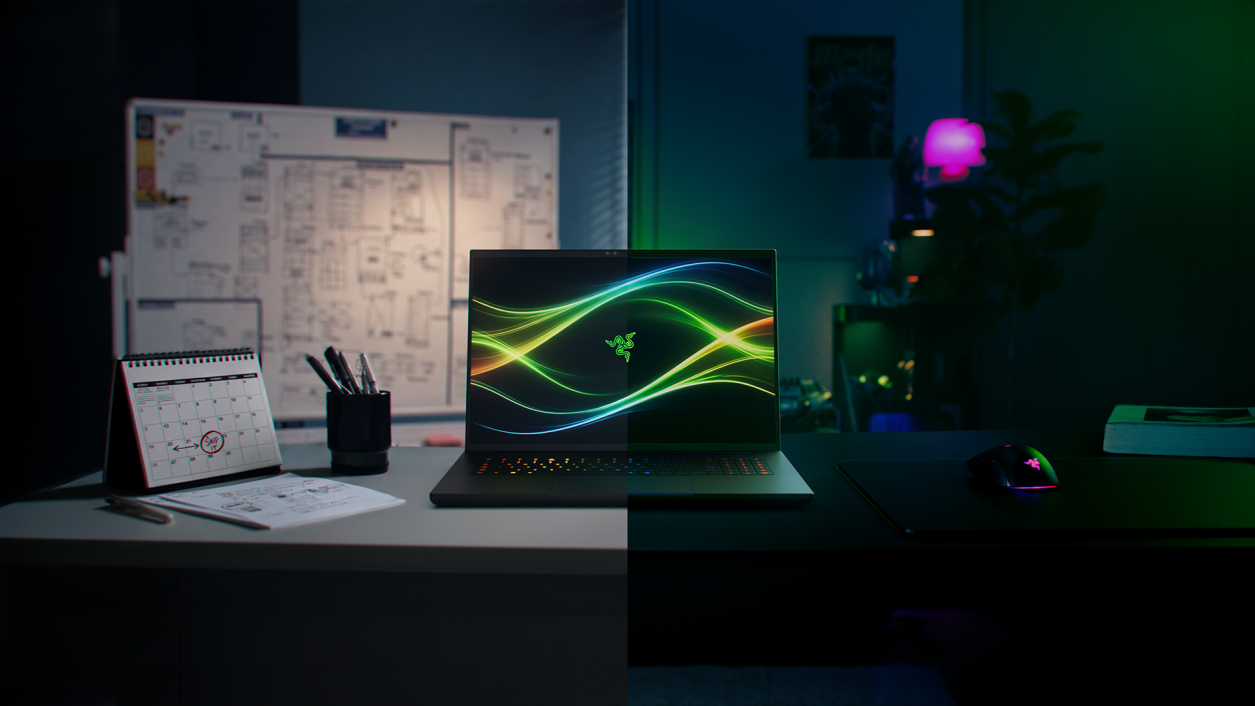
Buy the Blade 18 (2026) if you want an 18-inch RTX 5090 laptop that games and renders near the top of its class, lasts longer on battery than most gaming laptops and is built from a single block of aluminum. Its dual-mode screen lets one machine handle 4K creative work at 240Hz and esports at 440Hz. The trade-off is value: apart from a brighter screen, this year's model is no faster than the 2025 version and launched with half the RAM and storage for more money. If HDR matters more than refresh rate, the Mini-LED MSI Titan 18 HX fits better.
Pros
- Top-tier RTX 5090 gaming and creative performance
- 4K 240Hz / FHD+ 440Hz dual-mode display
- Long battery life for a gaming laptop
- Solid CNC-milled aluminum chassis
- Easy RAM, SSD and battery upgrades
- Thunderbolt 5, HDMI 2.1 and 2.5Gb Ethernet
Cons
- No faster than the 2025 model, with half the RAM and storage for more money
- IPS panel lacks the HDR contrast of Mini-LED and OLED rivals
- Runs hot, and some testers found the fans loud under load
- Low key travel; rivals offer mechanical keyboards
As an Amazon Associate I earn from qualifying purchases. Disclosure
Overview
An 18-inch laptop with an RTX 5090 is really a desktop you can fold shut and carry to another room, and Razer’s Blade 18 (2026) is one of the most polished takes on that idea. Inside are Intel’s Core Ultra 9 290HX Plus and the RTX 5090 laptop GPU at up to 175W, under an 18-inch screen that switches between 3840 x 2400 at 240Hz and 1920 x 1200 at 440Hz. The Amazon listing we link is the 64GB, 2TB configuration, offered by a third-party seller at $7,495.00 in October 2026.
This year’s changes are modest: the newer processor, a screen Razer rates 20% brighter, and support for faster, larger memory. What it keeps is why people buy a Blade in the first place: a machined aluminum body, a long list of ports, battery life that outlasts most gaming laptops, and cooling that Notebookcheck rates among the quietest at this level of performance.
Key Specifications
| Price (USD) | $7,495.00 |
| Processor | Intel Core Ultra 9 290HX Plus (24 cores, up to 5.5 GHz) |
| Graphics | NVIDIA GeForce RTX 5090 laptop GPU, 24GB GDDR7, up to 175W (RTX 5070 Ti and 5080 also offered) |
| Memory | DDR5-6400, 2 slots, up to 128GB (64GB in the linked listing) |
| Display | 18″ 16:10 dual-mode IPS: 3840 x 2400 at 240Hz or 1920 x 1200 at 440Hz; rated 600 nits |
| Ports | 1x Thunderbolt 5, 1x Thunderbolt 4, 3x USB-A (USB 3.2 Gen 2), HDMI 2.1, 2.5Gb Ethernet, UHS-II SD card reader, 3.5 mm audio |
| Wireless | Wi-Fi 7, Bluetooth 5.4 |
| Webcam | 5MP IR camera with Windows Hello and a privacy shutter |
| Battery and charger | 99 Wh; 400W power adapter |
| Size | 22.8-28.7 x 400 x 275.4 mm (0.86-1.1 x 15.74 x 10.84 in) |
| Weight | 3.2 kg (7.05 lb) |
| Warranty | 1 year on the laptop, 2 years on the battery; accidental damage not covered |
Razer Blade 18 (2026) Gaming and Creative Performance
Raw speed is not in doubt. TechRadar held a stable 60-plus frames per second at 4K with maximum settings in almost every game it tried, and its Cyberpunk 2077 run at full resolution on Ultra with balanced upscaling averaged 69 fps. Tom’s Hardware’s stress test, the Metro Exodus benchmark looped 15 times, averaged 146.03 fps and never dipped after the first few runs, a sign the cooling holds its clocks over a long session. Creative work is just as strong: Creative Bloq recorded some of the highest Photoshop scores in PugetBench it has ever seen, and the GPU carries 24GB of its own video memory for 3D and AI work.
Rivals with the same GPU land in the same place: in Notebookcheck’s Cyberpunk 2077 test at 1440p Ultra, the Alienware 18 Area-51 and Lenovo Legion 9 18, both with RTX 5090s, finished a few frames ahead of the Blade. Notebookcheck also saw multi-core performance fall by almost half on battery power. On Tom’s Hardware’s unit, the 4K mode held games to 60Hz, so fast shooters belong in the 1920 x 1200 mode.
Dual-Mode 18-Inch Display
The screen is the Blade’s signature feature. By default it is a 3840 x 2400 IPS panel at 240Hz; switch modes in Razer’s Synapse software and it becomes 1920 x 1200 at 440Hz for competitive shooters, though the change can require a restart. Razer rates it at 600 nits, and Creative Bloq measured 615 nits. Tom’s Hardware’s unit came in lower at 538 nits, though that was still up from 467.6 nits on its unit of last year’s model and brighter than the two 16-inch rivals it tested alongside.
It is still IPS, and that sets its limits: next to OLED and Mini-LED screens it falls short on contrast, black levels in dark scenes and HDR brightness. Notebookcheck also saw image quality suffer in the 440Hz mode. That gap matters most against the MSI Titan 18 HX, whose 4K Mini-LED panel is VESA DisplayHDR 1000 certified. TechRadar, for its part, rarely reached for the 440Hz mode at all, because the RTX 5090 already ran most games fast at native resolution.
Fan Noise and Heat
Testers disagree about noise. Notebookcheck measured about 49 dB(A) while gaming in Performance mode, which gives nearly the same frame rates as Turbo, and ranks it among the quietest high-end gaming laptops; Turbo reached 51 dB(A) in games and 55 dB(A) in its stress test, while Silent mode kept the fans to 41 dB(A). Tom’s Hardware and Creative Bloq, by contrast, found the fans loud under load, and TechRadar heard them get a little noisy but has heard far worse from other gaming laptops.
Heat is the more consistent finding: the chassis runs warm under load. Tom’s Hardware found the keyboard hot to the touch after its Metro Exodus loop, while Notebookcheck measured up to 46.8°C (116°F) on top under full load, mostly toward the rear, and found typing no issue. At this size and weight it is a desk machine, not a lap one.
Battery Life
For an RTX 5090 laptop, battery life is a genuine strength. Notebookcheck’s Wi-Fi browsing test at 150 nits ran for almost 8 hours (7h 47min), and 4.5 hours at maximum brightness; TechRadar got nearly eight and a half hours of video playback and more than three and a half hours of gaming in Marathon; and Creative Bloq recorded over eight hours of looping video. Tom’s Hardware’s mixed web, video and graphics test came in at 5 hours 31 minutes, slightly longer than last year’s model and well ahead of the Alienware 16 Area-51, although the MSI Raider in that comparison lasted 8:34.
The battery is 99 Wh, and charging runs through a large proprietary 400W power brick, which TechRadar counts against portability. In practice that makes it a laptop you can unplug for an afternoon of lighter work, while long gaming sessions still happen at the wall.
Build, Keyboard and Upgrades
The chassis is CNC-milled aluminum, about 28.7 mm (1.1 in) at its thickest and 3.2 kg (7.05 lb). Testers describe it as rock solid, with Tom’s Hardware noting a little flex behind the logo on the lid. The port selection covers almost everything a desk setup needs, but the two USB-C ports aren’t labelled, and Creative Bloq points out that the Thunderbolt 5 port is wired to the Nvidia GPU while the Thunderbolt 4 port runs from the processor’s integrated graphics, which matters when you plug in an external gaming monitor.
The keyboard is a full layout with a number pad and per-key RGB lighting. Razer quotes 1.5 mm of key travel, and Notebookcheck lists the low travel as a drawback; Tom’s Hardware typed comfortably on it but notes that MSI and Alienware fit mechanical switches to their flagships. The large touchpad is a standard mechanical one rather than a haptic pad.
Upgrading is easy. In Tom’s Hardware’s teardown, twelve Torx screws held the base, and inside were the slotted RAM (up to 128GB across two slots, per Razer), a second SSD slot that supports PCIe 5.0, a removable Wi-Fi card and a replaceable battery; the included 2TB drive sat in the PCIe Gen 4 slot, so the spare one is the faster choice for added storage. Notebookcheck also found the Wi-Fi 7 card limited to 160 MHz channels, which caps transfers at around 2 Gbps. Razer covers the laptop for one year and the battery for two; accidental damage needs a paid RazerCare plan.
What You Pay Compared With the 2025 Model
Value is where this generation slips, because it is not faster than the model it replaces. Notebookcheck measured 2,198 points in Cinebench 2024’s multi-core test against 2,168 for the 2025 Blade 18, and 114.1 fps in Cyberpunk 2077 at 1440p Ultra against the older model’s 118.9. It also reported in July 2026 that the 2026 RTX 5090 model launched at a higher price than the 2025 RTX 5090 version had sold for, while shipping with half the RAM and storage, and it blames memory and storage prices. Tom’s Hardware, reviewing a 32GB, 2TB RTX 5090 unit in June 2026, noted that last year’s models were still on sale for less, though without this year’s brighter screen.
The Amazon listing we link, the 64GB, 2TB configuration, was offered by a third-party seller rather than by Amazon at $7,495.00 in October 2026; the Alienware 18 Area-51 with an RTX 5090, 64GB, 2TB and the older Core Ultra 9 275HX was $5,864.00 on Amazon the same month. Whichever configuration you choose, you are paying flagship money for a light refresh.
How Does It Stack Up Against the Competition?
The Blade 18’s closest rivals are other 18-inch RTX 5090 laptops: MSI’s Mini-LED Titan 18 HX and Dell’s Alienware 18 Area-51, the heaviest of the three.
| Feature | Razer Blade 18 (2026) | MSI Titan 18 HX | Alienware 18 Area-51 |
|---|---|---|---|
| Price (USD) | $7,495.00 (64GB, 2TB) | See price on Amazon (64GB, 2TB) | $5,846.99 (64GB, 2TB) |
| Processor | Core Ultra 9 290HX Plus | Core Ultra 9 290HX Plus | Core Ultra 9 275HX (290HX Plus offered) |
| Graphics | RTX 5090, 24GB, up to 175W | RTX 5090, 24GB, up to 175W | RTX 5090, 24GB |
| Display | 18″ IPS, 3840 x 2400 at 240Hz or 1920 x 1200 at 440Hz, 600 nits | 18″ Mini LED, 3840 x 2400 at 240Hz, DisplayHDR 1000 | 18″ IPS, 2560 x 1600 at 300Hz, 500 nits |
| Thunderbolt 5 ports | 1 (plus 1 Thunderbolt 4) | 2 | 2 |
| Keyboard | Per-key RGB, 1.5 mm travel | Cherry mechanical, per-key RGB | CherryMX ultra low-profile mechanical option |
| Battery | 99 Wh | 99.9 Wh | 96 Wh |
| Weight | 3.2 kg (7.05 lb) | 3.6 kg (7.94 lb) | Up to 4.34 kg (9.56 lb) |
| Amazon | View on Amazon | View on Amazon | View on Amazon |
Are some of these out of stock? Get an email when they’re back with our free Stock Check
Prices change frequently — always verify current pricing before purchasing.
Razer Blade 18 (2026): Worth It for Fast, Polished 18-Inch Power
It earns its place for someone who wants one machine for both work and play: 4K editing or 3D work at 240Hz by day, esports at 440Hz in the evening, a battery that covers a few hours away from the wall, and a chassis that still looks at home in a meeting. If a 2025 Blade 18 is still on offer near its old price, though, take Notebookcheck’s advice and buy that instead; this year’s model mainly adds a brighter screen.
Look elsewhere if HDR is the priority: the MSI Titan 18 HX’s Mini-LED panel and mechanical keyboard suit films and long typing sessions better. If you mostly play competitive games at QHD and want more than 240Hz without switching modes, the Alienware 18 Area-51’s 300Hz 2560 x 1600 panel does that, at the cost of extra weight. And if 18 inches is more laptop than you want to carry, Razer’s Blade 16 pairs RTX 50-series graphics with a 16-inch QHD+ OLED screen in what Razer calls its thinnest gaming laptop.

Sources
- Razer — Razer Blade 18 (product page, tech specs and FAQ)
- Razer Blade 18 (2026) — Amazon Product Listing
- Notebookcheck — Still one of the fastest and quietest gaming laptops: Razer Blade 18 2026 Review
- Notebookcheck — Razer Blade 18 (2026) in review: One of the quietest 18-inch RTX 5090 laptops
- Tom’s Hardware — Razer Blade 18 (2026) review: Coming in fast and hot
- TechRadar — Razer Blade 18 (2026) review
- Creative Bloq — Razer Blade 18 (2026) review: the biggest and baddest of them all
- Engadget — Razer updates the Blade 18 with new chips
- MSI — Titan 18 HX A2W specifications
- Dell — Alienware 18 Area-51 Gaming Laptop
- Notebookcheck — Alienware 18 Area-51 gets Intel Arrow Lake-HX Refresh processors
- Razer — Razer Blade 16
Reader Poll
Which Blade 18 screen mode would you use most?
Help Our Editors Know What Matters to You
Explore on Amazon →