Apple HomeView is for iPhone households that want a kitchen or nightstand screen for Siri AI, FaceTime, music and Apple Home control, and the tabletop model's sound made a good first impression on reporters at the launch event. The trade-offs are a Siri AI that launches as a beta, no App Store, and a wall-mounted model that needs a mount and power adapter bought separately.
Pros
- Tabletop model's sound made a good first impression
- Up to six people each get their own Home Screen
- Shows up to nine camera feeds at once
- Works with HomeKit, Matter and Thread accessories
Cons
- Siri AI launches as a beta
- No App Store
- Needs an iPhone or iPad to set up
- Wall model needs a mount and adapter bought separately
As an Amazon Associate I earn from qualifying purchases. Disclosure
Overview
Apple HomeView isn’t shipping yet, so this is a pre-release preview built from Apple’s October 13 announcement, its spec sheet and the first look reporters got at Apple’s launch event, not a finished buying verdict. Pre-orders are open now at Apple’s price of $299, and Apple says it arrives on Friday, November 13.
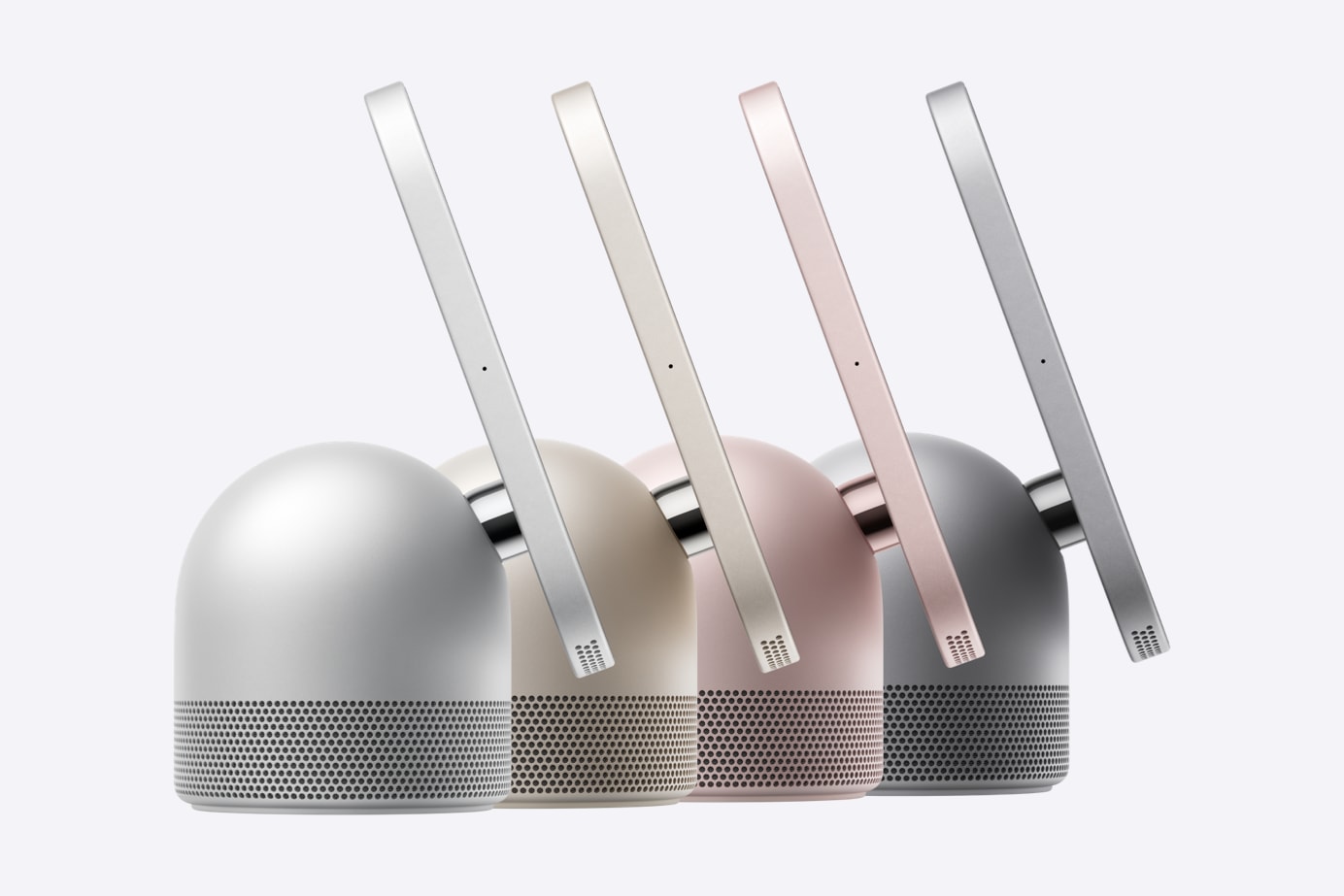
HomeView is Apple’s first smart display: a 7-inch square touchscreen that answers to Siri AI, recognizes up to six people in the household by face, makes FaceTime calls and controls the smart home. It comes in two versions at the same price: a tabletop model whose screen sits on a domed speaker base, and a flat wall-mounted model. Nobody outside Apple has had one at home yet; the early impressions below come from supervised demos at the event.
Key Specifications
| Display | 7-inch Liquid Retina (IPS) touchscreen, 1088 x 1088 pixels at 220 ppi, True Tone |
| Brightness | 500 nits maximum, 0.3 nits minimum |
| Chip | Apple A18 |
| Camera | 12MP Center Stage camera, f/2.4 |
| Microphones | Four-microphone design for far-field Siri |
| Wireless | Wi-Fi 6E (802.11ax), Bluetooth 6.0, Thread |
| Sensors | Ambient light, temperature and humidity |
| Setup | Needs an iPhone with iOS 27.2 or later or an iPad with iPadOS 27.2 or later |
| Release Window | Pre-order now; available from November 13, 2026 |
Apple HomeView vs HomeView (Wall Mounted): What’s Different
Both versions share the screen, chip, camera and microphones on Apple’s spec sheet; the speaker, power and colors are where they part.
| Spec | HomeView (tabletop) | HomeView (Wall Mounted) |
|---|---|---|
| Speakers | Two full-range drivers, down-firing woofer, dual force-cancelling passive radiators | Two full-range drivers |
| Weight | 2.1 lb (952 g) | 0.63 lb (286 g) |
| In the box | 1.5 m USB-C cable, 30W power adapter | Display and documentation only |
| Sold separately | Nothing required | Wall mount, USB-C cable, power adapter (20W minimum) |
| Colors | Silver, starlight, rose pink, space gray | Silver, space gray |
Apple HomeView Sound and Design
The tabletop model is the one built for music: on top of the screen’s two drivers, its base adds a down-firing woofer and two passive radiators, and reporters who heard it at the event found it got loud without distorting. Gizmodo, playing Apple Music at full volume, wrote that “the nightstand that it sat on rattled.” Engadget was cooler on it, expecting no standout tuning, though it called its first listen, in a noisy demo area, positive overall. Nobody at the event reported hearing music on the wall-mounted version, which drops the woofer and radiators, so how it sounds is still an open question.
The screen sits on a stainless steel hinge, and the early accounts differ on how far it moves. Apple describes it only as tilting, and TechRadar wrote of an arm that lets you tilt and rotate the display, but Gizmodo, which handled it, found it only tilts up and down by hand, so you turn the whole unit to face another way. Treat any swivel as unconfirmed until full reviews. The bigger practical limit is the cable: the tabletop model comes with a 1.5 m (about 5 ft) USB-C cable, and Macworld points out that it has to stay near an outlet, so it can’t sit in the middle of a table the way Apple’s ads show.
Apple HomeView Siri AI and Personal Features
Siri AI is the headline, and it ships as a beta: Apple’s fine print says it’s in beta in HomeView software version 27.2. Anyone can ask it general questions or for music, but personal requests, such as pulling something from Messages or Calendar, need a paired iPhone or iPad that supports Apple Intelligence. Apple also says some server-based Apple Intelligence features have daily usage limits, with expanded access “available for a fee in the future.”
Each of up to six people gets their own Home Screen, apps and widgets. Apple says personal content in apps like Messages and Calendar appears only when HomeView recognizes the enrolled person’s face and their paired iPhone or iPad is present and was recently unlocked. That recognition is the part nobody outside Apple has tried yet: Gizmodo says attendees couldn’t test face or voice recognition and only watched an Apple spokesperson demonstrate it. Face isn’t the only way in, though: Engadget saw that someone just out of view, or who preferred another method, could unlock it with their iPhone instead.
TechRadar confirms there is no App Store. HomeView runs Apple’s own apps (Music, Podcasts, FaceTime, Messages, Calendar, Reminders, Find My, Safari, Home and others), while TV, News, Audiobooks and supported third-party audio and video apps come through a paired iPhone. Setup needs an iPhone or iPad too, so this is a device for households already on Apple phones.
Apple HomeView as a Smart Home Hub
HomeView works as an Apple Home hub for HomeKit and Matter accessories, including Thread devices. A Home Camera face can show up to nine live camera feeds at once, and with a supported iCloud+ plan it can recognize people, pets, packages and vehicles from compatible cameras. It also listens for smoke and carbon monoxide alarm sounds and alerts your iPhone, iPad or Apple Watch, though Apple warns this “should not be relied upon” in emergencies, so it’s an extra layer beside a working alarm.
Apple’s new Home Collection of LG and Schneider Electric cameras, thermostats and a door lock works with HomeView (a HomePod or Apple TV can also act as its hub), but it starts arriving in December, with some pieces not until early 2027. Until then, HomeView controls whatever Apple Home or Matter gear you already own.
Apple HomeView Tabletop or Wall Mounted: The Real Cost
Both models are $299, but the wall version needs more. Its Schneider Home mounts are $59.95 for the USB-C Wall Connector, $79.95 for the AC Wired mount, and $129.95 for a PoE Wired mount due in early 2027, and the wall model ships without a cable or power adapter (Apple lists a 20W minimum). With the cheapest mount, the wall setup starts at $358.95 before any adapter or installation, so the tabletop model is the cheaper way in.
The obvious rival is Amazon’s Echo Show 11. TechRepublic’s comparison notes it launched at $219.99 with a larger screen, established Alexa+ integrations and Zigbee hub support, which HomeView’s spec sheet doesn’t list, and frames the choice as mostly about which ecosystem your household already uses.
Is the Apple HomeView Worth Waiting For?
If your household runs on iPhones and you’ve wanted a kitchen or nightstand screen that, per TechRadar, carries no ads, unlike the Echo Show (TechRepublic reports Amazon is adding autoplay video ads to eligible Echo Shows), pre-ordering the tabletop model is a reasonable bet on what’s confirmed: the sound made a good first impression, and it’s the version with everything in the box. Waiting for full reviews makes more sense if face recognition and Siri AI are why you’d buy it, since both were only demonstrated by Apple, and Siri AI arrives as a beta with usage limits on some features.
Hold off on the wall-mounted model until someone has heard it and lived with the mount. Its speaker is smaller and the PoE mount isn’t out until 2027. How much either model is worth also depends on the smart home gear you have for it to control: Gizmodo thought apartment dwellers like its reviewer might get less from it. Homes split between Android and iPhone, or built around Alexa and Zigbee gear, have less reason to switch.
Sources
- Apple — Meet Apple HomeView
- Apple — Apple HomeView Technical Specifications
- Apple — Introducing Apple Home Collection
- Gizmodo — Apple HomeView Hands-On
- TechRadar — I’ve seen Apple’s HomeView smart display in action
- Engadget — Apple HomeView hands-on
- Macworld — HomeView first look
- TechRepublic — Apple HomeView vs Echo Show 11
- MacRumors — Apple Announces ‘HomeView’ Smart Home Hub
- 9to5Mac — Apple unveils new HomeView smart display
- CNBC — Apple releases HomeView smart home hub
- Apple HomeView — Amazon.com Search Results