Buy the GW2486TC if a laptop lives on your desk and the budget is tight: one USB-C cable carries the picture and up to 65W of charging, and the stand raises, swivels and pivots, features rarely found on monitors this cheap. Amazon.ca sells the same model as the US store, and its on-screen menu includes French. The trade-off is 1080p on a 24-inch screen, which fits less on screen than a 1440p or 4K monitor. If you only connect a desktop by HDMI, Dell's 24 Plus S2425HSM skips the USB-C features you would be paying for.
Pros
- Video and 65W laptop charging over one USB-C cable
- Stand adjusts height, tilt, swivel and pivot
- Accurate IPS picture with full sRGB coverage
- DisplayPort out for daisy-chaining a second monitor
- 100Hz refresh rate
- Built-in speakers and noise-cancelling microphone
Cons
- 1080p fits less on screen than 1440p or 4K
- No KVM switch or Ethernet port
- Menu buttons instead of a joystick
- No adaptive sync for gaming
As an Amazon Associate I earn from qualifying purchases. Disclosure
Overview
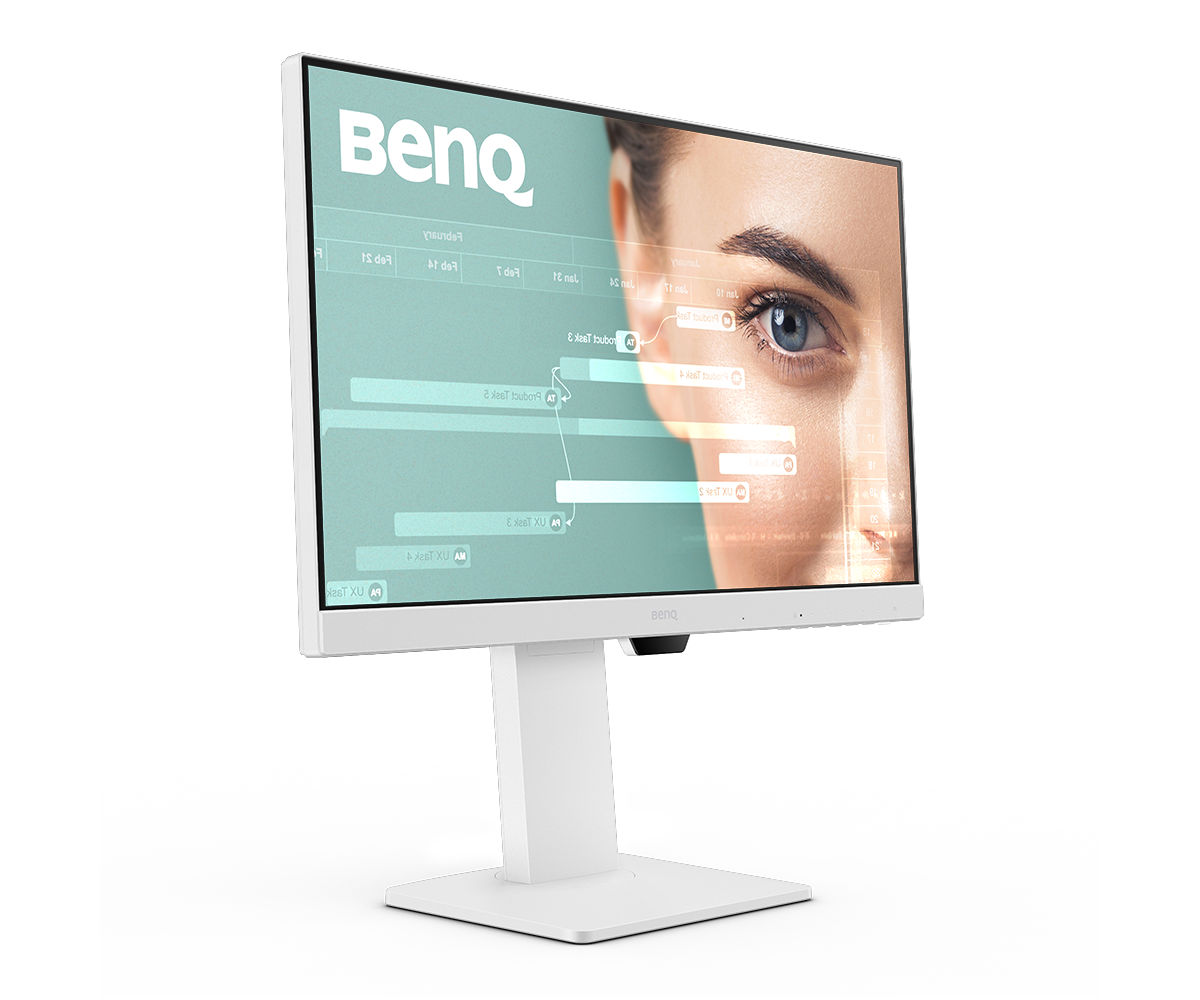
The BenQ GW2486TC is Wirecutter’s budget pick among monitors and PCMag’s Editors’ Choice for a general-purpose budget monitor, and both picks rest on the same strength: it has features that cheap 24-inch screens usually leave out. A single USB-C cable from a laptop carries the picture and up to 65W of charging, the stand adjusts for height, swivel, tilt and pivot, and a DisplayPort output can drive a second monitor. It fits a laptop owner with a small desk and a tight budget.
Under the white shell is a 23.8-inch 1080p IPS panel running at 100Hz, rated for 99% of the sRGB color space and 1,300:1 contrast, above the 1,000:1 that PCMag says most lower-priced IPS screens top out at. Amazon.ca carries the same model and listing as Amazon.com, and it was $219.98 CAD there in October 2026. BenQ Canada sells the GW2486TC as well, and French is one of the on-screen menu’s languages, which helps in a bilingual office.
Key Specifications
| Price (CAD) | $219.98 |
| Screen | 23.8 inches, 1920 x 1080, IPS, matte, 93 pixels per inch |
| Refresh rate | 100Hz, 5ms (GtG), no adaptive sync |
| Brightness and contrast (rated) | 250 nits, 1,300:1 native contrast |
| Color gamut (rated) | 99% sRGB |
| Inputs | USB-C (DisplayPort Alt Mode, data, 65W power delivery), HDMI 1.4, DisplayPort 1.2 |
| Outputs and hub | DisplayPort out (MST daisy chain), 2 x USB-A (USB 3.2 Gen 1, 5Gbps), headphone jack |
| Audio | 2 x 2W speakers, noise-cancelling microphone |
| Stand | 130 mm height, tilt -5° to 20°, swivel 45° each way, 90° pivot |
| Mounting | VESA 100 x 100 mm |
| Weight | 6.2 kg with stand, 3.8 kg without |
| Power | Built-in power supply, 14.6W typical use |
BenQ GW2486TC Picture Quality
For office work the panel delivers more than its price suggests. PCMag measured 254 nits of brightness against BenQ’s 250-nit rating, a 1,260:1 contrast ratio and 99.4% sRGB coverage. Monitornerds found an average Delta E color error of 1.14 straight out of the box, close enough that most owners won’t need to calibrate it.
Brightness is the modest spec. TechRadar found 250 nits good enough for office use but a bit dark for some kinds of media, and there’s no HDR support. It isn’t a screen for serious photo or color editing either.
The resolution is the real compromise. At 1920 x 1080 on a 23.8-inch screen, pixel density is 93 pixels per inch, so text looks larger and fewer windows fit side by side than on a 1440p or 4K monitor. Wirecutter points out that this is true of every 24-inch 1080p monitor, not just this one, and Monitornerds sees an upside: the larger text is easy to read for documents and browsing.
The 100Hz refresh rate makes scrolling smoother than on the 60Hz panels most cheap monitors use. There’s no FreeSync or G-Sync adaptive sync, though Monitornerds measured 6ms of input lag at 100Hz, quicker than a typical office display. Casual games are fine; it’s no gaming monitor.
USB-C, Daisy Chaining and Ports
The USB-C port is why most people buy it. One cable carries video, USB data and up to 65W of power, so a laptop charges while it drives the screen; PCMag’s own laptop charged over that connection during testing. TechRadar notes that 65W is enough for an ultrabook such as a MacBook Air, but not for a gaming laptop.
Two USB-A ports (5Gbps, with 4.5W for charging small devices) and a headphone jack sit alongside an HDMI 1.4 and a DisplayPort 1.2 input. A DisplayPort output daisy-chains a second monitor through Multi-Stream Transport, so a laptop with one USB-C video port can run two screens. Macs are the exception: BenQ says Macs only daisy-chain over Thunderbolt, so a MacBook can’t chain a second screen through this monitor’s DisplayPort output and needs a Thunderbolt dock or a similar device to do it.
Some hub features are missing. There’s no KVM switch for sharing a keyboard and mouse between two computers and no Ethernet port, and TechRadar found no real cable management, with every port facing downward.
Stand, Controls and Eye-Care Modes
The stand is the other surprise at this price, since many budget monitors only tilt. It raises the screen 130 mm (5.1 in), tilts 20 degrees back and 5 forward, swivels 45 degrees each way and pivots 90 degrees into portrait for code or long documents. Monitornerds found it firm and stable, with no wobble unless the desk takes a real knock, and a 100 x 100 mm VESA mount takes a monitor arm instead.
Settings are changed with six buttons along the bottom-right edge, not a joystick, and opinions differ. Monitornerds found the controls clunky, with several presses for some changes; PCMag, though it prefers a joystick, thought the buttons did the job thanks to on-screen icons that label each one.
BenQ’s Eye-Care features are a real bonus here. The screen is flicker-free, has a Low Blue Light Plus mode and TÜV Rheinland’s Eyesafe 2.0 certification, and adds Coding, ePaper and Color Weakness modes. Brightness Intelligence Gen2 adjusts the screen to the room’s light on its own, and TechRadar found it reacted fairly quickly. BenQ’s Eye-CareU app adds timers and light and distance reminders.
Speakers and Microphone
The two 2W speakers save desk space, but they’re basic: PCMag found them fairly soft with decent quality, while TechRadar thought the volume enough for someone at the desk but the sound boxy, with little low end. The noise-cancelling microphone filters room sound on calls, but BenQ says it only works when a computer is connected over USB-C; over HDMI or DisplayPort you’ll need the computer’s own microphone or a headset.
How Does It Stack Up Against the Competition?
The closest rivals are ASUS’s ProArt PA247CV, Dell’s Pro 24 hub monitor with Ethernet and up to 100W of charging, and Dell’s 24 Plus, which drops USB-C for a 144Hz panel.
| Feature | BenQ GW2486TC | ASUS ProArt PA247CV | Dell Pro 24 P2426HE | Dell 24 Plus S2425HSM |
|---|---|---|---|---|
| Price (CAD) | $219.98 | $279.99 | $458.62 | $169.10 |
| Screen | 23.8″ 1920 x 1080, IPS | 23.8″ 1920 x 1080, IPS | 23.8″ 1920 x 1080, IPS | 23.8″ 1920 x 1080, IPS |
| Refresh rate | 100Hz | 75Hz | 120Hz | 144Hz (AMD FreeSync) |
| Rated brightness | 250 nits | 300 nits | 300 nits | 300 nits |
| Rated contrast | 1,300:1 (native) | 1,000:1 (typical) | 1,500:1 (native) | 1,500:1 (native) |
| Rated color gamut | 99% sRGB | 100% sRGB | 99% sRGB | 99% sRGB |
| USB-C power delivery | 65W | 65W | Up to 100W | No USB-C |
| Daisy chain | Yes (DisplayPort out) | Yes (DisplayPort 1.2) | Yes (DisplayPort out 1.4) | No (2 x HDMI 1.4 inputs only) |
| USB hub | 2 x USB-A | 4 x USB-A | 2 x USB-A, 2 x USB-C, 1GbE Ethernet | None |
| Speakers | 2 x 2W, plus noise-cancelling mic | 2 x 2W | None listed | 2 speakers, 3W |
| Stand | 130 mm height, 45° swivel each way, 90° pivot | 130 mm height, 90° swivel each way, 90° pivot each way | 150 mm height, 45° swivel each way, 90° pivot each way | 110 mm height, 30° swivel each way, 90° pivot each way |
| Amazon | View on Amazon | View on Amazon | View on Amazon | View on Amazon |
Prices change frequently — always verify current pricing before purchasing.
BenQ GW2486TC: Worth It for One-Cable Laptop Desks
It earns its place on a desk where a laptop comes and goes every day. Plug in one cable and the laptop charges, the screen lights up and the keyboard or webcam plugged into the monitor’s USB ports comes along. For Canadian buyers it was $219.98 CAD on Amazon.ca in October 2026, against $249.99 CAD for the ASUS PA247CV, its closest match in the table, and it brings a faster 100Hz panel, a microphone, auto-brightness and BenQ’s Eye-Care modes; the ASUS answers with more USB ports, a wider swivel and a 300-nit rating. When Monitornerds reviewed it in June 2025, it placed the GW2486TC at the more expensive end of 1080p business displays; what that money buys over a basic 1080p screen is the USB-C charging, the full stand and daisy chaining.
Look elsewhere if you need more on screen, which takes a 1440p or 4K monitor, or more charging power: Dell’s Pro 24 P2426HE delivers up to 100W for bigger laptops and adds a 1GbE Ethernet port. A desk shared by two computers needs a KVM switch, which this BenQ lacks, and a desktop PC connected by HDMI gets little from the USB-C features; for that setup Dell’s 24 Plus S2425HSM offers a 144Hz panel instead.


Sources
- BenQ — GW2486TC Specifications
- BenQ — GW2486TC 23.8″ USB-C 100Hz Home Office Monitor
- BenQ GW2486TC — Amazon.ca Product Listing
- Wirecutter — The Best Monitors
- PCMag — BenQ GW2486TC review
- TechRadar — BenQ GW2486TC Eye-Care Monitor review
- Monitornerds — BenQ GW2486TC review
- ASUS — ProArt Display PA247CV Tech Specs
- Dell — Pro P 24 USB-C Hub Monitor P2426HE
- Dell — 24 Plus Monitor S2425HSM
- BenQ Canada — GW2486TC 23.8″ USB-C 100Hz Home Office Monitor
Reader Poll
How would you hook up the BenQ GW2486TC?
Help Our Editors Know What Matters to You
Explore on Amazon →