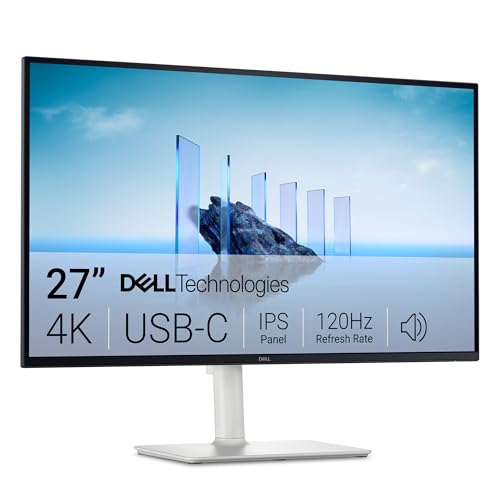
If a laptop sits at the center of your desk, the S2725QC is a strong buy: one USB-C cable carries the picture, the hub and up to 65W of charging, and 4K text looks sharp. Its 120Hz refresh rate makes scrolling and window dragging smoother, and its HDMI 2.1 ports make it a good console screen after work. The trade-off is charging power: 65W covers most laptops, but a power-hungry one is better served by LG's 90W 27UP850K-W. If you need Thunderbolt or a KVM switch, Dell's UltraSharp U2725QE is the step-up.
Pros
- Video, data and 65W charging over one USB-C cable
- Sharp 4K text at 163 pixels per inch
- 120Hz refresh rate over USB-C and HDMI 2.1
- Stand adjusts height, tilt, swivel and pivot
- Accurate sRGB mode for everyday color work
- Built-in 5W speakers handle calls and videos
Cons
- 65W USB-C charging trails rivals' 90W
- Stand wobbled and some adjustments didn't easily stay put in RTINGS' test
- Reflections distract in sunny rooms
- Motion handling too slow for competitive shooters
As an Amazon Associate I earn from qualifying purchases. Disclosure
Overview
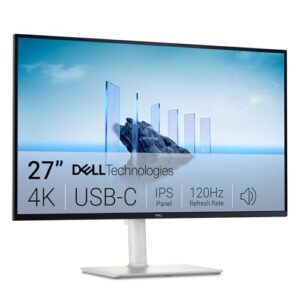
A laptop desk usually collects a dock, a charger and a tangle of cables. The Dell S2725QC, sold as the Dell 27 Plus 4K USB-C Monitor, folds those into one USB-C cable: plug in a laptop and it gets a 27-inch 4K picture, a small USB hub and up to 65W of charging. It’s aimed at home-office workers who live in documents, browsers and spreadsheets on a MacBook or a thin Windows laptop and want sharper text than a 1080p screen gives, without paying UltraSharp prices. Amazon sells it in the US.
It replaces the S2722QC, a popular productivity monitor, and the headline change is the refresh rate: 120Hz instead of 60Hz, so scrolling and window dragging look smoother. Two HDMI 2.1 ports also make it a good match for a PS5 or Xbox Series X after work.
Key Specifications
| Price (USD) | $349.99 |
| Screen | 27-inch IPS, anti-glare coating |
| Resolution | 3840 x 2160 (163 pixels per inch) |
| Refresh rate | 120Hz, AMD FreeSync Premium |
| Brightness (typical) | 350 cd/m² |
| Contrast ratio (typical) | 1,500:1 |
| Color gamut | 99% sRGB |
| Response time | 4 ms gray to gray (Extreme mode) |
| USB-C upstream | DisplayPort 1.4 Alt Mode, data, up to 65W power delivery |
| Other ports | 2 x HDMI 2.1, 2 x USB-A 5Gbps, 1 x USB-C 5Gbps (up to 15W) |
| Speakers | 2 x 5W |
| Stand | 130 mm height, -5° to 21° tilt, -30° to 30° swivel, -90° to 90° pivot; VESA 100 mm |
| Weight | 6.71 kg (14.79 lb) with stand and cables |
Dell S2725QC Picture Quality and Text Clarity
Packing 3840 x 2160 pixels into 27 inches works out to 163 pixels per inch, and that density is the reason to buy this monitor. Text looks crisp, so long documents, web pages and dense spreadsheets are easier to read. On a Mac, ProVideo Coalition’s reviewer runs it at a 1920 x 1080 workspace, which macOS draws with Retina-style sharpness on this panel.
Dell rates the panel at 99% of sRGB, and RTINGS found its sRGB mode gives accurate colors without calibration. It covers a narrower range of colors than wide-gamut monitors such as Dell’s UltraSharp U2725QE, so creators who work in DCI-P3 should look higher up the range.
Brightness is rated at 350 nits, enough for a typical office or a moderately lit room, though reflections and glare become a problem in a bright, sunny one. Contrast is ordinary for an IPS panel, and HDR adds little: in 91mobiles’ review, dark scenes looked grayish and highlights lacked punch, with no local dimming to help.
USB-C Hub and Laptop Charging
The upstream USB-C port carries video (DisplayPort 1.4 Alt Mode), data and up to 65W of power, so one cable replaces a dock and a charger. The AU Review calls that enough to charge most modern laptops, and ProVideo Coalition’s Allan Tépper reports it has worked perfectly so far with his 14-inch MacBook Pro M4 while also running his keyboard, trackpad, audio interface and USB drives through the monitor.
Rivals supply more power: LG’s 27UP850K-W delivers 90W and ASUS’s ProArt PA279CRV 96W, which matters for a larger laptop that ships with a bigger charger.
The hub is modest. The main ports face down: two HDMI 2.1 inputs and a 5Gbps USB-A port, and a pop-out tab under the bottom-left edge of the screen adds a second USB-A port and a USB-C port with up to 15W for accessories. There’s no DisplayPort input, Ethernet port, KVM switch or headphone jack, so wired headphones plug into the laptop instead.
120Hz for Work and Play
The 120Hz refresh rate makes everyday scrolling and window dragging look noticeably smoother than on a 60Hz screen, and it works over USB-C as well as HDMI 2.1, so a laptop gets the benefit too. The AU Review points out that 4K at 120Hz is not something you often see at this price.
For games, the HDMI 2.1 ports run current consoles at 4K and 120Hz, and AMD FreeSync Premium reduces tearing. Motion handling is the limit: moving objects aren’t as clear as on a fast gaming monitor, so story games and racing titles look good while competitive shooters are better served elsewhere. Casual shooter play is fine: The AU Review found Call of Duty: Black Ops 6 “buttery smooth” at 120Hz. It’s fast competitive play, where motion clarity matters most, that shows the limit.
One quirk matters to Mac video editors. ProVideo Coalition found that Apple Silicon Macs only offer the whole-number refresh rates (24, 25, 50, 60 and 120Hz) unless you add the third-party BetterDisplay app, while a Windows PC can pick 23.976, 29.97 or 59.94Hz directly.
Stand, Build and Speakers
The stand clicks together without tools and adjusts 130 mm in height, tilts from -5° to 21°, swivels 30° each way and pivots into portrait. It also comes off for a 100 mm VESA arm. RTINGS found that the screen wobbles easily on the stand and that some adjustments don’t easily stay in place, while The AU Review found the whole unit “rock solid on the desk.” RTINGS also found the older S2722QC feels better built.
Two 5W speakers are built in. They’re fine for video calls, YouTube and background music, but they won’t replace desktop speakers for music or games.
How Does It Stack Up Against the Competition?
Three alternatives cover the choices a laptop user weighs against the S2725QC: LG’s UltraFine with stronger charging, ASUS’s color-focused ProArt and Dell’s own UltraSharp step-up.
| Feature | Dell S2725QC | LG 27UP850K-W | ASUS ProArt PA279CRV | Dell UltraSharp U2725QE |
|---|---|---|---|---|
| Price (USD) | $349.99 | $349.99 | $399.00 | $639.00 |
| Resolution | 3840 x 2160 | 3840 x 2160 | 3840 x 2160 | 3840 x 2160 |
| Refresh rate | 120Hz | 60Hz | 60Hz | 120Hz |
| Brightness (typical) | 350 nits | 400 nits | 350 nits | 450 nits |
| Contrast ratio (typical) | 1,500:1 | 1,200:1 | 1,000:1 | 3,000:1 |
| Color gamut | 99% sRGB | 95% DCI-P3 | 99% DCI-P3, 99% Adobe RGB | 99% DCI-P3 |
| USB-C power delivery | 65W | 90W | 96W | 140W |
| Stand adjustments | Height, tilt, swivel, pivot | Height, tilt, pivot | Height, tilt, swivel, pivot | Height, tilt, swivel, pivot |
| TTP Review | This review ↑ | — | — | Read our review → |
| Amazon | View on Amazon | View on Amazon | View on Amazon | View on Amazon |
Prices change frequently — always verify current pricing before purchasing.
Dell S2725QC: Worth It for Sharp, Smooth Laptop Desks
For a home office built around one laptop, the S2725QC is easy to recommend. A single cable handles the picture, the hub and charging, 4K text is sharp, and 120Hz makes a full day of scrolling feel smoother. It also works as a console screen in the evening, and as of November 2026 Amazon sells it for the same price as LG’s 27UP850K-W, which stays at 60Hz.
Look elsewhere if your laptop wants faster charging or color range matters most. LG’s 27UP850K-W charges at 90W and adds a DisplayPort input and headphone jack, and 91mobiles rates its colors and HDR stronger. ASUS’s ProArt PA279CRV covers 99% of DCI-P3 and Adobe RGB for photo and video work. If a work laptop docks there all day and you want Thunderbolt, Ethernet and a KVM switch, Dell’s UltraSharp U2725QE is the step-up, and its IPS Black panel doubles the contrast rating.

Sources
- Dell — Dell 27 Plus 4K USB-C Monitor (S2725QC)
- Dell — Dell 27 Plus 4K USB-C Monitor S2725QC User’s Guide
- Dell S2725QC — Amazon Product Listing
- RTINGS — Dell S2725QC Monitor Review
- 91mobiles — Dell 27 Plus S2725QC Monitor Review
- The AU Review — Dell’s feature-packed 27-inch 4K monitor (S2725QC)
- ProVideo Coalition — First review: Dell S2725QC
- Impulse Gamer — Dell 27 Plus 4K USB-C Monitor (S2725QC) Review
- PC Monitors — Dell S2725QC 120Hz 4K UHD IPS with USB-C
- LG — 27UP850K-W UltraFine 4K Monitor Specifications
- ASUS — ProArt Display PA279CRV Tech Specs
- Dell — UltraSharp 27 4K Thunderbolt Hub Monitor (U2725QE)
Reader Poll
How much charging does your laptop need from a monitor?
Help Our Editors Know What Matters to You
Explore on Amazon →