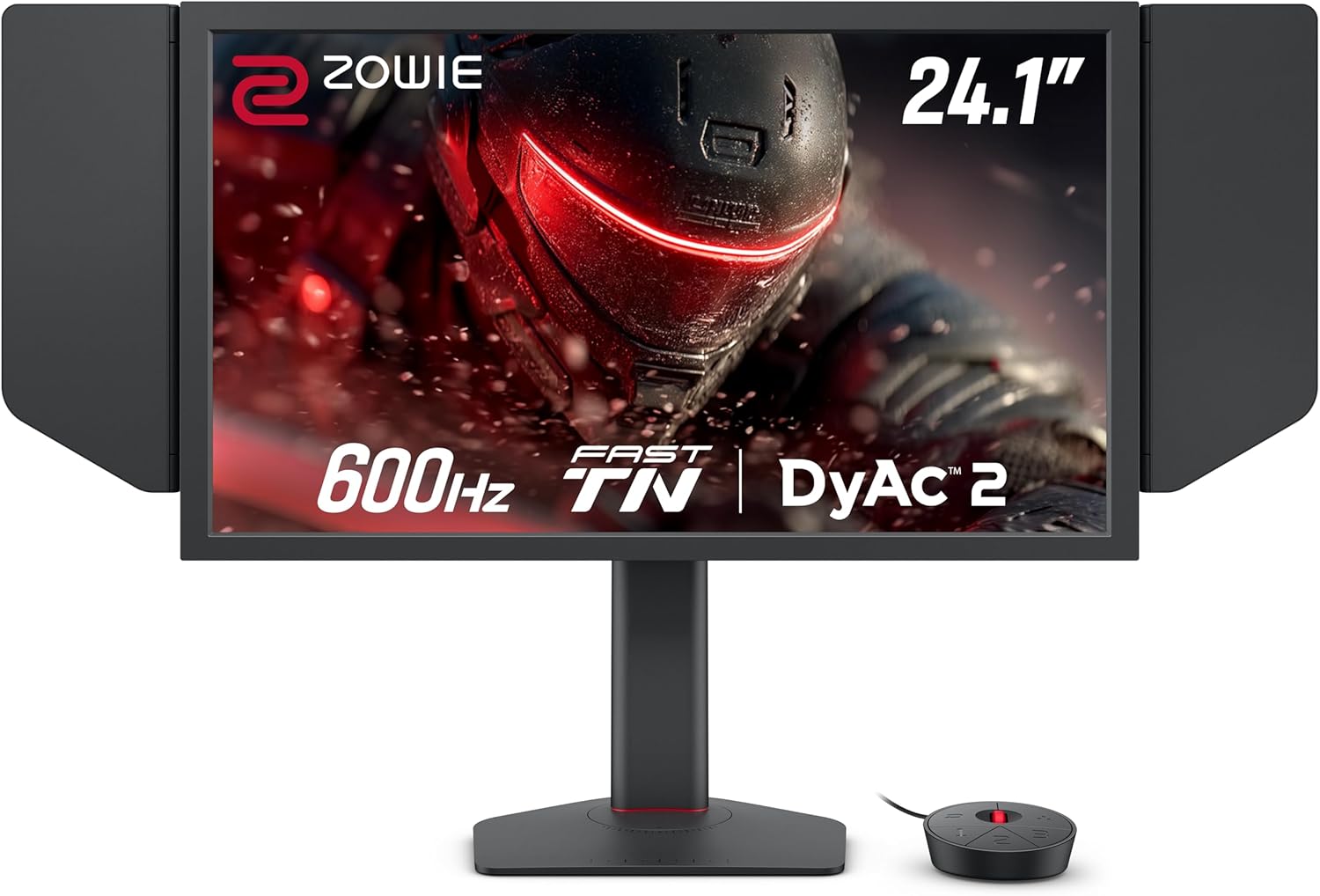
Buy the XL2586X+ if you play CS2 or Valorant near the top of the rankings, or in tournaments, and your PC already runs them well above 400 fps: both full reviews rate its 600Hz motion clarity at the top of the field. PC Gamer measured just 6.81 ms from click to on-screen muzzle flash, and the small, precise stand is built for repeatable tournament setups. The trade-off is that the premium for 600Hz buys a small gain over 360Hz and 400Hz screens, so most players are better served by Zowie's 400Hz XL2566X+. If you also want one monitor for films and slower games, a 500Hz OLED such as the ASUS XG27AQDPG fits better.
Pros
- 600Hz with DyAc 2 for top-tier motion clarity in shooters
- Very low measured click-to-screen latency
- Small, stable stand with markings for a repeatable setup
- S Switch, side shields and shareable game profiles
Cons
- The premium for 600Hz buys a small gain over 360-400Hz monitors
- 1080p TN panel with narrow viewing angles
- No HDR, and no adaptive sync while DyAc 2 is on
- Thick bezels
As an Amazon Associate I earn from qualifying purchases. Disclosure
Overview
The BenQ Zowie XL2586X+ is a 24.1-inch, 1080p monitor that runs at 600Hz on a Fast TN panel, and it is made for one kind of player: someone who plays Counter-Strike 2 or Valorant at a high level and wants every frame on screen. Zowie announced it in January 2025, upgraded from 540Hz to 600Hz, and ZOWIE was the official monitor partner of the IEM Cologne Major 2026 with this model.
The case for it rests on two full reviews. PC Gamer measured 6.81 ms from mouse click to on-screen muzzle flash at 600Hz and called its clarity in competitive shooters unparalleled. ProSettings.net gave it 4.5 out of 5 and called it a statement product built for no-compromise competitive performance. The other side is just as clear: it only pays off for players who already hold very high frame rates and play little else, and its picture is ordinary once you leave a shooter.
Key Specifications
| Screen | 24.1-inch TN (Fast TN), 1920 x 1080 |
| Refresh rate | 600Hz (HDMI 2.1 or DisplayPort 1.4) |
| Brightness / contrast | 320 nits typical / 1000:1 native |
| Blur reduction | DyAc 2 (variable refresh rate only with DyAc 2 off) |
| Inputs | 3x HDMI 2.1, 1x DisplayPort 1.4, headphone jack |
| Consoles | 1920 x 1080 at 120Hz on PS5 and Xbox Series X/S (HDMI 2.1) |
| Stand | 155 mm height adjustment, tilt -5° to 35°, swivel 45° each way; VESA 100 x 100 mm |
| Weight | 5.9 kg (net) |
| In the box | S Switch, shielding hood, DisplayPort 1.4 and HDMI 2.1 cables (1.8 m) |
| Price (USD) | $999.99 |
BenQ Zowie XL2586X+ Motion Clarity and Speed
BenQ reaches 600Hz without overclocking, and pairs it with DyAc 2, its backlight-strobing mode, which uses a dual backlight to cut blur on moving targets. Both full reviews put the result at the top of the field for tactical shooters. ProSettings.net’s reviewer called it the smoothest and most responsive panel he had tested, and said that if he had to play a high-stakes tournament, this is the monitor he would choose.
PC Gamer’s LDAT tests found a click-to-screen delay of 6.81 ms at 600Hz, against 7.5 ms with the same monitor at 144Hz and 6.22 ms for a 280Hz Gigabyte OLED, a half-millisecond gap its reviewer couldn’t feel in play. Against slower screens the gain is real: PC Gamer concluded it can improve your play even against fast OLED and IPS panels, and ProSettings.net calls it a clear upgrade over 144Hz and 240Hz monitors. Over 360Hz the step is smaller: PC Gamer’s reviewer could tell the difference but didn’t feel it improve his play significantly, so the premium for 600Hz buys a small gain for players near the top of the rankings.
Testers differ on how much DyAc 2 adds at 600Hz. ProSettings.net found it felt great on this panel, while PC Gamer noticed only a small difference with it on, even when it tried 240Hz and 360Hz, though enough to see why a pro might choose it. Note that BenQ lists variable refresh rate as available only with DyAc 2 off, so you pick strobing or adaptive sync, not both.
The rest of your PC has to keep up. BenQ says 600Hz needs an up-to-date Windows 11 (versions released before November 1, 2023 stop at 500Hz) and recommends an NVIDIA RTX 40 or AMD RX 7000 series graphics card with a 14th-generation Intel or Ryzen 7000 processor or newer. PC Gamer adds that the monitor is close to pointless if your games run below about 360 fps; its test system held 450 to 600 fps in CS2.
Picture Quality Outside Shooters
BenQ says a new vivid colour film improves colour performance by 35% and reduces the washed-out look of older TN panels. Testers split on how far that goes: PC Gamer found it far from the washed-out TN panels of old, while Tom’s Guide still called the picture dull and its 320 nits dim. In shooters the presets do their job: PC Gamer’s reviewer preferred how CS2 looked in the FPS1 preset to any IPS or OLED he had used, with enemies easy to spot.
Away from competitive games, the panel shows its type. PC Gamer would rather use any half-decent VA, IPS or OLED monitor for browsing, video and slower games, because this one misses colour detail and nuance, and there is no HDR. ProSettings.net rated the picture very good for a TN panel but found the viewing angles very limited, with the image shifting as soon as you move off-centre, and said it preferred the image of Zowie’s own XL2566X.
Stand, Controls and Setup
The stand is one of its strengths. BenQ fitted industrial-grade bearings to the height adjustment, and ProSettings.net found the small base stable during fast, low-sensitivity mouse swipes, with markings that let you return to the exact same position every time, a feature aimed at players who set up on tournament desks. The panel tilts, swivels and adjusts in height, but it doesn’t turn to portrait.
The S Switch is a small puck for changing settings and saving profiles, and it can be plugged into a different monitor to set it up with your saved settings. The box also has side shields to block distractions, plus DisplayPort and HDMI cables. There is also a flip-down headphone stand on the back. BenQ’s XL Setting to Share software adds an Auto Game Mode that switches colour modes by game, and PC Gamer found it worked well for downloading game profiles and shared pro settings.
Its thick bezels are made for the arena rather than the living room: Zowie says they help frame the picture against a bright crowd. ProSettings.net, which found they have grown since earlier models, thinks many home players will find them too big, and that with the dark grey plastic they may make the monitor look a bit outdated to some.
How Does It Stack Up Against the Competition?
The XL2586X+ reviews point to Zowie’s lower-refresh DyAc 2 models and to fast OLEDs. We compare ASUS’s 610Hz TN rival, the 500Hz OLED Tom’s Hardware weighs against that ASUS, and Alienware’s 500Hz IPS screen.
| Feature | BenQ Zowie XL2586X+ | ASUS ROG Strix XG248QSG Ace | ASUS ROG Strix OLED XG27AQDPG | Alienware AW2524HF |
|---|---|---|---|---|
| Price (USD) | $999.99 | $799.00 | $849.00 | $523.20 |
| Refresh rate | 600Hz | 610Hz (max) | 500Hz | 500Hz (overclocked; 480Hz native) |
| Panel | 24.1-inch TN, 1080p | 24.1-inch Super TN, 1080p | 26.5-inch QD-OLED, 1440p | 25-inch IPS, 1080p |
| Brightness | 320 nits (typical) | 350 nits (typical) | 300 nits (typical) | 400 nits (rated) |
| Blur reduction | DyAc 2 (variable refresh only with it off) | ELMB 2 and ELMB Sync (strobing with Adaptive-Sync) | ELMB | None (no backlight strobe) |
| HDR | None | HDR10, VESA DisplayHDR 400 | VESA DisplayHDR 500 True Black | HDR10 |
| Video inputs | 3x HDMI 2.1, 1x DisplayPort 1.4 | 2x HDMI 2.1, 1x DisplayPort 1.4 DSC | 2x HDMI 2.1, 1x DisplayPort 1.4 DSC | 1x HDMI 2.1, 2x DisplayPort 1.4 |
| Amazon | View on Amazon | View on Amazon | — | View on Amazon |
Prices change frequently — always verify current pricing before purchasing.
BenQ Zowie XL2586X+: Worth It for Top-Ranked CS2 and Valorant Players
Picture the buyer this is for: you play CS2 or Valorant most nights, you sit close to a 24-inch screen, your PC already runs these games well above 400 fps, and you have upgraded your mouse, settings and connection as far as they go. For you, the XL2586X+ delivers the clearest motion in these tests and latency within about half a millisecond of a fast OLED, and its precise stand makes your setup repeatable. As of October 2026 it costs more than all three rivals here, so it is a purchase for players who have nothing left to tune.
Most competitive players should look at the XL2566X+ first: ProSettings.net found Zowie’s 400Hz model came extremely close in games and looked better outside them, with the same DyAc 2, and it was $649.99 against $999.99 for the XL2586X+ on Amazon in October 2026. If you want blur reduction and adaptive sync running together, plus HDR and brighter colour, Tom’s Hardware found the ASUS XG248QSG Ace’s ELMB the best backlight strobing it had seen. And if the monitor has to handle films and slower games too, a 500Hz OLED such as the ASUS XG27AQDPG gives you perfect blacks and 1440p; Tom’s Hardware notes that no LCD can match an OLED’s contrast. On a tighter budget, Tom’s Hardware found the 500Hz Alienware AW2524HF delivers incredible motion resolution and low input lag with excellent image quality, though it has no backlight strobe.


Sources
- BenQ Zowie — XL2586X+ Official Product Page and Specifications
- BenQ Zowie XL2586X+ — Amazon Product Listing
- PC Gamer — Zowie XL2586X+ 600 Hz review
- ProSettings.net — ZOWIE XL2586X+ Review
- TechPowerUp — ZOWIE Introduces XL2586X+ eSports Monitor With 600Hz Refresh Rate
- BenQ — ZOWIE at the IEM Cologne Major 2026 (press release)
- Tom’s Hardware — Alienware AW2524HF 500 Hz Gaming Monitor Review
- BenQ Zowie — XL2566X+ Official Product Page and Specifications
- Tom’s Guide — I just tested this 600Hz gaming monitor
- Dot Esports — ZOWIE XL2566X+ review
- ASUS — ROG Strix XG248QSG Ace Tech Specs
- Tom’s Hardware — Asus ROG Strix XG248QSG Ace 610 Hz gaming monitor review
- ASUS — ROG Strix OLED XG27AQDPG Tech Specs
Reader Poll
What frame rate does your PC hold in CS2 or Valorant?
Help Our Editors Know What Matters to You
Explore on Amazon →