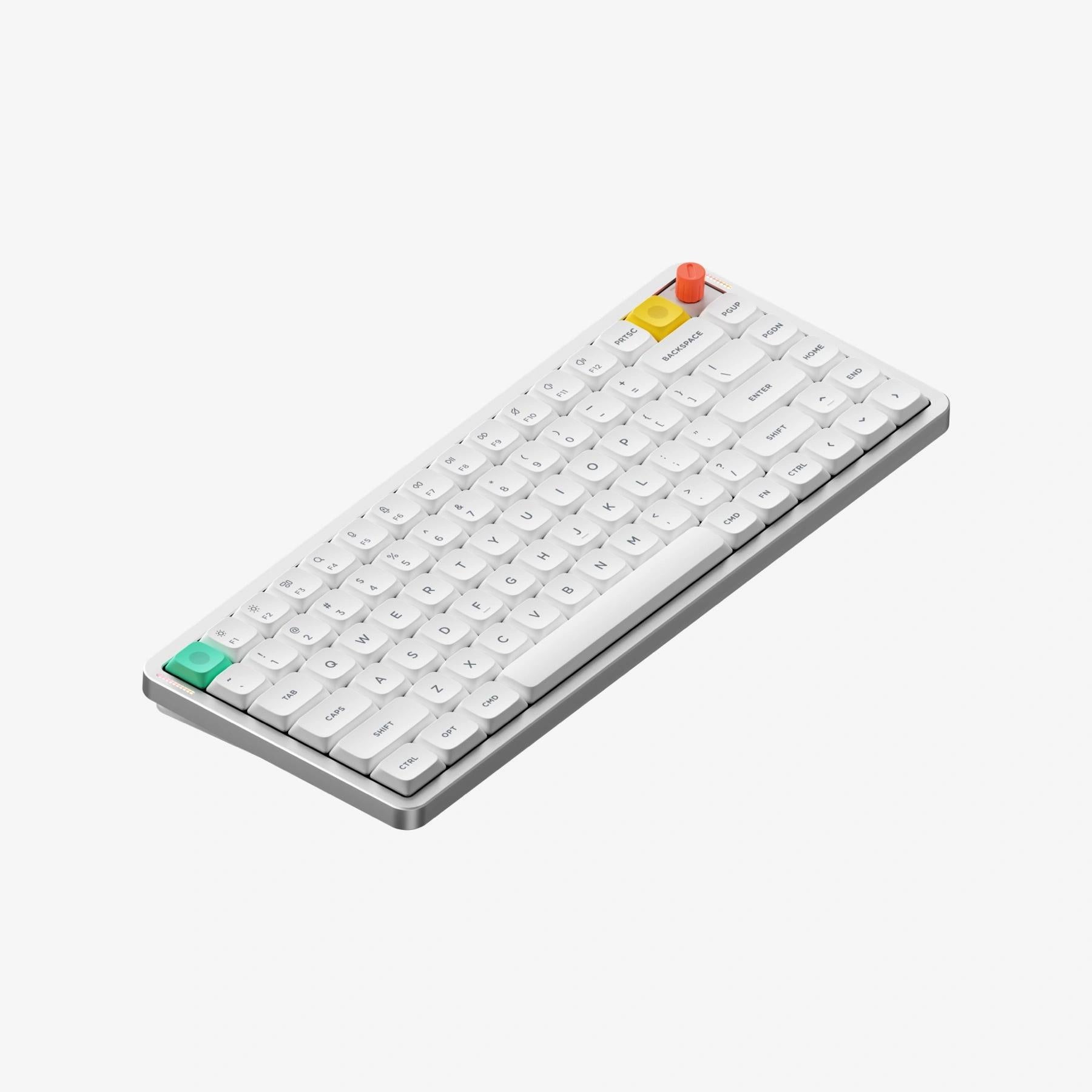
A slim wireless keyboard for people who type all day on a laptop and want one board for the desk and the bag. Gateron's low-profile switches travel 3.5 mm in the Red and Brown versions, close to standard-height key travel, with a soft, creamy sound, and NuPhy rates the battery at up to 1,200 hours with the lights off. The trade-offs: it's heavier than the rivals we compared, the tall knob wobbles, and NuPhy IO has no VIA support or per-key lighting control.
Pros
- Up to 3.5 mm key travel (Red and Brown) in a 13.2 mm-thin board
- Soft, creamy, even sound
- Up to 1,200 hours of battery (lights off)
- 2.4 GHz dongle plus three Bluetooth slots
- Browser-based NuPhy IO, nothing to install
Cons
- Heaviest of the low-profile boards we compared (724 g)
- Tall knob wobbles
- No VIA support or per-key lighting control
- Only three switch options
As an Amazon Associate I earn from qualifying purchases. Disclosure
Overview
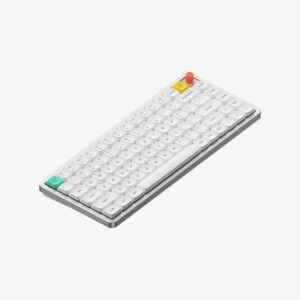
Low-profile keyboards have usually asked you to give up a deep, satisfying keypress in exchange for a slim case. The NuPhy Air75 V3 is NuPhy’s third go at removing that trade-off: an 84-key wireless board just 13.2 mm tall at the front, with an aluminum top, a gasket-mounted interior and new Gateron low-profile switches that travel 3.5 mm in the Red and Brown versions, close to what a standard-height keyboard gives you. It connects by 2.4 GHz dongle, Bluetooth or USB-C, and ships with Mac keys and shortcuts in place, with a switch on the back for Windows.
Next to the Air75 V2, almost everything changed. The battery is the same 4,000 mAh size, yet NuPhy now rates it at up to 1,200 hours with the lighting off, against a maximum of about 220 hours on the V2. The firmware moved from QMK/VIA to NuPhy’s own browser-based NuPhy IO, a swappable knob module can replace the top-right key, and the case gained a gasket mount and extra damping layers. The cost is weight: at 724 g (1.6 lb) it’s the heaviest keyboard in our comparison below.
Key Specifications
| Price (USD) | $139.95 |
| Layout | 75% ANSI, 84 keys |
| Switches | Gateron low-profile 3.0 Nano: Red (linear), Brown (tactile) or Blush (silent linear); hot-swappable |
| Key travel | 3.5 mm (Red and Brown Nano) |
| Mount | Gasket; plate-mounted stabilizers |
| Connections | 2.4 GHz dongle, Bluetooth 5.0, USB-C wired |
| Polling rate | 1,000 Hz on 2.4 GHz and wired; 125 Hz on Bluetooth |
| Battery | 4,000 mAh; up to 1,200 hours with lights off, 60 to 100 hours with all lights on (NuPhy lab figures) |
| Backlight | North-facing RGB, 20 modes |
| Materials | Aluminum top case, ABS bottom case, PC plate, double-shot PBT keycaps |
| Size and weight | 12.56 x 5.07 x 0.52 in (318.9 x 128.9 x 13.2 mm); 1.6 lb (724 g) |
| Typing angle | 4°, 8° or 10° |
| Knob | Optional module in place of the top-right key; high- and low-profile knobs included |
| Software | NuPhy IO (web app) |
| Works with | macOS, Windows, Android, iOS |
| Operating temperature | 14°F to 122°F (-10°C to 50°C) |
| Warranty | 1 year |
NuPhy Air75 V3 Typing Feel and Sound
The new switches are the reason to buy this keyboard. With 3.5 mm of travel on the Red and Brown switches, each press comes close to the depth of a standard-height board while the keycaps stay low and flat. The sound changed just as much: the V2’s hollow note is gone, replaced by a soft, even, creamy sound across the whole board. Tom’s Guide found the gasket mount still fairly firm by gasket standards, with bottom-out comfort on par with other low-profile boards, and its reviewer still prefers the Kailh low-profile switches in the Lofree Flow84, while adding that you won’t be disappointed by the Gaterons unless you try both back to back.
You get three switch choices: Red linear, Brown tactile and Blush silent linear, down from the seven the V2 offered. For an office, a library or a partner on calls, Blush is the one to pick. It mutes keystrokes rather than silencing them, while Red and Brown can still be noticed in a quiet room. AppleVis’s reviewer notes that the Blush switches give up some travel in exchange for their silicone cushioning. The stabilizers draw a split verdict: SemiPro Tech+Gear heard a slight rattle from the spacebar on its unit, while Crafting Worlds called the spacebar one of the best-sounding it had heard on a low-profile board. Every switch is hot-swappable, but SemiPro points out that switches from the Air75 V1 or V2 won’t fit.
Battery Life and Connections
NuPhy rates the battery at up to 1,200 hours with the lights off and 60 to 100 hours with all of them on. Those are its own lab figures, and we found no outlet that ran the battery down to check them. The early signs are good, though: Tom’s Guide saw it drop only a few percent over several days of writing with reactive lighting at full brightness. For scale, SemiPro Tech+Gear puts the usual ceiling for rival low-profile mechanical boards at around 300 to 400 hours. Among the keyboards in our table, Keychron rates the K3 Ultra 8K at up to 550 hours and Lofree rates the Flow84 at up to 40, without saying with what lighting.
The keyboard holds three Bluetooth devices plus the 2.4 GHz dongle, and you switch between them with the Fn key and a number. The dongle stores in a slot on the back, so it travels with the keyboard. Over the dongle or a cable it polls at 1,000 Hz, enough for casual gaming, though this is a typing-first keyboard rather than a competitive gaming one. Bluetooth runs at 125 Hz, which is fine for typing. AppleVis’s reviewer, who had to watch for missed keystrokes on the V2 over Bluetooth, hadn’t seen a single one on the V3. On an iPhone or iPad, use Bluetooth or a USB-C cable: the dongle needs a USB-A port.
NuPhy IO Software and the Knob
Customization now happens in NuPhy IO, a web app that needs no install. It handles key remapping across layers, macros, knob functions, gaming options such as SOCD (which key wins when two opposing keys are held) and firmware updates, all from the browser. Whether leaving QMK/VIA is a loss depends on who you ask: Tom’s Guide says NuPhy IO does everything VIA does and more in a friendlier interface, while Notebookcheck calls it not quite as powerful as VIA, Keychron’s Launcher or QMK. A few limits are clear. Lighting can’t be set key by key: you choose from NuPhy’s effects. TweakTown found only two onboard profiles, one for Windows and one for Mac. And AppleVis’s reviewer found NuPhy IO inaccessible to blind users on iPhone and iPad.
The knob is optional. It replaces the top-right key with one screw, and both a tall and a low-profile knob come in the box, so you can keep a plain key if you prefer. It can control volume, scrolling, zoom or a macro. The tall knob wobbles, so for a keyboard that lives in a backpack, the low-profile knob is the safer choice.
Portability and Laptop Use
At 13.2 mm tall at the front and about 12.6 inches wide, the Air75 V3 slips into a laptop bag easily, and NuPhy says its feet fit over the keyboard of almost all MacBooks, so you can type on it on a train or a small desk. Crafting Worlds found the feet grip a laptop firmly enough to stop the board sliding. Tom’s Guide had less luck on a 15-inch MacBook Pro, where finding a position that didn’t press the function or bottom rows took fiddling and the slightest bump moved it. Fold-out legs give typing angles of 4, 8 or 10 degrees for desk use.
The weight is the travel trade-off. Tom’s Guide found it about four ounces heavier than the V2 and noticed the difference on its commute. It also isn’t designed to be opened: SemiPro Tech+Gear warns that its clip-together case makes disassembly risky, which matters if you hope to replace the battery yourself years from now.
How Does It Stack Up Against the Competition?
The Lofree Flow84 is the obvious rival, another gasket-mounted 84-key low-profile board, but it has no 2.4 GHz dongle and a much smaller battery. The Keychron K3 Ultra 8K leans toward gaming with an 8,000 Hz polling rate, and the Logitech MX Mechanical Mini for Mac swaps switch choice and an in-box dongle for Logitech’s software and a hand-sensing backlight.
| Feature | NuPhy Air75 V3 | Lofree Flow84 | Keychron K3 Ultra 8K | Logitech MX Mechanical Mini for Mac |
|---|---|---|---|---|
| Price (USD) | $139.95 | $129.99 | $109.99 | $159.99 |
| Wireless | 2.4 GHz dongle + Bluetooth 5.0 | Bluetooth 5.0 only | 2.4 GHz + Bluetooth 5.2 | Bluetooth Low Energy (Logi Bolt receiver sold separately) |
| Battery capacity | 4,000 mAh | 2,000 mAh | 2,600 mAh | 1,500 mAh |
| Maker’s battery claim | Up to 1,200 hours (lights off) | Up to 40 hours (lighting not stated) | Up to 550 hours (backlight off) | Up to 10 months (backlight off); up to 15 days with it on |
| Switches | Gateron low-profile 3.0 (Red, Brown, Blush silent) | Kailh full-POM low-profile (linear or tactile) | Keychron Milk POM (Red, Brown, Banana) | Tactile Quiet |
| Backlight | North-facing RGB | White backlight, RGB sidelight | North-facing RGB | Backlit keys with hand-proximity sensor |
| Weight | 724 g | 594 g | 566 g | 612 g |
Prices change frequently — always verify current pricing before purchasing.
Is the NuPhy Air75 V3 Worth It?
If you write for a living on a Mac or Windows laptop and want one keyboard for the desk and the bag, yes. It pairs the long-travel, quiet-sounding switches with a battery you’ll rarely think about and three Bluetooth slots plus a dongle, so it can move between a work laptop, a home PC and a tablet without re-pairing. Order it with Blush switches if you share a room, and use the low-profile knob (or none) if it travels daily.
Look elsewhere if every ounce in your bag counts, since the Lofree Flow84 and Keychron K3 Ultra 8K are both lighter. If your games come first, the Keychron’s 8,000 Hz polling rate is built for that. And if you rely on QMK/VIA or per-key lighting, NuPhy IO will frustrate you, and screen-reader users on an iPhone or iPad may not be able to use it at all. Logitech’s MX Mechanical Mini for Mac is the pick for someone who wants a quiet tactile switch, Logitech’s Options+ app and Flow with an MX mouse, and doesn’t need a choice of switches.

Sources
- NuPhy — Air75 V3 Official Product Specifications
- NuPhy Air75 V3 — Amazon Product Listing
- Tom’s Guide — NuPhy Air75 V3 review
- TweakTown — NuPhy Air75 V3 Low-Profile Wireless Keyboard Review
- SemiPro Tech+Gear — NuPhy Air75 V3 Review: Closer to Perfection
- Crafting Worlds — NuPhy Air75 V3 Review
- AppleVis — Nuphy Air75 V3 Keyboard Review
- Notebookcheck — NuPhy Air75 V3 launch coverage
- Lofree — Flow84 Specifications
- Keychron — K3 Ultra 8K Specifications
- Logitech — MX Mechanical Mini for Mac Specifications
Reader Poll
Which Air75 V3 switch would you pick for your desk?
Help Our Editors Know What Matters to You
Explore on Amazon →