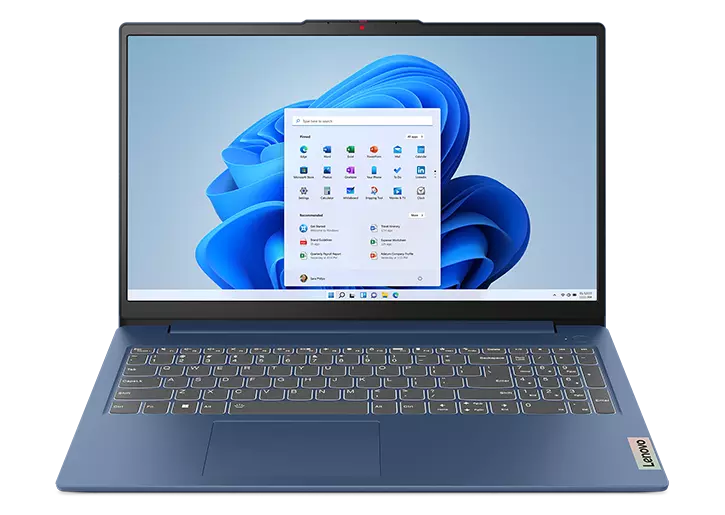
The IdeaPad Slim 3i is worth buying as a home or office Windows laptop when its price stays close to rivals with the same 16GB and 512GB, such as the Acer Aspire Go 15 in the table. Twice the memory of the tested units should avoid the slowdowns Reviewed blamed on 8GB, and testers found the backlit keyboard with number pad comfortable and quick. In Canada it is hard to find new, since Lenovo Canada lists it as Available Soon and Amazon.ca only has a US-model import. Battery life is the trade-off: two of three testers saw roughly 4 to 6 hours of real use, so anyone working unplugged all day should look at a newer model first.
Pros
- 16GB of dual-channel memory
- Comfortable backlit keyboard with number pad
- Fingerprint reader and webcam privacy shutter
- Full-size USB-A, HDMI and SD card ports
- Matte, anti-glare 1080p IPS screen
Cons
- Real-world battery life varied widely in testing (about 4 to 6 hours in two of three tests)
- Muted colours (60.5% sRGB in TechRadar's test)
- Weak speakers; only a 720p webcam
- 2023 design; Lenovo's 2026 Gen 11 is newer
As an Amazon Associate I earn from qualifying purchases. Disclosure
Overview
Lenovo’s IdeaPad Slim 3i is a plain, full-size Windows laptop for schoolwork, email, spreadsheets and streaming, with a 15.6-inch screen and a keyboard that includes a number pad. This review covers the version sold on Amazon, Lenovo part 82X700B4US from the IdeaPad Slim 3 15IRU8 line: a 13th-gen Intel Core i5-1335U, 16GB of memory, a 512GB SSD, a non-touch 1080p IPS screen, a backlit keyboard and a fingerprint reader built into the power button.
Three things shape the verdict for Canadian buyers. Most published tests used the entry version with a Core i3-1315U and 8GB of memory; this one has a 10-core i5 and twice the memory, which addresses the memory shortfall Reviewed blamed for its 8GB unit’s slowdowns. It is no longer Lenovo’s newest model: Lenovo Canada sells the 2026 IdeaPad Slim 3i Gen 11, and its page for this generation shows Available Soon with no price (October 2026). And on Amazon.ca the only offer is a third-party seller’s listing of the US model, part 82X700B4US with a US English keyboard, priced well above the US listing in October 2026, so we don’t quote a Canadian price for it.
Key Specifications
| Price (CAD) | See price on Amazon |
| Model | IdeaPad Slim 3 15IRU8, part 82X700B4US |
| Processor | Intel Core i5-1335U, 10 cores (2P + 8E), 12 threads, up to 4.6GHz |
| Graphics | Integrated Intel Iris Xe |
| Memory | 16GB LPDDR5-4800, dual-channel, soldered (not upgradable) |
| Storage | 512GB M.2 2242 PCIe 4.0 NVMe SSD |
| Display | 15.6-inch 1920 x 1080 IPS, 300 nits, anti-glare, non-touch |
| Webcam | 720p with privacy shutter |
| Keyboard | Backlit, with number pad |
| Security | Fingerprint reader in the power button |
| Ports | 2 x USB-A (5Gbps), 1 x USB-C (5Gbps, charging and DisplayPort), HDMI 1.4, SD card reader, headphone/mic jack |
| Wireless | Wi-Fi 6, Bluetooth 5.2 |
| Battery (rated) | 47Wh; 8.1 hours (MobileMark 2018), 12 hours of local 1080p video |
| Charger | 65W round-tip barrel; USB-C charging at 45-65W also supported |
| Weight | 1.62 kg (3.57 lb) |
| Dimensions | 359.3 x 235 x 17.9 mm (14.15 x 9.25 x 0.70 in) |
| Durability | MIL-STD-810H (21 test items, Lenovo’s testing) |
| Warranty | 1 year, courier or carry-in |
Lenovo IdeaPad Slim 3i Everyday Performance
For browsing, documents, video calls and streaming, there is enough speed here, and even the entry i3 version handled heavy tab loads in testing. TechRadar ran 20 Chrome tabs, three of them streaming YouTube, and found switching between them immediate; How-To Geek’s tester kept 32 tabs open with two videos playing and saw no stutter.
Where testers did hit a limit, it was memory. Reviewed found that its 8GB unit ran short once Chrome got busy, with tabs reloading and the system hitching, and pinned that on the 8GB rather than the processor. This configuration has 16GB running in dual-channel mode, which Lenovo’s spec sheet says is also what enables the Iris Xe graphics; single-channel 8GB models fall back to basic UHD graphics. The memory is soldered, so 16GB is what it will always have, while the SSD sits in a standard M.2 2242 slot.
It is not a laptop for gaming or video editing. TechRadar measured under 18 frames per second in Civilization VI on the i3 version, and testers pointed anyone with heavier software toward more powerful machines.
Screen, Keyboard and Build
Testers praised the keyboard as comfortable and quick to type on. Reviewed’s tester reached 115 words per minute on it, in line with their best, though its backlight has only on and off. The number pad pushes the touchpad left of centre, and testers split on that: Reviewed’s tester kept triggering right-clicks by mistake and TechRadar found the far-left placement a bit uncomfortable, while How-To Geek’s tester found it no nuisance.
The 15.6-inch screen has a matte anti-glare finish that Reviewed found easy to read in most lighting, but in most reviews its colours looked muted: TechRadar’s touchscreen unit covered 60.5% of sRGB. Lenovo rates the panel at 300 nits and 45% of the NTSC colour range, the same rating it lists for the touchscreen version, and Reviewed measured 361 nits on its touchscreen unit. That is fine for documents and streaming, and a poor match for photo editing.
Lenovo lists the case as PC-ABS plastic and says the design passed 21 MIL-STD-810H test items. The 720p webcam has a sliding privacy shutter, but How-To Geek found it washed out skin tones and fine detail. The speakers are weak, with thin sound and little bass, so headphones are the better choice for music.
Battery Life and Charging
Lenovo rates the 47Wh battery at 8.1 hours in the MobileMark 2018 test and 12 hours of local video playback. Lab tests of the i3 version landed close to the first figure: just over nine hours in TechRadar’s battery benchmark, and 8 hours 41 minutes in Reviewed’s web-browsing test at about 200 nits.
Everyday results varied widely. Reviewed’s tester got closer to 4 hours of mixed work. How-To Geek’s took 4 hours 53 minutes to go from full to 15% at half brightness with a YouTube stream playing, which it summed up as about six hours of use. TechRadar, which used its unit as a work laptop for a couple of weeks, judged its result enough to get through a day without charging. All three tested the i3 version, so treat their results as a guide for this i5 model rather than a measurement of it.
Charging uses a 65W round barrel plug, but the USB-C port also accepts a 45-65W USB-C charger, which leaves that single USB-C port busy while it charges. Lenovo’s Rapid Charge Boost claims 2 hours of use from a 15-minute charge, and How-To Geek went from 2% to 48% in 39 minutes.
How Does It Stack Up Against the Competition?
Buyers in this class weigh an older full-size Windows laptop against a newer model with a better screen or Apple’s smaller MacBook Neo. Prices are Amazon.ca’s except where labelled; every other figure is the maker’s own spec.
| Feature | Lenovo IdeaPad Slim 3i | Apple MacBook Neo | Acer Aspire Go 15 | Lenovo IdeaPad Slim 3i Gen 11 |
|---|---|---|---|---|
| Price (CAD) | See price on Amazon | $949.00 (8GB/256GB) (Oct 5) | $829.99 (16GB/512GB) | $1,432.78 |
| Processor | Intel Core i5-1335U | Apple A18 Pro | AMD Ryzen 7 5825U | Intel Core Ultra 7 355 |
| Memory / storage | 16GB / 512GB SSD | 8GB / 256GB SSD | 16GB / 512GB SSD | 16GB / 512GB SSD |
| Screen | 15.6-inch 1920 x 1080 IPS | 13.0-inch 2408 x 1506 IPS | 15.6-inch 1920 x 1080 TN | 15.3-inch 1920 x 1200, 120Hz touch |
| Battery (rated capacity) | 47Wh | 36.5Wh | 53Wh | Not listed by Lenovo Canada |
| Operating system | Windows 11 Home | macOS | Windows 11 Home | Windows 11 Home |
| TTP Review | This review ↑ | Read our review → | — | Read our review → |
| Amazon | View on Amazon | View on Amazon | View on Amazon | View on Amazon |
Prices change frequently — always verify current pricing before purchasing.
Lenovo IdeaPad Slim 3i: Worth It as a Full-Size Home and Office Laptop
Buy it for a laptop that lives on a desk or kitchen table and handles school or office work, if you can find one new at a price close to rivals with the same memory and storage; testers judged the entry version good value mainly on sale. Twice the memory of the tested units leaves more room for a busy browser, the number pad helps with spreadsheets and data entry, and it has a backlit keyboard and fingerprint reader. For most Canadians, though, the Acer Aspire Go 15 is the easier buy in October 2026: Amazon.ca sells its AG15-42P-R4FW version itself, with a bilingual keyboard and a Canadian model number, while this IdeaPad is only on offer there as a US-model import.
If the laptop has to last a day of classes unplugged, look elsewhere first. Tom’s Guide’s tester got through a full workday on one charge with the Core 7 350 version of Lenovo’s Gen 11, which also has a taller 1920 x 1200 display that runs at up to 120Hz. Lenovo Canada doesn’t list that version: the Gen 11 it sells uses a Core Ultra 7 355, and we haven’t seen a battery test of it. The MacBook Neo weighs 1.23 kg (2.7 lb) against this model’s 1.62 kg (3.57 lb), with a smaller 13-inch screen and macOS. If an IPS screen doesn’t matter to you, the Aspire Go 15 matches its 16GB and 512GB with a TN panel; compare the live prices above.

Sources
- Lenovo PSREF — IdeaPad Slim 3 15IRU8, model 82X700B4US
- Lenovo PSREF — IdeaPad Slim 3 15IRU8 Specifications
- Lenovo IdeaPad Slim 3i — Amazon.ca Product Listing
- TechRadar — Lenovo IdeaPad Slim 3i review
- How-To Geek — Lenovo IdeaPad Slim 3i 15 (2023) Review
- Reviewed — Lenovo IdeaPad Slim 3i 15 (2023) Review
- Tom’s Guide — Lenovo IdeaPad Slim 3i Gen 11 review
- Lenovo PSREF — IdeaPad Slim 3 15IWC11 (Gen 11) Specifications
- Apple — MacBook Neo Tech Specs
- Acer — Aspire Go AG15-42P-R917 Tech Specs
- Lenovo Canada — IdeaPad Slim 3i (15-inch Intel, Gen 8)
- Lenovo Canada — IdeaPad Slim 3i (15-inch Intel, Gen 11)
- Acer Canada — Aspire Go AG15-42P-R4FW Tech Specs
Reader Poll
What would you mostly use a 15.6-inch laptop like the IdeaPad Slim 3i for?
Help Our Editors Know What Matters to You
Explore on Amazon →