Buy the TWO+ if people with different phones share a car that runs CarPlay or Android Auto over a cable: one press of its button hands the screen to the next phone, and most testers found its wireless link steady. It also has a companion app, which most rivals lack, for firmware updates and button settings. The trade-off is time, since it is slower to reach CarPlay than the quickest rivals. A solo driver with one phone doesn't need the button; a simpler plug-in adapter will do.
Pros
- One-button switching between iPhone and Android phones
- Most stable Wi-Fi link in TechTwo's seven-adapter test
- Companion app for updates and button settings
- Runs cool on a short cable
- Two-year warranty
Cons
- Slower to reach CarPlay than the quickest rivals
- No CarPlay directions in the instrument cluster in TechTwo's test
- Not for cars with wireless CarPlay or Android Auto built in
As an Amazon Associate I earn from qualifying purchases. Disclosure
Overview
Two drivers, one iPhone, one Android phone and a car that only runs CarPlay or Android Auto over a cable: that is the problem the AAWireless TWO+ solves. The small adapter plugs into the car’s USB port, makes both systems wireless, and has a single button that hands the screen from one paired phone to the next.
AAWireless’s earlier adapters, including the TWO it still sells, handled Android Auto only; the TWO+ adds CarPlay. Its edge over most rival adapters is that switching button plus a companion app, and it took first place in TechTwo’s May 2026 test of seven adapters with multi-user switching. It needs a car or head unit that already supports wired CarPlay or Android Auto, and AAWireless says it isn’t compatible with cars that have those systems built in wirelessly.
Key Specifications
| Price (USD) | $74.99 |
| Works with | Wired Apple CarPlay and Android Auto systems (factory or aftermarket) |
| Phones | iPhone X or newer; Android 11 or newer |
| Connection | Bluetooth and Wi-Fi (the phone must support 5 GHz Wi-Fi) |
| Paired phones | No limit, per AAWireless |
| Button | Pair a phone, switch to the next phone, standby |
| Port and cable | USB-C on the adapter; USB-C to USB-A cable included |
| Size and weight | 5.5 × 3.5 × 1.5 cm (2.2 × 1.4 × 0.6 in); 18 g (0.6 oz) |
| Warranty | 2 years (bought through Amazon or AAWireless’s store) |
AAWireless TWO+ Connection Speed and Stability
Once paired, the TWO+ behaves much like a cable. Testers who used it for weeks or months reported no real lag in navigation, music or voice assistants, and it remembered its phones and reconnected on its own when the car started. In TechTwo’s seven-adapter comparison it held the most stable Wi-Fi link and had the lowest touch latency, while three rivals dropped their wireless connection within about ten minutes.
Aftermarket head units are less predictable. MobileSyrup’s two Pioneer units worked well, but iCulture’s testers saw CarPlay freeze completely several times during navigation with a Sony aftermarket unit, fixed only by switching the car off and on again, while a Skoda with factory CarPlay had no freezes; iCulture fully recommends it only for factory systems. iCulture also noted that music takes about a second and a half to pause, which it says is true of almost every wireless CarPlay adapter.
Startup is where results split. The adapter itself was ready in 3.5 seconds in TechTwo’s test, the fastest of the group, and Android Auto came up in about 8 seconds. CarPlay is slower: about 24 seconds in that comparison, among the slowest there, and an average of about 26 seconds in CarPlay Life’s own review. In teltarif’s test the car’s screen was ready about 15 seconds after starting a Hyundai i20N and 20 seconds in a VW Polo, and timings differ by car, since some infotainment systems are slow to power their USB ports.
ArenaEV’s three weeks with it turned up one glitch, twice: the car’s own controls stopped responding while an app was open full screen, until it went back to the main menu, and AAWireless told the site a fix was on the way. TechTwo also found that turn-by-turn directions reached the car’s instrument cluster only through Android Auto, not CarPlay. MobileSyrup counted about four firmware updates over several months of use, so fixes do arrive.
Switching Between Phones
The button is the reason to buy this adapter. With several phones paired, one press moves to the next one, with no Bluetooth toggling on the phone you’re leaving, and it works across platforms, from an iPhone on CarPlay to an Android phone on Android Auto. In TechTwo’s test the TWO+ was among the quickest at that cross-platform hop, under 14 seconds, though switching between two iPhones took twice as long and TechTwo says CarPlay switching “can still feel slower than expected”; CarPlay Life’s own review of it timed switches at between 9 and 30 seconds.
Households with three or more phones get extra help: the button can be set so a double-press jumps straight to one chosen phone, and TechTwo found that made the TWO+ cope with a third phone far better than most rivals. AAWireless says there’s no limit on how many phones can be paired. When two paired phones are in the car, it also tends to pick the one most likely to be the driver’s; MobileSyrup’s reviewer said it has “a remarkable knack for knowing which one to lean towards,” even though it can’t truly know who is driving.
Setup, App and Compatibility
Setup takes a few minutes: plug the adapter into the car’s CarPlay or Android Auto USB port with the included cable, pair it with the phone over Bluetooth and follow the prompts on the car screen. teltarif’s phones couldn’t find it at first; holding the button for two seconds to enter pairing mode, a step the quick guide covers only on a later page, solved it. The app isn’t needed for daily use, but it handles firmware updates, button settings, LED brightness and standby, and, per CarPlay Life, settings for picky systems such as Mercedes MBUX and Honda.
Check the car first. The TWO+ needs a car or aftermarket head unit that already runs CarPlay or Android Auto over a cable; it can’t add either system. AAWireless says cars with wireless CarPlay or Android Auto built in aren’t compatible. CarPlay Life did run CarPlay through it in a Cupra Born that has both built in, but Android Auto got stuck in connection loops there. The phone must be an iPhone X or newer or run Android 11 or later, and ArenaEV points out that a phone running wirelessly uses battery instead of charging from the cable.
Unlike thumb-drive adapters, the TWO+ sits on a short cable, so it can be tucked out of sight, and it ran the coolest of the seven in TechTwo’s test, at 28 C (about 82°F). AAWireless backs it with a two-year warranty when it’s bought through Amazon or the company’s own store.
How Does It Stack Up Against the Competition?
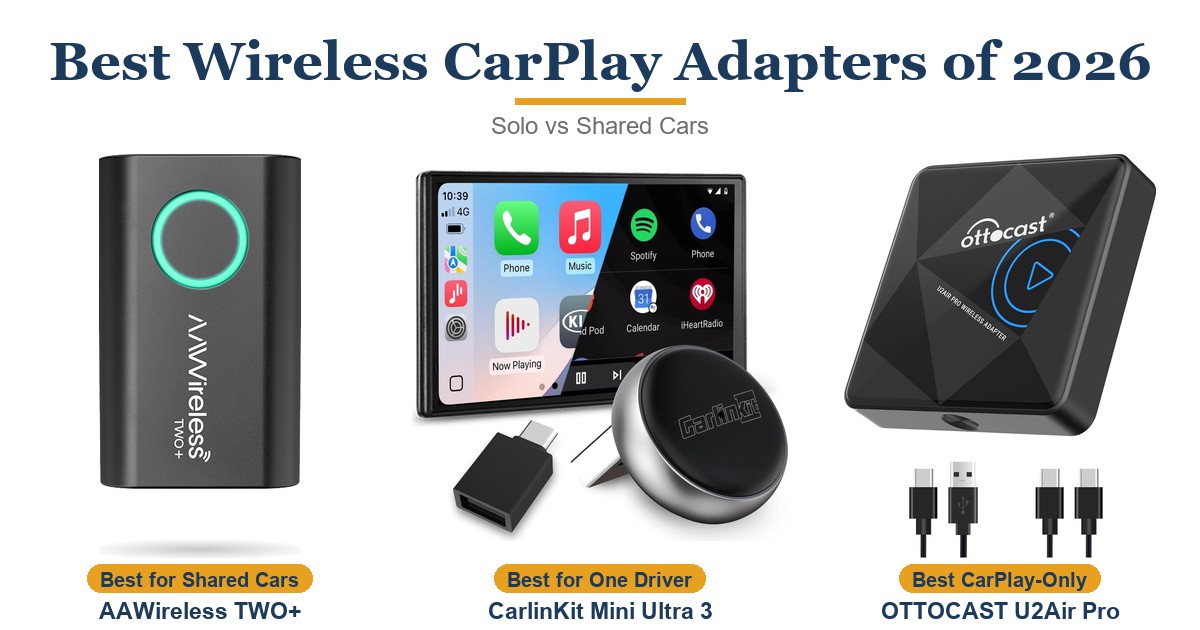
The TWO+ faces three current 2-in-1 adapters: CarlinKit’s Mini Ultra 3 and two Ottocast models, the button-equipped Mini and the newer Mini Cube 3.0.
| Feature | AAWireless TWO+ | CarlinKit Mini Ultra 3 | Ottocast Mini | Ottocast Mini Cube 3.0 |
|---|---|---|---|---|
| Price (USD) | $74.99 | $43.99 | $39.99 | $43.00 |
| Works with | CarPlay and Android Auto | CarPlay and Android Auto | CarPlay and Android Auto | CarPlay and Android Auto |
| Phone switching | Button: next phone, or a chosen phone on double-press | No button (LED and USB plug only) | Button toggles paired phones | No switch button |
| Phones supported | iPhone X or newer; Android 11+ | iPhone 6 or newer (iOS 10+); Android 11+ | iOS 10+; Android 11+ | iOS 10+; Android 11+ |
| Settings and updates | Phone app | Web page in the phone’s browser | No app needed; over-the-air updates | Over-the-air updates |
| Fit | Small box on a short cable | Plugs straight into the port | Thumb-drive size | Plugs in with a 90° USB plug |
| TechTwo multi-user test (May 2026) | 1st of 7 | Not tested | 2nd of 7 | Not tested |
| TTP Review | This review ↑ | Read our review → | — | — |
| Amazon | View on Amazon | View on Amazon | View on Amazon | View on Amazon |
Prices change frequently — always verify current pricing before purchasing.
Ottocast’s Mini is the closest match: its button also toggles between paired phones, and it finished second to the TWO+ in TechTwo’s test. It reached CarPlay in about 10 seconds there, but its switches between CarPlay and Android Auto were slower. CarlinKit’s Mini Ultra 3 and Ottocast’s Mini Cube 3.0 have no switch button and plug straight into the port, which suits a car with one regular driver. ArenaEV names the Mini Cube 3.0 as the only alternative from an established maker.
AAWireless TWO+: Worth It for Cars Shared Across iPhone and Android
It earns its higher price in a car that changes hands: a couple with one iPhone and one Android phone, a family car with new drivers, or a work vehicle with a rotating crew. One press settles whose phone runs the screen, the link stayed steady for most testers, and the app keeps it updated. If you mostly use Android Auto, the slower CarPlay start never comes up.
A solo driver with one phone doesn’t need the button: CarlinKit’s Mini Ultra 3 or Ottocast’s Mini Cube 3.0 offers the basic wired-to-wireless job without one. Ottocast’s Mini is the other shared-car choice; it also has a switch button and finished second in TechTwo’s test, though its hops between CarPlay and Android Auto were slower. And if your car already has wireless CarPlay or Android Auto built in, you don’t need an adapter like this at all.

Sources
- AAWireless — TWO+ Official Product Specifications
- AAWireless TWO+ — Amazon Product Listing
- TechTwo — The Best Multi-User Wireless CarPlay & Android Auto Adapters Tested (2026)
- CarPlay Life — AAWireless TWO+ Review
- ArenaEV — AAWireless Two+ Wireless Apple CarPlay and Android Auto Adapter Review
- MobileSyrup — AAWireless TWO+ Review: Bridging Together Android and iPhone
- iCulture — Review AAWireless TWO+ (in Dutch)
- teltarif — AAWireless TWO+ Test
- CarlinKit — Mini Ultra 3 Specifications
- Ottocast — Mini Wireless CarPlay & Android Auto Adapter
- Ottocast — Mini Cube 3.0 Wireless CarPlay & Android Auto Adapter
- CarPlay Life — Ottocast Mini Update Adds Multi-User Switching
Reader Poll
What would you use the TWO+ switch button for most?
Help Our Editors Know What Matters to You
Explore on Amazon →