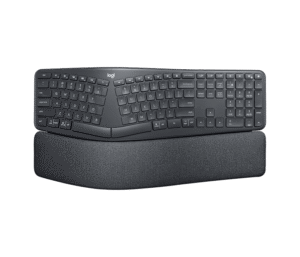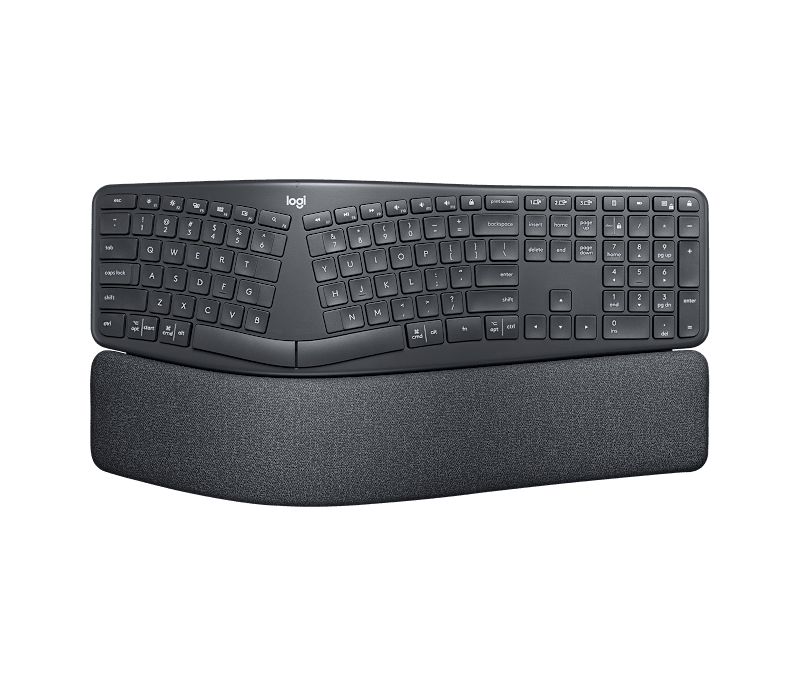
The Logitech Ergo K860 is an excellent ergonomic keyboard for Canadian home office workers dealing with long typing sessions and wrist fatigue—the fixed-split curved layout and triple-layer memory foam wrist rest make it one of the most comfortable options available on Amazon.ca. Multi-device support via Bluetooth and the included USB receiver means a single keyboard handles a laptop, a work desktop, and a tablet without cable swapping. The keyboard's large footprint demands clear desk space, and the missing backlighting is a drawback for dimly lit home offices common in Canadian winters.
Pros
- Curved split layout reduces wrist bending by 25%
- Triple-layer memory foam wrist rest is best-in-class
- Two-year battery life on 2x AAA batteries
- Connects to 3 devices via USB + Bluetooth
- Available on Amazon.ca with Prime shipping
Cons
- No backlighting — a real issue in dark Canadian winters
- Large footprint — needs clear desk space
- Wrist rest is not removable
- Fixed split cannot be tented or separated
As an Amazon Associate I earn from qualifying purchases. Disclosure
Overview
The Logitech Ergo K860 is a full-size wireless ergonomic keyboard designed for office workers and remote professionals who spend long hours at a desk and want to address wrist and shoulder fatigue without switching to an extreme split setup. It’s available on Amazon.ca with Prime shipping to most Canadian cities, and it’s consistently one of the top-recommended ergonomic keyboards for Canadian home office setups.
A fixed-split curved layout, three palm-lift tilt angles, and an integrated triple-layer memory foam wrist rest come together in one package here that requires no separate accessories to use comfortably from day one. Whether you’re working through a long Ottawa winter from your basement office or managing a hybrid schedule across downtown Toronto and home, the K860’s dual Bluetooth and USB connectivity means one keyboard handles all your devices without cable hassle.
Key Specifications
| Switch Type | PerfectStroke scissor-switch (membrane) |
| Wrist Rest | 3-layer: knitted fabric + high-density foam + memory foam (7mm total) |
| Tilt Options | 0°, −4°, −7° palm lift (adjustable legs) |
| Connectivity | 2.4 GHz USB (Logi Bolt) + Bluetooth 5.0 |
| Multi-Device | Up to 3 devices (Easy-Switch button) |
| Battery | 2× AAA (up to 2-year life) |
| Dimensions | 18.0 × 9.2 × 1.9 in (456 × 233 × 48 mm) |
| Weight | 2.56 lbs (1,160 g) |
| Compatibility | Windows 7+, macOS 10.13+, Chrome OS, Linux |
| Backlighting | None |
| Color | Graphite |
| Price (CAD) | $189.97 |
Design & Build Quality
The K860 is a substantial keyboard—nearly 2.6 lbs—and it stays planted on the desk thanks to its weight. The curved wave shape positions both keyboard halves at a natural inward angle, and the integrated palm rest spans the full width of the board. Logitech’s three-layer wrist rest construction—knitted stain-resistant fabric over high-density foam over a memory foam base—is among the best in the ergonomic keyboard category. It compresses where needed and rebounds slowly, distributing pressure across the palm rather than concentrating it at the wrist.
The keyboard is built with recycled plastic, giving it a matte finish that resists fingerprints well. Two adjustable legs at the front raise the front edge to −4° or −7° for a negative tilt—the ergonomic position that reduces wrist extension and the strain that compounds during long Canadian work-from-home sessions. The stain-resistant knitted fabric on the wrist rest holds up well over time, though it does gradually absorb skin oils with extended daily use.
Key Features
Curved Split Layout: The fixed-split design spreads the two halves of the keyboard apart and angles them inward, positioning the hands closer to shoulder-width. The 14° split angle is moderate enough that most touch typists adapt within a few hours—a significant advantage over fully separated keyboards that can take weeks to relearn.
PerfectStroke Key Technology: Logitech’s scissor-switch mechanism uses scooped keycaps shaped to match fingertip curvature, resulting in a soft, low-travel keystroke with consistent actuation across the full key surface. The keys are quiet enough for apartments and open-plan home offices where noise matters.
Multi-Device Easy Switch: A dedicated Easy-Switch button cycles between up to three connected devices. For Canadian remote workers juggling a personal MacBook, a work laptop issued by an Ontario or BC employer, and a tablet, this one keyboard handles all three without any pairing hassle. Two devices connect via Bluetooth; the third uses the Logi Bolt USB receiver.
Two-Year Battery Life: Running on two standard AAA batteries available at any Canadian drugstore or grocery chain, the K860 is rated for up to two years of use before a replacement is needed—far more practical than rechargeable keyboards that need regular cable management.
Software Integration: Logitech Options+ software (free download for Windows and macOS) enables function key remapping, device-specific profiles, and Flow cursor-switching between connected computers. It’s entirely optional for basic use but adds real value for power users managing multiple machines.
Performance
The transition to the K860 takes a few sessions for touch typists but very little for hunt-and-peck typists, since the curve guides fingers naturally. The reduction in wrist bending becomes noticeable by the end of the first full workday—the keyboard sits lower at the front than a conventional flat keyboard, and the palm rest’s memory foam keeps the hands in a relaxed position rather than hovering above the keys. PC Gamer, which tested the K860 at length, noted the wrist rest hits a balance between softness and support that holds up hours into a session. PC Gamer’s review is also direct about the feel of the keys themselves: compared to a mechanical keyboard, the scissor-switch keystroke is noticeably muted—fine for the office typists this keyboard targets, but a genuine downside for anyone who wants tactile click feedback.
The lack of backlighting is a real drawback for Canadian home offices, where winter months mean working in the dark by mid-afternoon. If you work regularly under low light—whether in a basement office in Vancouver or a poorly lit apartment in Montreal—the K860 will frustrate. The ProtoArc EK01 Plus is the most direct backlit alternative at a lower price. The K860 also can’t be tented vertically, which some ergonomists prefer for addressing forearm pronation beyond what horizontal spreading alone provides.
How Does It Stack Up Against the Competition?
The K860 competes against several ergonomic keyboards available on Amazon.ca. Here’s how pricing and features compare for Canadian shoppers.
| Feature | Logitech K860 | Microsoft Sculpt | Logitech Wave Keys | ProtoArc EK01 Plus |
|---|---|---|---|---|
| Price (CAD) | $189.97 | — | $89.99 | $95.00 |
| Layout Type | Fixed split + curve | Fixed split dome | Wavy (no split) | Fixed split + backlit |
| Wrist Rest | Integrated, 3-layer memory foam | Separate palm rest | Integrated foam | None |
| Connectivity | USB + Bluetooth (3 devices) | 2.4 GHz USB only | USB + Bluetooth (3 devices) | Bluetooth (3 devices) |
| Backlighting | No | No | No | Yes |
| Battery | 2× AAA (2 years) | AAA batteries | AAA batteries (2 years) | Rechargeable (USB-C) |
| Numpad | Integrated | Separate (included) | No | No |
| Amazon | View on Amazon | — | View on Amazon | View on Amazon |
Prices change frequently — always verify current pricing before purchasing.
Is the Logitech Ergo K860 Worth It?
The Logitech Ergo K860 is the best ergonomic keyboard upgrade for Canadian home office workers who want real wrist and shoulder relief from long typing sessions without the steep relearning curve of a fully split mechanical keyboard. The triple-layer memory foam wrist rest, multi-device connectivity, and two-year AAA battery life make it one of the most practical ergonomic keyboards available on Amazon.ca.
For those who need backlighting during dark Canadian winter afternoons—or who need a keyboard that can tent vertically for more advanced pronation correction—the ProtoArc EK01 Plus or the Kinesis Freestyle2 are worth a look, and PC Gamer’s testing is a fair reminder that this is not a keyboard for anyone chasing a tactile, clicky typing feel. But for straightforward ergonomic improvement that works from the first day, the K860 is the most complete package in its price range on the Canadian market.