The DXP4800 Plus is the NAS to buy for a household or small office that wants fast storage without a steep learning curve: setup is easy in the browser and the app, and 10GbE plus 2.5GbE networking leaves room to grow. Docker and per-person folders let one box handle media, backups and self-hosted apps. The main trade-off is a smaller app library than Synology or QNAP, which matters to anyone who needs surveillance or network services out of the box, though Docker can close much of that gap if you are comfortable setting up containers. UGREEN Canada backs it with a two-year warranty.
Pros
- 10GbE plus 2.5GbE networking
- Easy setup in the browser and the app
- Docker and virtual machine support
- Per-person folders and remote access
- Two M.2 slots, upgradable memory and an SD card reader
Cons
- Smaller app library than Synology or QNAP
- No Thunderbolt 4 on this model
As an Amazon Associate I earn from qualifying purchases. Disclosure
Overview
A four-bay NAS earns its place only if setting it up does not turn into a weekend project, and the UGREEN NASync DXP4800 Plus is built to avoid that. It takes four 3.5-inch or 2.5-inch drives plus two M.2 SSDs, and it pairs a 10GbE port with a 2.5GbE one, a combination that is unusual on a NAS at this tier.
UGREEN Canada sells the DXP4800 Plus as a diskless four-bay unit with the same 10GbE and 2.5GbE ports and a two-year warranty, so the drives are a separate purchase. We have used ours for three months with two 12TB Seagate IronWolf Pro drives as the backup and file hub for our Mac and Windows computers, and we are very impressed with it: setup was easy in the browser and in the UGREEN NAS app, and it holds our Time Machine backups, Windows image backups and shared folders.
Key Specifications
| Price (CAD) | Deal $807.99 |
| Processor | Intel Pentium Gold 8505 (5 cores, 6 threads) |
| Memory | 8 GB DDR5-4800, expandable to 64 GB (two SO-DIMM slots) |
| Drive bays | 4 x SATA 3.5-inch or 2.5-inch (UGREEN lists drives up to 32 TB each) |
| M.2 slots | 2 x M.2 2280 NVMe, for cache or an SSD pool |
| Operating system storage | 128 GB built-in SSD |
| Network | 1 x 10GbE (RJ45), 1 x 2.5GbE |
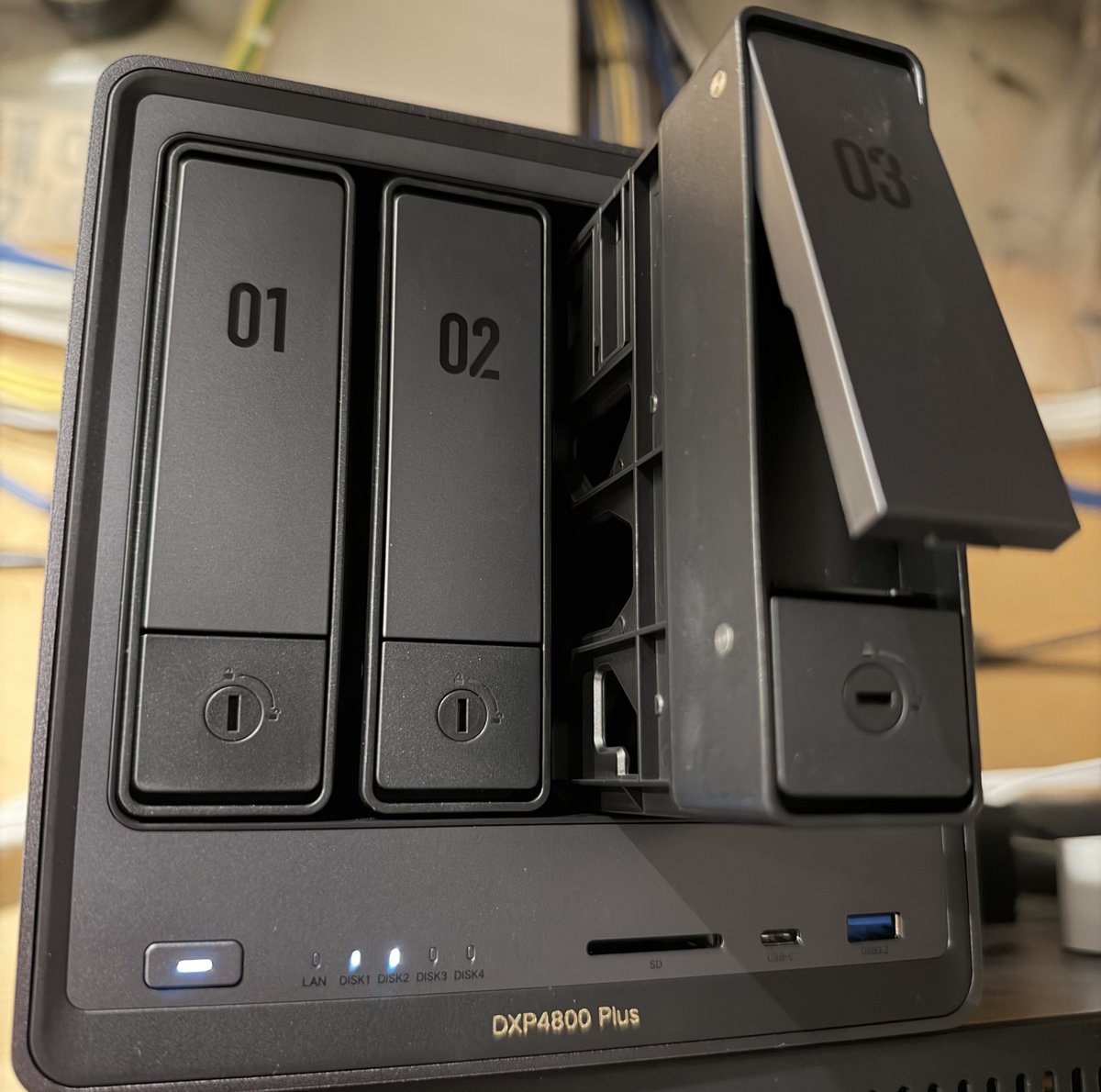
| Front ports | USB 3.2 Gen 2 Type-C, USB 3.2 Gen 2 Type-A, SD 3.0 card slot |
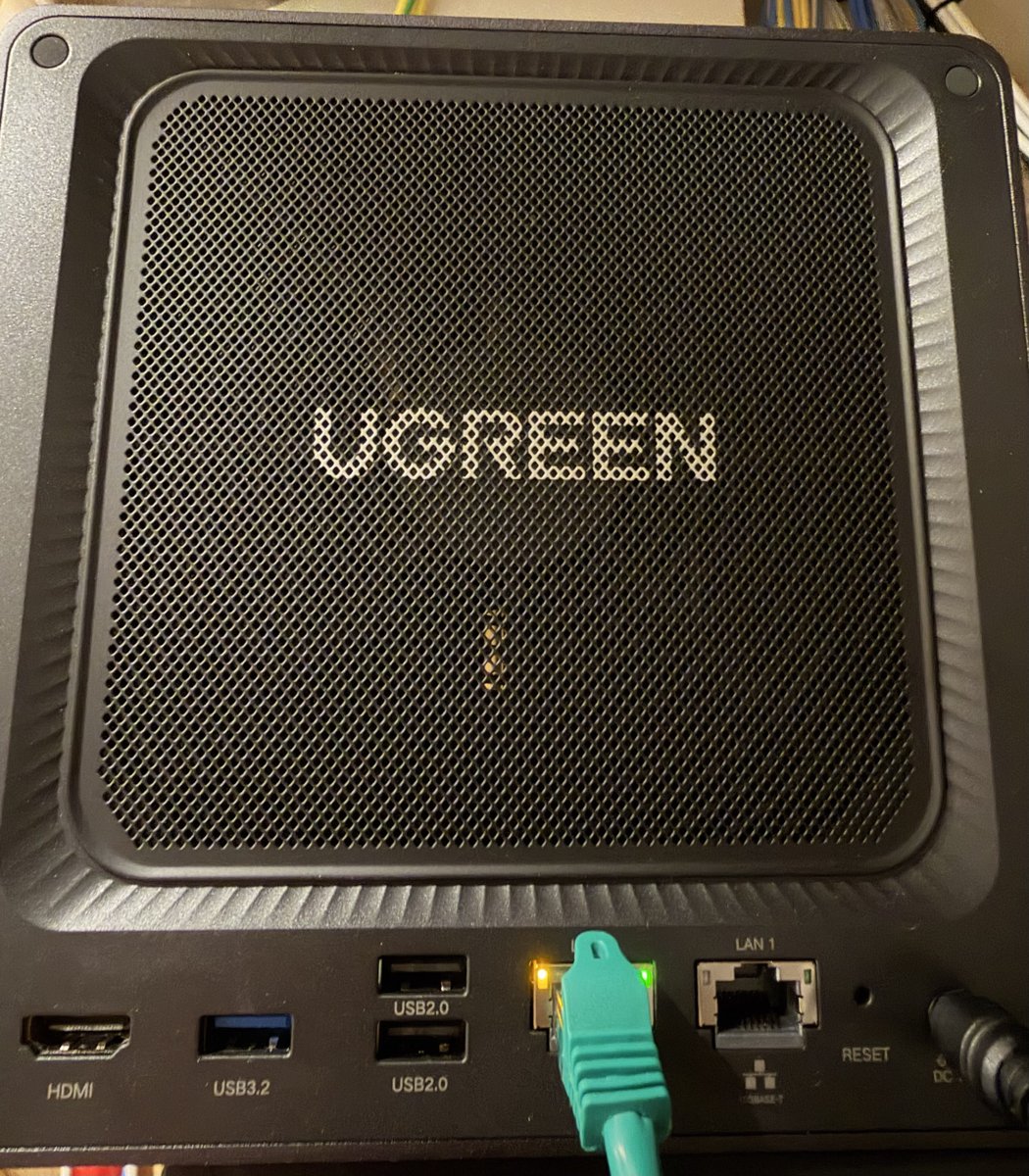
| Rear ports | HDMI, USB 3.2 Gen 1 Type-A, 2 x USB 2.0 |
| RAID options | Single disk, JBOD, RAID 0, 1, 5, 6, 10 |
| Operating system | UGOS Pro (Docker and virtual machine support) |
| Dimensions and weight | 178 x 178 x 258 mm, 3.9 kg without drives |
| Warranty | 2 years |
UGREEN NASync DXP4800 Plus Setup and Everyday Use
Getting started was easy. We slid the drives into the trays, set the NAS up through the local web interface, and then again through the UGREEN NAS app from the App Store. Other reviewers found the same guided first run: name the NAS, create the admin account, and let it walk you through a storage pool and a shared folder.
When it arrived we built a RAID array to try it out, and it worked flawlessly. Day to day we run the two drives without RAID, each used much like a large external drive on the network: one place for Time Machine, Windows image backups and the shares we use from every computer, and the NAS also appears in the Files app on our phone. The storage options cover single disk, JBOD and RAID 0, 1, 5, 6 and 10, so two drives can mirror and four can run RAID 5 or 6. Initializing a new array takes several hours with large drives, so start it before you plan to move files across.
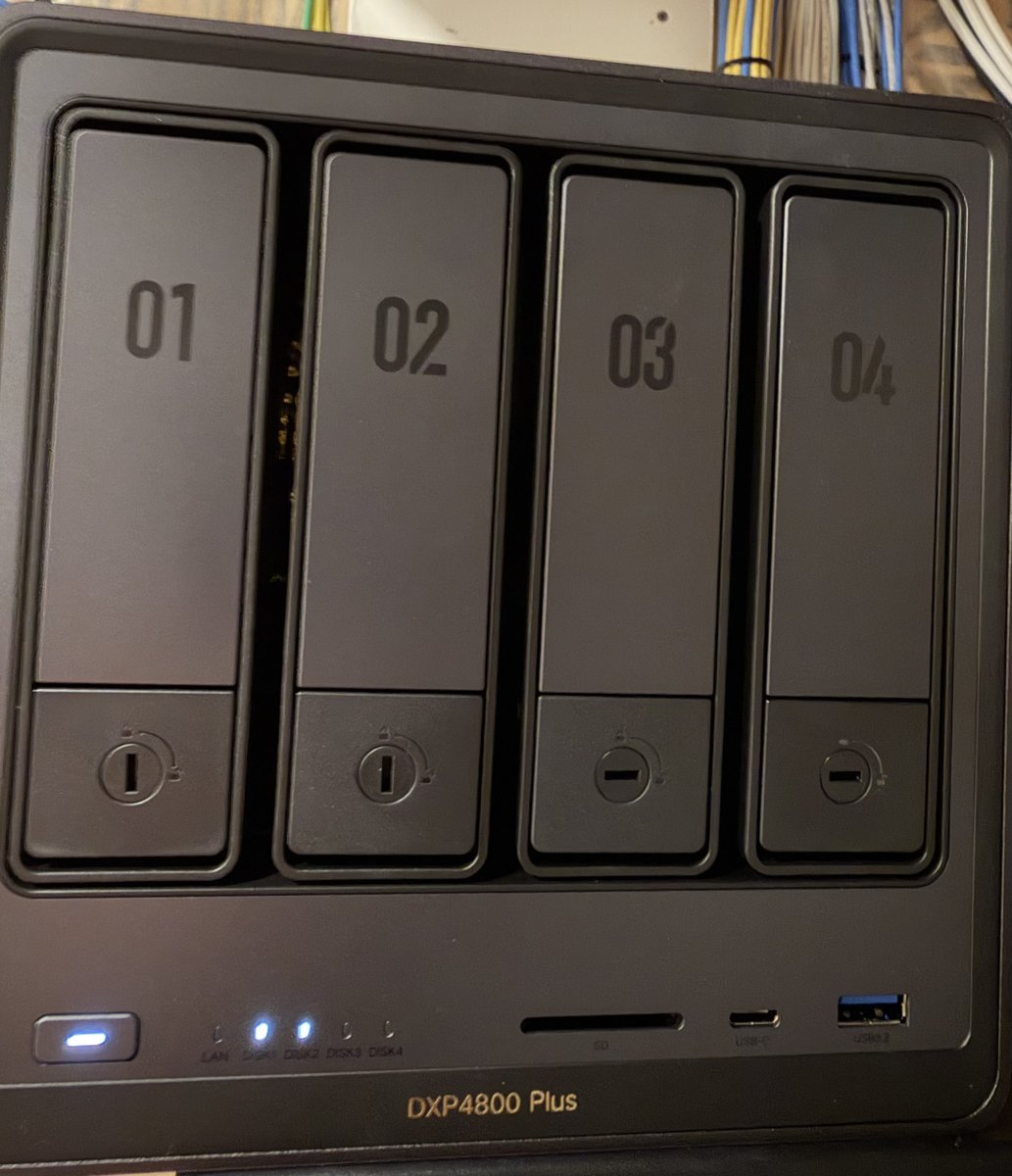
The trays slide out for 3.5-inch drives without tools, each bay is numbered and lockable, and a magnetic dust filter over the rear fan pulls off for cleaning. The enclosure is metal with a single large fan. UGREEN gives a quiet-mode figure of 29-34 dB, and PetaPixel’s reviewer found it surprisingly quiet even with the fan at full speed.
10GbE, 2.5GbE and the Connections
For most homes the 10GbE port is headroom rather than an instant speed-up. It is a copper RJ45 jack, so it plugs into the 1GbE or 2.5GbE switch you already have and runs faster once you add a 10GbE switch and a 10GbE adapter in your computer. The second port can be paired with it, either as a backup link or to add bandwidth.
The rest of the connections add flexibility. HDMI on the back drives a monitor at 4K for local use, alongside one USB 3.2 Gen 1 port and two USB 2.0 ports. On the front, the USB-C and USB-A ports both run at 10Gbps, and a full-size SD card slot takes a memory card for quick copying onto the NAS. This model has no Thunderbolt port.
Inside, the 8 GB of DDR5 memory can be raised to 64 GB, and two M.2 slots take NVMe SSDs for caching or a fast pool. The operating system lives on its own 128 GB SSD, so the hard drives hold only your files. Independent results are mixed. ITPro measured 580 MB/s or more on large-file benchmarks across its disk, SSD and cached volumes, limited by its 5GbE test PC, while its Windows copy of an 11.1GB mix of large, medium and small files managed 58.37 MB/s writing and 75.84 MB/s reading, which ITPro found slower than some 2.5GbE enclosures it has tested. Fstoppers, copying raw files and video clips to a four-drive RAID 10 over 2.5GbE, consistently reached about 285 MB/s, the limit of that connection.
UGOS Pro, the App and Docker
UGOS Pro is the operating system, and it is easy to live with. The UGREEN NAS app gives you the files, backup, sharing and photos on your phone. UGREEN offers its own remote access, UGREENlink, which Fstoppers found connects from outside the home network without complex router setup. We skipped a UGREEN cloud account entirely, because we wanted the NAS isolated from UGREEN’s servers. For access away from home we use the UGREEN app over Tailscale, which runs on a server in our home, and it has worked great.
The app also lets you give each person their own folder, which suits a family or a small team sharing one box, and the user permissions control who sees what. UGREEN’s own apps add to that, including an AI photo album that tags faces and subjects, which Camera Jabber’s reviewer called one of the most advanced auto-tagging systems on a NAS of this type. In Fstoppers’ test of 1,000 photos, the scene recognition picked out only 4 of at least 50 animal shots, and Fstoppers found it weaker than Apple’s or Google’s photo apps.
Because it runs Docker, the box is not limited to UGREEN’s own apps. UGREEN lists Home Assistant, Pi-hole, Nextcloud, Vaultwarden, Immich and Portainer among the containers people run on it, and a Plex or Jellyfin media server installs the same way. Setting up containers takes some know-how, and UGOS Pro also offers a virtual machine app. The one limit is the size of the built-in app library: ITPro counted 29 apps at the time of its February 2026 review and no servers for DHCP, DNS or a web proxy.
Pairing It With NAS Drives
The DXP4800 Plus ships without drives, so the first purchase after the NAS is the drives. We paired ours with two 12TB Seagate IronWolf Pro 12TB drives, and a 12TB drive is well inside the 32TB per-drive size UGREEN lists. IronWolf Pro is the drive WunderTech names best overall for NAS use, and the regular IronWolf is its best budget pick.
Supply is the catch. Hard drives have been scarce through 2026, with hyperscalers and businesses buying up high-capacity drives: TechRadar reported in June 2026 that Seagate’s 28TB Expansion was sold out at every US online retailer it checked, and Western Digital confirmed in February that it had sold out its hard drive capacity for 2026. If the IronWolf you want shows as unavailable, Top Trusted Products Stock Check will email you when it comes back in stock on Amazon.ca, so you can buy it when it returns and do not have to keep refreshing the page.
How Does It Stack Up Against the Competition?
The DXP4800 Plus pairs 10GbE with 2.5GbE, where the Synology DS925+ and the QNAP TS-464 use two 2.5GbE ports, and the step-up UGREEN Pro adds processor power.
| Feature | UGREEN DXP4800 Plus | UGREEN DXP4800 Pro | Synology DS925+ | QNAP TS-464-8G-US |
|---|---|---|---|---|
| Price (CAD) | Deal $807.99 | Deal $934.99 | See price on Amazon | $953.36 |
| Processor | Intel Pentium Gold 8505 | Intel Core i3-1315U | AMD Ryzen V1500B | Intel Celeron N5095 |
| Network | 10GbE + 2.5GbE | 10GbE + 2.5GbE | 2 x 2.5GbE | 2 x 2.5GbE |
| M.2 NVMe slots | 2 | 2 | 2 | 2 |
| Amazon | View on Amazon | View on Amazon | View on Amazon | View on Amazon |
Prices change frequently — always verify current pricing before purchasing.
Before buying, we weighed the Synology DS423+ against the DXP4800 Plus. We chose the UGREEN, spending a little more, for the significant step up in processor, memory expandability and networking. The DS423+ pairs a Celeron J4125 processor with 2 GB of RAM, one slot for up to 4 GB more, and two gigabit Ethernet ports. The DXP4800 Plus brings a Pentium Gold 8505, memory that can be raised to 64 GB, and 10GbE plus 2.5GbE.
The Pro swaps the Pentium for a faster Core i3 processor and keeps the same pair of network ports, which makes it the one to look at if you plan to run several Docker containers alongside the occasional virtual machine. The Synology DS925+ is the pick for software maturity: PetaPixel points to DSM’s reputation as the NAS software to beat. QNAP’s TS-464 also leans on its software, a feature-rich suite that PetaPixel says can feel more technical to beginners.
UGREEN NASync DXP4800 Plus: Worth It for Easy 10GbE Home Storage
Bought in Canada, the DXP4800 Plus makes the most sense as a home backup and file hub, which is exactly how we use it for our Mac and Windows computers. As of November 2026 on Amazon.ca it undercuts both the UGREEN Pro and the QNAP TS-464 in the table above, and the Synology DS925+ showed no Amazon.ca price when we checked. UGREEN Canada sells it diskless with a two-year warranty, so budget for drives on top, and it suits anyone who wants Docker without building a server.
Look at the Synology DS925+ or the QNAP TS-464 if you need surveillance software or native network services out of the box; those gaps are why ITPro’s verdict is more guarded, calling it a fair choice for a small business that will not miss features UGOS Pro lacks. If you will run lots of containers or the occasional virtual machine, the Pro’s faster Core i3 gives more headroom. For the home and small-office jobs this review covers, the DXP4800 Plus is the one we recommend.
Editorial Disclosure: This review is based on our own UGREEN NASync DXP4800 Plus, which we bought, set up and use with two 12TB Seagate IronWolf Pro drives. No payment was made or requested for this coverage, and no promise of a positive review was given or expected. Everything we say about other reviewers’ tests comes from their published reviews, listed in Sources.
Sources
- UGREEN — NASync DXP4800 Plus Product Page
- UGREEN NASync DXP4800 Plus — Amazon.ca Product Listing
- TechPowerUp — Ugreen NASync DXP4800 Plus Review
- ITPro — UGREEN NASync DXP4800 Plus review
- PetaPixel — UGreen NASync DXP4800 Plus Review: A Beginner NAS That Just Works
- Fstoppers — UGREEN NASync DXP4800 Plus: The Ideal NAS For Photographers?
- Camera Jabber — I tested the UGREEN DXP4800 Plus
- UGREEN — NASync DXP4800 Pro Product Page
- Synology — DiskStation DS925+ Specifications
- QNAP — TS-464 Hardware Specifications
- WunderTech — Best NAS Hard Drives in 2026
- TechRadar — Hands on: Synology Diskstation DS423+ review
- TechRadar — Where are all 28TB external hard drives?
- UGREEN Canada — NASync DXP4800 Plus Product Page
Reader Poll
What would you mainly use a home NAS for?
Help Our Editors Know What Matters to You
Explore on Amazon →