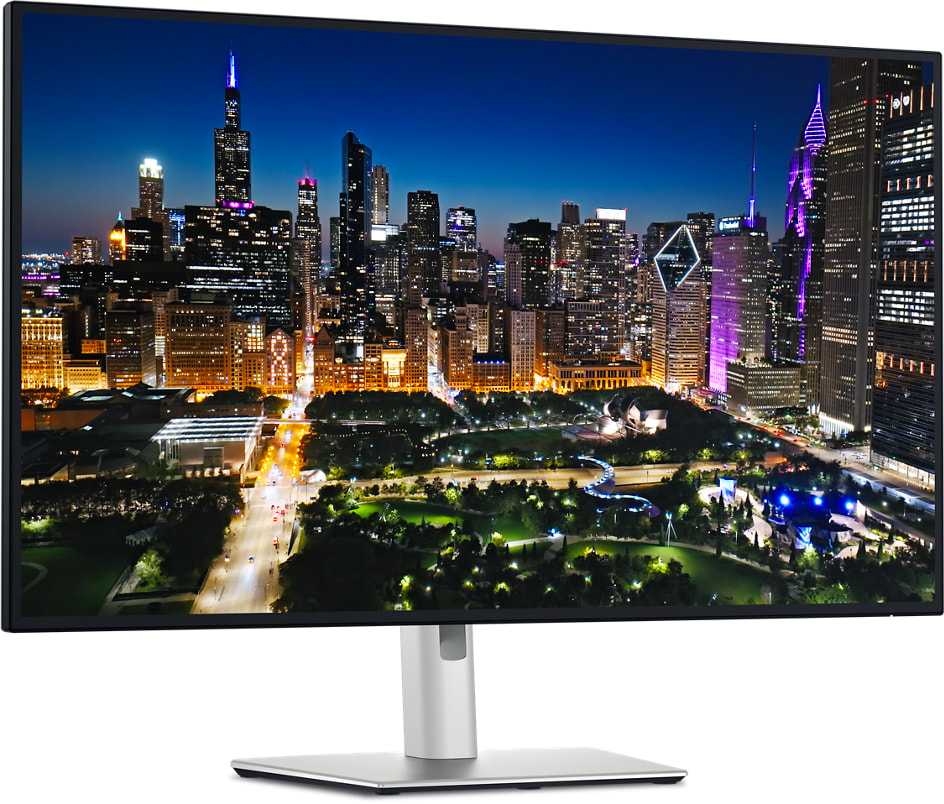
For Canadian laptop desks, the U3225QE earns its place: one Thunderbolt 4 cable charges at up to 140W and connects a 120Hz 4K screen, Ethernet and a KVM switch for a second computer, and Amazon.ca carries it through a third-party seller. Its color accuracy, the best among close rivals in PCWorld's testing, suits photo and design work too. The trade-off is HDR, which looks flat because the backlight has no dimming zones, and there are no speakers. Fast gamers are better served by a high-refresh gaming monitor, and anyone after sharper text by the 6K ASUS ProArt PA32QCV.
Pros
- 140W laptop charging over one Thunderbolt 4 cable
- Built-in KVM switch and 2.5GbE Ethernet
- High contrast for an IPS panel
- Very accurate color in PCWorld's testing
- 120Hz makes scrolling smoother
Cons
- HDR looks flat without local dimming
- No built-in speakers
- Thunderbolt 4, not Thunderbolt 5
- Pop-out USB tray: a bit cheap-feeling to PCWorld, a little stiff to Reviewed
As an Amazon Associate I earn from qualifying purchases. Disclosure
Overview
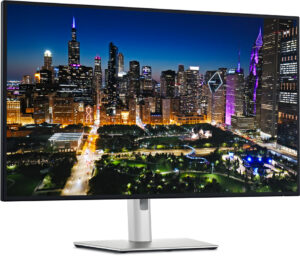
Most laptop desks end up with a dock, a charger, an Ethernet dongle and a tangle of cables behind the screen. The Dell UltraSharp U3225QE folds all of that into a 31.5-inch 4K monitor: one Thunderbolt 4 cable carries picture, data and up to 140W of charging, and the monitor itself supplies 2.5GbE Ethernet, a KVM switch and a row of 10Gbps USB ports. It is built for people who plug a work laptop in every morning and want the screen to be the dock, especially anyone who switches between two computers at one desk.
Dell launched it in February 2025 as the first monitor with a new 4K 120Hz IPS Black panel, rated at 3,000:1 contrast against the 2,000:1 quoted for the earlier IPS Black generation that debuted in the 2022 U3223QE. In Canada, its Amazon.ca listing is sold by a third-party seller rather than by Amazon itself, at $1,289.00 CAD in October 2026. Dell Canada lists the same 3-year limited hardware warranty with Advanced Exchange Service and Premium Panel Exchange, and its product page links Quebec buyers to their legal warranty information under the Quebec Consumer Protection Act. The Amazon.ca listing itself states a 2-year manufacturer guarantee, so confirm Dell’s 3-year coverage with the seller before buying. Amazon.ca also sells a Dell UltraSharp 32 Thunderbolt Hub Monitor under a newer model number, U3226QER, directly; we haven’t found an independent test of that version yet.
Key Specifications
| Price (CAD) | $1,289.00 |
| Screen | 31.5 inches, 3840 x 2160 (4K), IPS Black |
| Refresh rate | 120Hz, HDMI VRR |
| Contrast ratio (Dell spec) | 3,000:1 |
| Color gamut (Dell spec) | 100% sRGB, 99% DCI-P3, 99% Display P3 |
| HDR | VESA DisplayHDR 600 |
| Response time (Dell spec) | 5 ms GTG (Fast), 8 ms GTG |
| Laptop charging | Up to 140W over the Thunderbolt 4 upstream port |
| Video inputs | Thunderbolt 4, HDMI 2.1, DisplayPort 1.4 |
| Other ports | Thunderbolt 4 downstream (daisy chain, 15W), DisplayPort 1.4 out, USB-C 10Gbps upstream (KVM), 2x USB-C 10Gbps with 15W charging, 5x USB-A 10Gbps, RJ45 2.5GbE, audio line-out |
| Speakers | None |
| Stand | Height, tilt, swivel and pivot (±90°); 100 x 100mm VESA mount |
| Weight | 9.34 kg (20.59 lb) with stand and cables; 6.52 kg (14.37 lb) without |
| Warranty | 3-year limited hardware warranty with Advanced Exchange Service and Premium Panel Exchange |
Dell UltraSharp U3225QE Picture Quality
For an IPS monitor, the contrast is the headline. Dell rates the panel at 3,000:1, and PCWorld measured 2,900:1 at half brightness, far beyond the conventional IPS monitor on its chart and notably ahead of older IPS Black models. Dark scenes look deeper than on an ordinary office monitor, but its blacks don’t reach an OLED’s: Reviewed found they still look like very dark grey, and PCWorld notes dark images can still show some IPS glow, though less than on other IPS monitors.
If you edit photos, check the factory tuning first: PCWorld measured a gamma of 2.1 and a 6,300K white point, so images look slightly brighter and warmer than the usual targets until you change them in the menu. Once set, color is where this monitor earns a place on a design desk, with the lowest average color error among its close competitors in PCWorld’s testing and coverage of 100% of sRGB, 98% of DCI-P3 and 92% of Adobe RGB. PCWorld still calls the SDR picture excellent rather than exceptional, since similarly priced monitors often match or beat it on some measurements.
Brightness readings depend on the test and the picture mode. PCWorld measured a maximum sustained SDR brightness of 469 nits, while Laptop Mag’s Standard mode peaked at 339 nits and its reviewer wished it were a bit brighter. It’s bright enough for a well-lit office, and Reviewed’s tester could read it comfortably at about 75% brightness with afternoon sun coming through a nearby window; the anti-glare coating cuts reflections without removing them.
Buy it for SDR work rather than HDR films. Its DisplayHDR 600 certification is a step above the DisplayHDR 400 found on most office monitors, and Reviewed could see the difference, but the edge-lit backlight has no local dimming, which Reviewed found makes HDR highlights less impressive. In PCWorld’s testing a bright object raised the brightness of the entire screen, leaving high-contrast HDR scenes flat and dull, and PCWorld judged HDR most useful for previewing HDR video you’re working on. Sharpness is good at about 140 pixels per inch, yet PCWorld points out that 27-inch 5K monitors pack 217, which matters if crisp text is your priority.
Thunderbolt 4 Hub, Charging and Ports
The 140W charging is the spec that sets it apart. Where most rivals stop at 90 to 100W, PCWorld judges this enough to power Windows laptops with entry-level discrete graphics.
The built-in KVM switch changes how a two-computer desk works. With a work laptop on Thunderbolt and a second computer on the USB-C upstream port, one button moves the keyboard, mouse and other USB accessories between them, so there’s no second keyboard on the desk. The USB-A ports run at 10Gbps, and the 2.5GbE port gives a laptop without its own Ethernet a wired connection. Two-screen setups are covered too: a second monitor chains from the downstream Thunderbolt 4 port or the DisplayPort output, handy when your laptop has a single video output.
Plug-and-go ports sit in a pop-out tray under the left edge: two USB-C ports with 15W charging and one USB-A. Two testers faulted the tray for different reasons, PCWorld because the plastic felt a bit cheap and Reviewed because it was a little stiff to pop out. One more point for anyone buying in 2026: the hub is Thunderbolt 4, not the newer Thunderbolt 5, which Laptop Mag counts against it.
120Hz Motion and Gaming
For work, the 120Hz refresh rate is the upgrade you notice every day. Scrolling long pages and dragging windows look smoother than at the 60Hz that is still common on office monitors, and text stays easier to read while it moves. Dell rates the response time at 5ms in its Fast mode and 8ms otherwise.
It handles casual games, but it isn’t a gaming monitor. Variable refresh rate works over HDMI VRR, and Reviewed notes that it lacks AMD FreeSync and Nvidia G-Sync support and that its response time is slower than competitive shooter players look for. PCWorld found fast-paced games reasonably clear, though fine details above fast-moving enemies can be hard to make out and motion clarity is nowhere near a 4K OLED gaming monitor’s. Laptop Mag’s 60 fps MMO session looked crisp and smooth, which fits a monitor that works by day and plays slower games after hours.
Stand, Controls and Everyday Comfort
The stand adjusts for height, tilt and swivel and pivots 90 degrees into portrait, and a 100 x 100mm VESA mount takes a monitor arm. Testers split on stability: PCWorld found the stand stable, while Laptop Mag’s unit shook with minor movements on its flimsy office desks. At 9.34 kg (20.59 lb) with its stand, it’s heavy, so a solid desk or an arm helps.
Settings are changed with a joystick on the back right or with Dell Display and Peripheral Manager. An ambient light sensor can adjust brightness and color temperature to the room. There are no speakers at all, so plan on headphones or desk speakers for calls.
Dell backs it with a 3-year limited hardware warranty that includes Advanced Exchange Service, which ships a replacement monitor the next business day when remote diagnosis finds one is needed, and Premium Panel Exchange, which replaces the panel during the warranty even if only one bright pixel is found.
How Does It Stack Up Against the Competition?
The nearest match is HP’s Series 7 Pro 732pk, another 32-inch 4K IPS Black hub monitor; BenQ’s PD3225U covers similar ground with its own extras, and ASUS’s 6K ProArt is a sharper step up.
| Feature | Dell UltraSharp U3225QE | HP Series 7 Pro 732pk | BenQ PD3225U | ASUS ProArt PA32QCV |
|---|---|---|---|---|
| Price (CAD) | $1,289.00 | $1,030.67 | $1,199.98 | $1,795.25 |
| Screen | 31.5″ 3840 x 2160, IPS Black | 31.5″ 3840 x 2160, IPS Black | 31.5″ 3840 x 2160, IPS | 31.5″ 6016 x 3384, IPS |
| Refresh rate | 120Hz | 60Hz | 60Hz | 60Hz |
| Contrast ratio (maker spec) | 3,000:1 | 2,000:1 | 2,000:1 | 3,000:1 (max.) |
| HDR certification | DisplayHDR 600 | DisplayHDR 400 | DisplayHDR 400 | DisplayHDR 600 |
| Laptop charging (max.) | 140W | 100W | 85W | 96W |
| Upstream connection | Thunderbolt 4 | Thunderbolt 4 | Thunderbolt 3 | Thunderbolt 4 |
| P3 color coverage (maker spec) | 99% DCI-P3 | 98% Display P3 | 98% P3 | 98% DCI-P3 |
| Amazon | View on Amazon | View on Amazon | View on Amazon | View on Amazon |
Prices change frequently — always verify current pricing before purchasing.
HP’s Series 7 Pro 732pk is the closest match on paper, with an IPS Black panel, Thunderbolt 4, a KVM switch and an Ethernet port. It stops at 60Hz, 100W charging, 1Gb Ethernet and a 2,000:1 contrast rating, so the Dell’s edge is the faster panel, the extra charging headroom and the faster network port. The BenQ PD3225U also runs at 60Hz and charges at 85W over Thunderbolt 3, but it comes with BenQ’s Hotkey Puck controller and a pair of 2.5W speakers, which the Dell lacks. BenQ’s PD3226G adds 144Hz and Thunderbolt 4 with 90W charging for $1,149.99 CAD on Amazon.ca (October 2026), with a 1,200:1 rated contrast and 95% P3 coverage, so it suits a desk that games more than it edits photos.
The ASUS ProArt PA32QCV is for buyers who want sharper text more than a faster panel: its 6K resolution packs 218 pixels per inch against the Dell’s roughly 140, with 96W charging and a 3,000:1 maximum contrast rating, but it stays at 60Hz. For Thunderbolt 5, the LG UltraFine 32U990A pairs it with a 6K Nano IPS Black screen at 224 pixels per inch and 96W charging, but PCWorld found its other connections thin, with no USB-A or Ethernet ports, and measured its contrast at 1,500:1 against LG’s 2,000:1 rating. If a smaller, sharper screen appeals, the 27-inch 5K BenQ MA270S we reviewed is built for Macs.
Dell UltraSharp U3225QE: Worth It for a One-Cable Laptop Desk
At $1,289.00 CAD on Amazon.ca in October 2026, the Dell costs more than HP’s Series 7 Pro 732pk and BenQ’s PD3225U (prices in the table above), and adds 120Hz and 140W charging over both. Owners of a 2022 U3223QE gain the doubled refresh rate and the higher contrast rating.
Look elsewhere if you mostly watch HDR films or play fast games: its HDR looks flat and its motion falls short of OLED gaming monitors, so a gaming display serves those uses better. If sharper text matters most, a 27-inch 5K monitor or a 32-inch 6K model such as the ASUS ProArt gives you more pixels per inch. Dell makes the same design in a 27-inch size, the U2725QE, for smaller desks.

Sources
- Dell — UltraSharp 32 4K Thunderbolt Hub Monitor (U3225QE) Specifications
- Dell UltraSharp U3225QE — Amazon.ca Product Listing
- PCWorld — Dell Ultrasharp U3225QE review
- Laptop Mag — Dell UltraSharp 32 4K Thunderbolt Hub Monitor review
- Reviewed — Dell UltraSharp 32 4K Thunderbolt Hub Monitor (U3225QE) review
- TechRadar — Dell UltraSharp U3225QE monitor review
- HP Series 7 Pro 31.5 inch 4K Thunderbolt 4 Monitor (732pk) — Specifications
- BenQ — PD3225U Specifications
- BenQ — PD3226G Specifications
- LG — 32-inch UltraFine evo 6K Monitor (32U990A-S)
- PCWorld — LG Ultrafine Evo 32U990A-S review
- ASUS — ProArt Display 6K PA32QCV
- ASUS — ProArt Display 6K PA32QCV Tech Specs
- Dell Canada — UltraSharp 32 4K Thunderbolt Hub Monitor (U3225QE)
Reader Poll
Would the U3225QE replace the dock on your desk?
Help Our Editors Know What Matters to You
Explore on Amazon →