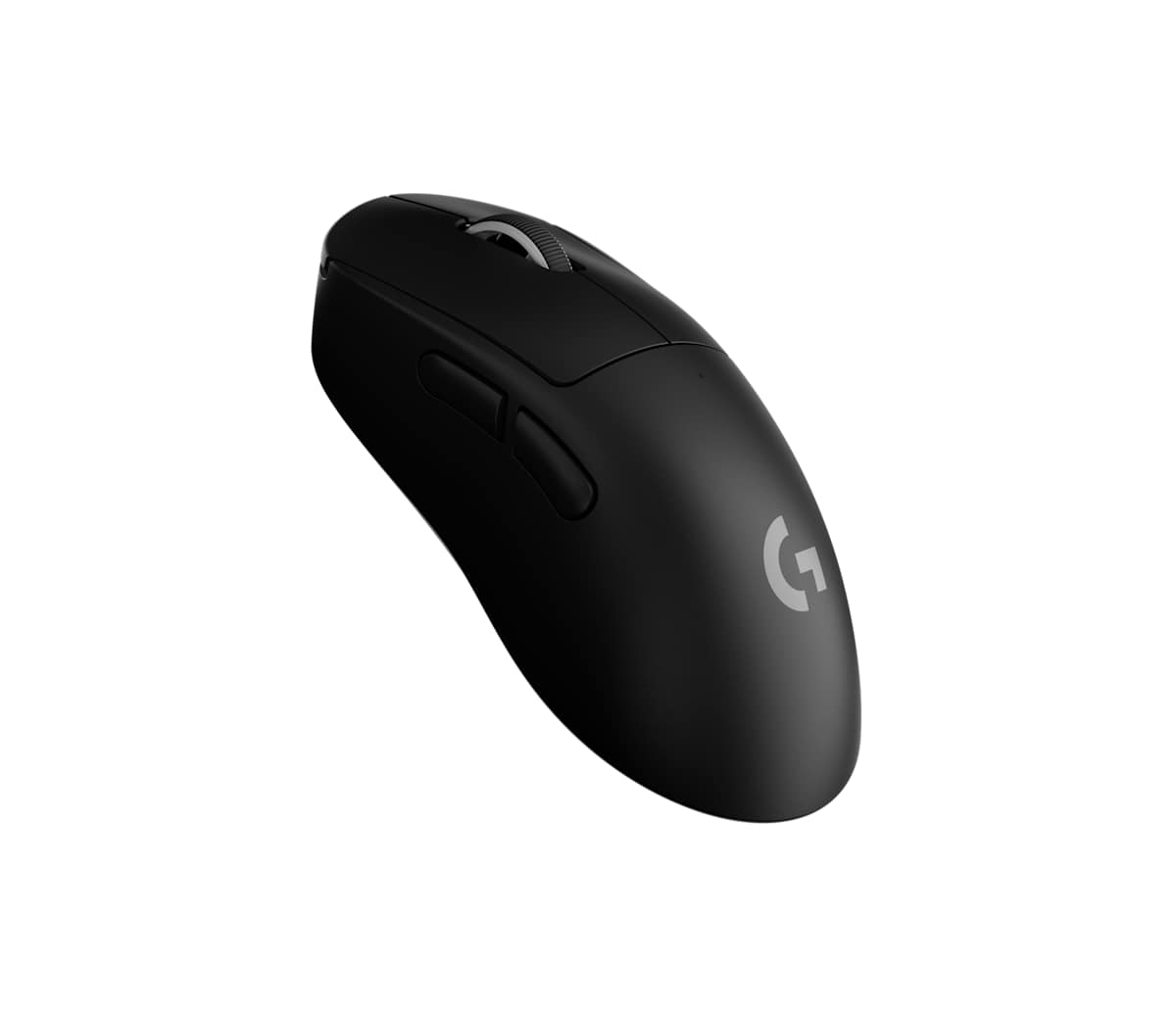
Buy the Superlight 2 DEX if you play shooters with a claw grip and value comfort and click feel in a light, right-handed mouse whose tracking and click response rank among the best in its class. Its 8,000 Hz wireless runs from a small receiver that stores inside the mouse, so it packs easily. Controls are sparse, with five buttons and no DPI button, so sensitivity presets live in G Hub. If you play competitively and want every bit of speed, or want longer battery life, try the Razer DeathAdder V4 Pro first: GamesRadar+ found it a touch faster, and it is rated for up to 150 hours.
Pros
- Precise tracking and very low click latency
- Light 60 g shell that feels solidly built
- 8,000 Hz wireless from a receiver that stores inside the mouse
- Real-world battery life in line with its 95-hour rating
- Deep G Hub tuning, including separate X and Y sensitivity
Cons
- Only five buttons and no DPI button on the mouse
- Tall, right-handed shape doesn't suit every grip
- Scroll wheel feels less refined than the rest of the mouse
- About 19 hours of battery at 8,000 Hz with optical-only clicks
As an Amazon Associate I earn from qualifying purchases. Disclosure
Overview
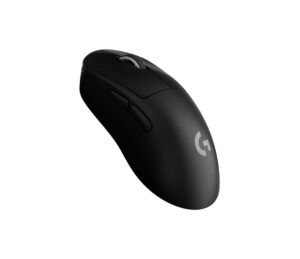
Logitech’s Superlight 2 has always had a flat shape built for either hand. The Superlight 2 DEX keeps its insides and changes the body: a taller, right-handed ergonomic shape with a hump under the palm and sculpted sides. It shares the HERO 2 sensor, the LIGHTFORCE hybrid switches, the 60 g weight and the up-to-8,000 Hz wireless polling of the original, and it comes in black, white and pink.
The new shape puts it up against the ergonomic mice many competitive players already use, Razer’s DeathAdder above all. Its practical edge over the Razers is the receiver: the 8,000 Hz link runs from a small dongle that stores inside the mouse, and it is set up through Logitech’s G Hub software rather than Razer Synapse.
Built from 15 sources, including 6 independent reviewers such as RTINGS, Tom's Hardware and GamesRadar+. Here’s where they agree, and where they don’t.
Where the reviews agree
- Aim is precise and quick in fast shooters, and click latency is very low.
- The shell feels solid and well put together for such a light mouse.
- Real-world battery life lands in line with, or a little above, Logitech’s 95-hour rating at normal settings.
Where they split
- The shape: GamesRadar+ called it one of the most comfortable mice it had tested in a long time, while TechRadar found the pinched sides hard to grip.
- The glide: Tom’s Hardware found it smooth on just about any surface, while RTINGS says its feet don’t glide as smoothly as many rivals.
Key Specifications
| Shape | Right-handed, asymmetrical ergonomic |
| Weight | 60 g (2.12 oz) |
| Dimensions (L x W x H) | 4.95 x 2.67 x 1.73 in (125.8 x 67.7 x 43.9 mm) |
| Sensor | HERO 2, up to 44,000 DPI, 888 IPS, 88 G |
| Main switches | LIGHTFORCE hybrid optical-mechanical |
| Polling rate | Up to 8,000 Hz wireless; 1,000 Hz wired |
| Connection | LIGHTSPEED 2.4 GHz wireless, USB-C cable; no Bluetooth |
| Rated battery life | Up to 95 hours |
| Buttons | 5 programmable |
| In the box | LIGHTSPEED receiver, receiver extension adapter, USB-C to USB-A cable, spare PTFE receiver door, grip tape |
| Colors | Black, white, pink |
| Price (USD) | $152.99 |
Logitech G Pro X Superlight 2 DEX Shape and Comfort
This is a mouse to match to your hand and grip more carefully than most, because its tall hump and pinched sides win some testers over and lose others. It measures 125.8 by 67.7 mm (4.95 by 2.67 inches) and stands 43.9 mm (1.73 inches) tall at the hump, close to the size of Razer’s DeathAdder V4 Pro. The hump sits left of center and the left side is contoured more deeply than the right, which leaves the thumb and pinky room to steer the back of the mouse.
Claw grip is the one fit every review that names a grip endorses, while a fingertip grip is a harder fit that needs larger hands. Palm grip is where they part ways. GamesRadar+ found palm holders well served and called it one of the most comfortable gaming mice it had tested in a long time, while Tom’s Hardware, a palm gripper, never got used to the steep, centered hump. TechRadar had the hardest time, finding that the deep side cut-outs forced a tighter grip and that the rear-heavy balance made the mouse tip back on lift-offs, while GamesRadar+ found the weight well balanced.
The finish is smooth all over, and Logitech puts pre-cut grip tape for the sides and buttons in the box for anyone who wants more hold.
Tracking, Clicks and Wireless Speed
Aim is the DEX’s strength: testers found it precise and quick in fast shooters. RTINGS calls it an outstanding FPS mouse, with remarkably good all-around sensor performance and exceptionally low click latency. Its 44,000 DPI ceiling is far more than most players use, while its 888 IPS tracking speed, the figure GamesRadar+ says matters more for fast flicks, keeps up with sudden swipes. The wireless link reaches 8,000 Hz, while a cable tops out at 1,000 Hz.
How the main clicks feel divides testers more than how fast they are. GamesRadar+ ranks them among the best it has used, crisper and more satisfying than Razer’s or Alienware’s, while TechRadar wanted them snappier and Tom’s Hardware found them loud and clicky with a slightly inconsistent feel. Logitech’s LIGHTFORCE switches pair the speed of an optical switch with the feel of a mechanical microswitch. They can run in that hybrid mode or as optical only, which is faster but drains the battery sooner.
The 8,000 Hz setting is a tool for serious competitive players rather than a must. PC Gamer found it snappy at the default 1,000 Hz and expects many players’ sweet spot to sit between 1,000 and 4,000 Hz, and the top rate costs a lot of battery. One practical edge over Razer is how the DEX gets there: it reaches 8,000 Hz from its small receiver, which stores behind a magnetic door underneath, while the DeathAdder V4 Pro and Viper V4 Pro use a larger, weighted dongle that sits on the desk. The trade-off, GamesRadar+ notes, is reception: Razer’s desk dongle is the better fit when your PC sits away from your desk, though the DEX comes with an extension adapter for its receiver. If you own Logitech’s POWERPLAY charging mat, its module replaces that door, so the mouse charges as you play.
Battery Life and Charging
Battery life is good at normal settings and short at the extremes, so the polling rate you choose matters. Logitech rates it at up to 95 hours over its wireless receiver at the standard 1,000 Hz. Real use backs that up: GamesRadar+ got roughly 100 to 105 hours from a mix of work and gaming, and TechRadar saw a 6% drop after a day of varied use.
Push it to 8,000 Hz with optical-only clicks and Tom’s Hardware puts it at around 19 hours instead, while TechRadar timed a full charge over USB-C at about two hours and forty minutes. Razer rates both rivals for longer: up to 150 hours for the DeathAdder V4 Pro and up to 180 hours at 1,000 Hz for the Viper V4 Pro.
Buttons, Software and Build
Controls are the DEX’s main limitation: it has five buttons and no DPI button, so changing sensitivity mid-game means remapping a side button in G Hub (both Razer rivals let the power button change DPI, though GamesRadar+ found the DeathAdder’s, underneath, awkward for on-the-fly changes). G Hub’s G-Shift layer gives each button a second job, and the side buttons sit high enough that smaller hands may have to reach for them.
G Hub covers the rest: up to five onboard profiles, separate X and Y sensitivity, macros and a calibration tool that matches the feel of a mouse you used before. Tom’s Hardware and TechRadar both set lift-off distance to low, medium or high in G Hub, while GamesRadar+ found no lift-off setting at all during its testing. PC Gamer had G Hub freeze or fail to load on three separate PCs, one of which needed a clean reinstall.
The shell itself is solidly built, but the scroll wheel is the weakest part of it. PC Gamer found its click mushy and inconsistent, Tom’s Hardware heard a slight rattle when scrolling quickly though GamesRadar+ heard none, and TechRadar’s wheel could be pushed sideways when pressed on its right side. Large PTFE feet cover much of the base, and a spare receiver door with its own PTFE layer adds more. RTINGS still found that the feet don’t glide as smoothly as many competing gaming mice, and TechRadar thought the thin skates work best on a padded surface. There’s no RGB lighting and no Bluetooth.
How Does It Stack Up Against the Competition?
The closest rivals are Razer’s ergonomic DeathAdder V4 Pro and its lighter, symmetrical Viper V4 Pro (testers compared the DEX with the earlier V3 Pro versions), plus Logitech’s own ambidextrous Superlight 2 for anyone choosing between the two Superlight shapes.
| Feature | Logitech G Pro X Superlight 2 DEX | Razer DeathAdder V4 Pro | Razer Viper V4 Pro | Logitech G Pro X Superlight 2 |
|---|---|---|---|---|
| Price (USD) | $152.99 | $169.00 | $159.99 | $157.00 |
| Shape | Right-handed ergonomic | Right-handed ergonomic | Right-handed symmetrical | Ambidextrous |
| Weight (maker, black) | 60 g | 56 g | 49 g | 60 g |
| Maximum DPI | 44,000 | 45,000 | 50,000 | 44,000 |
| Maximum wireless polling | 8,000 Hz | 8,000 Hz | 8,000 Hz | 8,000 Hz |
| Rated battery life (maker) | Up to 95 hours | Up to 150 hours | Up to 180 hours | Up to 95 hours |
| Programmable buttons | 5 | 6 | 6 | 5 |
| Amazon | View on Amazon | View on Amazon | View on Amazon | View on Amazon |
Prices change frequently — always verify current pricing before purchasing.
Logitech G Pro X Superlight 2 DEX: Worth It for Claw-Grip Shooter Players
If you play shooters with a claw grip and like a right-handed hump under your hand, the DEX gives you precise tracking and very fast clicks in a 60 g body. Its receiver-in-the-mouse design also makes it the easier 8,000 Hz mouse to pack for a LAN or a trip. It is also the obvious move for Superlight 2 fans who like everything about that mouse except its flat, ambidextrous shape, which is exactly the buyer PC Gamer points it to. Most of the reviews we read found it expensive for what it offers. TechRadar was the most critical, mainly over a shape its tester couldn’t grip securely; our rating weighs the tracking and build most testers praised, so try the shape first if you can.
Competitive players and palm grippers with smaller hands should try the Razer DeathAdder V4 Pro first. In a later head-to-head, GamesRadar+ found its sensor and lighter clicks a touch faster and pointed competitive players to it, while still giving the DEX the edge on feel. Tom’s Hardware preferred the DeathAdder’s shape for palm grips and smaller hands, and the V4 Pro keeps that size and shape. As of November 2026 it costs a little more on Amazon, and the extra buys a DPI button underneath and a longer battery rating. Fingertip players who want the lightest option should consider the 49 g Viper V4 Pro, which Razer built for claw and fingertip grips.
Sources
- Logitech G — PRO X SUPERLIGHT 2 DEX Wireless Gaming Mouse
- Logitech — Logitech G Launches the Next Generation of PRO Series Mice and Keyboard
- Logitech G Pro X Superlight 2 DEX — Amazon Product Listing
- RTINGS — Logitech G PRO X SUPERLIGHT 2 DEX Mouse Review
- Tom’s Hardware — Logitech G Pro X Superlight 2 Dex Review: A very close second
- GamesRadar+ — Logitech G Pro X Superlight 2 DEX review
- PC Gamer — Logitech Pro X Superlight 2 Dex review
- TechRadar — Logitech Pro X Superlight 2 Dex review
- Razer — Razer DeathAdder V4 Pro
- Tom’s Hardware — Razer DeathAdder V4 Pro Review
- GamesRadar+ — Razer DeathAdder V4 Pro review
- Razer — Razer Viper V4 Pro
- Razer — Razer Viper V4 Pro: Same Trusted Shape, Sharper Performance
- Logitech G — PRO X Superlight 2 Wireless Gaming Mouse
- Trusted Reviews — Logitech G Pro X Superlight 2 Review
Reader Poll
Which grip do you use on your gaming mouse?
Help Our Editors Know What Matters to You
Explore on Amazon →