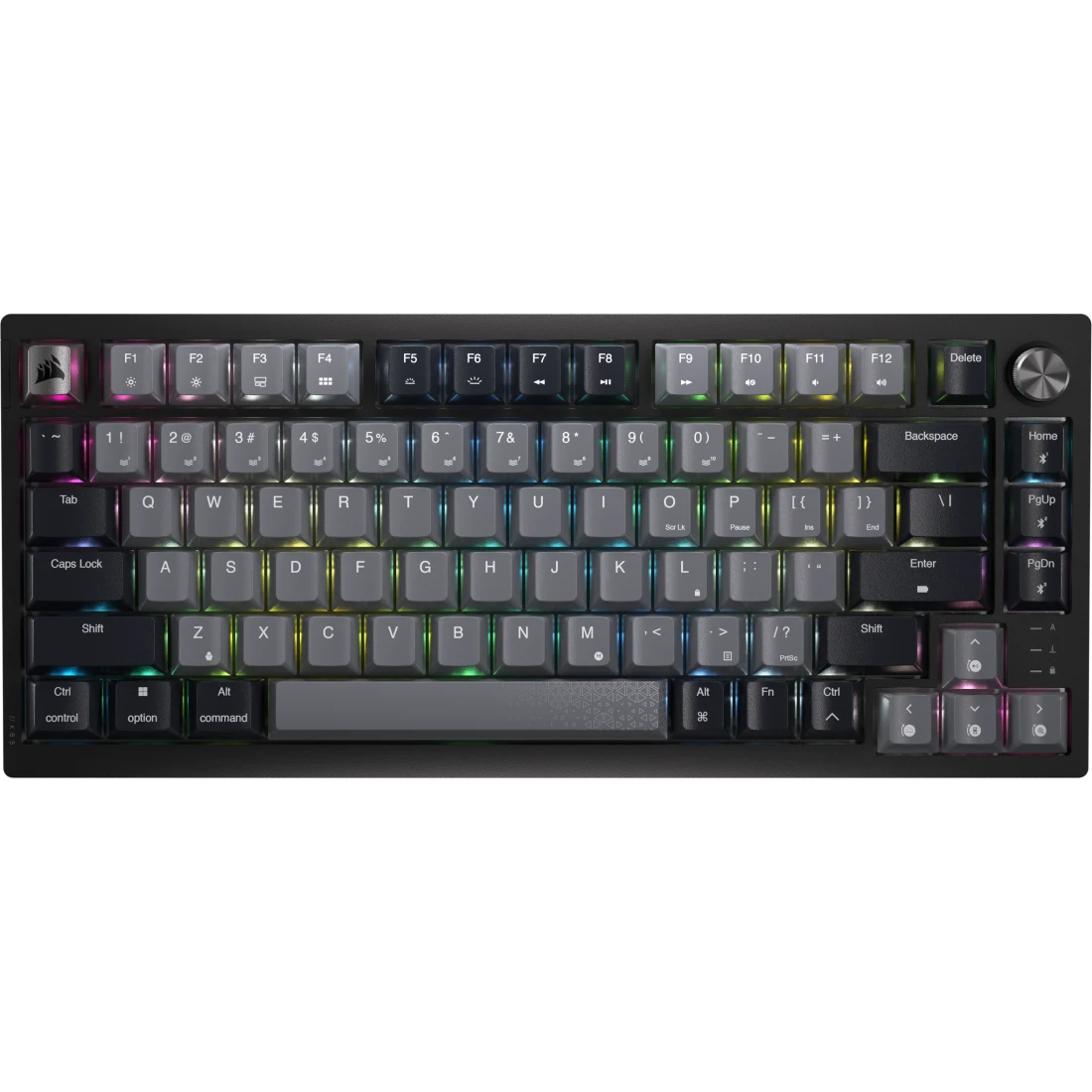
Get the Corsair K65 Plus Wireless if you want a compact gaming keyboard that also types quietly for work: its lubed linear switches and two layers of dampening give it a softer sound than most gaming boards. Hot-swap sockets, three connection modes and console support let it change with you and cover several devices. The main trade-off is the opaque keycaps, which block the backlight from the legends. If you want the fastest wired input, the Razer BlackWidow V4 75% fits better.
Pros
- Smooth pre-lubed linear switches
- Quiet, dampened typing sound
- Hot-swappable switch sockets
- 2.4GHz, Bluetooth and wired modes, plus console support
- Up to 266 hours rated battery with RGB off
Cons
- Opaque keycaps block the backlight from the legends
- Plastic case instead of aluminum
- Detailed per-key lighting only works when plugged in
- 1,000 Hz polling, not 8,000 Hz
As an Amazon Associate I earn from qualifying purchases. Disclosure
Overview
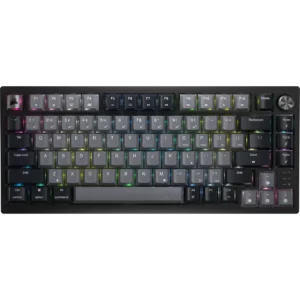
Corsair’s first 75% keyboard is a gaming board built around typing feel and sound. The Corsair K65 Plus Wireless pairs pre-lubed linear switches with two layers of internal sound dampening and hot-swap sockets, then adds a 2.4GHz dongle, Bluetooth and a USB-C cable so one board can serve a gaming PC, a work laptop and a console. It sells on Amazon in black and gray with Corsair MLX Red switches.
Testers keep coming back to the typing feel. Tom’s Hardware called it “the best 75% keyboard I’ve tested”, and its muted sound comes up in nearly every review. The trade-offs sit in the materials and the extras: a plastic case around a steel plate, keycaps that block the backlight from the legends, and a polling rate that matches most wireless boards rather than the 8,000 Hz some rivals offer.
Key Specifications
| Layout | 75% (function row, arrow keys, three-key navigation column) |
| Switches | Corsair MLX Red linear, pre-lubed; 45 g actuation force, 1.9 mm actuation point, 4.0 mm total travel |
| Rated switch lifespan | 70 million keystrokes |
| Hot-swappable | Yes (switch and keycap puller included) |
| Keycaps | PBT, dye-sublimated legends |
| Connections | 2.4GHz wireless (USB-A dongle), Bluetooth, USB wired |
| Polling rate | 1,000 Hz |
| Rated battery life | Up to 266 hours (2.4GHz, RGB off) |
| Construction | Top-mount plate, two layers of sound dampening, screw-in stabilizers |
| Dimensions | 320 x 136 x 35 mm (12.59 x 5.35 x 1.37 in) |
| Weight | About 0.92 kg (2.02 lb) |
| Warranty | 2 years |
| Price (USD) | $159.00 |
Corsair K65 Plus Wireless Typing Feel and Sound
This is where the board earns its price. The factory-lubed MLX Red switches are light linears (45 g to actuate, 1.9 mm to register, 4 mm of total travel), and reviewers describe the keystroke as smooth. Reviewed found the keys consistent with little wiggle, though Trusted Reviews heard a slight rattle as the keys wobble when typing at speed. Corsair packs a foam layer and a silicone pad inside the case, and that dampening is why typing comes out as a muted, low-pitched thock rather than the hollow clack many red-switch boards make. CGMagazine’s tester found the keystrokes not much louder than a laptop keyboard.
The stabilized keys are where opinions split. KitGuru called the improvement over earlier Corsair boards “remarkable, especially in the stabiliser rattle and spacebar sound”. Reviewed disagreed on the space bar: its tester found it “sounds cheap and plasticky” next to the rest of the keys.
Gaming and work: linear switches suit fast, repeated presses in games, and reviewers who play shooters and strategy games on it found it responsive. People who prefer a tactile bump for typing aren’t stuck: the hot-swap sockets take other Cherry-style switches, and testers who swapped in tactile switches liked it even more for writing. Club386 found the sockets accept both 3-pin and 5-pin switches, though some switches took real force to pull out.
Wireless Modes, Battery and Gaming Speed
A three-position switch on the back picks between 2.4GHz, Bluetooth and wired mode, and a second switch sets Windows or Mac layout. The board holds three Bluetooth devices on top of the dongle and the cable, and it works with PlayStation and Xbox consoles through the 2.4GHz dongle. The receiver tucks into a slot on the back edge when you travel.
The 2.4GHz and wired modes both poll at 1,000 Hz, which is standard for a gaming keyboard, and testers didn’t notice input lag in games. Trusted Reviews notes that Bluetooth drops to 125 Hz, so Bluetooth is for work devices and the dongle is for games. Reviewed’s tester found the switches only average in responsiveness while gaming, though reliable over the 2.4GHz link, and buyers chasing the highest polling rates will find 8,000 Hz options elsewhere.
Battery: Corsair rates the battery at up to 266 hours with 2.4GHz and the RGB off. Lighting cuts that sharply: Tom’s Hardware estimated that most people using it for hours a day with bright RGB would charge it about once a week. A full recharge takes around five to six hours, so a weekly top-up while you’re away from the desk covers it. A status light shows the battery level when you power it on.
Build, Layout and Keycaps
The case is plastic, but a steel plate inside gives it rigidity and weight. At about 0.92 kg (2 lb) it stays put on a desk, and testers found very little flex. Several reviewers wished for an aluminum shell to match the premium typing feel, and Tom’s Hardware thinks a metal case and better keycaps would let it pass for a custom keyboard. The 75% layout keeps the function row and full-size arrows, offsets the arrows slightly, and puts Delete beside the dial, the one layout change Tom’s Hardware had to get used to.
The keycaps are PBT with dye-sublimated legends, which Corsair calls fade-resistant, but testers note they are single-shot and the legends are opaque, so the per-key RGB only glows in the gaps between keys. Testers split on how much that matters: CGMagazine found low-light typing “may be a slightly more difficult task” and Club386 had to look for some keys, while Trusted Reviews found the light between the keys bright enough to pick out the legends. The two-stage flip-out feet set the typing angle; there is no wrist rest in the box, which Tom’s Guide missed because the board isn’t low profile.
iCUE Software, the Dial and Lighting
You can run the board without software. Media controls, lighting presets and the dial’s modes all work through Fn shortcuts, and a dedicated button on the left edge turns the lighting on and off. Corsair’s iCUE app adds macros, key remapping, firmware updates and finer lighting control, and it can save up to four profiles to the keyboard so it doesn’t need to keep running.
The knurled metal dial, which has a little wobble, controls volume by default and can switch to scrolling, zoom or backlight brightness. Tom’s Guide wished it could run macros, since its handful of modes felt limited. The bigger catch for RGB fans is that the most detailed per-key lighting layouts only stay active while the keyboard is plugged in over USB; on wireless, you are limited to the built-in effects.
How Does It Stack Up Against the Competition?
Two 75% rivals reviewers compare it with directly, one wired and one wireless with a screen, plus Logitech’s low-profile wireless tenkeyless from the same price class.
| Feature | Corsair K65 Plus Wireless | Razer BlackWidow V4 75% | ASUS ROG Azoth | Logitech G515 Lightspeed TKL |
|---|---|---|---|---|
| Price (USD) | $159.00 | $129.03 | $221.99 | $135.51 |
| Layout | 75% | 75% | 75% | Low-profile tenkeyless |
| Connections | 2.4GHz, Bluetooth, wired | Wired only | 2.4GHz, Bluetooth, wired | 2.4GHz, Bluetooth, wired |
| Switches (as priced) | Corsair MLX Red linear | Razer Orange tactile | ROG NX Snow linear | Logitech GL linear (low profile) |
| Hot-swappable | Yes | Yes | Yes | No |
| Maximum polling rate | 1,000 Hz | 8,000 Hz | 1,000 Hz | 1,000 Hz |
| Rated battery, lighting off | Up to 266 hours | None (wired only) | 2,000+ hours (OLED and RGB off) | Up to 600 hours |
| Standout extra | Metal multi-function dial | Aluminum top case, magnetic wrist rest | OLED display and control knob | Double-shot PBT keycaps |
| TTP Review | This review ↑ | — | — | Read our review → |
| Amazon | View on Amazon | View on Amazon | View on Amazon | View on Amazon |
Prices change frequently — always verify current pricing before purchasing.
Corsair K65 Plus Wireless: Worth It for Quiet, Moddable 75% Gaming
Buy it if you want one compact board for gaming and work that types quietly out of the box and can be re-switched later. Its three connection modes and console support let one board cover a desk shared between a PC, a laptop and a PlayStation. As of November 2026 it costs more on Amazon than the Razer and Logitech boards in the table and less than the Azoth, so the value case rests on getting wireless and hot-swap together at a mid-range price. Not every tester was sold on the price: Reviewed’s February 2024 review found it “a bit outclassed by some of its cheaper competitors”, and others called it a little steep. The case is strongest if you want the quiet feel as well as the features.
Look elsewhere in three cases. If you play wired and want the fastest input, the Razer BlackWidow V4 75% offers up to 8,000 Hz polling, an aluminum top case and a wrist rest, though it never cuts the cord. If you want a screen, a gasket-mounted feel and far longer rated battery life, the ASUS ROG Azoth is the step up. And if you want a flat low-profile feel, double-shot keycaps with shine-through legends and a longer rated battery (up to 600 hours with the lighting off), the Logitech G515 Lightspeed TKL is the better fit, as long as you don’t plan to swap switches.

Sources
- Corsair — K65 Plus Wireless 75% RGB Mechanical Gaming Keyboard (official specifications)
- Corsair K65 Plus Wireless — Amazon Product Listing
- Tom’s Hardware — Corsair K65 Plus Wireless Keyboard Review: High-end value
- Tom’s Guide — Corsair K65 Plus Wireless review
- Reviewed — Corsair K65 Plus Wireless review: A bit basic
- Trusted Reviews — Corsair K65 Plus Wireless Review
- KitGuru — Corsair K65 Plus Wireless 75% Keyboard Review
- Club386 — Corsair K65 Plus Wireless review: a multi-tasking maestro
- CGMagazine — Corsair K65 Plus Wireless Keyboard Review
- Razer — BlackWidow V4 75% product page
- Tom’s Hardware — Razer BlackWidow V4 75% Review
- ASUS ROG — ROG Azoth Gaming Keyboard
- ASUS ROG — ROG Azoth Tech Specs
- Tom’s Hardware — Logitech G515 Lightspeed TKL Review
- PCMag — Logitech G515 Lightspeed TKL Review
Reader Poll
Which K65 Plus Wireless trade-off would bother you most?
Help Our Editors Know What Matters to You
Explore on Amazon →