Best Gaming Keyboards of 2026: Analog, Wireless and Slim
The Razer Huntsman V3 Tenkeyless 8KHz leads for shooter players who want to set where every key fires.

As an Amazon Associate I earn from qualifying purchases. Disclosure
At a glance
The best gaming keyboards of 2026 split on one question first: do you want analog switches that let you set where each key fires, or a fixed mechanical switch that types well? After that, the choice comes down to wired or wireless, and how much of the layout you keep. We weighed 30 keyboards, from four test sites’ current lists and our own reviews, and these three picks cover the competitive, the wireless and the low-profile buyer. They are ranked by our review scores; where scores tie, the board with hot-swappable switches comes first.
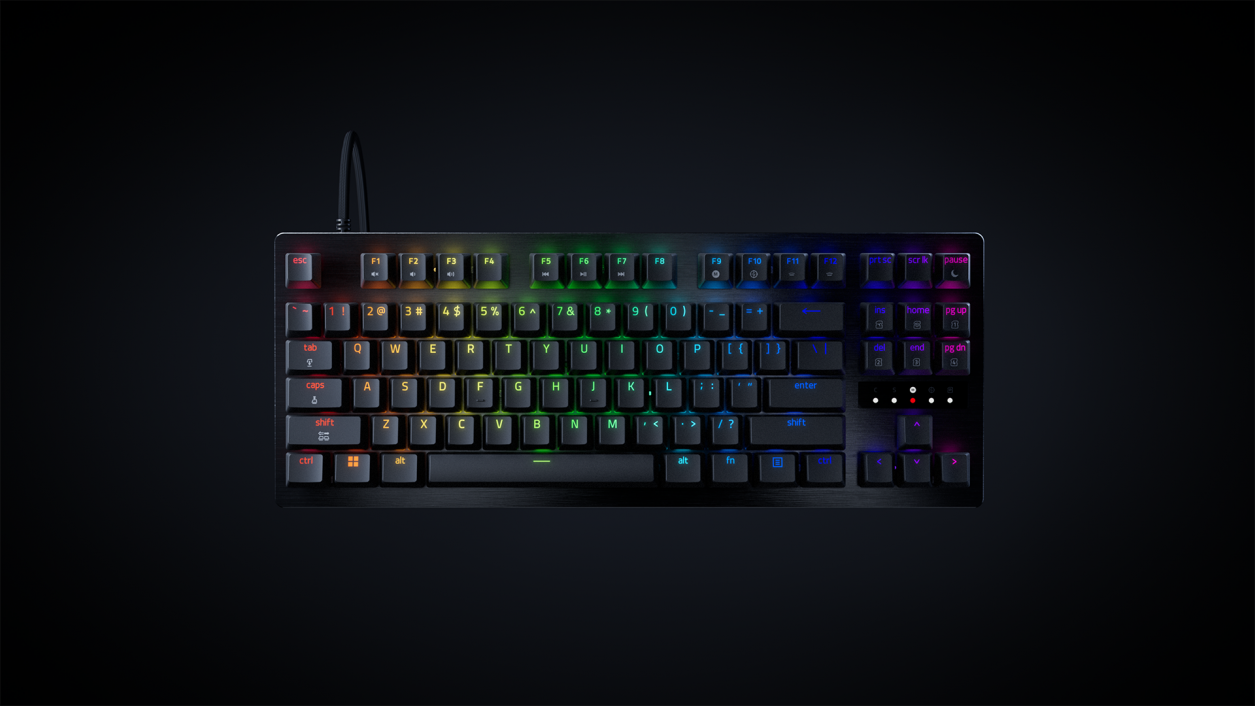
Buy it if you play Counter-Strike 2 or Valorant and want per-key actuation with Rapid Trigger.
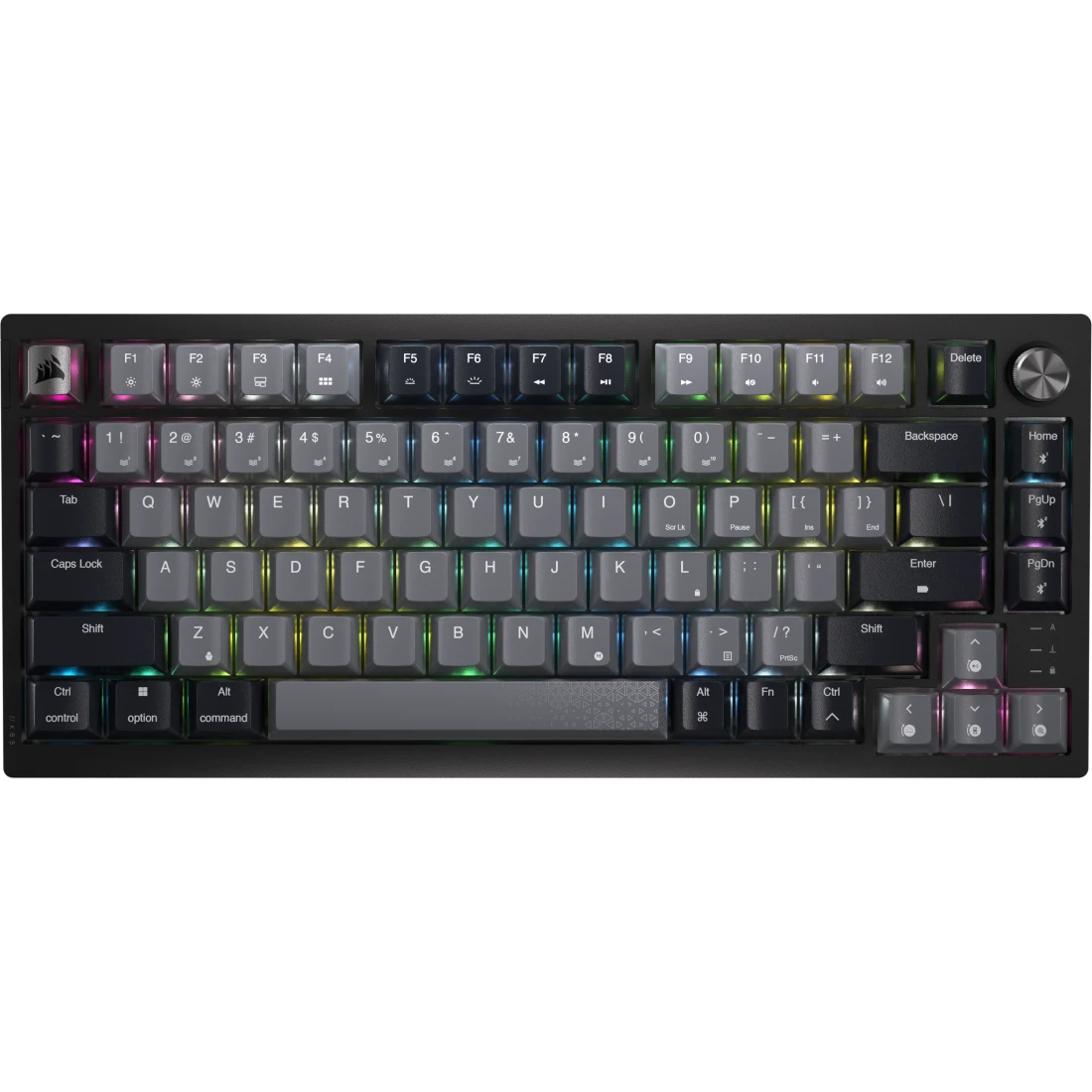
Buy it if you want a quiet wireless board that covers a PC, a laptop and a console, with switches you can change later.
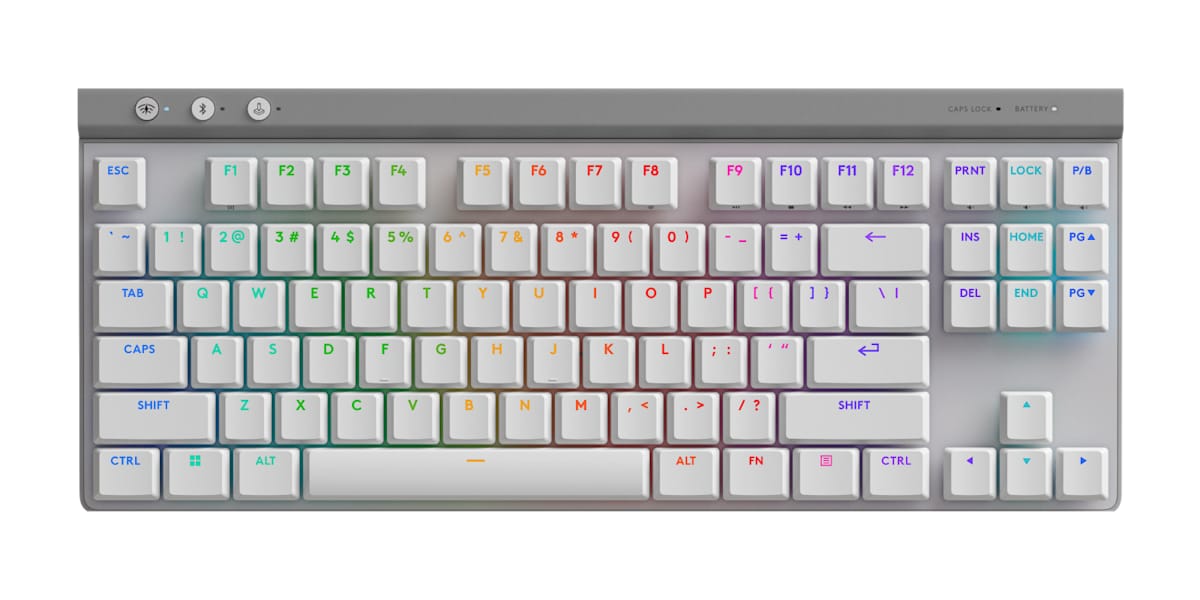
Buy it if one thin wireless keyboard has to handle a workday and an evening of games.
Razer Huntsman V3 Tenkeyless 8KHz: Best for Competitive Shooters
This is the only analog board of the three, and that is the reason to buy it. Each key can fire anywhere from 0.1 mm to 4.0 mm into its travel, and Rapid Trigger resets a key as soon as it starts to rise, from as little as 0.1 mm. The Corsair and Logitech picks fire at one fixed point instead. All three full reviews of the Razer found the analog response smooth and precise, and it polls at up to 8,000 Hz, eight times the 1,000 Hz both other picks run at. It went on sale in May 2026 as the lower-priced base version of Razer’s Huntsman V3 Pro Tenkeyless 8KHz, keeping that board’s Gen-2 analog optical switches and dropping its media dial and wrist rest. TechRadar found the keys a little numb at the very top of the press, which can make an exact actuation point harder to hit, and Gaming Trend’s reviewer typed some characters by accident on the default settings.
What you give up next to the Corsair is everything off the desk: it is a wired board, so there is no battery, no wireless option and no dial. Most players outside competitive play won’t need 8,000 Hz, and it loads the CPU, so check your PC has headroom; Razer’s Synapse software lets you turn it down. Typing is where testers split. TechRadar found the tall keycaps made it a chore to type on and scored it lower for that, while the other two full reviews found typing comfortable.
Corsair K65 Plus Wireless: Best Wireless 75%
The K65 Plus Wireless is the one to pick if you want a gaming board that also sounds good at a desk. Its factory-lubed MLX Red linear switches sit over a foam layer and a silicone pad, and its muted, low-pitched sound comes up in nearly every review; Tom’s Hardware called it “the best 75% keyboard I’ve tested”. It also has hot-swap sockets, which the Logitech lacks, so you can fit other Cherry-style switches later, and testers who swapped in tactile switches liked it even more for writing.
It is the most flexible pick for a shared desk. A switch on the back picks 2.4GHz, Bluetooth or a cable, it holds three Bluetooth devices, and it works with PlayStation and Xbox consoles through its dongle. Corsair rates the battery at up to 266 hours with the lighting off. Next to the Huntsman it is a conventional switch with a fixed 1.9 mm actuation point and 1,000 Hz polling. Trusted Reviews notes that Bluetooth drops to 125 Hz, so games belong on the dongle. Its main limitation is cosmetic: the opaque keycaps block the backlight from the legends, so the lighting only glows between the keys.
Logitech G515 Lightspeed TKL: Best for Work and Play on One Desk
The G515 is a full tenkeyless layout in a body 22 mm tall, with low-profile switches that register at 1.3 mm. Its keys feel smooth and controlled for long typing sessions, and the tactile version won over testers who normally avoid low-profile boards. In testing, its Lightspeed 2.4 GHz link felt no slower than a cable, with no dropouts. Logitech’s G HUB software with KEYCONTROL can put up to 15 functions on one key, which can stand in for the missing number pad and macro keys. It is also the cheapest of the three.
Next to the Corsair, it trades deeper key travel (3.2 mm against 4.0 mm), a volume dial and swappable switches for a flatter, thinner feel and a full set of navigation keys. For shooters, Tom’s Hardware found the flat, slightly slippery keys held it back somewhat in games where speed and accuracy both peak, and there is no Rapid Trigger. Battery life with the lights on is the trade-off: Logitech’s rating of up to 600 hours with the RGB off shrinks to up to 36 hours with it at full brightness. Tom’s Hardware calls that fantastic for so slim a board, while PCMag found it surprisingly low, so plan on plugging in regularly if you keep the RGB bright.
How the Picks Compare
| Razer Huntsman V3 Tenkeyless 8KHz | Corsair K65 Plus Wireless | Logitech G515 Lightspeed TKL | |
|---|---|---|---|
| Price (USD)Price (CAD) | $169.99$239.99 | $159.00$239.99 | $149.00$179.99 |
| Our score | 4.4/5 | 4.2/5 | 4.2/5 |
| Layout | Tenkeyless (TKL) | 75% | Low-profile tenkeyless (TKL) |
| Switches | Razer Analog Optical Gen-2 | Corsair MLX Red linear, pre-lubed | Low-profile GL mechanical, tactile or linear |
| Actuation point (maker) | Adjustable per key, 0.1 to 4.0 mm | 1.9 mm, fixed | 1.3 mm, fixed |
| Rapid Trigger | Yes, reset from 0.1 mm | No | No |
| Actuation force (maker) | 40 g | 45 g | 43 g linear, 45 g tactile |
| Maximum polling rate | 8,000 Hz | 1,000 Hz (Bluetooth 125 Hz) | 1,000 Hz (2.4 GHz receiver) |
| Connections | Wired (detachable USB-C) | 2.4GHz, Bluetooth, wired | 2.4 GHz, Bluetooth, wired USB-C |
| Rated battery (maker) | None (wired only) | Up to 266 hours (RGB off) | Up to 36 hours (full lighting); up to 600 hours (lighting off) |
| Keycaps | Textured doubleshot PBT | PBT, dye-sublimated, opaque legends | Low-profile double-shot PBT |
| Media control | No dial (dropped from the Pro model) | Metal multi-function dial | Fn shortcuts only |
| Profiles stored on the keyboard | 6 (4 customizable) | Up to 4 | 1 (Digital Citizen); Hardware Busters lists 4 |
| Size (W x D x H) | 362 x 140 x 38 mm | 320 x 136 x 35 mm | 368 x 150 x 22 mm |
| Warranty | Up to 2 years | 2 years | 2 years |
| Amazon | View on AmazonView on Amazon | View on AmazonView on Amazon | View on AmazonView on Amazon |
Do You Need Analog Switches and Rapid Trigger?
An ordinary mechanical switch is simply on or off. An analog switch, whether Hall effect, optical or TMR, measures how far the key is pressed, which is what makes adjustable actuation and Rapid Trigger possible; PC Gamer adds that these boards lean on their software much more, so the app matters when you choose one. Tom’s Guide counts Rapid Trigger as a handy extra rather than an essential for Counter-Strike or Valorant, though it helps most in fast shooters. Instead of waiting for a key to rise past a fixed point, the board resets it as soon as it starts coming up, so you can tap again or change direction sooner.
When it matters: you play competitive shooters and counter-strafe constantly, or you want one key to do different things at different press depths. The Razer is the pick here.
When it doesn’t: you mostly play other genres, or the keyboard is also your typing keyboard. A fixed switch that feels good, like the Corsair’s or the Logitech’s, serves you just as well.
Does an 8,000 Hz Polling Rate Make You Faster?
Polling rate is how often the keyboard reports to your PC: every 1 millisecond at 1,000 Hz, every 0.125 ms at 8,000 Hz. Both test sites that explain it doubt most people can feel the difference. Tom’s Hardware says anything above 1,000 Hz is very difficult for even competitive gamers to discern, because a keyboard doesn’t send continuous movement the way a mouse does. Tom’s Guide adds that 8,000 Hz drains system resources and a wireless keyboard’s battery, and may even affect game performance on older PCs.
When it matters: you play at an esports level on a PC with headroom to spare. Only the Razer offers it, and you can turn it down.
When it doesn’t: for most players, 1,000 Hz is the standard, and both wireless picks run at it over their receivers.
Wireless or Wired, and How Much Keyboard Do You Need?
Tom’s Hardware still calls a cable the reliable, low-latency, budget-friendly choice, but notes wireless keyboards are now solid enough that even professional players use them, as long as they connect over 2.4GHz at 1,000 Hz or more; Bluetooth is there for work devices, not games. Layout is the other half. A tenkeyless board drops only the number pad and keeps the full navigation cluster; a 75% board usually squeezes the navigation keys into a single column as well. A smaller board leaves more room for wide mouse sweeps, which PC Gamer says comes in handy if you play at a very low mouse DPI.
When it matters: one board serves a gaming PC, a laptop and a console, or you want the smallest footprint. The Corsair covers all three devices in a 75% body; the Logitech keeps the full tenkeyless layout without a cable.
When it doesn’t: the keyboard never leaves one desk and one PC. Then the wired Razer gives up nothing that matters for games.
How We Chose
We started from what four test sites recommend now: the current gaming keyboard lists from PCMag, PC Gamer, Tom’s Hardware and Tom’s Guide, about 30 keyboards in all once the ones we have reviewed are added. Each pick needed a full, well-rated review on this site and had to be a current model sold on Amazon. We then compared them on what splits gaming keyboard buyers: switch type and actuation, polling rate, connection and battery, layout and typing feel. The facts come from the makers’ specifications and the independent editorial reviews and buying guides listed in Sources; we haven’t tested these keyboards ourselves. The picks are ordered by our review scores.
Which Gaming Keyboard Should You Buy?
Each of these boards wins a different desk. If competitive shooters are the reason you’re shopping, the Razer Huntsman V3 Tenkeyless 8KHz gives you analog control over every key and lets you keep tuning it as your aim improves. If you want one wireless board for a PC, a laptop and a console that sounds as good as it plays, the Corsair K65 Plus Wireless is the one to get, and it can grow with new switches. And if your keyboard works all day before it plays at night, the Logitech G515 Lightspeed TKL gives you a thin, full tenkeyless layout and a wireless link you never have to think about.
Our picks
Buy it for per-key tuning in competitive shooters.
Buy it for quiet wireless play across several devices.
Buy it for one thin board that types all day and games at night.
Browse all Office & Productivity reviews →Office & Productivity reviews →
Frequently Asked Questions
Can I use Snap Tap on the Razer in Counter-Strike 2?
Do I need Razer’s software to change the actuation point?
How long does the Corsair K65 Plus Wireless take to recharge?
Can the Logitech G515 share a receiver with my Logitech mouse?
Can I put custom keycaps on the Logitech G515?
Is the Logitech G515 sold in a Canadian French layout?
Sources
- PCMag – The Best Gaming Keyboards We’ve Tested for 2026
- PC Gamer – Best gaming keyboards in 2026
- Tom’s Hardware – Best Gaming Keyboards 2026
- Tom’s Guide – Best gaming keyboard in 2026
- Razer – Huntsman V3 Tenkeyless 8KHz product page
- Razer – Huntsman V3 Tenkeyless 8KHz: Built for Fast, Repeatable Input
- TechRadar – Razer Huntsman V3 Tenkeyless 8KHz review
- Gaming Trend – Razer Huntsman V3 Tenkeyless 8KHz keyboard review
- CGMagazine – Razer Huntsman V3 Tenkeyless 8KHz Gaming Keyboard Review
- Lowyat.NET – Razer Launches Huntsman V3 TKL 8KHz
- KitGuru – Razer launches new Huntsman Tenkeyless keyboard with 8KHz polling rate
- Corsair – K65 PLUS WIRELESS 75% RGB Mechanical Gaming Keyboard
- Tom’s Hardware – Corsair K65 Plus Wireless Keyboard Review
- Tom’s Guide – Corsair K65 Plus Wireless review
- Reviewed – Corsair K65 Plus Wireless review
- Trusted Reviews – Corsair K65 Plus Wireless Review
- CGMagazine – Corsair K65 Plus Wireless Keyboard Review
- KitGuru – Corsair K65 Plus Wireless 75% Keyboard Review
- Club386 – Corsair K65 Plus Wireless review
- Logitech G – G515 LIGHTSPEED TKL Wireless Gaming Keyboard
- Logitech G Canada – G515 LIGHTSPEED TKL Wireless Gaming Keyboard
- Tom’s Guide – Logitech G515 Lightspeed TKL review
- Tom’s Hardware – Logitech G515 Lightspeed TKL Review
- PCMag – Logitech G515 Lightspeed TKL Review
- Stuff – Logitech G515 Lightspeed TKL review
- GGRecon – Logitech G515 review
- Hardware Busters – Logitech G515 Lightspeed TKL Wireless Keyboard Review
- Digital Citizen – Logitech G515 LIGHTSPEED TKL review
Reader Poll
What matters most in your next gaming keyboard?
Help Our Editors Know What Matters to You
Explore on Amazon →