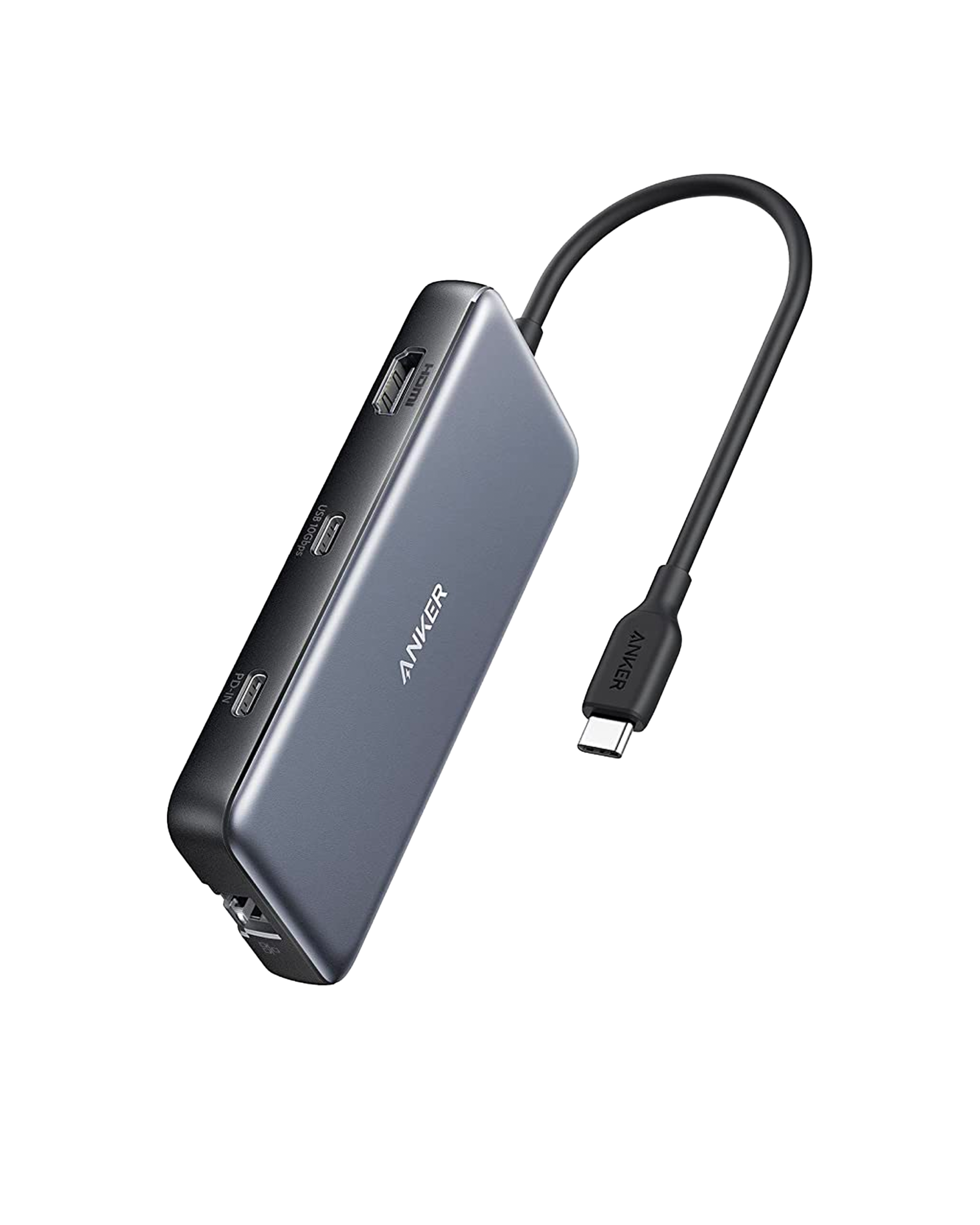
Buy the Anker 555 if your laptop is short on ports and you want one hub for a 4K monitor at 60Hz, wired Ethernet, camera cards and fast drives. All three data ports are rated at 10Gbps, and with a 100W charger it passes up to 85W to the laptop, enough for most machines short of the most power-hungry. The trade-off is one external monitor, since the USB-C data port has no video output; Anker's 553 is built for two.
Pros
- 4K at 60Hz over HDMI
- 10Gbps on all three data ports
- Gigabit Ethernet plus SD and microSD slots
- Up to 85W pass-through charging
- Compact, with a travel pouch
Cons
- One external monitor; the USB-C port has no video output
- 85W falls short for the most power-hungry laptops
- No rubber feet, so it can slide on a desk
- No charger or USB-C cable in the box
As an Amazon Associate I earn from qualifying purchases. Disclosure
Overview
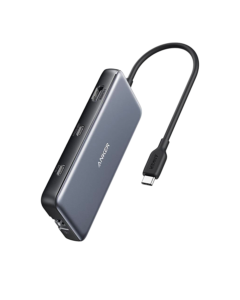
A thin laptop with two USB-C ports runs out of connections fast. The Anker 555 USB-C Hub (8-in-1), model A8383, turns one of those ports into eight. You get HDMI for a monitor, a Gigabit Ethernet jack, SD and microSD slots, two USB-A ports and a USB-C data port. An eighth port, a USB-C input, passes a charger’s power through to the laptop. It is small enough to live in a laptop bag and is sold on Amazon in the US and Canada.
What lifts it above many hubs in its class is speed on every port at once. The HDMI port is rated for 4K at 60Hz where many portable hubs stop at 30Hz, and all three data ports are rated at 10Gbps. PCWorld names it the best overall USB-C hub in its 2026 roundup.
Key Specifications
| Price (USD) | $49.99 |
| Model number | A8383 |
| HDMI | 1 port, 4K@60Hz, HDMI 2.0, HDCP 2.2 |
| USB data ports | 2 USB-A + 1 USB-C, 10Gbps each |
| Ethernet | 1Gbps |
| Card readers | SD + microSD, UHS-I |
| Power Delivery | Up to 100W in; up to 85W out to the laptop |
| Dimensions | 4.76 x 2.17 x 0.6 inches |
| Weight | 4.5 ounces |
| Attached cable (Fstoppers) | About six inches, fairly stiff |
| In the box | Hub and travel pouch; no charger |
| Warranty | 18 months |
Anker 555 USB-C Hub Ports and Speeds
The display port is the reason many buyers pick this hub. Anker rates the HDMI output at 4K and 60Hz, and Blogged Off, which uses the 555 with a MacBook Air 15, gets 60Hz on its external monitor. Its old hub stopped at 30Hz, and Blogged Off finds the difference between 30Hz and 60Hz very noticeable. Video runs only through the HDMI port: Anker states that the USB-C data port has no video output, so the 555 drives one external monitor.
The three data ports, two USB-A and one USB-C, are each rated at 10Gbps. In Fstoppers’ review, the hub kept up with fast SSDs and held their top speeds. PCWorld’s write-up lists the data ports at 5Gbps, which disagrees with Anker’s own specifications; its list of cons also gives the HDMI output as 30Hz, though its text credits the 555 with a 60Hz HDMI port.
Ethernet: in Fstoppers’ use, the Ethernet port reached its advertised 1 Gbps, a dependable fallback where Wi-Fi is slow or spotty. Blogged Off hasn’t tested its own port’s speed and notes that most hubs are optimistic about their Ethernet ratings.
Card readers: separate SD and microSD slots mean no adapter for camera cards. Fstoppers lists both at 104 MBps, fine for most photo imports but short of what faster UHS-II cards can do.
Pass-Through Charging
Plug a USB-C charger into the power input and the laptop charges through the hub while every other port keeps working. For most laptops the 85W it passes on is enough: the hub keeps 15W of a 100W charger for itself, and Fstoppers’ MacBook Air, which fast-charges at 67W, sits well inside that.
Only the hungriest machines notice the ceiling. Some workstation-class and gaming laptops want more than 85W. Fstoppers puts a 16-inch MacBook Pro at 96W, though it calls a long, full-speed load that outruns the hub quite rare. Bring your own USB-C charger and cable, since neither is in the box.
The hub also works with no charger at all, running from the laptop’s own port; Blogged Off uses it that way without problems. Its USB-A and USB-C data ports don’t charge phones or other gadgets, and Anker notes that the original wall chargers sold with phones and tablets can’t push power through the hub to them.
Size, Cable and Build
Anker includes a travel pouch for carrying it. How compact it feels depends on what you are used to. Fstoppers calls it barely bigger than its ports, while Blogged Off, coming from a slim hub, finds it awkward hanging off the side of a MacBook Air and about the size of a MagSafe power bank.
PCWorld rates its build quality as excellent. On a desk, Fstoppers’ one complaint is the missing rubber feet: the slick, light housing slides when cables tug on it, which a few dollars of stick-on feet solves.
Anker says the hub can reach 122°F when fully loaded or connected to a charger, and calls that normal. It lists the Nintendo Switch and Apple’s USB SuperDrive as incompatible.
How Does It Stack Up Against the Competition?
Of the hubs below, only the 555 pairs a 60Hz HDMI port with 10Gbps data ports. The table sets it against Anker’s own step-down, the 341, and two hubs from other brands. PCWorld names the Hiearcool its best budget hub. The Plugable offers the same display and network ports.
| Feature | Anker 555 USB-C Hub | Plugable 7-in-1 USB-C Hub with Ethernet | Hiearcool 7-in-1 USB-C Hub | Anker 341 USB-C Hub (7-in-1) |
|---|---|---|---|---|
| Price (USD) | $49.99 | $39.95 | $19.99 | $39.99 |
| HDMI output | 4K@60Hz | 4K@60Hz (on DP 1.4 laptops) | 4K@30Hz | 4K@30Hz |
| USB data ports | 2 USB-A + 1 USB-C, 10Gbps | 2 USB-A, 5Gbps | USB-A, 5Gbps | 2 USB-A (5Gbps) + 1 USB-C (480Mbps) |
| Ethernet | 1Gbps | Gigabit | No | No |
| Charging input | 100W in, up to 85W to laptop | 100W in | 100W in | 100W in, 85W to laptop |
| Card readers | SD + microSD | SD + microSD | SD + microSD | SD + microSD |
| Amazon | View on Amazon | View on Amazon | View on Amazon | View on Amazon |
Prices change frequently — always verify current pricing before purchasing.
Anker 555 USB-C Hub: Worth It for Laptops That Need Every Port
The 555 earns its place on a desk or in a bag where one laptop port has to do everything: a 4K monitor at a smooth 60Hz, a wired network, camera cards and a fast external drive, all running while the laptop charges. A photographer importing cards on the road, or a remote worker who docks a MacBook to a monitor and Ethernet each morning, gets the full set in one plug. As of October 2026 the Hiearcool and the Anker 341 cost less on Amazon, but both stop at 30Hz and skip Ethernet. The Plugable has the same display and network ports and a two-year warranty; its two USB-A ports run at 5Gbps, though, and it has no USB-C data port.
Look elsewhere if you need a second monitor: Blogged Off points those buyers to Anker’s 553, which swaps the USB-C data port for another HDMI port. Owners of a 16-inch MacBook Pro or one of the workstation and gaming laptops that draw more than 85W may charge faster with the charger plugged straight into the laptop. If all you plug in is a mouse, keyboard and a 1080p screen, PCWorld’s budget pick, the Hiearcool, is built for that kind of basic expansion.
Sources
- Anker — Anker 555 USB-C Hub (8-in-1) Product Page
- Anker 555 USB-C Hub — Amazon Product Listing
- Fstoppers — Portable Connectivity: We Review the Anker 555 USB-C Hub (8-in-1)
- Blogged Off — Anker 555 (A8383) USB 8-in-1 Hub Review
- PCWorld — Best USB-C Hubs and Dongles 2026
- Plugable — USB-C 7-in-1 Hub with Ethernet Product Page
- Anker — Anker 341 USB-C Hub (7-in-1) Product Page
Reader Poll
What would you plug into the Anker 555 first?
Help Our Editors Know What Matters to You
Explore on Amazon →