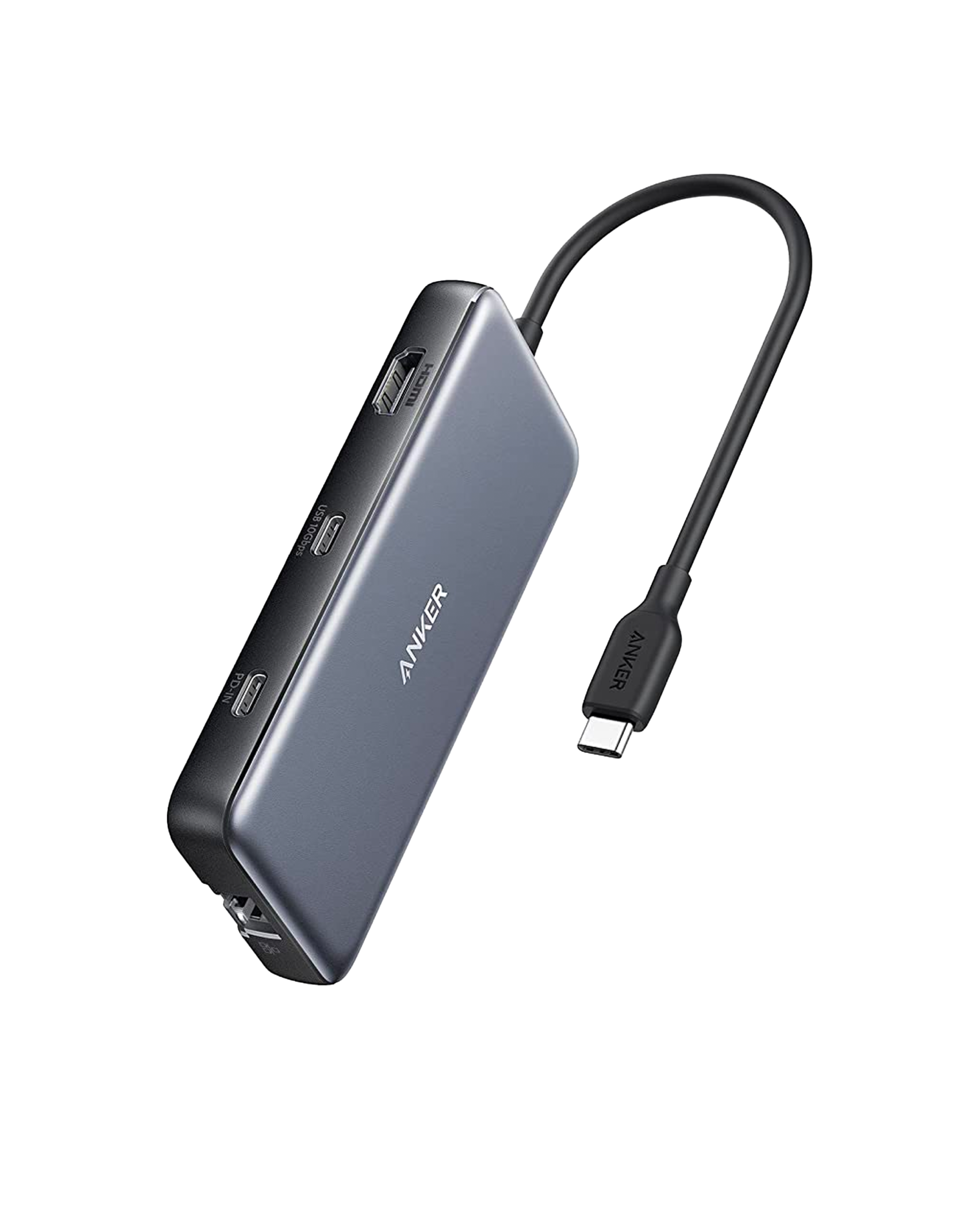
The Anker 555 USB-C Hub is the top pick for Canadian home office workers who need a compact 8-in-1 hub for 4K@60Hz display, Gigabit Ethernet, 85W charging, and 10 Gbps data transfer from a single USB-C port. At approximately $69.99 CAD on Amazon.ca, it delivers genuine 10 Gbps speeds on three data ports simultaneously — a meaningful edge over cheaper 5 Gbps alternatives on Canadian marketplaces. The main trade-off is single-display-only output; dual-monitor setups require a pricier docking station.
Pros
- 10 Gbps data on three ports simultaneously
- True 4K@60Hz HDMI output
- 85W pass-through charging keeps laptops powered
- Gigabit Ethernet included
- Compact and lightweight for travel
- 18-month warranty
Cons
- Single display output only — no dual-monitor support
- Integrated cable cannot be replaced if damaged
- USB-C data port does not support video output
- No DisplayPort — HDMI only
As an Amazon Associate I earn from qualifying purchases. Disclosure
Overview
The Anker 555 USB-C Hub (8-in-1) is the hub most remote workers and hybrid office employees reach for when a single USB-C port is standing between them and a full desktop setup. A single cable from your MacBook, Dell XPS, or Chromebook unlocks an HDMI display output at 4K and 60Hz, two 10 Gbps USB-A data ports, a dedicated 10 Gbps USB-C data port, Gigabit Ethernet, an SD card slot, a microSD slot, and 85W pass-through charging — all in a flat, pocket-sized package. It is available on Amazon.ca for approximately $69.99 CAD depending on current promotions.
What distinguishes the 555 from cheaper competitors available at Canadian retailers is the combination of true 10 Gbps data speeds on three ports simultaneously, a genuine Gigabit Ethernet port, and an HDMI 2.0 output that handles 4K at 60Hz rather than the 4K@30Hz ceiling that plagues sub-$40 hubs. PCWorld named it among its top-rated USB-C hubs, highlighting the excellent build quality and balanced port selection. Available on Amazon.ca for approximately $69.99 CAD, it delivers a clear value advantage over brand-name alternatives that charge $30–40 more for comparable specs — making it one of the most cost-effective connectivity upgrades for the Canadian home office.
Key Specifications
| Total Ports | 8 (USB-C PD, HDMI, 2× USB-A, USB-C data, Ethernet, SD, microSD) |
| Video Output | HDMI 2.0 — 4K @ 60Hz (HDR / HDCP 2.2) |
| Data Transfer Speed | 10 Gbps (USB 3.1 Gen 2) — USB-C and both USB-A ports |
| Power Delivery | 85W passthrough (100W input, 15W reserved for hub) |
| Ethernet | 1 Gbps (IEEE 802.3) |
| Card Slots | SD (UHS-I) + microSD (UHS-I) |
| Host Connection | USB-C 3.1 Gen 2 (integrated 12 cm cable) |
| Dimensions | 4.76 × 2.17 × 0.6 in (121 × 55 × 15 mm) |
| Weight | 4.5 oz (127 g) |
| Compatibility | USB-C 3.1 Gen 2 laptops and tablets; macOS, Windows, ChromeOS |
Anker 555 Connectivity & Port Performance
The three 10 Gbps data ports — one USB-C and two USB-A — are the primary reason to choose the 555 over cheaper alternatives. At that throughput, moving a 10 GB video project from an external SSD takes under 10 seconds rather than the 30–45 seconds users experience with USB 3.0 (5 Gbps) hubs. According to Anker’s published spec sheet, each data port delivers the full 10 Gbps independently, meaning an external NVMe drive and a USB-A flash drive can transfer simultaneously without sharing bandwidth. The integrated Gigabit Ethernet port accepts standard Cat 5e or Cat 6 cables and delivers a stable wired connection — a meaningful advantage for remote workers on congested Wi-Fi networks or those regularly moving large files to a NAS.
The dual card slots — SD and microSD — share a bus, which means simultaneous reads from both slots will split available bandwidth. For everyday single-card use, owners who work in photography report transfer speeds consistent with UHS-I spec, making it practical for offloading RAW files without a separate card reader on the desk. The USB-C data port is one of the 555’s distinguishing features versus 7-in-1 hubs that drop either the USB-C data port or the Ethernet port to hit a lower price point — the 555 keeps both. Limitation: The USB-C data port does not support video output; a second display requires an adapter or a hub with DisplayPort, which the 555 lacks.
Power Delivery & Display Output
The 555’s 85W passthrough charging keeps most USB-C laptops adequately powered during a full workday. The hub accepts up to 100W from the upstream charger and reserves 15W for hub operations, delivering the remaining 85W to the connected laptop — enough for a 13-inch MacBook Pro or Dell XPS 13 to maintain or slowly gain charge under moderate load. Note: Tablets and phones connected via the USB-C PD port require adapters that supply at least 15V (45W); standard 5V/2A phone chargers will not trigger fast-charge mode through the 555. According to Anker’s product documentation, the hub is incompatible with Nintendo Switch and Apple USB SuperDrive, which require specific power profiles the 555 does not provide.
The HDMI 2.0 output delivers 4K at 60Hz with HDR and HDCP 2.2 support, which covers standard use cases including Netflix 4K streaming and editing on an external 4K monitor. Engadget’s roundup noted that the Anker 555 delivers on its 4K@60Hz spec reliably — the key distinction from budget hubs that cap video at 30Hz or show flickering under sustained 4K loads. For dual-monitor setups, the 555 is not the right choice: it supports only one external display. Users who need two screens should consider the Anker 565 (~$100 CAD, adds DisplayPort alongside HDMI) or a full docking station.
Design, Portability & Build Quality
At 4.76 × 2.17 × 0.6 inches and 4.5 oz, the 555 is light enough to live in a laptop sleeve without adding noticeable weight, and slim enough to sit on a desk without lifting the MacBook’s thin chassis at an angle. The aluminum-reinforced shell gives it a rigid, premium feel compared to cheaper all-plastic hubs — reviewers consistently note it does not flex or creak when ports are in use. The integrated 12 cm USB-C cable is non-detachable, which keeps the design simple but means the entire hub is unusable if the cable is damaged (a risk shared with most portable hubs at this price point).
Port placement is thoughtful: all ports open on the back edge so cables run away from the user and do not block adjacent laptop ports. The two USB-A ports are spaced wide enough to accommodate USB-A dongles side by side without physical interference. Bloggedoff’s review of the A8383 noted that the Ethernet and SD ports resist wobble even with cables inserted — a quality-of-life detail absent on cheaper hubs where a nudged cable briefly drops the connection. Anker backs the hub with an 18-month warranty and access to customer support, which is standard for its premium lineup.
How Does It Stack Up Against the Competition?
The 555 is the benchmark for mid-range 8-in-1 hubs. Here are the alternatives worth considering if it does not fit your setup.
| Feature | Anker 555 | UGreen Revodok 109 | Belkin Connect 6-in-1 | Satechi Slim Multi-Port 3.0 |
|---|---|---|---|---|
| Price (CAD) | $49.99 | $68 | $95 | $68 |
| Total Ports | 8 | 9 | 6 | 7 |
| Power Delivery | 85W | 85W | 60W | 85W |
| Max Data Speed | 10 Gbps | 10 Gbps | 5 Gbps | 5 Gbps |
| 4K @ 60Hz | Yes | Yes | Yes | Yes |
| Ethernet | 1 Gbps | 1 Gbps | No | No |
Prices change frequently — always verify current pricing before purchasing.
Is the Anker 555 USB-C Hub Worth It?
The Anker 555 USB-C Hub is the top pick for Canadian home office and hybrid workers who need a compact, reliable 8-in-1 hub that handles 4K@60Hz display output, Gigabit Ethernet, 85W laptop charging, and 10 Gbps data transfer from a single USB-C port. At approximately $69.99 CAD on Amazon.ca, it delivers all eight ports with genuine 10 Gbps speeds on three data connections simultaneously — a meaningful advantage over the cheaper 5 Gbps alternatives that dominate lower price points on Canadian marketplaces. PCWorld’s top rating and consistently positive owner feedback confirm plug-and-play reliability with MacBook, XPS, and Chromebook setups from day one.
It is not the right hub for users who need two external monitors — the 555 outputs a single display only. Those with dual-monitor requirements should look at the Anker 565 (~$100 CAD, adds DisplayPort alongside HDMI) or a dedicated USB-C docking station. Laptop owners with older USB-A-only hosts cannot use it at all — the 555 requires USB-C 3.1 Gen 2. For everyone else squeezing a productive workspace from a single USB-C port, the 555 remains one of the cleanest, most balanced buys available on Amazon.ca.
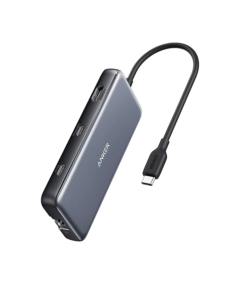
Check the latest price for the Anker 555 USB-C Hub
Check Current Price on Amazon.ca