Buy the Keychron K2 HE if one keyboard has to cover a workday of typing and an evening of competitive games: its magnetic switches let you set each key's actuation point and add rapid trigger, features usually found on dedicated gaming boards. Testers rank its smooth, well-dampened typing among the best they have used, and the wood-trimmed Special Edition looks more like home-office furniture than gaming gear. The trade-off is switch choice: the version sold on Amazon takes only Gateron's double-rail magnetic switches, all linear when it was reviewed, so tactile fans had nothing to swap in. If 8,000 Hz polling matters more than wireless, the Razer Huntsman V3 Tenkeyless 8KHz fits better.
Pros
- Per-key adjustable actuation (0.2-3.8 mm) with rapid trigger
- Smooth, pre-lubed double-rail linear switches
- Solid, well-dampened build with rosewood sides
- 2.4GHz, Bluetooth and wired, with Mac and Windows keycaps
- Browser-based Keychron Launcher, nothing to install
Cons
- Limited switch choice: compatible magnetic switches only
- Special Edition keycaps aren't shine-through
- No volume knob
- 1,000 Hz polling, not 8,000 Hz
As an Amazon Associate I earn from qualifying purchases. Disclosure
Overview
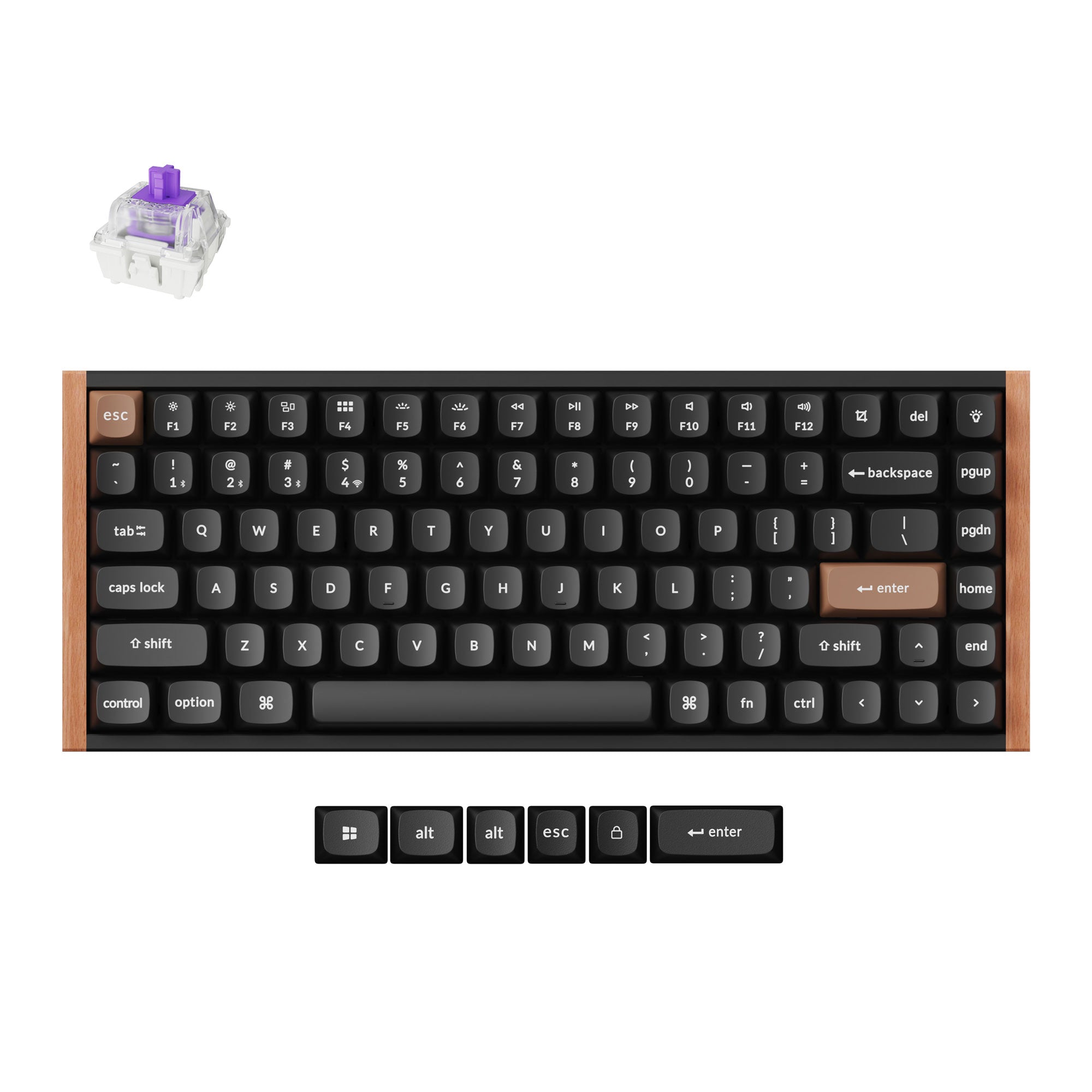
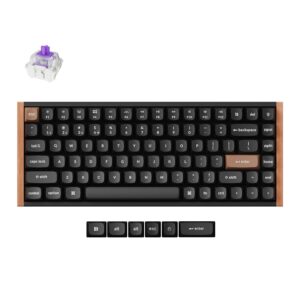
Keychron’s K2 has gone through several generations as a compact wireless keyboard for Mac and Windows. The K2 HE keeps the 75% layout and the Mac-friendly keys, then swaps in magnetic Hall effect switches whose actuation point you set key by key, anywhere from 0.2 to 3.8 mm. It connects over a 2.4GHz receiver, Bluetooth 5.2 for up to three devices, or a USB-C cable. The version we link is the black Special Edition, with rosewood side panels and rounded OSA-profile keycaps.
What sets it apart at its price is the gaming toolkit. Rapid trigger, multi-action keys and an analog mode usually come on dedicated gaming boards, and here they sit inside a keyboard that testers liked just as much for typing. Tom’s Guide gave it an Editor’s Choice award, and Tom’s Hardware called it the nicest 75% keyboard it has used for switch feel and typing sound. The Standard Version drops the wood for an all-aluminum frame and shine-through Cherry-profile keycaps; it was $129.99 against $139.99 for the Special Edition on Amazon (November 2026).
Key Specifications
| Price (USD) | $139.99 |
| Layout | 75% ANSI, 84 keys |
| Switches | Gateron Double-Rail Magnetic Nebula (linear), pre-lubed, hot-swappable |
| Actuation | Adjustable per key, 0.2-3.8 mm in 0.1 mm steps |
| Gaming features | Rapid Trigger, Dynamic Keystrokes (up to 4 actions per key), Last Key Priority, Snap Click, Analog Mode |
| Connectivity | 2.4GHz receiver, Bluetooth 5.2 (up to 3 devices), USB-C wired |
| Polling rate | 1,000 Hz wired and 2.4GHz; 125 Hz Bluetooth |
| Battery | 4,000 mAh, rated up to 110 hours |
| Frame | Aluminum with rosewood sides; ABS plastic bottom case |
| Keycaps | OSA-profile double-shot PBT, not shine-through (Mac and Windows sets included) |
| Backlight | North-facing per-key RGB |
| Size | 320.5 x 126.7 mm; 30.1 mm high at the front, 40.7 mm at the back (with keycaps) |
| Weight | 965 g (2.13 lb) |
| Software | QMK firmware; Keychron Launcher web app (macOS, Windows, Linux) |
Keychron K2 HE Gaming Features
Each magnetic switch reports how far the key has moved, not just whether it has closed a contact, and that is what the gaming features build on. You can set every key’s actuation point separately. Rapid Trigger resets a key the moment it starts to rise, so repeated taps register faster. Dynamic Keystrokes assigns up to four actions to one key by press depth, such as walk on a light press and run on a deep one. Last Key Priority and Snap Click handle two opposing keys pressed at once, which helps counter-strafing; Keychron ships both turned off. Analog Mode turns a key into something like a gamepad trigger for racing and sports games.
In play, the shallow settings are what testers noticed. Tom’s Guide set its movement keys to 0.2 mm in Counter-Strike 2 and found that this and the multiple actuation points alone gave a noticeable lift to its results. The units PC Gamer and TheSixthAxis reviewed went no shallower than 0.5 mm, while Keychron’s current spec, like Tom’s Guide’s unit, goes to 0.2 mm. TheSixthAxis cautions that very shallow settings can be impractical. Before using Snap Click or Last Key Priority online, check the game’s rules: some games don’t allow these inputs.
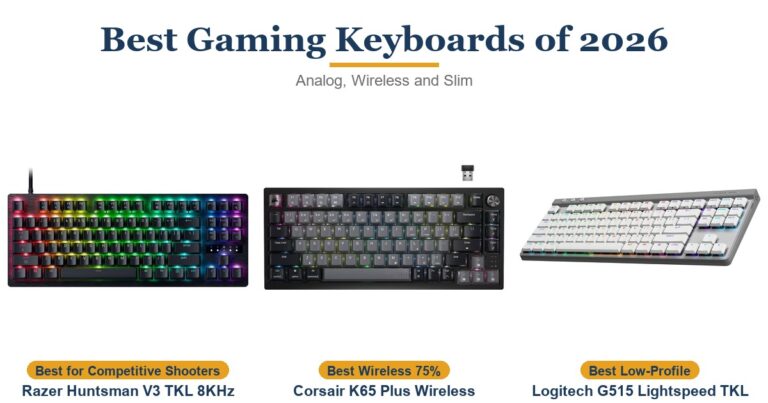
Polling runs at 1,000 Hz over the cable and the 2.4GHz receiver, and 125 Hz over Bluetooth. Wired gaming boards such as the Razer Huntsman V3 Tenkeyless 8KHz poll at 8,000 Hz. Tom’s Guide judged 1,000 Hz fast enough for all but the most demanding esports players, and the Corsair and NuPhy boards in the table top out at the same rate.
Typing Feel and Sound
The Nebula switches are linear, with a 40 g starting force and 60 g at the bottom, and they come lubricated from the factory. Their two plastic rails steady the stem, so keys barely wobble side to side. Tom’s Hardware, a longtime fan of tactile switches, found them about the smoothest linear switches it had used, and it preferred the feel and sound to the Corsair K65 Plus Wireless. Tom’s Guide’s reviewer called it the best keyboard they had used for typing. In its typing tests, raising the actuation point from the default 1.6 mm to 3.2 mm lifted its speed from 95 to 106 words per minute and its accuracy from 85.64% to 93.97%.
Inside, Keychron stacks 3.5 mm EVA foam, EPDM foam and a silicone pad to damp the sound. Testers agree it is free of hollow echo, but they describe the result differently. PC Gamer said it is probably one of the best-sounding keyboards it has used, creamy and without case rattle, while Tom’s Guide found it moderately loud and rather plain, somewhere between a clack and a thock, and said the NuPhy Halo75 V2 sounds better. The rounded OSA keycaps on the Special Edition are comfortable under the fingers.
It sits fairly high, at 30.1 mm at the front and 40.7 mm at the back. TheSixthAxis found the frame thicker than its usual keyboard and wanted a wrist rest for long typing sessions, though not for gaming. The two-stage feet give three typing angles: 5, 9.34 and 12.43 degrees.
Build, Wireless and Battery
The aluminum frame pieces and wood sides wrap a plastic core: the bottom case is ABS, and with the wood removed the metal rails slide off. It is still a sturdy board. APH Networks could twist only 1 to 3 mm of flex out of it, and the screw-in, factory-lubed stabilizers on the long keys don’t rattle. APH also took it fully apart with the screwdriver and hex key in the box, a good sign for anyone who wants to mod it later.
A slider on the left edge picks the 2.4GHz receiver, Bluetooth or the cable, and a second switch toggles Mac and Windows layouts. Spare keycaps for both systems come in the box, though the legends aren’t dual-labelled, so moving between Mac and Windows often means swapping keycaps by hand. Testers reported no connection trouble over either wireless mode on Windows or macOS. There is no volume knob, which Tom’s Hardware missed when coming from the Corsair K65 Plus Wireless. The north-facing RGB is bright, but the Special Edition’s keycaps aren’t shine-through, so the legends stay dark; the Standard Version’s keycaps let the light through.
Keychron rates the 4,000 mAh battery at up to 110 hours, which APH Networks reads as the figure with the backlight off. APH Networks got about 28 hours of active use over five days with the backlight on a breathing effect and two devices paired. Tom’s Hardware went nearly two weeks without charging, with the backlight on about 20% of the time. For a reference point, Corsair rates the K65 Plus Wireless at up to 266 hours with its lighting off.
Switches, Hot-Swap and Software
The sockets are hot-swappable, and the catch most testers raised is switch choice: only compatible magnetic switches fit, never ordinary mechanical ones. Keychron now sells the K2 HE with two versions of its Nebula switch. Version 1 works with Gateron’s double-rail magnetic switches, and Version 2 with Keychron’s own Lime magnetic switches, which include tactile Banana models. The Amazon listings we link are the Gateron double-rail version. When Tom’s Guide reviewed it in October 2024, Gateron’s double-rail range was Dawn, Nebula and Aurora, all linear, at 30 g, 40 g and 50 g.
Software is a strength. Keychron Launcher runs in a Chromium browser, so there is nothing to install, though the keyboard has to be plugged in by cable to set it up. It handles actuation, rapid trigger, remapping, macros and lighting, and saves up to three profiles on the keyboard. The firmware is open-source QMK, and the board also works with VIA. Tom’s Hardware hit one limit: the depth-based multi-action keys wouldn’t take media controls such as volume.
How Does It Stack Up Against the Competition?
Test sites set it against compact wireless boards at a similar price and against gaming boards with adjustable switches. Here it is next to one of each kind, plus a 75% board Tom’s Guide names as a rival.
| Feature | Keychron K2 HE | Corsair K65 Plus Wireless | Razer Huntsman V3 Tenkeyless 8KHz | NuPhy Halo75 V2 |
|---|---|---|---|---|
| Price (USD) | $139.99 | $159.00 | $169.99 | $125.96 |
| Layout | 75% | 75% | Tenkeyless | 75% |
| Switches and actuation | Gateron magnetic, adjustable 0.2-3.8 mm | Corsair MLX Red mechanical, 1.9 mm | Razer analog optical, adjustable 0.1-4.0 mm | Mechanical, 3/5-pin MX-style hot-swap |
| Connection | 2.4GHz, Bluetooth, wired | 2.4GHz, Bluetooth, wired | Wired | 2.4GHz, Bluetooth, wired |
| Top polling rate | 1,000 Hz | 1,000 Hz | 8,000 Hz | 1,000 Hz |
| Maker’s battery rating | Up to 110 hours | Up to 266 hours (lighting off) | No battery (wired) | Up to 307 hours (lighting off) |
| TTP Review | This review ↑ | Read our review → | Read our review → | — |
| Amazon | View on Amazon | View on Amazon | View on Amazon | View on Amazon |
Prices change frequently — always verify current pricing before purchasing.
Keychron K2 HE: Worth It for One Board That Games and Types
Buy it if the same keyboard has to carry a workday of typing and an evening of shooters. You can keep a deep actuation point for typing and a 0.2 mm one for games, and switch between saved profiles with a shortcut. Testers rated the feel, the build and the gaming features highly at this price, and the wood-trimmed Special Edition looks more like home-office furniture than gaming gear. As of November 2026 it costs less on Amazon than the Corsair and Razer boards in the table, and a little more than the NuPhy.
Look elsewhere in a few cases. Competitive players who want every millisecond should look at the wired Razer Huntsman V3 Tenkeyless 8KHz, which adds 8,000 Hz polling and adjustable actuation down to 0.1 mm. If you want a volume knob and a longer battery rating, the Corsair K65 Plus Wireless has both. If you want tactile switches or a wide switch choice, the NuPhy Halo75 V2 takes ordinary 3- and 5-pin MX-style mechanical switches. And if you want the backlight to shine through the legends, the Standard K2 HE has shine-through keycaps.
Sources
- Keychron — K2 HE Wireless Magnetic Switch Custom Keyboard (product page and specifications)
- Keychron K2 HE — Amazon Product Listing
- Tom’s Guide — Keychron K2 HE review
- Tom’s Hardware — Keychron K2 HE Special Edition Review
- PC Gamer — Keychron K2 HE review
- APH Networks — Keychron K2 HE Review
- TheSixthAxis — Keychron K2 HE Keyboard Review
- The Gadgeteer — Keychron K2 HE magnetic switch mechanical keyboard review
- Corsair — K65 Plus Wireless 75% RGB Mechanical Gaming Keyboard
- Razer — Huntsman V3 Tenkeyless 8KHz
- NuPhy — Halo75 V2
Reader Poll
What would you use the K2 HE's adjustable magnetic switches for most?
Help Our Editors Know What Matters to You
Explore on Amazon →