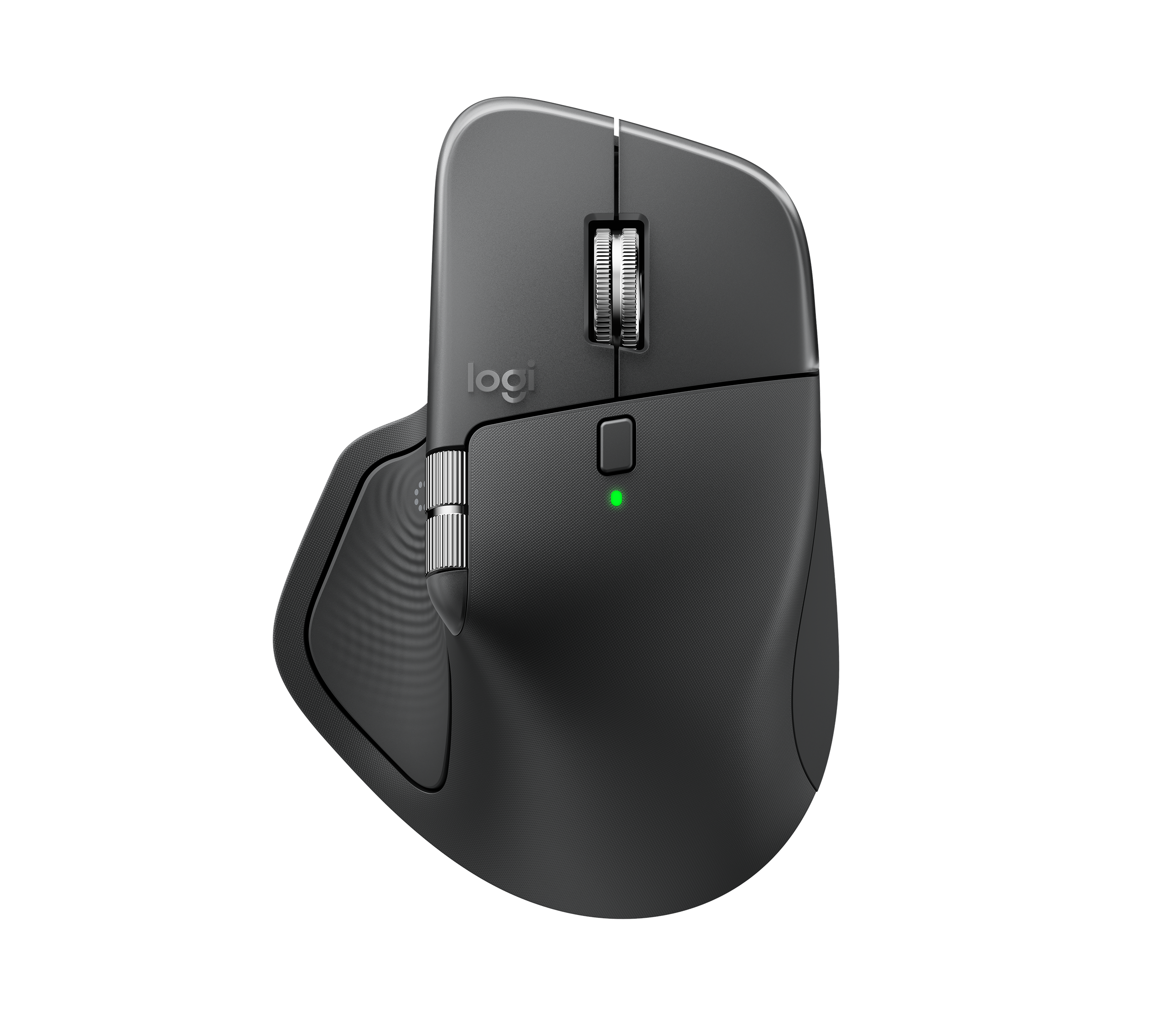
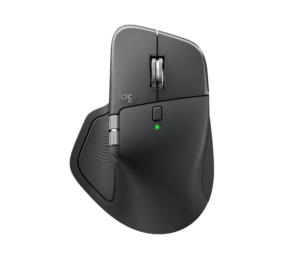
The MX Master 4 is the one to buy if you work all day on Windows or macOS and will set up its Actions Ring and per-app buttons: the MagSpeed wheel, the thumb wheel and very quiet clicks are why this line keeps topping productivity-mouse lists. Battery life stretches for weeks between charges, and the harder finish should wear better than the old rubber. It is heavy at 150 g, and some testers find the hard shell less comfortable than the old soft rubber. Smaller hands are better served by the Lift or the MX Anywhere 3S.
Pros
- MagSpeed wheel switches between notched and free-spin scrolling
- Thumb wheel for sideways scrolling
- Actions Ring puts up to eight per-app shortcuts at the cursor
- Very quiet main clicks
- Weeks of battery life, 3 hours from a 1-minute charge
- Harder finish should wear better than the old rubber coating
Cons
- Heavy at 150 g; some testers find the hard shell less comfortable than the old rubber
- Not well suited to smaller hands; no left-handed version
- Haptics, Actions Ring and custom settings need Logi Options+ (no onboard memory)
- 125 Hz polling and no USB-C cable in the box
As an Amazon Associate I earn from qualifying purchases. Disclosure
Overview
If your day runs through spreadsheets, editing timelines and a browser full of tabs, the mouse matters more than most desk gear, and Logitech’s MX Master line has been the default pick for that kind of work for years. The MX Master 4 keeps what earned it that spot: a MagSpeed wheel that flips between notched and free-spinning scrolling, a thumb wheel for sideways scrolling, a Darkfield sensor that tracks even on glass, and a sculpted right-handed shape. It was $118.00 on Amazon in October 2026.
The changes sit mostly under your thumb. Press the thumb rest, now a haptic panel, and the Actions Ring pops up: an on-screen menu of up to eight shortcuts. Gestures move to a third side button. The shell changed too, from the 3S’s all-over soft rubber to hard textured plastic, with silicone kept only where the thumb and outer fingers rest, and the wireless receiver is now a USB-C Logi Bolt dongle. RTINGS calls it the best productivity mouse for most users, though a 3S owner gains less than the spec sheet suggests.
Key Specifications
| Price (USD) | $119.99 |
| Sensor | Darkfield high precision, 200-8,000 DPI; tracks on glass at least 4 mm thick |
| Buttons | 8, including a gesture button and the Haptic Sense Panel |
| Scrolling | MagSpeed wheel with Smart Shift, plus a thumb wheel for horizontal scrolling |
| Connection | Logi Bolt USB-C receiver (included) or Bluetooth Low Energy 5.1; 10 m range |
| Battery | Rechargeable 650 mAh, rated up to 70 days; 3 hours from a 1-minute charge |
| Charging | USB-C (cable not included) |
| Dimensions | 128.15 x 88.35 x 50.8 mm (5.05 x 3.48 x 2 in) |
| Weight | 150 g (5.29 oz) |
| Full feature support | Logi Options+ on recent Windows and macOS; basic functions on Linux, ChromeOS, iPadOS and Android |
| Warranty | 1-year limited hardware warranty |
Logitech MX Master 4 Controls: Scroll Wheels, Actions Ring and Haptics
The main wheel is still the reason to buy an MX Master. It switches between a precise notched mode and a free-spinning mode, either with a button or automatically when you flick it harder, and Logitech rates the free-spin mode at up to 1,000 lines per second. The thumb wheel under it scrolls sideways through wide spreadsheets and video timelines, and PCGamesN found Logitech had loosened its feel compared with the MX Master 3, so it moves more easily.
The new thumb panel opens the Actions Ring around the cursor, with up to eight shortcuts that can change with the app you’re in, and downloadable plugins set it up for apps such as Photoshop, Premiere and Chrome; PCGamesN notes the plugins are free but need a Logitech account. Logitech says the ring saves up to 33% of your time, a figure from its own study of 37 MX Master users. Tom’s Guide found it a clear improvement over the 3S’s gesture pad, because every assigned command shows on screen instead of having to be remembered. PCGamesN found that setting it up properly, app by app, takes real time.
The panel also buzzes to confirm actions, at four intensity levels or switched off. Testers split on whether that matters. Notebookcheck found the feedback genuinely useful in supported apps such as Photoshop and Premiere Pro, while ITdaily said it adds nothing if you use the mouse like a traditional one. On Windows 11, Logitech says the mouse also works with the system’s own Advanced Haptics after the update from the end of March 2026.
Shape, Weight and the New Finish
The shape is the familiar one: a right-handed body that slopes to the right, long main buttons, and side controls placed so the thumb barely has to move. Tom’s Guide’s reviewer, who has arthritis affecting the wrists and fingers, had no hand or wrist pain using it. The body is a few millimetres bigger than the 3S, and testers warn that it isn’t well suited to smaller hands. There is no left-handed version.
At 150 g it is a heavy mouse, 9 g more than the 141 g MX Master 3S. PCWorld found it sluggish to move quickly, while Tom’s Guide and ITdaily didn’t notice the extra weight over the 3S. The new finish holds the hand well for most testers, and Engadget calls it “smooth without feeling slippery”, but PCGamesN found your palm slides off it and called the change “a big downgrade”. Tom’s Guide found the hard plastic less comfortable than the old soft rubber, though it could live with it.
What the new finish buys is longevity. The soft-touch coating on earlier MX Masters tended to wear and discolour over time, and the harder plastic should hold up better. The main buttons are very quiet, though not noticeably quieter than the 3S’s.
Tracking, Battery and the Software
Tracking is a strength for work: the Darkfield sensor works on almost any flat surface, glass included, and runs from 200 to 8,000 DPI. It reports at 125 Hz, which is fine for office work but too slow for competitive gaming. The mouse connects through the included Logi Bolt USB-C receiver or Bluetooth and switches between up to three devices with a button underneath. ITdaily notes that the Mac edition ships without the Bolt receiver, and that the standard version works just as well on macOS.
Logitech rates the battery at up to 70 days per charge, with three hours of use from a one-minute top-up, and you can keep working while it charges. How far that stretches depends on use: PCGamesN and Engadget found the rating borne out, while Tom’s Guide got about two working weeks of solid daily use, ITdaily still had half its charge after two weeks of intensive use, and Notebookcheck thinks 70 days is realistic with the haptics switched off. There’s no USB-C cable in the box.
Most of what sets this mouse apart depends on Logi Options+ running on a recent version of Windows or macOS: the haptics, the Actions Ring, Smart Actions and Flow, Logitech’s tool for moving the cursor and copied files between two computers. The mouse has no onboard memory, so your custom settings stay on each computer rather than in the mouse. RTINGS points out that this may be a dealbreaker on a locked-down work computer that blocks third-party apps. On a Mac, Options+ also asks for wide system access, including input monitoring.
How Does It Stack Up Against the Competition?
The MX Master 4’s closest alternatives are Logitech’s own: the MX Master 3S it replaces, the compact MX Anywhere 3S for a laptop bag, and the vertical Lift for smaller hands.
| Feature | Logitech MX Master 4 | Logitech MX Master 3S | Logitech MX Anywhere 3S | Logitech Lift |
|---|---|---|---|---|
| Price (USD) | $119.99 | $99.99 | $89.99 | $61.50 |
| Weight | 150 g | 141 g | 99 g | 125 g |
| Max sensitivity | 8,000 DPI | 8,000 DPI | 8,000 DPI | 4,000 DPI |
| Buttons (Logitech’s count) | 8 | 7 | 6 | 6 |
| Horizontal scrolling | Thumb wheel | Thumb wheel | Side button + main wheel | Not listed |
| Haptic thumb panel | Yes | No | No | No |
| Power (Logitech rating) | 650 mAh rechargeable, up to 70 days | 500 mAh rechargeable, up to 70 days | 500 mAh rechargeable, up to 70 days | 1 AA battery, up to 24 months |
| TTP Review | This review ↑ | Read our review → | — | — |
| Amazon | View on Amazon | View on Amazon | View on Amazon | View on Amazon |
Are some of these out of stock? Get an email when they’re back with our free Stock Check
Prices change frequently — always verify current pricing before purchasing.
Logitech MX Master 4: Worth It for Long Days at a Desk
Buy it if you spend most of the day in spreadsheets, Adobe apps or a crowded browser on Windows or macOS, and you’re willing to put time into setting up the Actions Ring and per-app buttons; that’s where the new hardware earns its place. Coming from an MX Master 3 or older, the upgrade brings the quiet clicks, the USB-C receiver and the new controls together. If your MX Master 3S still works, testers mostly say keep it unless the Actions Ring would change how you work.
Look elsewhere in three cases. With smaller hands, consider the vertical Lift, which Logitech designs for small to medium hands, while the MX Anywhere 3S keeps the MagSpeed wheel in a compact body. Competitive gamers need a gaming mouse with a faster polling rate. And if you’d like a rival from outside Logitech, Engadget’s runner-up is the Razer Pro Click V2. Razer gives it 9 programmable buttons, up to 3.5 months of battery life and one-click AI prompts, and it was $89.99 on Amazon in October 2026. For less money, RTINGS says the Keychron M6 offers similar comfort and features, free-scrolling included, though BGR found it less well built and harder to customize.
Sources
- Logitech — MX Master 4 Wireless Mouse (product page and specifications)
- Logitech MX Master 4 — Amazon Product Listing
- RTINGS — Logitech MX Master 4 Mouse Review
- Tom’s Guide — I review peripherals for a living: Here’s the truth about the Logitech MX Master 4
- PCGamesN — Logitech MX Master 4 review
- Notebookcheck — Logitech MX Master 4 review: Premium mouse with haptic feedback
- ITdaily — Logitech MX Master 4 review: something old, something new
- BGR — Logitech MX Master 4 Review: The Biggest Update To The Best Mouse
- PCWorld — Logitech MX Master 4 review
- EFTM — Review: Logitech MX Master 4, long live the king, again
- Engadget — The best wireless mice for 2026
- Logitech — MX Master 3S specifications
- Logitech — MX Anywhere 3S specifications
- Logitech — Lift Vertical Ergonomic Mouse specifications
- Razer — Razer Pro Click V2 specifications
Reader Poll
What would you put on the MX Master 4's Actions Ring first?
Help Our Editors Know What Matters to You
Explore on Amazon →