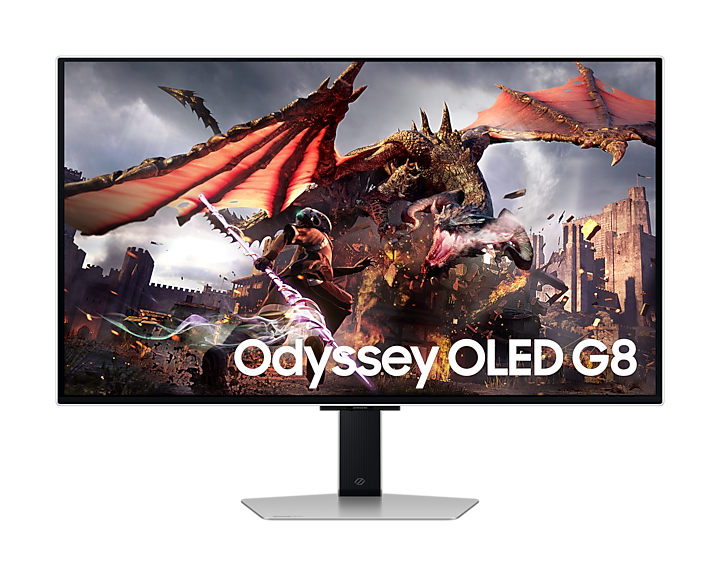
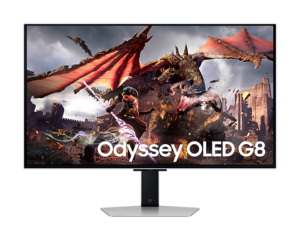
Buy the Odyssey OLED G8 G80SD if one 32-inch screen has to be both a 4K, 240Hz OLED gaming monitor and a smart TV: it runs Samsung's Tizen streaming and cloud-gaming apps from its own remote, with no PC switched on. Its matte coating also copes with room light better than glossy QD-OLED rivals. The trade-off is a TV-style menu system that PC-only users find fussy, plus no USB-C. Laptop-first desks are better served by Samsung's newer G80SH.
Pros
- 4K 240Hz QD-OLED with near-instant motion
- Built-in Tizen apps, Gaming Hub and remote
- Matte coating handles reflections well
- Very low measured input lag
- Metal design with a fully adjustable stand
Cons
- TV-style menu system slows PC setup
- No USB-C, KVM switch or headphone jack
- Modest SDR brightness for bright rooms; no Dolby Vision
As an Amazon Associate I earn from qualifying purchases. Disclosure
Overview
Most 32-inch 4K OLED gaming monitors use the same Samsung QD-OLED panel, so they tend to differ in coating, ports and price. Samsung’s own Odyssey OLED G8 G80SD goes further: it wraps that 4K, 240Hz panel in the Tizen smart-TV software from Samsung’s televisions, adds a remote and built-in speakers, and can stream Netflix or cloud games with no PC attached.
Two other things set it apart. Unlike the glossy QD-OLED monitors that came before it, it uses a matte anti-glare coating, which handles room light far better. And it now has a successor: RTINGS describes Samsung’s 2026 Odyssey OLED G8 G80SH as its replacement, with a brighter fourth-generation panel, DisplayPort 2.1 and USB-C, but without the Tizen smart-TV software. That leaves the G80SD as the model to pick for its TV side.
Key Specifications
| Price (USD) | $899.99 (last Amazon price, Oct 6, 2026) |
| Screen | 32-inch class, flat QD-OLED |
| Resolution and refresh rate | 3840 x 2160, up to 240Hz |
| Response time (rated) | 0.03 ms (GtG) |
| Brightness (rated) | 250 nits typical |
| HDR formats | HDR10, HDR10+, HDR10+ Gaming (no Dolby Vision) |
| Colour gamut (rated) | 99% DCI-P3 |
| Screen finish | Matte anti-glare (Samsung “Glare Free”) |
| Video inputs | 2 x HDMI 2.1, 1 x DisplayPort 1.4 |
| USB | 2-port USB 3.0 hub; no USB-C |
| Wireless | Wi-Fi 5, Bluetooth 5.2 |
| Smart platform | Tizen, with Gaming Hub and a remote control |
| Speakers | Built in, 10W output |
| Stand | Height (120 mm), tilt, swivel and pivot; 100 x 100 mm VESA mount |
| Weight with stand | 8.4 kg (18.5 lb) |
| Warranty | 3 years on the Amazon listing; burn-in from normal use covered |
Samsung Odyssey OLED G8 G80SD Picture Quality
Picture quality is the G80SD’s strength. Each pixel lights itself, so blacks are truly black in a dark room and contrast is effectively infinite, and the quantum-dot panel produces rich, saturated colour: TechRadar measured 100% of sRGB and 99.2% of DCI-P3. At 4K on a 32-inch screen, text and fine detail look sharp, with little of the colour fringing older QD-OLED panels showed around small type.
The matte coating is the part that divides opinion. It diffuses reflections from lamps and windows far better than the glossy finish on most QD-OLED rivals, which makes the G80SD easier to live with in a lit room. TFTCentral saw no noticeable grain from it, while DisplayNinja found it adds a little graininess and PCWorld felt it dampens perceived contrast in bright light. It doesn’t stop the raised, purplish blacks QD-OLED panels show in a bright room, either.
Brightness is where testers differ. PCWorld measured a maximum sustained SDR brightness of 206 nits, below the roughly 250 nits it sees from most alternatives, while TFTCentral measured about 260 nits, broadly in line with rivals and enough unless the room is very bright. In HDR, small highlights get much brighter than the full screen: PCWorld reached 779 nits on a 10% window after switching on the Peak Brightness and Active tone mapping settings, against 337 nits at the defaults, though TFTCentral found that tone-mapping boost very inaccurate. Getting HDR right takes some trial and error, and the formats stop at HDR10 and HDR10+, with no Dolby Vision.
Out-of-the-box colour gets mixed marks. DisplayNinja rated the factory calibration excellent and TFTCentral found the default setup pretty good, though it called the factory-calibrated preset “basically pointless”: it is only reachable with Game mode off, which TFTCentral says seems to cap the refresh rate at 120Hz. PCWorld found the default colour less precise than some competitors’. TFTCentral and DisplayNinja both found a usable sRGB emulation mode for SDR work, but PC Gamer couldn’t stop SDR colours from looking oversaturated on a PC.
Gaming Performance and Motion
For games, the 4K, 240Hz combination and OLED’s near-instant pixel response keep fast motion very sharp. TFTCentral measured total display lag of just 1.40 ms, which puts it in the lowest-lag class of its own rating scale. Both HDMI 2.1 ports handle 4K at 240Hz as well as a console’s 4K at 120Hz, so a PC, a PS5 and an Xbox Series X can all stay plugged in. Reaching 240 frames per second at 4K takes a high-end graphics card, so most systems will run games well below the panel’s limit.
Variable refresh rate covers FreeSync Premium Pro, HDMI VRR and, since a firmware update in late June 2024, Nvidia G-Sync Compatible mode. Like most OLEDs it can flicker slightly in dark scenes when frame rates swing; Samsung’s VRR Control setting suppresses that but adds input lag, so DisplayNinja suggests simply switching VRR off in the games where flicker bothers you. PCWorld also saw an occasional line of digital static along the bottom edge with Adaptive Sync on, which toggling the setting or restarting the PC could clear, sometimes only after several tries.
Smart TV Features and Menus
The G80SD’s real difference is its software. It runs the same Tizen system as Samsung’s TVs, with streaming apps such as Netflix, Prime Video, YouTube and Disney+, a Gaming Hub for Xbox Game Pass and GeForce Now cloud gaming, Alexa and Bixby voice control, and a remote with a solar panel on the back. Samsung’s TV processor also upscales lower-resolution video, though TechRadar found the upscaling doesn’t work in the monitor’s PC mode. In a bedroom, dorm or studio apartment, that lets one 32-inch screen do the job of both a monitor and a small TV.
The price of that software is a monitor that behaves like a TV, and testers disagree on how much it gets in the way. PC Gamer found the monitor settings scattered across several menus, needed over an hour before it could reliably switch inputs without rebooting the display, and scored it 60 out of 100. TFTCentral called the menu system unintuitive and hard to navigate. PCWorld was more relaxed: setup took about five minutes and the smart features can mostly be ignored, though it still landed on the TV home screen by accident more than once.
Ports, Speakers and Burn-In Care
Connections are the G80SD’s other gap. There is no USB-C port and no KVM switch, so a laptop can’t connect and charge over one cable, and the USB hub is just two USB-A ports fed by a USB-B upstream link. There is no headphone jack either; audio goes out over Bluetooth or to a soundbar through HDMI ARC.
The built-in speakers split testers. TFTCentral counted them as decent and useful for the TV apps and a connected console, TechRadar found them clear but short on bass, and PCWorld judged them muddy and harsh for music, and only somewhat better at moderate volume.
For burn-in, Samsung replaced the graphite heat-spreading sheet most OLED monitors use with a pulsating heat-pipe cooling system. Samsung also lists logo and taskbar detection (logo detection works in AV mode only) and a screen saver, but TFTCentral found only logo dimming and a pixel-refresh cycle in the menu. Samsung Canada’s spec sheet says burn-in from normal use is covered (commercial use and misuse are not), and Samsung US support told TFTCentral the three-year US warranty, the term the Amazon listing states, includes burn-in.
The metal-clad body and compact stand, with height, tilt, swivel and portrait pivot, feel premium, and the RGB lighting ring on the back can be switched off.
How Does It Stack Up Against the Competition?
The G80SD is the only one of these four 32-inch 4K OLED monitors with smart-TV apps built in; the others trade that for USB-C, and the ASUS adds a 480Hz mode at 1080p.
| Feature | Samsung Odyssey OLED G8 G80SD | MSI MAG 321UPX QD-OLED | ASUS ROG Swift OLED PG32UCDP | Samsung Odyssey OLED G8 G80SH |
|---|---|---|---|---|
| Price (USD) | $899.99 (last Amazon price, Oct 6, 2026) | $699.99 | $1,099.99 | $999.99 |
| Panel type | QD-OLED | QD-OLED | WOLED | QD-OLED |
| Resolution and max refresh | 4K, 240Hz | 4K, 240Hz | 4K at 240Hz, or 1080p at 480Hz | 4K, 240Hz |
| Screen finish | Matte | Glossy (anti-reflection) | Matte | Matte |
| Built-in smart TV apps | Yes (Tizen) | No | No | No |
| USB-C | None | Yes, 15W charging | Yes, 90W charging | Yes, 98W charging |
| DisplayPort version | 1.4 | 1.4a | 1.4 | 2.1 |
| Built-in speakers | Yes | No | No | No |
| Headphone jack | No | Yes | Yes | Yes |
| Burn-in covered by warranty | Yes | Yes | Yes | Yes |
| Amazon | View on Amazon | View on Amazon | View on Amazon | View on Amazon |
Prices change frequently — always verify current pricing before purchasing.
Samsung Odyssey OLED G8 G80SD: Worth It as a Monitor That Doubles as a TV
Buy the G80SD for a room where one screen has to do two jobs: 4K, 240Hz gaming from a PC (or 4K at 120Hz from a console) at the desk, and Netflix or cloud games from the bed or couch with no PC switched on. Its matte coating also suits a room with lamps or a window behind you better than the glossy rivals, as long as the space isn’t flooded with daylight.
If the monitor will only ever run a PC, look elsewhere. Samsung’s own G80SH gives up the TV apps for a brighter panel, 98W USB-C charging and DisplayPort 2.1, which makes it the better laptop-desk monitor, and MSI’s MAG 321UPX covers the same 4K, 240Hz basics with USB-C and none of the TV-style menu system. Players who want brighter HDR across large areas of the screen, or a 480Hz mode for esports, should look at ASUS’s WOLED-based ROG Swift PG32UCDP.
Sources
- Samsung — Odyssey OLED G8 G80SD (LS32DG800SNXZA) Product Page
- Samsung Canada — Odyssey OLED G8 G80SD Specifications
- Samsung Odyssey OLED G8 G80SD — Amazon Product Listing
- TFTCentral — Samsung Odyssey G80SD Review
- RTINGS — Samsung Odyssey OLED G80SD S32DG80 Review
- TechRadar — Samsung Odyssey OLED G8 Review
- PCWorld — Samsung OLED G8 Review
- PC Gamer — Samsung Odyssey G8 OLED G80SD Review
- DisplayNinja — Samsung Odyssey OLED G8/G80SD Review
- Newsweek — Samsung Odyssey OLED G8 Review
- RTINGS — Samsung Odyssey OLED G80SH S32HG802S Review
- Samsung Canada — Odyssey OLED G8 G80SH Specifications
- MSI — MAG 321UPX QD-OLED Specifications
- Chill Dad — MSI MAG 321UPX QD-OLED Review
- Tom’s Hardware — Asus ROG Swift OLED PG32UCDP Review
- TFTCentral — Asus ROG Swift PG32UCDP Review
Reader Poll
What would you mostly use a 32-inch OLED like the G80SD for?
Help Our Editors Know What Matters to You
Explore on Amazon →