For Canadians who type all day at one desk, the Rainy75 Pro, sold on Amazon.ca, is the keyboard to get: testers single out its rounded, rain-like sound and its extremely solid aluminum case, the sound and solidity of a custom board without building one. Its smooth Kailh Cocoa switches are hot-swappable, and its 7,000 mAh battery is rated for about 900 hours with the lighting off. The trade-off is a heavy, thick case fixed at 7 degrees: most testers found the slope comfortable, but if you type for hours a wrist rest is worth having. Gamers who want adjustable actuation are better served by a magnetic-switch board such as the MonsGeek FUN60 Ultra.
Pros
- Rich, rounded typing sound
- Extremely solid aluminum build
- Smooth Kailh Cocoa linear switches
- Hot-swappable switches
- Long rated battery life
- Wired, 2.4GHz and Bluetooth
Cons
- Fixed 7-degree angle and thick case; TechRadar wanted wrist support for long sessions
- Very heavy at 1.8 to 2.0 kg
- VIA setup can be fiddly
- Wireless power switch hidden under Caps Lock
As an Amazon Associate I earn from qualifying purchases. Disclosure
Overview
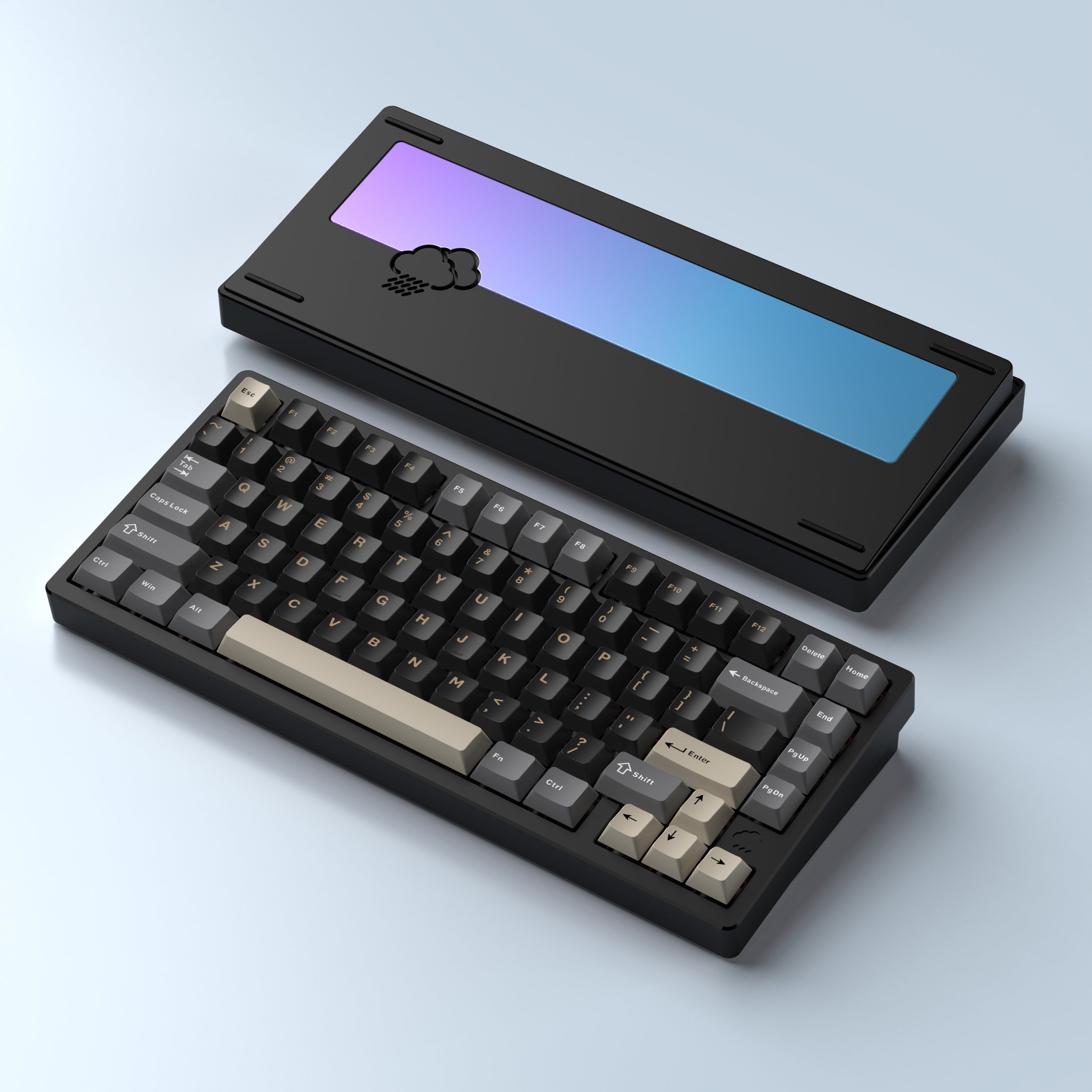
The Rainy75 Pro is the top model in WOBKEY’s Rainy 75 range: a 75% wireless mechanical keyboard with a CNC-machined aluminum case, Kailh Cocoa linear switches, a gasket mount and a 7,000 mAh battery. It gives people who type all day the sound and heft of a custom keyboard without the build, since it arrives assembled and connects over a USB-C cable, a 2.4GHz dongle or Bluetooth.
The Pro’s extra money goes into the parts. WOBKEY gives it an FR4 plate instead of the Standard’s plastic one, a stainless steel weight in place of a glass one, and twice the battery (7,000 mAh against 3,500 mAh). In Canada the step up to the Pro costs little: on Amazon.ca in October 2026 the Pro was $199 CAD, the Standard $189 CAD and the Lite, which drops the RGB lighting, $169 CAD. The trade-offs testers raise most are practical ones: it is very heavy, and its setup software takes patience.
Key Specifications
| Price (CAD) | $199.00 |
| Layout | 75%, 81 keys |
| Switches | Kailh Cocoa linear (Pro), hot-swappable |
| Case and plate | CNC 6063 aluminum case, FR4 plate, gasket mount |
| Keycaps | Double-shot PBT, Cherry profile |
| Connectivity | USB-C wired, 2.4GHz dongle, Bluetooth 5.0 |
| Polling rate | 1,000 Hz wired and 2.4GHz; 500 Hz Bluetooth |
| Battery | 7,000 mAh; rated about 900 hours with RGB off, about 80 hours with RGB on |
| Charging time | About 3 to 4 hours |
| Dimensions | 317.5 x 139.7 x 37.6 mm (12.5 x 5.5 x 1.5 in) |
| Weight | 1.8 to 2.0 kg (4.0 to 4.4 lb) across the Rainy 75 range |
| Typing angle | 7 degrees, no adjustable feet |
| Software | VIA (runs in a web browser) |
| Warranty | Manufacturing defects, 6 months from receipt (WOBKEY policy) |
WOBKEY Rainy75 Pro Sound and Typing Feel
The sound is the reason to buy it. Tom’s Guide called it the nicest-sounding keyboard its reviewer had tested and gave it 4.5 stars and an Editor’s Choice badge. Inside, five layers of sound-dampening foam and case padding sit around a gasket-mounted board. WOBKEY compares the sound to rain, and testers agree it sounds like heavy raindrops.
It is not a quiet keyboard. IGN measured peaks in the mid-60s on its decibel meter at roughly ear height while seated, though it found the sound more satisfying than distracting. If you share an office or type during calls, that volume is worth weighing. Amazon also lists a Pro with silent “Shhh” switches; none of the reviews we found tested that version, and this review covers the Cocoa model.
The Kailh Cocoa switches are smooth linears with no bump. IGN puts the actuation force at roughly 45 to 50 g, and testers read that differently. TechRadar found them light and snappy with a relatively short travel, while Tom’s Guide’s reviewer, used to 30 g switches, said “they’re a little on the heavy side”, and IGN found the extra force made the board less appealing for fast games. In Tom’s Guide’s typing test, its reviewer hit 110 words per minute at 96.48% accuracy, her best result on any keyboard she had tested and well above her 88.75 WPM average across keyboards.
The Pro ships with linear switches only, which Tom’s Guide counts against it if you prefer a tactile bump. The fix is cheap and solder-free, because the board is hot-swappable and takes 3- and 5-pin MX-style switches. Gaming is where it is less convincing. TechRadar enjoyed it in Counter-Strike 2, but for players who want adjustable actuation, two testers point to magnetic-switch boards such as MonsGeek’s FUN60 Ultra instead.
Build Quality and Weight
The build is the other thing testers agree on. The case is CNC-machined 6063 aluminum, the Pro adds a stainless steel weight, and testers describe it as extremely solid and hard-wearing. GreenKeys, whose review unit was the Lite, says the Pro’s FR4 plate and steel weight give it a slightly harder, more resilient typing feel than the other Rainy 75 models.
That build makes it very heavy. WOBKEY lists 1.8 to 2.0 kg across the Rainy 75 range, and the Pro IGN reviewed weighed about 1.95 kg (4.3 lb), near the top of that range. The upside is stability: it stays put on the desk while you type.
The double-shot PBT keycaps in a Cherry profile have a smooth finish that testers liked. The south-facing RGB lights the gaps between the keys rather than shining through them, since the keycaps aren’t shine-through, which IGN notes makes less of the lighting visible. TechRadar points out that the function-layer shortcuts aren’t printed on the keys; IGN found the included manual and reference card useful, with diagrams of every function.
In the box are a USB-C cable, a combined keycap and switch puller, the 2.4GHz dongle and three spare switches, but IGN notes the board has nowhere to store the dongle. WOBKEY’s published policy covers manufacturing defects for six months from receipt. On Amazon.ca, as in the US, the Pro is sold by a third-party seller, KBM Gadgets, rather than by Amazon.ca itself.
Comfort and Typing Angle
For most people the shape works. WOBKEY gives the case one fixed 7-degree slope and no adjustable feet, and at 37.6 mm tall by its dimensions it is a thick board. Most testers found the slope comfortable, and Tom’s Guide’s reviewer used it for three weeks without her hands feeling fatigued.
TechRadar, though, thought the stock angle gave a good typing position but still wanted wrist support after long periods, so if you type for hours at a stretch on a bare desk, a wrist rest is worth having.
Wireless, Battery and Latency
It connects three ways: USB-C, the 2.4GHz dongle and Bluetooth, with up to three Bluetooth devices. The quirk most testers mention is the wireless power switch, which sits under the Caps Lock keycap, so you have to pull the keycap to reach it. In practice you can leave it on: TechRadar only needed to turn it off for a firmware update, and IGN notes it’s best switched off for long stretches of wired use.
WOBKEY rates the polling rate at 1,000 Hz wired and over 2.4GHz and 500 Hz over Bluetooth, with latency of 2 ms, 3 ms and 7 ms respectively. Tom’s Guide’s spec sheet lists 500 Hz and treats it as a productivity keyboard rather than a gaming one. IGN points to an ultra-low latency mode, switched on with Fn and H, which it only felt a need for in competitive gaming. TechRadar saw one brief bout of serious input lag over 2.4GHz while gaming, once in several days of use; IGN had no problems over any of the three connections.
The rated battery life is long. WOBKEY rates the battery at about 900 hours with the RGB off and about 80 hours with it on, and IGN expects it to fall below 80 hours with the low-latency mode on as well. Real-world results varied: Tom’s Guide’s keyboard was still at 80% after three weeks with the lighting on, while TechRadar’s dropped to 80% after several days of mixed Bluetooth and 2.4GHz use. WOBKEY puts a full charge at about three to four hours.
VIA Software and Setup
There’s no app to install: key remapping, macros and lighting all live in VIA, a configurator that runs in a web browser. Testers split on how easy that is. Tom’s Guide had no trouble with it and liked its clean layout. TechRadar had a harder time: it had to download and load a JSON file by hand, save profiles as files on its PC, and sometimes lost the connection to the keyboard. IGN landed in between, finding the first setup unintuitive but the rest fairly straightforward.
Once it’s running, IGN counted up to 15 macros and four layers. GreenKeys reports that the layout file has since been merged into VIA, so the manual step is usually no longer needed, and that WOBKEY told it advanced tap-hold features aren’t supported, so heavy users of tap-hold shortcuts should look at another keyboard. TechRadar adds that VIA offers no performance tweaks for gamers.
How Does It Stack Up Against the Competition?
The closest alternatives at this price are Keychron’s aluminum Q1 Max, Logitech’s full-size MX Mechanical for office work, and NuPhy’s low-profile Air75 V3 if you want something lighter.
| Feature | WOBKEY Rainy75 Pro | Keychron Q1 Max | Logitech MX Mechanical | NuPhy Air75 V3 |
|---|---|---|---|---|
| Price (CAD) | $199.00 | $299.99 | $222.98 | $189.99 |
| Layout | 75%, 81 keys | 75%, with knob | Full size, with number pad | 75% low profile, with knob |
| Case | CNC aluminum | CNC aluminum | Metal plate on a plastic base | Aluminum top case |
| Stock switches | Kailh Cocoa linear, hot-swappable | Gateron Jupiter Red, Brown or Banana, hot-swappable | Low-profile Tactile Quiet, Clicky or Linear | Low-profile, hot-swappable |
| Weight | 1.8 to 2.0 kg (4.0 to 4.4 lb) | 1,724 g (3.8 lb) | 828 g (1.8 lb) | 724 g (1.6 lb) |
| Typing angle | Fixed 7 degrees | 5.2 degrees | Fold-out feet | 4, 8 or 10 degrees (kickstand) |
| Connections | Wired, 2.4GHz, Bluetooth 5.0 | Wired, 2.4GHz, Bluetooth 5.1 | Bluetooth or 2.4GHz receiver, up to 3 devices | Wired, 2.4GHz, Bluetooth 5.0 |
| Rated battery (maker) | About 900 h lights off, 80 h RGB on | Up to 180 h backlight off, 100 h RGB at lowest | About 15 days of daily use, backlight on | Up to 1,200 h lights off, 60 to 100 h lights on |
| Software | VIA (browser) | Keychron Launcher (browser) | Logi Options+ (app) | NuPhyIO |
| TTP Review | This review ↑ | — | Read our review → | Read our review → |
| Amazon | View on Amazon | View on Amazon | View on Amazon | View on Amazon |
Prices change frequently — always verify current pricing before purchasing.
WOBKEY Rainy75 Pro: Worth It for Typists Who Want Custom-Board Sound
If most of your day is spent typing at one desk and you want a keyboard that sounds and feels like a custom build without assembling one, this is the one to get in Canada. It undercuts Keychron’s aluminum Q1 Max by a wide margin (on Amazon.ca in October 2026, $199 CAD against $299.99 CAD) while matching it on the things that make a custom board worth having: a heavy aluminum case, a gasket mount and hot-swappable switches. TechRadar scored it 3.5 out of 5, held back mainly by its price, its software and its lack of wrist support for long sessions; our higher score gives more weight to the sound and build that testers praised, with those trade-offs still counted.
Some buyers will do better elsewhere. For office work with a number pad and app-based shortcuts across devices, Logitech’s MX Mechanical fits better, though PCWorld found its chassis rattles as you type. If you carry your keyboard between places, the NuPhy Air75 V3 weighs well under half as much. Competitive gamers who want adjustable actuation should look at a magnetic-switch board instead.


Sources
- WOBKEY — Rainy 75 Keyboard (official product page)
- WOBKEY — Rainy 75 Specifications
- WOBKEY — Refund and Warranty Policy
- WOBKEY Rainy75 Pro — Amazon.ca Product Listing
- Tom’s Guide — Wobkey Rainy 75 Pro review
- TechRadar — Wobkey Rainy 75 Pro review
- IGN — WOBKEY’s Rainy 75 Pro Has What Keyboard Enthusiasts Are Looking For (via Yahoo Tech)
- GreenKeys — WOBKEY RAINY75 Review
- Keychron — Q1 Max product page
- Logitech — MX Mechanical product page
- PCWorld — Logitech MX Mechanical review
- NuPhy — Air75 V3 product page
Reader Poll
What would you trade for the Rainy75 Pro's rain-like sound?
Help Our Editors Know What Matters to You
Explore on Amazon →