For anyone whose smart TV apps have slowed down, this is an easy 4K upgrade that stays out of sight: it runs from the TV's USB port, sets up in minutes and opens the big streaming apps quickly. The redesigned remote, with TV controls and a customizable star button, is a real step up from older Fire TV remotes. The trade-off is that it has no Dolby Vision and installs apps only from Amazon's Appstore, so owners of premium TVs and anyone who sideloads apps should pick the Fire TV Stick 4K Max instead.
Pros
- Quick menus and fast app launches in everyday use
- Runs from the TV's USB port, no power brick needed
- Redesigned remote with TV controls and a customizable star button
- Wi-Fi 6, HDR10+ and AV1 support
- Alexa+ and Bluetooth headphone pairing built in
Cons
- No Dolby Vision
- No sideloading: apps only from the Amazon Appstore
- Home screen crowded with recommendations and sponsored content
- No power adapter or HDMI extender in the box
As an Amazon Associate I earn from qualifying purchases. Disclosure
Overview
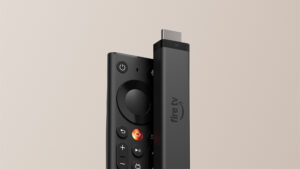
A smart TV whose built-in apps have slowed down is the problem the Amazon Fire TV Stick 4K (2026) is meant to fix. Amazon’s stick lineup is now three tiers, and this is the middle one, above the Fire TV Stick HD and below the Fire TV Stick 4K Max; the 4K Select and 4K Plus it replaces are on their way out. It is slim enough to sit beside other HDMI cables, runs from the TV’s own USB port and ships with Amazon’s redesigned remote.
The biggest change is the software. This is the first 4K Fire TV stick to run Amazon’s own Vega OS instead of the Android-based Fire OS, and it feels quick in daily use; the apps section explains what the switch means for the apps you can install.
Built from 13 sources, including 6 independent reviewers such as Tom's Guide, PCWorld and AFTVnews. Here’s where they agree.
Where the reviews agree
- Menus scroll smoothly and the main streaming apps open quickly in everyday use.
- Running it from the TV’s USB port cuts out a power brick and a cable, which helps on wall-mounted sets.
- Setup is quick: plug it in, sign in and it’s ready in minutes.
Key Specifications
| Price (USD) | $59.99 |
| Video output | 2160p, 1080p and 720p, up to 60 fps |
| HDR formats | HDR10, HDR10+, HLG |
| Video formats | H.265, H.264, VP9, AV1 |
| Audio | Dolby-encoded audio via HDMI pass-through |
| Processor | Quad-core 1.7 GHz |
| Memory / storage | 1 GB RAM / 8 GB storage |
| Wireless | Wi-Fi 6, Bluetooth 5.3, Bluetooth Low Energy |
| Software | Vega OS with Alexa+ (apps from the Amazon Appstore only) |
| Power | Direct Power from the TV’s USB port (cable included) |
| Remote | Fire TV Remote with customizable star button and TV power, volume and mute controls |
| Not in the box | Power adapter, HDMI extender |
Amazon Fire TV Stick 4K (2026) Speed and Everyday Performance
Day to day, it feels quick: menus move without lag and the big apps open promptly. The speed lead Amazon advertises over rival sticks is real in some apps and absent in others, though, and its small memory shows when you hop between apps.
Inside are a quad-core 1.7 GHz processor, 8 GB of storage and 1 GB of RAM, which AFTVnews points out is half the memory of the second-generation Fire TV Stick 4K it replaces. Amazon claims the stick gets to content nearly 20 to 40 percent faster than “a similarly priced 4K stick from another leading brand,” with apps launching over 35% faster. As PCWorld notes, Amazon names neither the rival nor the apps it timed.
Where it falls behind Roku’s Streaming Stick Plus is app switching and standby. PCWorld counted three apps kept loaded before one needed a full reload, against four on the Roku, and 5 seconds back to the home screen after standby, against 2 for the Roku, which never sleeps and only shows a screensaver. Its lead is in Netflix, where PCWorld’s stopwatch had a video playing from the home screen in 32 seconds against the Roku’s 39; in the Apple TV app the two were level, at 30 and 29 seconds.
None of those gaps is large enough to change how it feels to use. For most people the practical result is a TV that feels quick again.
Apps and Sideloading on Vega OS
For most households the app question is already settled: the big streaming services are all in Amazon’s Appstore. The loss falls on people who install apps from outside it.
Amazon counts more than 2,000 apps added to Vega OS since its debut, among them Spotify, Xbox, VLC and a range of VPNs, alongside Netflix, Disney+, YouTube, Prime Video, HBO Max, Peacock and Tubi. Sideloading, which the earlier Android-based Fire TV sticks allowed, is gone, so unofficial app stores and media players you installed yourself won’t run on it. Vega’s app catalogue is smaller than Fire OS’s, so check that any niche app you rely on is listed before you buy.
If sideloading is essential, the Fire TV Stick 4K Max is now the last Android-based stick in Amazon’s lineup.
Picture and Sound Formats
Picture support covers what most 4K TVs need, with one gap that matters to owners of premium sets.
It outputs up to 4K at 60 frames per second with HDR10, HDR10+ and HLG, and decodes AV1, VP9, H.265 and H.264 video. It is the first Fire TV Stick 4K without Dolby Vision since the line began in 2018, so on a TV that supports that format, Netflix and Disney+ play in HDR10 or HDR10+ instead.
Sound is handed to your TV, soundbar or receiver rather than decoded by the stick: Dolby audio, including Atmos, goes out over HDMI pass-through, so you need a compatible soundbar or receiver to hear Atmos. AFTVnews notes that earlier models could decode Dolby audio themselves.
Remote, Setup and Direct Power
This is where the new stick is easiest to like: the remote is a clear upgrade, and the stick can run without a power brick.
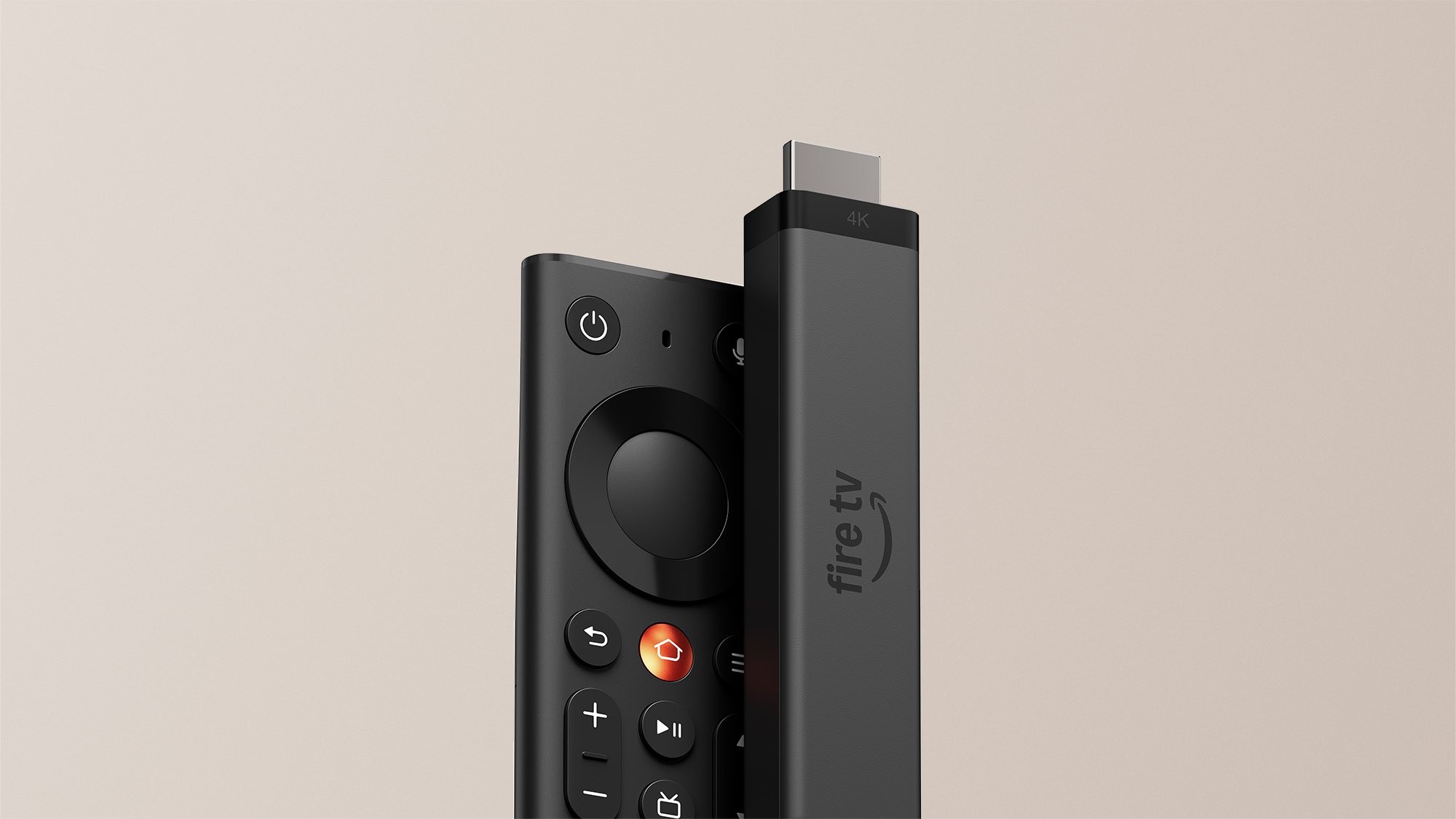
Of all the changes, the remote is the one you’ll notice every day. Its asymmetric shape, flat on top and weighted and curved underneath, puts it in your hand the right way round, the Home key is metal and the other keys are indented or shaped differently. Power, volume and mute buttons run a compatible TV, soundbar or receiver, and the customizable star button, until now limited to Amazon’s premium remote, can jump to a favorite app or switch on a setting like closed captions. Tom’s Guide calls it the best remote Amazon has made to date. Cord Cutters News notes that the big blue Alexa button is now a smaller microphone icon, which cuts accidental voice activations.
Setup is short. Cord Cutters News linked the stick through the Amazon shopping app by scanning a QR code, which pulled in saved Wi-Fi details, and had it ready in roughly five minutes.
Direct Power lets the stick run from the TV’s USB port with the included cable, so there’s no extra cord to an outlet behind a wall-mounted set. It is the first 4K Fire TV stick officially meant to run this way; earlier sticks weren’t officially supported on TV USB ports and could throw insufficient-power warnings. The box is leaner too: there’s no power adapter or HDMI extender, and PCWorld points out that if your TV’s eco mode cuts USB power when the set is off, you’ll need to supply your own charger.
Home Screen Ads and Alexa+
The interface is fast but busy. Recommendations and sponsored content take up a large share of the home screen, which is easy to ignore if you mostly open the same few apps and tiresome if you browse.
Alexa+ is built in, and Amazon offers it on Fire TV at no additional cost. It copes with conversational follow-ups: Tom’s Guide asked for a top-rated drama and then had Alexa+ narrow the results to newer releases. Headphones pair over Bluetooth 5.3, useful when the rest of the house is asleep.
How Does It Stack Up Against the Competition?
Roku’s Streaming Stick Plus is the closest rival from another brand, a 4K stick that also runs from the TV’s USB port, and Amazon’s own Fire TV Stick 4K Max is the step-up within Amazon’s range.
| Feature | Amazon Fire TV Stick 4K (2026) | Roku Streaming Stick Plus | Amazon Fire TV Stick 4K Max (2nd Gen) |
|---|---|---|---|
| Price (USD) | $59.99 | $46.00 | $84.99 |
| Software | Vega OS (Appstore apps only) | Roku OS | Fire OS (Android-based, allows sideloading) |
| HDR formats | HDR10, HDR10+, HLG | HDR10, HDR10+, HLG | Dolby Vision, HDR10, HDR10+, HLG |
| Wi-Fi | Wi-Fi 6 | Wi-Fi 5 (802.11ac), dual-band | Wi-Fi 6E |
| Powered by the TV’s USB port | Yes (officially supported) | Yes | Not officially supported |
| Remote | Fire TV Remote with customizable star button and TV controls | Roku Voice Remote with TV controls | Alexa Voice Remote Enhanced with TV controls (no customizable buttons) |
| TTP Review | This review ↑ | — | Read our review → |
| Amazon | View on Amazon | View on Amazon | View on Amazon |
Prices change frequently — always verify current pricing before purchasing.
Amazon Fire TV Stick 4K (2026): Worth It for a Faster, Simpler TV Setup
It earns its place in a household that streams the big services and wants the TV to respond quickly again. A bedroom or wall-mounted TV with laggy built-in apps is the best case: the stick powers itself from the TV, sets up in minutes and the new remote replaces the TV’s own for power and volume. Prime Video households get the most from it, with Alexa+ search built in and the star button free to jump straight to their most-used app.
Look elsewhere if you sideload apps or own a premium TV and want every format it supports. The Fire TV Stick 4K Max costs more as of November 2026 and in return keeps Fire OS sideloading and Dolby Vision, decodes Dolby audio itself and adds a faster 2.0 GHz processor and Wi-Fi 6E. It comes with the older remote, though, without the star button. If you simply prefer Roku’s interface, the Roku Streaming Stick Plus is the alternative: in PCWorld’s tests it got back to the home screen faster after sitting idle and kept more apps loaded.

Sources
- Amazon — Fire TV launches all-new, faster 4K stick and new remote design
- Amazon Fire TV Stick 4K (2026) — Amazon Product Listing
- Tom’s Guide — Amazon Fire TV Stick 4K review
- Cord Cutters News — Review: 2026 Fire TV Stick 4K
- PCWorld — Is the new Fire TV Stick 4K really faster? It depends
- AFTVnews — Amazon announces new 3rd-gen Fire TV Stick 4K running Vega OS
- Thurrott — Amazon Launches New Fire TV Stick 4K With Redesigned Remote
- 9to5Google — Amazon’s new Fire TV Stick 4K ditches Android, sideloading apps
- Android Central — Amazon just refreshed its Fire TV Stick 4K
- TechRadar — There’s a new Amazon Fire TV Stick that’s faster to use
- Tom’s Guide — Roku Streaming Stick Plus review
- Roku Canada — Roku Streaming Stick Plus
- Tom’s Guide — Amazon Fire TV Stick 4K Max (2nd gen) review
Reader Poll
What would make you skip the new Fire TV Stick 4K?
Help Our Editors Know What Matters to You
Explore on Amazon →