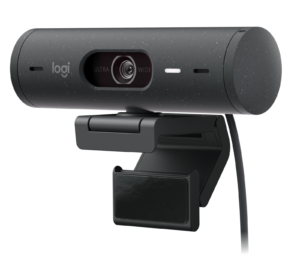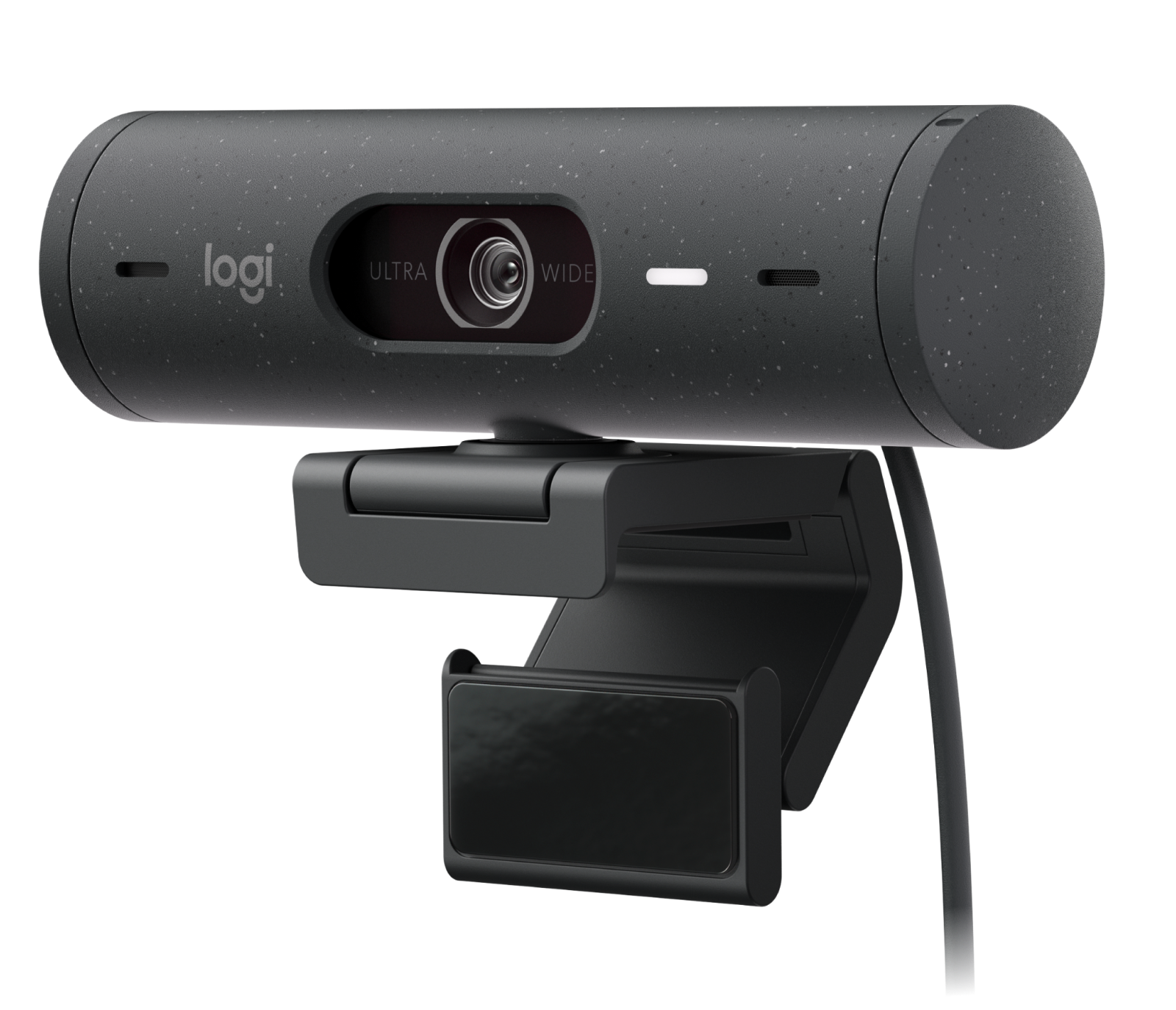
The Logitech Brio 500 is the most complete 1080p webcam for remote workers and hybrid professionals who care about how they look on daily video calls. Its 4-megapixel sensor, RightLight 4 AI auto-exposure, and adjustable field of view produce noticeably better results on Teams, Meet, and Zoom than the budget C920-class webcams it replaces. Show Mode and a magnetic detachable mount add practical utility that no direct competitor at this price offers. The trade-off is a hard 30fps cap at 1080p and a short 5-foot USB-C cable that limits placement flexibility on large monitors.
Pros
- 4MP sensor with RightLight 4 AI auto-exposure
- Adjustable 90/78/65-degree field of view
- Dual beamforming noise-reduction mics
- Auto-framing (RightSight) + Show Mode
- Built-in privacy shutter
- USB-C with Microsoft Teams certification
Cons
- Capped at 30fps at 1080p
- Short 5-foot USB-C cable
- Premium price vs comparably featured competitors
As an Amazon Associate I earn from qualifying purchases. Disclosure
Overview
The Logitech Brio 500 Full HD Webcam is built for remote workers, hybrid office employees, and professionals who spend hours on Zoom, Microsoft Teams, and Google Meet each week and want to look significantly better on camera without a lighting rig or an external capture card. Available on Amazon.com, it targets the midrange of the webcam market — sitting above the budget C920-class options and below the $200-plus broadcast-grade segment — with a feature set focused entirely on making everyday video calls look polished.
RightLight 4 AI auto-exposure correction and a 4-megapixel sensor that downsamples to 1080p are the two features doing the real work here, giving Logitech more image data to draw on than a native 2-megapixel sensor allows. The magnetic detachable mount, adjustable 90°/78°/65° field of view, and built-in Show Mode — which flips the camera orientation for desk-level presentations — round out a feature set that goes well beyond what the previous C9xx generation offered.
Key Specifications
| Resolution | 1080p Full HD @ 30fps; 720p @ 60fps |
| Sensor | 4 megapixels |
| Field of View | 90° adjustable (78° and 65° via Logi Tune) |
| Digital Zoom | 4× via Logi Tune software |
| Microphones | Dual stereo beamforming, noise reduction, 4 ft range |
| Autofocus | Continuous autofocus, glass lens |
| Connectivity | USB-C (5 ft / 1.5m cable included) |
| Mount | Magnetic detachable base, 360° rotation |
| Dimensions (w/ clip) | 110mm × 51.5mm × 45mm |
| Weight (w/ clip + cable) | 121g (4.2 oz) |
| Certifications | Microsoft Teams Certified, Google Meet, Zoom |
| Price (USD) | $129.99 |
Logitech Brio 500 Image Quality & Video Performance
The Brio 500’s core image advantage comes from its 4-megapixel sensor, which captures more pixel data than the 2-megapixel sensor inside the C920x, then downsamples to 1080p output. According to Popular Science’s evaluation, the result is “significantly improved” HDR support compared to predecessor models — reducing the oversaturation in bright-window-behind-you situations that plague most budget webcams and lifting shadow detail in dim conference rooms. The adjustable field of view is genuinely useful: 90° fits multi-monitor setups where you want to frame yourself with some context; 78° is a standard tighter frame for focused calls; 65° works well in cluttered offices where background distraction matters.
The continuous autofocus uses a glass lens rather than the plastic lenses found in sub-$60 options, and Popular Science confirmed it stays locked on faces without the hunting behavior that troubles cheaper webcams on calls. At 1080p the output is capped at 30fps, which is the standard for virtually all video conferencing platforms — Teams, Google Meet, and Zoom all compress streams to 30fps anyway, so in practice this ceiling costs nothing in call quality. RightLight 4 processes the image in real time using AI-based face correction, adjusting exposure zone-by-zone rather than metering the full frame, which means a bright window behind you no longer silhouettes your face the way it would with the C920x.
Microphone Quality & Background Noise Reduction
The Brio 500 uses dual stereo beamforming microphones rated to pick up voice from up to four feet away. Beamforming means the mic array uses phase-shift processing to focus pickup on the person directly in front of the camera and reduce sound arriving from the sides and rear — which translates to less air conditioning hum, mechanical keyboard noise, and ambient room sound bleeding into calls. According to Popular Science’s testing, the beamforming mics perform “slightly more clear” than the dual mics in the older Logitech C922 Pro, with more effective noise isolation in typical office environments.
The microphones are a meaningful upgrade over the basic stereo mics in budget webcams, but they are not a substitute for a dedicated USB microphone if your primary use is podcasting or recording. For video conferencing — the scenario this webcam is built for — beamforming pickup combined with platform-level noise suppression from Teams or Zoom produces consistently clean audio without any configuration required. The mics work plug-and-play with every major conferencing platform on Windows, macOS, and Chrome OS, with no separate audio app needed.
Auto-Framing, Show Mode & Logi Tune Software
RightSight auto-framing uses AI to track your face and digitally reframe the crop in real time as you move around. According to Popular Science’s review, the feature “works well when framing up a static face” but may struggle to keep pace with faster movement. For desk-based video calls where you are seated but occasionally shift or lean, the tracking is smooth and unobtrusive. The feature can be toggled on or off inside Logi Tune without restarting any software, making it easy to switch between standing standups and seated one-on-ones.
Show Mode is a distinctive feature that flips the camera downward toward your desk surface and corrects the perspective so text and objects appear right-side-up to call participants — useful for live product demonstrations, whiteboard sketching, or walking a client through physical documents. The magnetic detachable mount supports quick repositioning, and with 360° rotation, angling the camera down for Show Mode and back to eye level takes seconds without tools. Logi Tune also manages the FOV selector, 4× digital zoom, auto-framing toggle, and speaker/mic tests from a single clean interface — straightforward for a plug-and-play peripheral.
How Does It Stack Up Against the Competition?
The Brio 500 sits between the budget C920 class and premium 4K models. Here is how it compares on the specs that matter most for daily video conferencing.
| Feature | Logitech Brio 500 | Logitech C920x | Razer Kiyo Pro | Obsbot Meet SE |
|---|---|---|---|---|
| Price (USD) | $129.99 | $69.99 | $99.99 | $69 |
| Max Resolution | 1080p/30fps | 1080p/30fps | 1080p/60fps | 1080p/100fps |
| Sensor Size | 4MP (larger) | 2MP | Large 1/2.7 inch | 2MP |
| Field of View | 90° (adj. 65°–90°) | 78° fixed | 80°/90°/103° adj. | Up to 95° |
| Auto-Light Correction | RightLight 4 (AI) | RightLight 2 | HDR + adaptive | AI auto-exposure |
| Auto-Framing | Yes (RightSight) | No | No | Yes (AI) |
| Show Mode | Yes | No | No | No |
| Microphones | Dual beamforming | Dual stereo | None (no built-in) | Dual AI mics |
| Connectivity | USB-C | USB-A | USB-A | USB-C |
| Privacy Cover | Yes | No | No | No |
Prices change frequently — always verify current pricing before purchasing.
Is the Logitech Brio 500 Worth It?
For remote workers and hybrid professionals who spend multiple hours a day on video calls, the Brio 500 is the right upgrade. The combination of RightLight 4 AI auto-exposure, the 4-megapixel sensor, adjustable field of view, and beamforming dual mics genuinely produces a better-looking, better-sounding result on Zoom, Teams, or Meet than anything in the sub-$80 range. Show Mode and the magnetic detachable mount add practical utility that no competitor in this price bracket matches, and full Microsoft Teams certification matters for enterprise environments where call quality is managed by IT.
Those who can be served by less should look at the Logitech C920x at approximately $69.99, which remains a reliable 1080p/30fps performer for straightforward calls without the auto-framing or advanced lighting correction. Users who want a higher frame rate at 1080p — streamers, for example — should consider the Razer Kiyo Pro at approximately $99.99, which delivers 1080p/60fps with a large low-light sensor but lacks built-in microphones, auto-framing, and Show Mode. The Brio 500’s $30 premium over the Kiyo Pro buys those features but concedes the frame rate advantage.