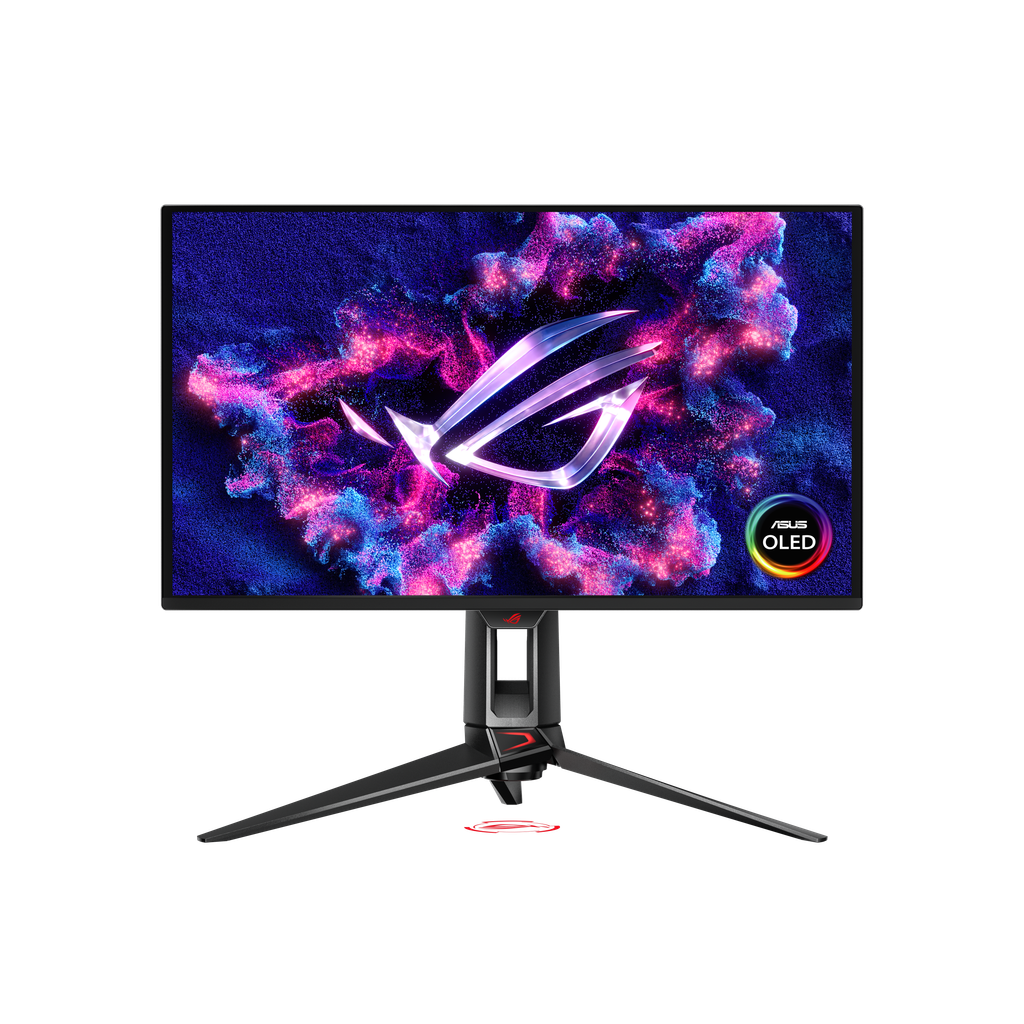
Buy the ROG Swift OLED PG27UCDM, available on Amazon.ca, if you'll use what ASUS adds to a sharp 4K OLED panel: full-bandwidth DisplayPort 2.1 for uncompressed 4K at 240Hz, Dolby Vision, and a KVM switch with 90W USB-C for sharing the screen with a laptop. At about 166 pixels per inch, text stays crisp enough for a full workday, and ASUS Canada's three-year warranty covers burn-in. The trade-off is the premium over rivals built on the same panel, which look much the same in testing. If you only want the picture, the MSI MPG 272URX keeps DisplayPort 2.1 and USB-C on that panel.
Pros
- Crisp 166 ppi text and detail
- Full-bandwidth DisplayPort 2.1 input
- Dolby Vision and adjustable HDR brightness
- KVM switch and 90W USB-C
- Three-year warranty covers burn-in
Cons
- Price premium over same-panel rivals
- Room light lifts blacks on the semi-glossy screen
- Wide tripod stand takes up desk space
- VRR flicker when frame rates swing
As an Amazon Associate I earn from qualifying purchases. Disclosure
Overview
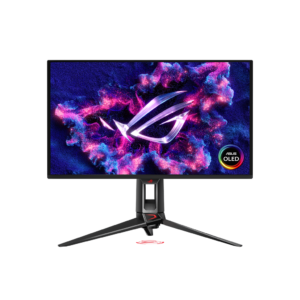
MSI, Alienware and Samsung all sell 27-inch monitors built on the same 4K, 240Hz QD-OLED panel, and the ASUS ROG Swift OLED PG27UCDM is the one that wraps it in more extras than most: a full-bandwidth DisplayPort 2.1 input, Dolby Vision, a KVM switch, a 90W USB-C port and a sensor that blanks the screen when you step away. It makes the most sense for a PC gamer with a recent high-end graphics card who also works at the same desk, because the extra pixel density helps a spreadsheet as much as a game.
In Canada the PG27UCDM sold for $1,599.99 CAD on Amazon.ca in October 2026, with the MSI MPG 272URX on the same panel at $1,349.44 CAD that month, so the question is the same as anywhere: whether you’ll use what sits around the panel. The full DisplayPort 2.1 bandwidth carries 4K at 240Hz without compression to a compatible graphics card, which ASUS’s own lower-end ROG Strix OLED XG27UCDMG can’t do over its DisplayPort 1.4 input, though TFTCentral notes both drive the screen fine. ASUS Canada lists the same three-year warranty with panel burn-in included.
Key Specifications
| Price (CAD) | $1,750.00 (last Amazon price, Oct 12, 2026) |
| Screen | 26.5-inch viewable (27-inch class), flat, 16:9 |
| Panel and resolution | QD-OLED, 3840 x 2160 (about 166 pixels per inch) |
| Refresh rate and response time | 240Hz; 0.03 ms (GtG, rated) |
| HDR | HDR10 and Dolby Vision; VESA DisplayHDR 400 True Black; 1,000 nits peak (rated) |
| Colour gamut (rated) | 99% DCI-P3 |
| Variable refresh | FreeSync Premium Pro, G-Sync Compatible |
| Video inputs | 1x DisplayPort 2.1, 2x HDMI 2.1, 1x USB-C (DisplayPort Alt Mode) |
| USB and extras | 90W USB-C power delivery, 3x USB-A 3.2 Gen 1, KVM switch, headphone jack, no speakers |
| Stand | Tilt +20° to -5°, swivel ±30°, pivot ±90°, height 0-110 mm; 100 x 100 mm VESA |
| Weight | 7.62 kg (16.8 lb) with stand; 4.97 kg (10.96 lb) without |
| Warranty | 3 years, including panel burn-in |
ASUS ROG Swift OLED PG27UCDM Picture Quality and Sharpness
Pixel density is the reason to want a 27-inch 4K OLED at all. At about 166 pixels per inch, it packs far more detail than the roughly 110 ppi of a 27-inch 1440p OLED or the 140 ppi of a 32-inch 4K model. For work, that means small text in documents and dark-mode apps shows no visible colour fringing, the slight fringing older QD-OLED screens had with their triangular sub-pixels. TFTCentral notes this panel also switches to a squarer sub-pixel shape.
Colour is a strength out of the box. Tests measured close to the panel’s 99% DCI-P3 rating, and PCWorld found it more precise than most OLED rivals, though its sample ran a slightly warm 6,300K white and a 2.3 gamma that makes content look a touch dark. Tom’s Hardware saw the opposite gamma error in the default Racing mode, slightly light, and fixed it with the RGB sliders, so a quick adjustment is worth making either way.
Brightness depends on the mode. With Uniform Brightness on, TFTCentral measured up to about 263 nits, held steady whatever the content, which avoids the dimming OLEDs apply to large bright areas. In its default gaming profile, PCMag measured 412 nits on a 10% window, and with variable brightness Tom’s Hardware measured 445 nits on a 25% window. Tom’s Hardware considers anything over 250 nits enough for an indoor room, while PCWorld points out that IPS monitors at this price typically exceed 400 nits and suit a brightly lit room better.
Room light is the panel’s weak spot. QD-OLED panels have no polarizer, so light falling on the screen lifts black levels and can tint them purple; in a dim room or with lamps behind the screen it isn’t an issue. Reflections on the semi-glossy coating split the testers: PCWorld saw crisp reflections of bright objects opposite the screen, while TFTCentral didn’t find them too bad even with a window facing it, and PCMag saw no glare to speak of. Samsung’s G81SF is the matte alternative, though RTINGS found its blacks also look purple in a bright room.
Gaming Performance and Motion
Motion is very sharp, as on other fast OLEDs, though PCWorld notes that eagle-eyed players may still spot a little blur. Lag is low by any measure. PCMag recorded 2.5 ms of input lag at 1080p and 240Hz, matching dedicated esports panels, where the MSI MPG 272URX it also tested took 6 ms. Tom’s Hardware uses its own, different test and got 18 ms, which made the PG27UCDM the fastest 4K OLED it had measured, tied with HP’s Omen 32 OLED. Driving 4K at high frame rates in new games still takes a very powerful graphics card.
Variable refresh covers FreeSync Premium Pro and G-Sync Compatible, but like other OLEDs it can flicker in dark scenes when the frame rate swings. ASUS’s OLED Anti Flicker setting narrows the variable-refresh range to reduce it: RTINGS found it doesn’t fix the flicker, and TFTCentral saw some small improvements on its High setting, though not a cure, and oddly the least flicker with it off.
For slower PCs and consoles limited to 120Hz, ELMB inserts black frames at 120Hz to sharpen motion. The cost is brightness, which tops out at around 130 nits with it on, and the mode can’t be combined with HDR or variable refresh.
HDR and Dolby Vision
HDR is good rather than dazzling. ASUS rates the panel for 1,000-nit highlights on small areas, and PCMag measured 394 nits of sustained HDR brightness, in line with its DisplayHDR True Black 400 certification. TFTCentral found the True Black 400 mode the most accurate but limited to about 462 nits, while the brighter modes reach higher peaks but can often look darker than the True Black 400 mode, so its testers wanted a brighter, accurate option. You can also adjust brightness in HDR, a control PCWorld notes most competing monitors don’t offer.
Dolby Vision support sets it apart from most monitors and helps with streaming boxes and Xbox. Tom’s Hardware connected an Apple TV 4K and played Dolby Vision shows from Netflix without issues, with frame rates matched to 24p and 50p content, though TFTCentral found the Dolby Vision modes capped at around 455 nits. TechRadar’s tester had a different experience and switched Dolby Vision off because the display kept turning off and on when opening different programs. There are no speakers, so plan on headphones or desk speakers for films.
Ports, OLED Care and the Stand
The port panel is the PG27UCDM’s real advantage. DisplayPort 2.1 at the full 80 Gbps (UHBR20) runs 4K at 240Hz uncompressed with graphics cards that support it, such as Nvidia’s RTX 50 series. Two HDMI 2.1 ports handle consoles, and the USB-C port carries video plus 90W of charging, so a work laptop can share the screen, keyboard and mouse with a gaming PC through the built-in KVM switch and three USB-A ports.
Burn-in, the main long-term risk with OLED, is covered by ASUS’s three-year warranty. The Neo Proximity Sensor blanks the screen when you leave the desk and wakes it when you return, and PCMag’s reviewer found it ignored people walking past outside its range. A pixel-cleaning cycle is suggested every eight hours or so, and the reminder can be switched off. The monitor is fanless, so it runs silently.
The stand is the weakest part of the design. Its three-legged tripod base spreads across a lot of desk, and its depth can push the screen closer to you than you’d like on a shallow desk. Mounting on an arm works through the 100 x 100 mm VESA pattern, but only with ASUS’s included bracket, so keep it.
How Does It Stack Up Against the Competition?
All four monitors use a 27-inch 4K, 240Hz QD-OLED panel, so the differences are in the ports, HDR formats and screen coating:
| Feature | ASUS ROG Swift OLED PG27UCDM | MSI MPG 272URX QD-OLED | Samsung Odyssey OLED G8 G81SF | ASUS ROG Strix OLED XG27UCDMG |
|---|---|---|---|---|
| Price (CAD) | $1,750.00 (last Amazon price, Oct 12, 2026) | $1,290.07 | $1,648.00 | $1,210.34 |
| DisplayPort | 2.1 (UHBR20, 80 Gbps) | 2.1a (UHBR20) | 1.4 | 1.4 with DSC |
| USB-C (video and charging) | Yes, 90W | Yes, 98W | No | Yes, 90W |
| KVM switch | Yes | Yes | No | Yes |
| Dolby Vision (maker’s HDR list) | Yes | Not listed by MSI | No (HDR10+) | No (HDR10) |
| Screen coating (maker’s term) | Anti-Reflection | Anti-glare | Glare Free | Anti-Reflection |
| Height adjustment | 110 mm | 110 mm | 120 mm | 120 mm |
| Burn-in warranty | 3 years, burn-in included | 3 years, burn-in included | Burn-in from normal use covered | 3 years, burn-in included |
| Amazon | View on Amazon | View on Amazon | View on Amazon | View on Amazon |
Prices change frequently — always verify current pricing before purchasing.
ASUS ROG Swift OLED PG27UCDM: Worth It When You’ll Use Every Port
For Canadian buyers the case is the same, at a higher price in dollars: at $1,599.99 CAD on Amazon.ca in October 2026, it makes sense when you’ll use what the rivals leave out. With a graphics card that supports DisplayPort 2.1, it’s one of only a few 27-inch OLEDs that run 4K at 240Hz without compression; with an Apple TV or Xbox, it adds Dolby Vision; and with a work laptop beside a gaming PC, one USB-C cable and the KVM switch let both share the screen and peripherals. ASUS Canada’s three-year warranty, which includes panel burn-in, takes much of the long-term risk out of an OLED at this price. PCMag named it the OLED gaming monitor to beat and gave it an Editors’ Choice.
If you mainly want the picture, look at the rivals first. RTINGS suggests that without a strong preference for screen coating, you may as well let price decide among these 4K QD-OLEDs, given how similarly they perform. As of October 2026 the MSI MPG 272URX cost less on Amazon and keeps DisplayPort 2.1, USB-C and a KVM switch, though MSI doesn’t list Dolby Vision. If you prefer a matte screen, Samsung’s G81SF has one, but it drops USB-C and the KVM switch. Alienware’s AW2725Q uses the same panel with Dolby Vision, but it wasn’t sold new on Amazon in the US or Canada when we checked in October 2026.

Sources
- ASUS — ROG Swift OLED PG27UCDM Specifications
- ASUS ROG Swift OLED PG27UCDM — Amazon.ca Product Listing
- TFTCentral — Asus ROG Swift PG27UCDM Review
- RTINGS — ASUS ROG Swift OLED PG27UCDM Review
- PCMag — Asus ROG Swift PG27UCDM Review
- Tom’s Hardware — Asus ROG Swift PG27UCDM Review
- Tom’s Hardware — PG27UCDM Response, Input Lag, Viewing Angles and Uniformity
- Tom’s Hardware — PG27UCDM Brightness and Contrast
- PCWorld — Asus ROG Swift OLED PG27UCDM Review
- TechRadar — Asus ROG Swift OLED PG27UCDM Review
- DisplayNinja — ASUS PG27UCDM Review
- MSI — MPG 272URX QD-OLED Specifications
- Samsung — 27-inch Odyssey OLED G8 G81SF
- TechRadar — Samsung Odyssey OLED G81SF Review
- RTINGS — Samsung Odyssey OLED G81SF Review
- ASUS — ROG Strix OLED XG27UCDMG Specifications
- TFTCentral — Dell Alienware AW2725Q Announced
- TFTCentral — Asus ROG Strix XG27UCDMG Launched
- RTINGS — Dell Alienware AW2725Q Review
- ASUS Canada — ROG Swift OLED PG27UCDM Specifications
Reader Poll
What would decide your 27-inch 4K OLED purchase?
Help Our Editors Know What Matters to You
Explore on Amazon →