Buy the XV272U W2 if you want 1440p at 240Hz for competitive games and your PC can hold frame rates near that: at full speed it responds about as quickly as a typical IPS gaming monitor, with low input lag, and its stand adjusts for height, tilt, swivel and pivot. In Canada it's good value at a sale price like Amazon.ca's Prime Big Deal Days price, much less so at the non-deal price, so it's best bought on sale. The trade-off is motion at lower frame rates, where its locked overdrive leaves visible trails. If your games run at 60 to 120 fps, the KTC H27E6, whose overdrive Tom's Hardware found works well at lower frame rates, fits better.
Pros
- 1440p at 240Hz over DisplayPort
- Low input lag at full refresh
- Stand adjusts for height, tilt, swivel and pivot
- Wide colour gamut, about 90% DCI-P3
- Built-in speakers and crosshair overlays
Cons
- Locked overdrive leaves trails at 165Hz and below
- No sRGB mode, so everyday colour is oversaturated
- HDMI ports limited to 144Hz
- Wobbly stand and no USB ports
As an Amazon Associate I earn from qualifying purchases. Disclosure
Overview
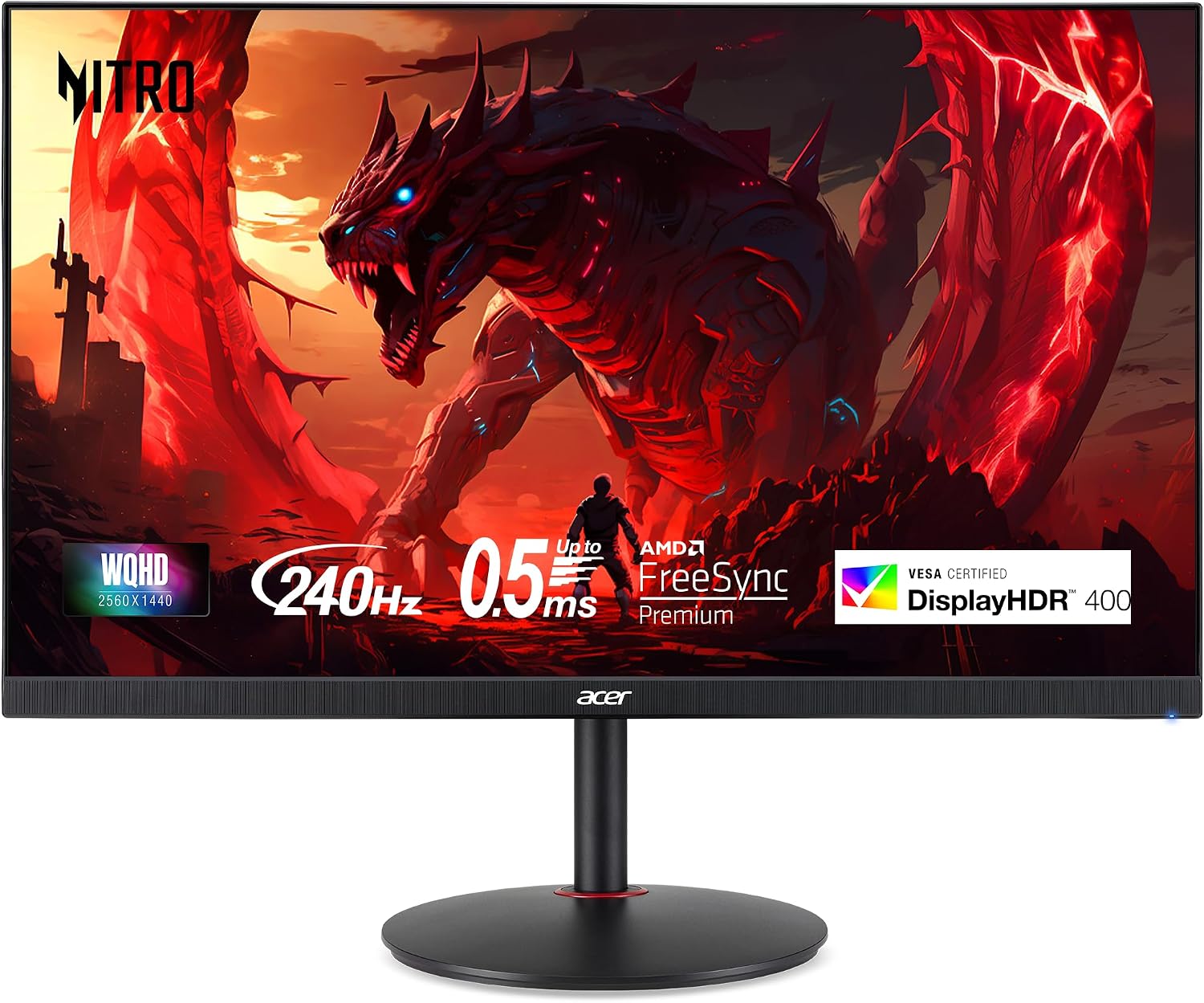
The Acer Nitro XV272U W2 puts a 27-inch 1440p IPS screen running at 240Hz on your desk, along with AMD FreeSync Premium, a pair of small built-in speakers and a stand that adjusts for height, tilt, swivel and pivot. Sharper than 1080p and far easier on a graphics card than 4K, 1440p at 240Hz is a common upgrade target for PC players in competitive games.
Its value in Canada depends on when you buy. On October 6, 2026, Amazon.ca, which sells and ships it itself, had it at $229.99 CAD for Prime members during Prime Big Deal Days, while the price for everyone else was $431.27 CAD. Run at its full 240Hz, it responds about as quickly as a typical IPS gaming monitor, with very little input lag. Below that its motion slips, and it cuts corners in other places too: no sRGB mode to tame its wide-gamut colour, HDMI ports that stop at 144Hz, and a stand that wobbles.
Key Specifications
| Model | XV272U W2bmiiprx (part UM.HX2AA.201) |
| Screen | 27-inch IPS, 2560 x 1440, anti-glare |
| Refresh rate | 240Hz over DisplayPort, 144Hz over HDMI |
| Response time (rated) | 1 ms GTG, up to 0.5 ms |
| Brightness (rated) | 400 nits |
| Native contrast (rated) | 1,000:1 |
| Colour | 99% sRGB (rated), 8-bit + FRC |
| HDR and adaptive sync | VESA DisplayHDR 400, AMD FreeSync Premium |
| Inputs | 1x DisplayPort 1.4, 2x HDMI 2.0, headphone jack (no USB ports) |
| Speakers | 2 x 2W |
| Stand | Height (up to 120 mm / 4.72 in), tilt -5° to 25°, swivel, pivot; VESA 100 x 100 mm |
| Power (typical) | 26 W |
| Price (CAD) | $229.99 |
Acer Nitro XV272U W2 Motion and Response Time
At its full 240Hz, the W2 holds its own. With FreeSync on, Monitors Unboxed measured a 4.89 ms average response time with a moderate amount of overshoot, which put it mid-table among the 1440p gaming monitors it had tested at their top refresh rates. Input lag is low enough for competitive play: MonitorNerds put it at 3 ms at 240Hz, and Monitors Unboxed measured a processing delay under 0.5 ms. Acer’s rated 0.5 ms response time is a best case that Monitors Unboxed called optimistic for real-world use.
The weak point is what happens below that. Monitors Unboxed saw faint inverse ghosting trails behind moving objects at 165Hz, clearer ones at 144Hz and glaring ones from 120Hz down, while 200Hz was still okay. The cause is a design choice: Acer hides the overdrive menu whenever adaptive sync is on, so FreeSync and G-Sync users are stuck with one fixed setting tuned for high refresh rates. Switching adaptive sync off brings the menu back, but there the only way to avoid the trails is overdrive off, which makes the panel much slower. Games that run at 60 to 120 fps on your PC will show those artifacts; esports titles held near 240 fps mostly won’t.
Acer’s backlight strobing mode, VRB, offers another route to motion clarity, but it works only with adaptive sync off and locks the brightness control. Monitors Unboxed found it improved clarity, most of all at 120Hz, but still saw strobe crosstalk and red fringing, and didn’t find it especially usable.
Colour, Brightness and HDR
Acer rates the panel at 99% sRGB, but it covers a wider gamut than that: both tests measured about 90% of DCI-P3. Monitors Unboxed found no sRGB mode to clamp it, so everyday SDR content such as websites and photos looks oversaturated, and out-of-the-box accuracy is middling. MonitorNerds measured an average Delta E of 2.96, and the other test came in at 4.02 by Notebookcheck’s account of it, both above the under-2 figure Acer’s store page claims. Monitors Unboxed also found a mild green-blue tint and gamma off target. A full calibration fixed it in testing (MonitorNerds got the average down to 0.6), but that needs a colorimeter, and Monitors Unboxed notes that a software profile only applies in some applications.
Brightness is no problem in a lit room. Monitors Unboxed measured a 438-nit maximum. MonitorNerds’ reading was a little lower, 391 nits, and both sit close to Acer’s 400-nit rating. It doesn’t dim far, though: the 88-nit minimum Monitors Unboxed recorded is high for late-night use in a dark room. Contrast measured just over 1,100:1, typical for an IPS panel, so dark scenes look grayish rather than black, and Monitors Unboxed saw more IPS glow than it expects from this type of panel.
The DisplayHDR 400 badge doesn’t add much. With no local dimming and little or no brightness headroom above its SDR level (MonitorNerds measured 421 nits in HDR mode against 391 in SDR), HDR mode doesn’t improve contrast over SDR, so it’s best left off for games and video.
Stand, Ports and Build
The stand is the W2’s most unusual feature at its price: it raises and lowers by up to 120 mm (4.72 inches), tilts, pivots to portrait and swivels, with the whole circular base turning. It’s also where the cost-cutting shows. The pillar is thin, the stand wobbles when the desk is bumped, and the housing is plain black plastic. A 100 x 100 mm VESA mount takes a monitor arm instead.
Connections are basic. The single DisplayPort 1.4 input is the one to use for 240Hz; the two HDMI ports top out at 144Hz. Acer once listed them as HDMI 2.1, but Monitors Unboxed and MonitorNerds found they work as HDMI 2.0, without HDMI 2.1’s extra bandwidth, and Acer’s spec page now lists them that way. That’s fine for a second device that doesn’t need more than 144Hz. There are no USB ports, so, as Monitors Unboxed points out, there’s no way to update the firmware. A joystick on the back runs the on-screen menu, which includes crosshair overlays but limited colour controls. The two 2-watt speakers lack depth and bass, according to MonitorNerds, so they’re for system sounds rather than games.
How Does It Stack Up Against the Competition?
The KTC and LG add HDMI 2.1 and an sRGB mode the Acer lacks, while the MSI steps down to 200Hz and a tilt-only stand.
| Feature | Acer Nitro XV272U W2 | KTC H27E6 | LG 27GR83Q-B | MSI MAG 275QF E20 |
|---|---|---|---|---|
| Price (CAD) | $229.99 | $426.72 | $449.21 (Oct 6) | $239.99 |
| Max refresh rate (DisplayPort) | 240Hz | 300Hz (320Hz overclocked) | 240Hz | 200Hz |
| HDMI ports | 2x HDMI 2.0 (up to 144Hz) | 2x HDMI 2.1 | 2x HDMI 2.1 | 2x HDMI 2.0b (up to 144Hz) |
| DisplayPort inputs | 1x DisplayPort 1.4 | 2x DisplayPort 1.4 | 1x DisplayPort 1.4 | 1x DisplayPort 1.4a |
| Panel | IPS | Fast IPS | IPS | Rapid IPS |
| Native contrast (rated) | 1,000:1 | 1,000:1 | 1,000:1 | 1,200:1 |
| Stand adjustment | Height, tilt, swivel, pivot | Height, tilt, swivel, pivot | Height, tilt, pivot | Tilt only |
| USB ports | None | 1x USB service port (firmware updates only) | 2x USB-A downstream (USB 3.0) | None listed |
| HDR | DisplayHDR 400 | HDR400 | DisplayHDR 400 | HDR Ready |
| Amazon | View on Amazon | View on Amazon | View on Amazon | View on Amazon |
Prices change frequently — always verify current pricing before purchasing.
The KTC H27E6 is the step up for players whose frame rates move around. Tom’s Hardware found that its Dynamic overdrive mode, which changes its compensation with the refresh rate, left only slight ghosting that stayed the same as frame rates changed, and that without a high-end graphics card both its overdrive and its backlight strobing work very well. Its measured contrast of around 1,500:1 is also well above the IPS norm, though it has no speakers. The LG 27GR83Q-B runs its full refresh rate over HDMI 2.1, adds an sRGB mode and a USB hub, and PCWorld measured 477 nits and 1,250:1 contrast; its wide-legged stand doesn’t swivel and takes up desk space, and on October 6, 2026, Amazon.ca offered it only from a third-party seller. The MSI MAG 275QF E20 tops out at 200Hz and only tilts, but it was $179.99 CAD on Amazon.ca on October 6, 2026.
Acer’s own XV272U F3, a 300Hz model in the same 27-inch 1440p line, adds HDMI 2.1 and keeps a fully adjustable stand, but on October 6, 2026, the only Amazon.ca offer for it was a used unit from Amazon’s Warehouse Deals. No independent motion test of the F3 turned up in our research, so we can’t say whether it handles lower frame rates better than the W2.
Acer Nitro XV272U W2: Worth It for High-Frame-Rate Esports on a Budget
In Canada, the W2 is worth buying at a sale price like the $229.99 CAD Amazon.ca charged Prime members on October 6, 2026, if your main games are competitive shooters and your graphics card holds them near 240 fps at 1440p. There, it’s responsive, its input lag is low, and the fully adjustable stand lets you set the height and angle you play at, or turn it to portrait for a second screen. The two tests that measured it split on whether it’s worth buying: MonitorNerds called it an excellent buy for esports-grade 1440p at its US price in October 2023, while Monitors Unboxed, judging it at its higher US launch pricing, would rather give up some refresh rate for a 1440p monitor around 165Hz with better motion overall, even for competitive play. A sale price like that Prime one brings it well below what either test assumed. At the $431.27 CAD non-Prime price the same day, it cost about as much as the KTC H27E6 ($426.72 CAD on Amazon.ca), which adds a 300Hz panel, HDMI 2.1 and an sRGB mode, so a sale is the time to buy the Acer.
Look elsewhere if your games mostly run at 60 to 120 fps. Tom’s Hardware found the KTC H27E6’s overdrive works well at lower frame rates, with only slight, consistent ghosting in its Dynamic mode, and the LG 27GR83Q-B suits a desk shared with a console thanks to full-speed HDMI 2.1. If 200Hz is enough and you’ll use a monitor arm, the MSI MAG 275QF E20 is the budget alternative.


Sources
- Acer — Nitro XV2 XV272U W2 Tech Specs
- Acer Store — 27″ Nitro XV2 Gaming Monitor XV272U W2BMIIPRX
- Acer Nitro XV272U W2 — Amazon.ca Product Listing
- Monitors Unboxed — Acer XV272U W2 Review (video)
- Notebookcheck — Acer Nitro XV272U W2 deal report (citing Monitors Unboxed)
- MonitorNerds — Acer Nitro XV272U W2 Review
- MonitorNerds — Acer Nitro XV272U F3 Review
- Tom’s Hardware — KTC H27E6 Review
- KTC — H27E6 Product Page
- PCWorld — LG UltraGear 27GR83Q-B Review
- LG — 27GR83Q-B Specifications
- MSI — MAG 275QF E20 Specifications
Reader Poll
What frame rates do your games usually run at?
Help Our Editors Know What Matters to You
Explore on Amazon →