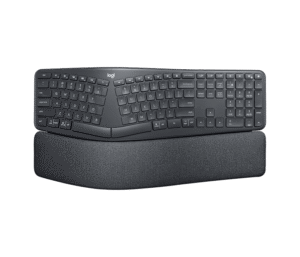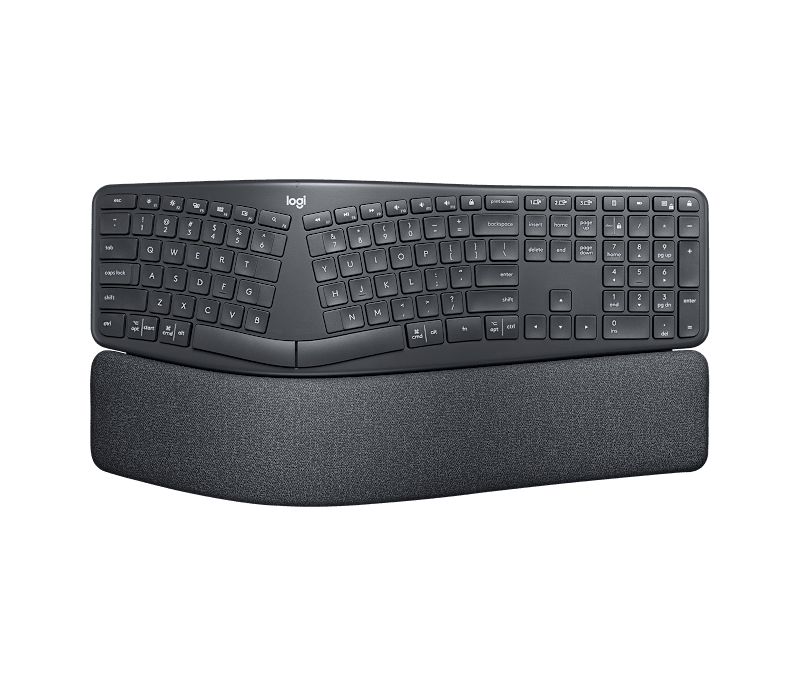
The Logitech Ergo K860 is the best ergonomic keyboard for full-day desk workers who want wrist and shoulder relief without relearning how to type—the fixed-split layout, scooped keycaps, and triple-layer memory foam wrist rest make the transition genuinely comfortable from day one. Multi-device pairing across Bluetooth and USB keeps it versatile for workers who switch between a laptop and desktop throughout the day. The keyboard is heavy, takes up significant desk space, and the absence of backlighting is a real limitation for low-light users.
Pros
- Curved split layout reduces wrist bending by 25%
- Triple-layer memory foam wrist rest is best-in-class
- Two-year battery life on 2x AAA batteries
- Connects to 3 devices via USB + Bluetooth
- Compatible with Windows, Mac, Chrome OS, and Linux
Cons
- No backlighting — unusable in low light
- Large footprint — needs clear desk space
- Wrist rest is not removable
- Fixed split cannot be tented or separated
As an Amazon Associate I earn from qualifying purchases. Disclosure
Overview
The Logitech Ergo K860 is a full-size wireless ergonomic keyboard built for remote workers, writers, and office professionals who spend long hours at a desk and want to reduce wrist and shoulder fatigue without switching to an extreme split layout. It’s available on Amazon.com and at major retailers across the US, sitting at the top of the mid-range ergonomic keyboard market.
A fixed-split curved layout, three palm-lift tilt angles, and a triple-layer memory foam wrist rest come together in one integrated design here — a combination most ergonomic keyboards split across separate accessories. Where earlier ergonomic keyboards forced a choice between comfort and familiarity, the K860 bridges both: the layout is still recognizable to touch typists, but the 14° keyboard slope and scooped keycaps encourage a far more natural wrist angle from the first session.
Key Specifications
| Switch Type | PerfectStroke scissor-switch (membrane) |
| Wrist Rest | 3-layer: knitted fabric + high-density foam + memory foam (7mm total) |
| Tilt Options | 0°, −4°, −7° palm lift (adjustable legs) |
| Connectivity | 2.4 GHz USB (Logi Bolt) + Bluetooth 5.0 |
| Multi-Device | Up to 3 devices (Easy-Switch button) |
| Battery | 2× AAA (up to 2-year life) |
| Dimensions | 18.0 × 9.2 × 1.9 in (456 × 233 × 48 mm) |
| Weight | 2.56 lbs (1,160 g) |
| Compatibility | Windows 7+, macOS 10.13+, Chrome OS, Linux |
| Backlighting | None |
| Color | Graphite |
| Price (USD) | Deal $119.99 until Nov 1 |
Design & Build Quality
The K860 is substantial—at nearly 2.6 lbs it stays planted on the desk, but it takes up real estate. The curved wave shape positions both halves of the keyboard at a natural angle, and the integrated palm rest spans the full width of the board. Logitech’s three-layer wrist rest construction—knitted stain-resistant fabric over high-density foam over a memory foam base—is genuinely one of the best in the ergonomic keyboard category. It compresses where needed and rebounds slowly, distributing pressure across your palm rather than concentrating it at the wrist.
Build materials include recycled plastic, giving the keyboard a matte finish that resists fingerprints reasonably well. The stain-resistant fabric on the wrist rest holds up well over time, though it does absorb skin oils gradually. The two adjustable legs at the front raise the front edge to −4° or −7° for a negative tilt, which ergonomics specialists recommend for reducing wrist extension—a common cause of carpal tunnel symptoms among heavy keyboard users.
Key Features
Curved Split Layout: The fixed-split design spreads the two halves of the keyboard apart and angles them inward, positioning the hands at shoulder-width rather than pinching the wrists inward. The 14° split angle is conservative enough that most touch typists adapt within a few hours, unlike fully separated keyboards that require weeks of relearning.
PerfectStroke Key Technology: Logitech’s scissor-switch mechanism uses scooped keycaps shaped to match fingertip curvature. The result is a soft, low-travel keystroke with consistent actuation across the full key surface—you don’t need to hit the center precisely to register a clean press. The keys are quiet enough for shared office spaces and open-plan home setups.
Multi-Device Easy Switch: A dedicated Easy-Switch button cycles between up to three connected devices—handy for anyone who bounces between a desktop, a laptop, and a tablet throughout the day. The keyboard pairs via Bluetooth to two devices and via the included Logi Bolt USB receiver to a third.
Two-Year Battery Life: Running on two standard AAA batteries, the K860 is rated for up to two years of use on a single set—a practical choice compared to rechargeable keyboards that need periodic charging. A low-battery indicator LED sits above the number row.
Software Integration: Logitech Options+ software (free, Windows and macOS) enables function key remapping, device-specific profiles, and Flow switching—moving the cursor between connected computers by pushing it to the screen edge. Not required for basic operation but adds meaningful customization for power users.
Performance
Typing on the K860 is a gradual adjustment rather than an immediate revelation. Touch typists adapt fastest—the scooped keycaps guide fingers into position, and the reduced wrist pronation becomes noticeable within the first extended session. PC Gamer, which tested the K860 at length, noted the wrist rest’s firmness hits a balance: soft enough to be comfortable, stiff enough to not collapse under prolonged use. PC Gamer’s review is also direct about the feel of the keys themselves: compared to a mechanical keyboard, the scissor-switch keystroke is noticeably muted—fine for the office typists this keyboard targets, but a genuine downside for anyone who wants tactile click feedback. The scissor switches register quietly and consistently, making the keyboard viable in both quiet home offices and open workspaces.
Where the K860 doesn’t excel is for users who type in low-light conditions—there is no backlighting, full stop. It also can’t be tented (the halves can’t be angled vertically toward each other), which some ergonomists prefer for reducing forearm pronation beyond what the horizontal curve alone provides. For users with severe wrist issues or those who have already committed to a split mechanical setup, the fixed layout may feel like a compromise rather than a solution.
How Does It Stack Up Against the Competition?
The K860 sits at the top of the fixed-split ergonomic keyboard market. Here’s how it compares to the three most common alternatives buyers consider.
| Feature | Logitech K860 | Microsoft Sculpt | Logitech Wave Keys | ProtoArc EK01 Plus |
|---|---|---|---|---|
| Price (USD) | Deal $119.99 until Nov 1 | — | $69.99 | Deal $67.49 until Nov 1 |
| Layout Type | Fixed split + curve | Fixed split dome | Wavy (no split) | Fixed split + backlit |
| Wrist Rest | Integrated, 3-layer memory foam | Separate palm rest | Integrated foam | None |
| Connectivity | USB + Bluetooth (3 devices) | 2.4 GHz USB only | USB + Bluetooth (3 devices) | Bluetooth (3 devices) |
| Backlighting | No | No | No | Yes |
| Battery | 2× AAA (2 years) | AAA batteries | AAA batteries (2 years) | Rechargeable (USB-C) |
| Numpad | Integrated | Separate (included) | No | No |
| Amazon | View on Amazon | — | View on Amazon | View on Amazon |
Prices change frequently — always verify current pricing before purchasing.
Is the Logitech Ergo K860 Worth It?
The Logitech Ergo K860 is the go-to ergonomic keyboard for office workers and remote professionals who want real wrist and shoulder relief without abandoning familiar keyboard muscle memory. The three-layer wrist rest, scooped keys, and dual wireless connectivity make it one of the most complete packages in the fixed-split category, and the two-year battery life removes one more maintenance task from the work-from-home setup.
If you work regularly in low-light conditions, the lack of backlighting is a genuine limitation—the ProtoArc EK01 Plus fills that gap at a lower price point. Users with severe repetitive strain injury who need adjustable tenting or fully separated halves should look at the Kinesis Freestyle2 or the MoErgo Glove80 instead, and PC Gamer’s testing is a fair reminder that this is not a keyboard for anyone chasing a tactile, clicky typing feel. But for the vast majority of desk workers looking to make an ergonomic upgrade, the K860 sets the standard in its price range.