How to Choose a Robot Vacuum: Measure Your Home First
The right robot depends as much on your furniture, your floors and how much upkeep you’ll put up with as on its price or suction rating. These six checks narrow the field before you compare a single model.

How We Researched
Built from the 2026 buying guide and obstacle tests of Vacuum Wars, the lab-backed advice of Consumer NZ, Tech Advisor‘s navigation explainer and TechRadar‘s guide. Product details come from the makers’ own spec pages and Gizmodo‘s test of the Roomba Max 775. No manufacturer paid for placement.
* As an Amazon Associate I earn from qualifying purchases. Disclosure
What You’ll Learn
- What to measure before you shop
- Which mop design suits your floors and rugs
- Why the brush matters more than the suction figure
- How much obstacle avoidance your clutter calls for
- Which dock level is worth its size and running costs
- What to check in the app, battery and price claims
2 robot vacuums referenced in this guide
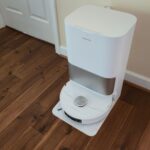
How do you choose a robot vacuum when every box promises more suction than the last? Start with your home rather than the spec sheet: the gap under your furniture, the thresholds between rooms, how much of the floor is hard or carpeted, and who in the house sheds. Those answers decide which features are worth paying for.
Step 1: Measure Under Your Furniture and Across Your Doorways
A robot can only clean the floor it can reach, so get a tape measure out before you compare models.
- Furniture gaps: find the lowest bed, sofa or cabinet you want cleaned under, measure the gap, and set it against the robot height on the maker’s spec sheet. Vacuum Wars puts a typical robot at about 4 inches (102 mm) and the slimmest it has seen at about 3.14 inches. Don’t buy one that only just fits: a laser turret that sticks up, a sagging sofa or an uneven floor can eat the difference.
- Thresholds: about 0.79 inch (20 mm) is the usual climbing limit unless a maker claims more. When it does, check whether the figure is for a single step or a two-stage one. Dreame, for example, rates its L40s Ultra for a 1.57-inch double-layer step but 0.87 inch on a single step.
- Stairs: no robot vacuum climbs them. Cliff sensors stop it at the top step, so a home on two floors needs a robot per floor or someone to carry it up. Consumer NZ notes that many, but not all, robots can store maps for more than one level.
- The dock spot: self-emptying and mop-washing docks take real floor space. Dreame says all-in-one docks are usually bigger than photos suggest and suggests planning for about 15 inches wide, 17 deep and 22 tall, plus room for the robot to dock.
Step 2: Choose a Mop System That Fits Your Hard Floors and Rugs
If most of your floor is hard, the mop may deserve more of your attention than extra suction, because many current robots already pick up everyday debris from hard floors well. The mop design sets what the robot can do:
- Two spinning pads scrub as they turn and are a strong all-round choice for routine mopping.
- A roller mop is fed clean water as it turns while dirty water is collected, which helps most with wet spills.
- A flat pad drags a damp cloth behind the robot: fine for a light wipe between cleans, usually weak on dried-on stains.
The design is only a starting point: Vacuum Wars has seen a wide spread of dried-stain results within every mop type, so read tests of the exact model you’re considering.
If you have rugs, the wet mop has to stay off them. Robots handle this by lifting the pads, leaving the pads at the dock, or covering a roller. The Dreame L40s UltraDreame L40s Ultra lifts its pads up to 0.41 inch and can also drop them off at the dock, while the Roomba Max 775 ComboRoomba Max 775 Combo slides a cover over its roller when it detects carpet. Carpet detection can still miss: Gizmodo caught the 775 mopping part of a thin rug next to a clear chair mat, and a no-mop zone drawn in the app fixed it. Plan to draw one for very thin or very plush rugs.
Step 3: Pick the Brush for the Hair in Your Home
Don’t choose by the biggest suction number on the box. Brands don’t always rate Pascals (Pa) the same way, and a high figure says nothing about whether the brush and floorhead get that suction into your carpet. Even Dreame, which sells 35,000 Pa robots, says the brush and airflow matter more than the suction number.
Hair is where brushes differ most. With pets or long-haired people in the house, look for an anti-tangle design: Vacuum Wars’ tests favour brushes with some bristles over all-rubber ones for pet hair on carpet, and its strong tangle results come from twin brushes with a gap between them or a single brush that tapers toward one end. Check the onboard bin as well. Vacuum Wars treats anything under 300 mL as small for a pet home, and a self-emptying dock makes up for a small one.
On deep carpet cleaning, the two big testers differ in tone. The best robot in Consumer NZ’s tests scored 41 for carpet cleaning, against scores in the 80s and 90s for its top corded and stick vacuums, while Vacuum Wars finds robots have moved much closer to uprights in its embedded-grit test, though deep cleaning is still not a strong point for many. Either way, a robot keeps carpet tidy between cleans, but plan to keep a regular vacuum for deep cleans and for the stairs.
Step 4: Match Mapping and Obstacle Avoidance to Your Clutter
Mapping and obstacle avoidance solve different problems, so judge them separately.
Mapping lets a robot clean in tidy rows, clean one room on request and respect no-go zones; robots without it bump around at random and take longer to cover the floor. A spinning laser (LiDAR) maps in the dark, while navigation that relies on a camera can lose its way in dim rooms, so choose LiDAR if the robot will run at night or in low light.
Obstacle avoidance is what helps the robot steer around cables, socks and pet mess, which sit below the mapping sensor’s view. The hardware makes a large difference. In Vacuum Wars’ 24-object course, robots with only a single-line laser avoided 3.6 objects on average, 3D structured light alone 7.1, 3D light plus another sensor 17.0, and sensor systems with one or two cameras 18.5 and 20.1. A label such as “AI obstacle avoidance” doesn’t tell you which of these you’re getting, so look for the sensor list and the model’s own test results.
No system is foolproof, and even well-equipped robots still snag the odd cable, so a quick pick-up of cords and toys, and a check for pet accidents, before a run remains the surest fix. If a camera in your home bothers you, a camera-free model avoids it, though in Vacuum Wars’ averages camera-free systems are generally less effective at avoiding objects. On a camera model, read the privacy policy and switch off camera features you don’t use.
Step 5: Decide How Much Dock You Want to Live With
The dock sets how often you touch the robot, and it drives much of the price.
- Charging only: you empty the bin, refill the water and wash the mop yourself. It’s cheaper and smaller.
- Self-emptying: the dock pulls debris out of the robot into a bag or a bagless bin. Instead of emptying the robot after most runs, you empty the dock every few weeks to every few months, depending on the dock (makers rate some bags for up to about three months). Bagless bins cost nothing to run but, as Vacuum Wars notes, can release more dust when you empty them; bags keep dust contained at the price of buying refills.
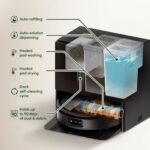
- All-in-one: the robot comes home to have its mop cleaned and dried and its own water tank refilled, which takes most mopping chores off your hands. You’ll still rinse the dock’s clean-water and dirty-water tanks now and then, and it costs more and needs more floor space than a simpler dock.
Self-emptying docks are often loud while they empty the robot, so schedule runs for when you’re out. Before buying, also check that the maker sells the parts that wear out (dust bags, filters, brushes and mop pads) and how often each one needs replacing.
Step 6: Check the App, Battery and Price Claims
- Wi-Fi and app: maps, schedules and no-go zones all live in the app, and on some models the buttons alone do far less. Before buying, check the network it needs: Vacuum Wars notes most robots still need 2.4 GHz Wi-Fi for setup, which matters if your router splits its bands.
- Battery: runtime matters less than it looks, because most robots recharge and then resume where they stopped. Consumer NZ measured runtimes from about one hour to almost two across the models it tested, so check tests if you want a large home done on one charge. Gizmodo’s Roomba Max 775 vacuumed and then mopped a 750 sq ft apartment in two and a half hours and still had 36% left.
- Price: robots generally get better as the price rises, but a higher price isn’t a guarantee: in Consumer NZ’s testing, one lower-priced model outperformed robots costing four times as much. Spend on the features your answers to Steps 1 to 5 call for, and skip the rest.
The Right Gear Makes It Easier
Two robots we’ve reviewed show how these trade-offs play out in real models.
Dreame L40s UltraDreame L40s Ultra — for homes with shedding pets and a mix of hard floors and rugs: a detangling DuoBrush, mop pads it can lift up to 0.41 inch or leave at the dock, and a single-step climb of up to 0.87 inch (1.57 inches only on a two-layer step).
iRobot Roomba Max 775 ComboiRobot Roomba Max 775 Combo — for mostly hard floors with a few rugs: a roller mop the dock washes at 167°F and dries with heat, a cover that shields rugs, and dust bags rated for up to three months. Gizmodo found the robot and dock loud, so run it while you’re out.
Picked your robot? See How to Set Up a Robot Vacuum Schedule →See How to Set Up a Robot Vacuum Schedule →
Sources
- Vacuum Wars – Robot Vacuum Buyers Guide 2026
- Consumer NZ – How to buy the best robot vacuum cleaner
- Tech Advisor – Robot vacuum navigation types: LiDAR, SLAM, vSLAM and more
- TechRadar – How to buy a robot vacuum cleaner
- Evetech – How to Choose a Robot Vacuum: Everything That Actually Matters
- Dreame – Robot Vacuum Buying Guide: How to Choose & What Actually Matters in 2026
- Dreame – L40s Ultra Robot Vacuum and Mop
- iRobot – Roomba Max 775 Combo Robot + AutoWash Dock
- Gizmodo – iRobot Roomba Max 775 Review: A Respectable Roomba Redux