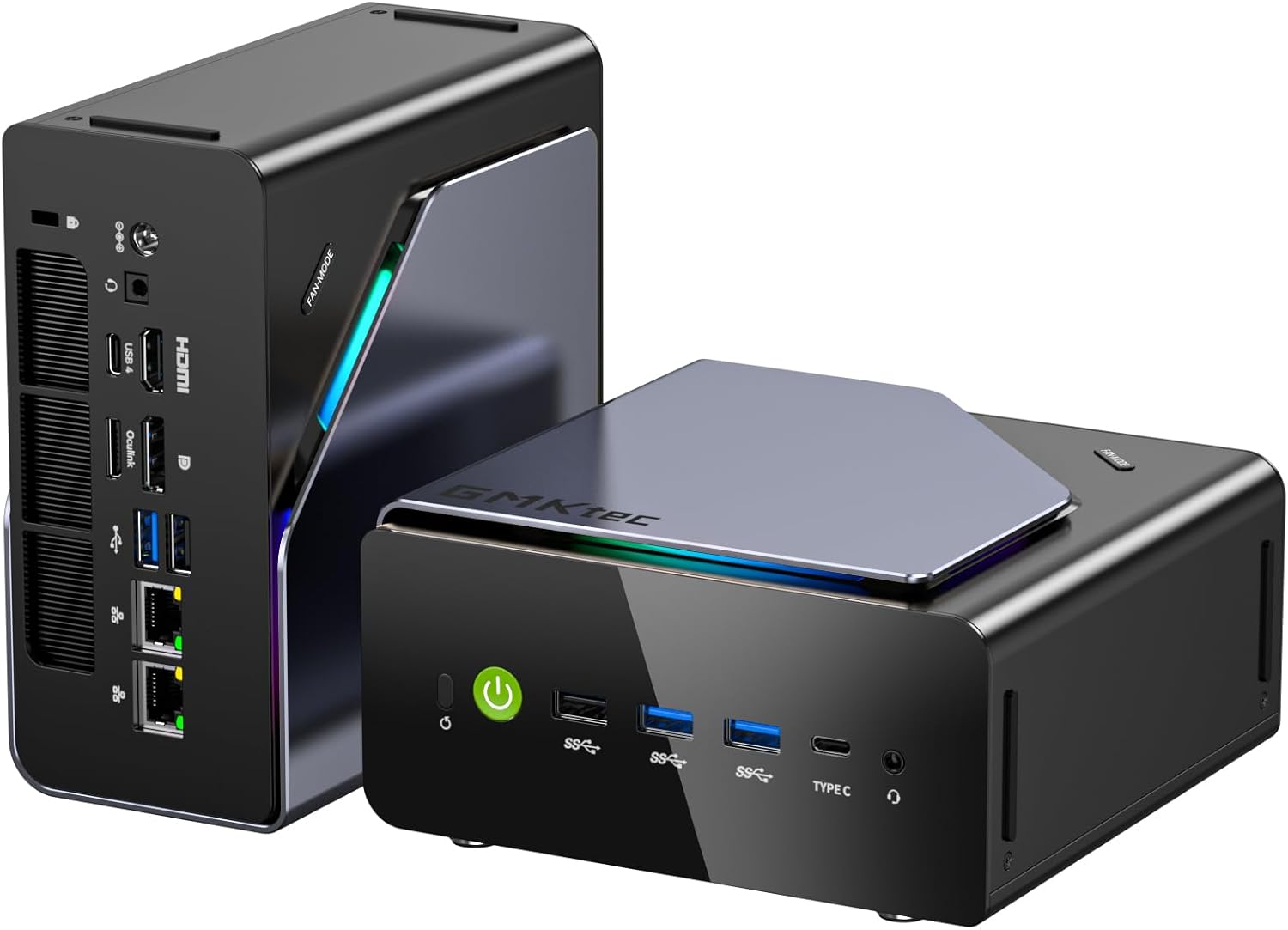
We own a GMKtec K12 ourselves, running it as a home AI workstation, file server, and emulation-gaming machine — and it has earned a genuine recommendation. Three internal M.2 2280 slots support up to 24TB of storage (up from two on the previous-generation NucBox K11), backed by 32GB of DDR5 5600MHz RAM, an AMD Ryzen 7 H255 at 4.9GHz, and modern USB4 plus dual 2.5GbE networking. It has stayed quiet under sustained server and emulation loads in our own use, and when one of our units needed a RAM module replaced, GMKtec's support team resolved it within days. Notebookcheck's lab benchmarks found the redesign added storage and I/O rather than a meaningfully faster chip, so buyers chasing peak CPU speed have faster options — but for real-world AI, server, and multitasking use, this is one of the strongest mini PCs we've tested, and we highly recommend it.
Pros
- Triple M.2 2280 slots for up to 24TB internal storage, up from two on the predecessor
- 32GB DDR5 5600MHz RAM comfortably handles home AI workloads, server tasks, and heavy multitasking
- Stayed quiet under sustained server and emulation-gaming loads in our own hands-on use
- AMD Ryzen 7 H 255 with 4.9GHz boost clock; Radeon 780M runs esports and emulation titles smoothly
- USB4, HDMI 2.1, and dual 2.5GbE NICs for modern connectivity
Cons
- Benchmarks roughly match the predecessor despite the redesign, per Notebookcheck
- CPU boost clock slightly lower than 5.1GHz competitors like the Beelink SER8
- One of our own units needed a RAM module replaced under warranty — GMKtec support resolved it within days
As an Amazon Associate I earn from qualifying purchases. Disclosure
Overview
Most small-form-factor PCs force a trade-off between a compact footprint and real storage headroom. The GMKtec K12 Mini PC doesn’t make that trade-off — three internal M.2 2280 slots support up to 24TB of storage, a genuinely rare ceiling for a machine this size. We bought one ourselves to run as a home AI workstation, media server, and emulation-gaming box, and it has held up well across all three roles.
Paired with 32GB of DDR5 5600MHz RAM, an AMD Ryzen 7 H255 processor at a 4.9 GHz boost clock, and the integrated Radeon 780M GPU, the K12 is built for buyers who need a stable, high-capacity hub rather than the single fastest chip on the market. That makes it a strong fit for content creators, home-lab enthusiasts, and anyone running local AI models, retro/emulation gaming, or a self-hosted server that needs real storage room to grow.
Pros
- Triple M.2 2280 slots for up to 24TB internal storage, up from two on the predecessor
- 32GB DDR5 5600MHz RAM comfortably handles home AI workloads, server tasks, and heavy multitasking
- Stayed quiet under sustained server and emulation-gaming loads in our own hands-on use
- AMD Ryzen 7 H 255 with 4.9 GHz boost clock; Radeon 780M runs esports and emulation titles smoothly
- USB4, HDMI 2.1, and dual 2.5GbE NICs for modern connectivity
Cons
- Benchmarks roughly match the predecessor despite the redesign, per Notebookcheck
- CPU boost clock slightly lower than 5.1 GHz competitors like the Beelink SER8
- One of our own units needed a RAM module replaced under warranty — GMKtec support resolved it within days
Key Specifications
Technical capabilities of this unit are centered around the AMD Ryzen 7 H255 processor, which operates with a boost frequency of up to 4.9 GHz. This processing power is paired with 32GB of DDR5 5600MHz RAM, providing a significant amount of high-speed memory for intensive workloads. For graphics and display output, the integrated AMD Radeon 780M GPU handles modern rendering tasks and supports 4K resolutions. Storage capacity is a standout feature, with the potential to reach a massive 24TB through the use of triple M.2 2280 slots. Connectivity is handled via a modern array of ports, including USB4, HDMI 2.1, and dual 2.5GbE NICs for high-speed networking.
Build Quality and Noise Levels
The chassis presents a compact, dense construction designed to minimize desktop clutter. The exterior casing appears solidly built, capable of withstanding the minor bumps and vibrations common in a busy home office or gaming setup. The arrangement of the interface ports is organized to allow for easy cable management, with the primary connectivity array positioned to prevent obstruction when plugged into a monitor. When compared to the footprint of the Beelink SER8, this unit maintains a similarly small profile that allows it to disappear into a workstation setup.
Notebookcheck’s lab review noted a genuine trade-off in the redesign: despite the larger chassis than the previous-generation NucBox K11, the K12 doesn’t add integrated speakers and its fans aren’t meaningfully quieter. Separately, Hostbor and TechRadar both measured the fan noise as well-controlled in everyday use — around 35dB in quiet mode — rising audibly but not aggressively under sustained gaming or export loads. That matches our own experience: running it as a server and emulation box under sustained load, it stays background-level quiet rather than a standout improvement over the previous chassis.
Storage Expansion and Modern Connectivity
The most impactful feature of this hardware is the ability to utilize three separate M.2 2280 slots for internal storage — up from two on the previous-generation NucBox K11, per Notebookcheck. This configuration allows a user to dedicate one drive to the operating system, a second to active project files, and a third to a massive archive, all within a single, small-form-factor device. Such an arrangement effectively eliminates the need for cumbersome external hard drive enclosures that clutter a workspace.
High-speed data transfer and modern display support are also central to the user experience. The inclusion of USB4 and HDMI 2.1 ports enables high-speed connection to modern peripherals and high-resolution monitors — essential for anyone working with 4K video or high-fidelity gaming. The dual 2.5GbE networking ports provide a significant advantage for users running network-attached storage or managing high-speed local area networks, allowing for the separation of internet traffic from local data transfers.
Performance for Gaming, AI, and Everyday Multitasking
Wccftech and Hostbor both found the Radeon 780M capable of running esports titles like Valorant, Fortnite, and Apex at high frame rates, with AAA titles playable at medium settings at 1080p. Notebookcheck’s benchmark suite found the K12’s CPU performance lands roughly in line with its predecessor rather than a clear generational leap — the redesign brought more storage and I/O, not a faster chip. The clock speed also sits slightly lower than the 5.1 GHz found in the Beelink SER8, which may result in a marginal difference in single-threaded task completion times.
In our own use running local AI models and server tasks alongside multiple background applications, the 32GB of DDR5 RAM provides comfortable headroom with no slowdown. For workloads defined by large datasets, self-hosted services, or emulation gaming rather than chasing peak single-core speed, the trade-off in raw CPU frequency is negligible next to the benefits of massive internal capacity and high-speed memory.
Our Hands-On Experience: Home AI, Server, and Emulation Use
We own a GMKtec K12 ourselves and have been running it as a home AI and file-server machine, alongside regular emulation-gaming sessions. The combination of 32GB of RAM and triple-drive storage makes it a comfortable host for running local AI models and serving files at the same time, and it has stayed quiet enough to sit in a living room or office without becoming background noise — including during sustained emulation sessions on the Radeon 780M.
We did run into one real issue: a RAM problem on our unit not long after setup. GMKtec’s support team diagnosed it quickly and had a replacement sorted within days, which was a smooth, low-friction fix. Between that responsive support and how capable the machine has been for AI, server, and emulation use well beyond a short review period, we’re rating it higher than a specs-only read would suggest — this is a machine we’d recommend without hesitation.
How Does It Stack Up Against the Competition?
If the GMKtec K12 doesn’t quite fit your needs, here are the closest alternatives worth considering. The main trade-off is between expandable storage capacity and overall CPU frequency.
| Feature | GMKtec K12 | Beelink SER8 | MINISFORUM UM890 Pro |
|---|---|---|---|
| Price (USD) | $879.99 | $549.00 (32GB/1TB config) | $989.00 (32GB/1TB config) |
| Max Internal Storage | 24TB (triple M.2) | Dual M.2, lower ceiling | Dual M.2, lower ceiling |
| CPU Boost Clock | 4.9 GHz | 5.1 GHz | 5.1 GHz |
| Best For | Gaming, content creation, high storage | Budget gaming, compact design | High-end gaming, expandable storage |
| TTP Review | This review ↑ | — | — |
| Amazon | View on Amazon | View on Amazon | View on Amazon |
Prices change frequently — always verify current pricing before purchasing.
Is the GMKtec K12 Mini PC Worth It?
Between our own hands-on use as a home AI, server, and emulation-gaming machine and the raw storage capacity on paper, this is one of the strongest all-around mini PCs we’ve reviewed at this price. Buyers chasing the single fastest CPU clock speed have faster options, as covered above — but for AI workloads, self-hosted services, and general multitasking, real-world performance holds up better than synthetic benchmarks alone would suggest.
If your priority is big storage, home-server duty, or running local AI models rather than chasing peak single-core speed, we highly recommend the GMKtec K12 — genuinely, as owners who’ve put it to daily use. Check current pricing on Amazon to see if it fits your setup.
Check the latest price for the GMKtec K12 Mini PC
Check Current Price on Amazon