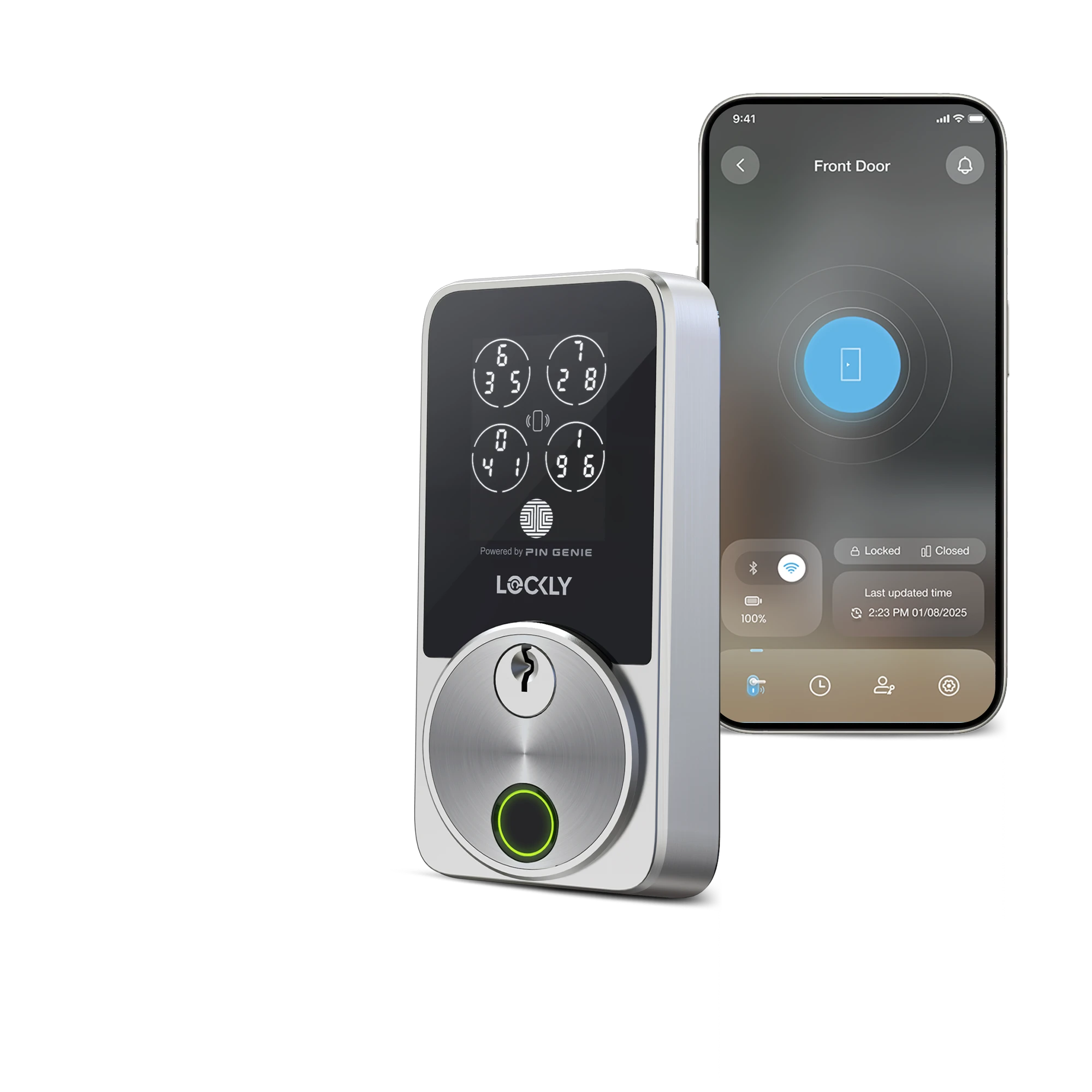
A Wi-Fi deadbolt for iPhone homes where not everyone wants to use a phone: the Secure Pro Zeno combines a fingerprint reader, Apple Home Key, a shuffling keypad and built-in Wi-Fi with no hub, and it fits doors up to 3 1/8 inches thick, though doors over 2 inches may need a longer torque plate from Lockly. In The Gadgeteer's hands-on review of a Lockly-supplied unit, it opened on the first try every time. The trade-offs are batteries rated for only up to 5 months, a lower security rating than Schlage's Encode Plus, and little independent testing so far.
Pros
- Fingerprint, Apple Home Key, keypad and key in one lock
- Built-in Wi-Fi, no hub needed
- Shuffling PIN Genie keypad
- Fits doors up to 3 1/8 in thick (over 2 in may need a longer torque plate from Lockly)
- USB-C emergency power
Cons
- Batteries rated for only up to 5 months
- Lower security rating than Schlage's Encode Plus
- Little independent testing so far
- Free app keeps only 90 days of history
As an Amazon Associate I earn from qualifying purchases. Disclosure
Overview
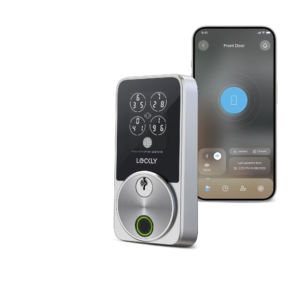
The Lockly Secure Pro Zeno (model PGK728WHK) is a Wi-Fi deadbolt for iPhone households where not everyone wants to reach for a phone. You can open it with a registered fingerprint, an iPhone or Apple Watch held to the lock as an Apple Home Key, a code on its shuffling touchscreen, the Lockly Home app, a voice assistant, or one of the two keys in the box. The Wi-Fi radio is built in, so remote locking and entry alerts don’t need a separate hub.
Within Lockly’s own range, it adds Apple Home Key, which the older Wi-Fi Secure Pro doesn’t offer, to fingerprint access, using what Lockly calls an upgraded sensor, in a body Lockly says is up to 35% smaller than its previous models. Battery life is the trade-off: Lockly rates the Zeno at up to 5 months on four AA batteries, half the 10 months it quotes for the older Secure Pro, which connects through a separate Wi-Fi hub. Independent testing of this exact model is still thin; the one hands-on review we found, from The Gadgeteer, used a sample Lockly supplied.
Key Specifications
| Price (USD) | $289.00 |
| Model | PGK728WHK (Matte Black or Satin Nickel) |
| Ways to unlock | Fingerprint, Apple Home Key (iPhone or Apple Watch), PIN Genie keypad, Lockly Home app, Alexa / Google Assistant / Siri, app QR scan, physical key |
| Capacity | Up to 99 fingerprints; up to 49 access codes in the Lockly Home app, or 16 created in Apple Home |
| Connectivity | Built-in Wi-Fi (2.4 GHz), encrypted Bluetooth |
| Power | 4 AA alkaline batteries (included), rated up to 5 months; USB-C backup power port |
| Door thickness | 1 3/8 to 3 1/8 in (35 to 80 mm) |
| Backset and bore | 2 3/8 or 2 3/4 in (60 or 70 mm) backset; 2 1/8 in (54 mm) bore hole |
| Exterior unit (H x W x D) | 5 5/16 x 2 9/16 x 1 1/8 in (135 x 65 x 28 mm) |
| Interior unit (H x W x D) | 5 1/8 x 3 x 2 3/16 in (130 x 77 x 55 mm) |
| Ratings | IP65; “built to meet ANSI Grade 2 standards” (Lockly) |
| In the box | Wired door sensor, touchscreen cover, thick-door extension kit, 2 keys, 4 AA batteries |
| Warranty | 5 years mechanical and finish, 2 years electronics |
Lockly Secure Pro Zeno Fingerprint and Keypad Access
The fingerprint reader is the reason to choose this model over the PIN Genie Pro, the Zeno without one. Lockly describes a 3D sensor with on-board AI learning that recognises a finger in 0.2 seconds, gets quicker and more accurate with use, and stores up to 99 prints; its own blog puts accuracy at up to 99.8%. Those are Lockly’s figures, and we found no independent lab measurement of speed or rejection rates for this model. The Gadgeteer’s tester, who fitted it to a detached garage, reported that it opened on the first try every time, by fingerprint, code, app or Apple Home, and kept working in freezing New York temperatures.
Enrolment asks a little patience: the lock scans each finger six times, and the manual wants it flat and centred. If a print isn’t recognised, the manual’s checks are a registered finger, a clean and dry one, and a centred press.
The keypad is Lockly’s PIN Genie. Its digits sit in circles and swap places between uses, so worn spots on the screen and a watching passer-by don’t give the code away. Codes run 6 to 8 digits, and holding the enter button for three seconds switches to fixed positions if the shuffle annoys you. One documented quirk: if the screen detects water it may switch to Rain Mode and stop taking codes, and the manual’s answer is to use Apple Home Key or the app until it dries.
Apple Home Key, Wi-Fi and the App
Home Key lives in Apple Wallet. With Express Mode on, holding an iPhone or Apple Watch near the reader unlocks the door without opening an app, and setup runs through Apple’s Home app using the code under the battery cover. Two limits are worth knowing: out of the box, only one Apple account can use it, and sharing Home Key or Apple Home access with other accounts needs a HomePod or Apple TV set up as a home hub.
Android users aren’t shut out. The built-in Wi-Fi, which needs a 2.4 GHz network, links the lock to the free Lockly Home app for remote locking, real-time alerts and access logs, and the lock works with Alexa and Google Assistant. Lockly’s spec page doesn’t list Matter, so plan on Apple Home, Alexa, Google Home or Lockly’s own app. Fit the included wired door sensor: Lockly’s installation guide says it provides the open and closed alerts and enables voice control.
The free app has limits that mostly matter to hosts and landlords: up to three properties, 90 days of history, three Offline Access Codes and three eBadges a month, and 50 credential transfers a month; Lockly’s LocklyOS subscription raises them. Offline Access Codes are single-use guest codes you can issue even while the lock is offline. If you’re moving from another Lockly, Air Transfer copies codes and eBadges across, but not fingerprints, so everyone re-enrols.
Battery Life, Fit and Build
Lockly’s rating of up to 5 months on four AA alkalines compares with up to 8 months per charge for the rechargeable packs in its Visage Zeno and up to six months Schlage quotes for the Encode Plus. At the rated 5 months, that’s about 10 AA batteries a year, roughly $3 at the $15.29 Amazon asked for a 48-pack of Amazon Basics AAs on October 3, 2026, so the real cost is the chore, not the money. The app and an interior light warn when the batteries run low, a USB-C port on the outside can power a dead lock long enough to get in, and the keys remain the last resort.
It fits doors from 1 3/8 to 3 1/8 inches thick with a 2 3/8- or 2 3/4-inch backset and a standard 2 1/8-inch bore, a wider thickness range than the Schlage (up to 1 3/4 inches) or the Yale (up to 2 1/4 inches) covers. The box includes a thick-door extension kit, though Lockly’s guide notes that doors thicker than 2 inches (50 mm) may need a longer torque plate and screws from its support team. Lockly’s guide puts installation at 20 to 35 minutes with two screwdrivers and a tape measure, and The Gadgeteer found it straightforward, with accurate step-by-step instructions.
On security ratings it trails the Schlage. Lockly says the Zeno is built to meet ANSI Grade 2 standards and rates it IP65, while Schlage’s Encode Plus is certified Grade AAA for security, durability and finish under ANSI/BHMA A156.40. Lockly’s warranty covers mechanical parts and finish for five years and electronics for two, against Schlage’s limited lifetime and three years. The five-pin cylinder can be swapped or rekeyed with kits from other brands, so the Zeno’s keys can match the rest of the house.
How Does It Stack Up Against the Competition?
Yale’s fingerprint deadbolt and Schlage’s Home Key deadbolt each offer one of the Zeno’s two headline features; Lockly’s Visage Zeno adds face recognition to both. Specs are each maker’s figures.
| Feature | Lockly Secure Pro Zeno | Yale Assure Lock 2 Touch Keypad with Wi-Fi | Schlage Encode Plus | Lockly Visage Zeno Series |
|---|---|---|---|---|
| Price (USD) | $289.00 | $175.99 | $329.00 | $339.00 |
| Fingerprint reader | Yes, up to 99 prints | Yes | No | Yes, up to 99 prints, plus face recognition |
| Apple Home Key | Yes | No | Yes | Yes |
| Wi-Fi | Built in | Built in | Built in | Built in |
| Power | 4 AA, rated up to 5 months | 4 AA (no rated life on Yale’s product page) | 4 AA, rated up to 6 months | 2 rechargeable batteries (included), rated up to 8 months |
| Door thickness | 1 3/8 to 3 1/8 in | 1 3/8 to 2 1/4 in | 1 3/8 to 1 3/4 in | 1 3/8 to 3 1/8 in |
| Security rating | Built to meet ANSI Grade 2 | ANSI/BHMA Grade 2 | ANSI/BHMA Grade AAA (A156.40) | Built to meet ANSI Grade 2 |
| Electronics warranty | 2 years | 2 years | 3 years | 2 years |
| Amazon | View on Amazon | View on Amazon | View on Amazon | View on Amazon |
Prices change frequently — always verify current pricing before purchasing.
Is the Lockly Secure Pro Zeno Worth It?
Buy it for a front door shared by iPhone users and people who’d rather not carry anything: children, a parent who visits, a dog walker on a timed code. Apart from Lockly’s own Visage, it’s the only lock in this comparison with a fingerprint reader, Apple Home Key and built-in Wi-Fi together, and its 3 1/8-inch door range covers thick doors that the Schlage and Yale can’t (ask Lockly for the longer torque plate if yours is over 2 inches). Budget for a battery swap every few months, and fit the door sensor if you want open-and-closed alerts.
Look elsewhere if one of those features would go unused. Without iPhones in the house, the Yale Assure Lock 2 Touch Keypad with Wi-Fi gives you a fingerprint reader and Wi-Fi, at $165.99 on Amazon on October 3, 2026. If a certified security grade and a longer electronics warranty matter more than fingerprints, the Schlage Encode Plus carries a BHMA AAA rating and Home Key. And if you’d rather walk up hands-free and recharge less often, Lockly’s Visage Zeno adds face recognition and rechargeable batteries rated for up to 8 months, at $349 on Amazon on October 3, 2026.
Sources
- Lockly — Secure Pro Zeno Series Specifications
- Lockly Secure Pro Zeno — Amazon Product Listing
- Lockly — Secure Pro Zeno Series (PGK728WHK) Setup and User Manual
- Lockly — Secure Pro Zeno Series (PGK728WHK) Installation Guide
- Lockly — What Is the Zeno Series and Should I Upgrade?
- The Gadgeteer — Lockly Secure Pro Zeno Series Fingerprint Deadbolt Review
- Yale — Assure Lock 2 Touch Keypad with Wi-Fi Specifications
- Schlage — Encode Plus Smart WiFi Deadbolt Specifications
- Lockly — Visage Zeno Series Specifications
Reader Poll
Which way would you most often open a Zeno?
Help Our Editors Know What Matters to You
Explore on Amazon →