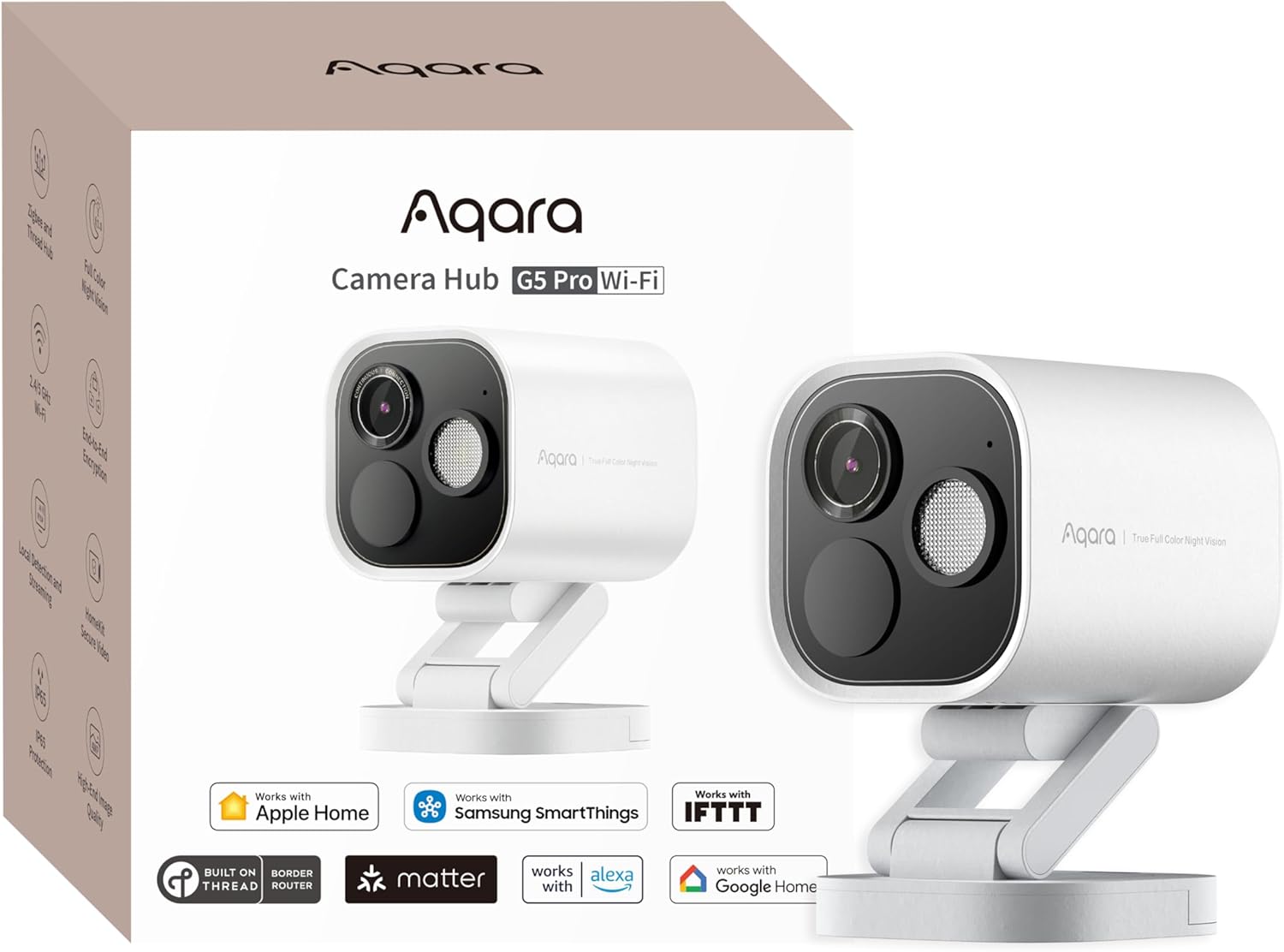
This is the outdoor camera to buy for an Apple Home: it brings HomeKit Secure Video, color night video and free on-camera detection of people, faces, vehicles and packages, and it can keep your footage at home instead of in a paid cloud. It's also a Thread border router, Matter controller and Aqara Zigbee hub, which makes it a strong buy if you have or plan Aqara locks and sensors outside. It's pricey for a camera alone, so you're paying for the hub. For cameras all around a property, budget cameras feeding a recording server make more sense.
Pros
- Color night video from a large sensor and f/1.0 lens
- HomeKit Secure Video, plus Alexa, Google Home and SmartThings
- Free on-camera detection of people, faces, vehicles and packages
- Thread border router, Matter controller and Aqara Zigbee hub
- Local storage, NAS and RTSP with no subscription
Cons
- Pricey if you only need a camera
- No infrared mode: real darkness needs the spotlight
- Zigbee hub works only with Aqara devices
- Sound alerts less effective outdoors; saving clips is clunky
As an Amazon Associate I earn from qualifying purchases. Disclosure
Overview
Many outdoor cameras sell you the hardware and then a subscription to make it useful. The Aqara Camera Hub G5 Pro works the other way round: it recognizes people, faces, vehicles, animals and packages on the camera itself at no charge, keeps clips on built-in storage or a NAS drive, and records to iCloud through Apple’s HomeKit Secure Video, so Aqara’s own cloud plan is optional. It’s also a smart home hub (a Thread border router, a Matter controller and a Zigbee hub for Aqara’s sensors and locks) in a weatherproof body you can mount outside. This review covers the Wi-Fi model, which runs on USB-C power; a Power over Ethernet (PoE) version is sold separately.
It stands out most in an Apple Home. Few outdoor cameras support HomeKit Secure Video, as 9to5Mac points out, and the main alternative in our comparison table, Eve’s Outdoor Cam, has to be wired to mains power. MacStories calls the G5 Pro “the best HomeKit-compatible camera I’ve ever used.” It also works with Alexa, Google Home and SmartThings, and can stream over RTSP to Home Assistant or a recording server. The trade-off is price: it’s pricey for a camera alone, because part of what you pay for is the hub.
Key Specifications
| Price (USD) | $199.99 |
| Model (Wi-Fi version) | CH-C07E/CH-C07D |
| Resolution | 2688 x 1520 (4MP) |
| Sensor and lens | 1/1.8-inch sensor; f/1.0 aperture; 4.2 mm focal length |
| Field of view | 133° diagonal |
| Spotlight | 3W, 120° beam, 3000K |
| Motion sensor | PIR, 100° horizontal, 65° vertical |
| Audio | Two-way talk; 100dB siren |
| Wireless | Wi-Fi 802.11 b/g/n/ac (2.4 and 5 GHz); Zigbee and Thread (IEEE 802.15.4); Bluetooth |
| Power | USB-C, 5V 2A (power adapter not included) |
| Local storage | Built-in 8GB eMMC (Aqara’s spec), not expandable; NAS over SMB |
| Works with | Apple Home (including HomeKit Secure Video), Alexa, Google Home, SmartThings; RTSP streaming |
| Weather rating | IP65 |
| Operating temperature | -22°F to 122°F (-30°C to 50°C) |
| Dimensions | 2.78 x 2.78 x 3.50 in (70.5 x 70.5 x 89 mm), stand not included |
| Free cloud trial | 30 days from first connection |
Aqara Camera Hub G5 Pro Video and Night Vision
In daylight it records sharp 2688 x 1520 video with natural color. It isn’t 4K, and that shows at a distance: on the PoE version Mighty Gadget tested, mounted high on a house, license plates and street signs weren’t readable, although its footage showed enough to make out anyone coming into the garden. Tom’s Guide was struck by its dynamic range: aimed at a living room with bright windows, it kept some detail outside, where the Eufy Cam 2C Pro that reviewer had tested turned the windows into white squares.
Low light is its strength. A large 1/1.8-inch sensor behind an f/1.0 lens gathers enough light to keep recording in color after dark, and its night footage is the most praised part of its video. With a little light around, such as a porch lamp or a streetlight, it stays in color without its own spotlight: MacStories could see its front walk and the sidewalk with its door light on or off, and Mighty Gadget’s camera stayed in color under streetlights while its Reolink cameras switched to black and white, though it notes the cameras were positioned differently, so it wasn’t a like-for-like comparison.
If you don’t want a light switching on outside after dark, look elsewhere. Tom’s Guide points out that there’s no black-and-white infrared mode at all, so in real darkness the 3W spotlight is the only way it sees. Making that light come on only for motion takes an automation in the Aqara app, not a simple switch.
Smart Home Hub and HomeKit Secure Video
The hub is the reason to choose it over a plain camera. It’s a Thread border router and a Matter controller, so Thread and Matter devices can connect through it, and a Zigbee hub. Mounted outside, it carries that network to Aqara locks and sensors beyond the reach of an indoor hub; PCWorld calls it one of the few outdoor-rated devices with a Thread border router. As a Matter bridge, it also brings the Aqara Zigbee devices paired to it into Apple Home, Google Home or Alexa.
The Zigbee side has a limit: it works only with Aqara’s own Zigbee devices, so it won’t replace a general Zigbee hub for other brands’ bulbs and plugs.
For Apple users, HomeKit Secure Video is the main draw. With an iCloud+ plan and a home hub (a HomePod, Apple TV or iPad), your hub analyzes the camera’s events at home and stores the recordings in iCloud, end-to-end encrypted, for 10 days, without counting against your iCloud storage. One camera needs Apple’s 50 GB plan at $0.99 a month and up to five need the 200 GB plan at $2.99 a month (Apple’s US prices, October 2026), so $11.88 or $35.88 a year. HomeKit records at 1080p, but Tom’s Guide found the Aqara app still records the full 1520p at the same time, which the Eufy Cam 2C Pro it had tested couldn’t do while connected to HomeKit.
Away from Apple, it streams over RTSP to Home Assistant, Frigate or other recording software, which is the route for anyone who wants nothing to do with the cloud. RTSP is off until you switch it on once in the Aqara app; after that, SmartHomeScene’s camera kept feeding Frigate even with the app removed and its internet access blocked.
AI Detection and Alerts
Detection runs on the camera, not in the cloud, and costs nothing: it recognizes people, faces, vehicles, animals and packages, and warns you when something blocks the lens. A PIR (heat-sensing) motion sensor starts it. Tom’s Guide got a package alert within three seconds of placing a box in its package zone, and even small movements from a cat started a recording.
Recognition was reliable in testing, telling people, vehicles, animals and packages apart quickly; Mighty Gadget’s vehicle recognition needed a bit of training but worked reasonably well. Because the processing is local, the detections can drive automations in the Aqara app that keep running when the internet is down, such as turning on the spotlight when a person appears at night or unlocking an Aqara smart lock for a recognized face.
Sound detection is the weak spot outdoors. Tom’s Guide’s indoor camera caught a baby crying a floor below, but on MacStories’ door camera, car tires on a wet road were flagged as crying, and Mighty Gadget found the feature not particularly effective outdoors on a camera mounted high up.
Storage, Plans and the Aqara App
Your recordings can stay at home. The built-in storage isn’t expandable, and once it’s full the oldest footage is overwritten (MacStories’ unit reported 6.7GB). For a longer local history it can save to a NAS drive over SMB or stream to a recording server, and Mighty Gadget notes the onboard storage holds event clips rather than 24/7 recording.
Without a subscription, Tom’s Guide found Aqara’s cloud keeps a day of footage at 360p. Aqara’s spec sheet lists a 30-day free cloud trial from the camera’s first connection, though Tom’s Guide was offered a 14-day trial. Aqara’s optional HomeGuardian plan, bought in the Aqara Home app, keeps 90 days of event history in 2K.
Testers split on the Aqara Home app. PCWorld found it clean and easy to navigate, while MacStories isn’t a fan of its design and SmartHomeScene found the menus could be clearer. Tom’s Guide’s biggest complaint is saving footage: to download an event clip to your phone, you press record and play it back in real time.
Setup, Power and Weatherproofing
Setup takes minutes. The Aqara app finds the camera over Bluetooth, and the HomeKit code is printed on the camera; 9to5Mac had it in Apple Home on the first try. Over a few weeks of use, MacStories’ camera never dropped off its network.
The Wi-Fi model needs a USB-C cable run to an outlet and your own 5V 2A power adapter, since none comes in the box. Where you can run Ethernet instead, the PoE version is worth the switch: one cable carries both power and data, and it gets around weak Wi-Fi.
It’s rated IP65 and for -22°F to 122°F, and it’s solid for its size. MacStories’ camera came through big storms with heavy blowing rain and snow in a semi-protected spot by its front door. The stand tilts and swivels, mounts on a wall or ceiling, and can be swapped for any standard 1/4-inch mount.
How Does It Stack Up Against the Competition?
The G5 Pro’s closest rivals are another outdoor HomeKit Secure Video camera, Eve’s Outdoor Cam, and the plug-in outdoor cameras from Google and Ring at a similar price.
| Feature | Aqara Camera Hub G5 Pro | Eve Outdoor Cam | Google Nest Cam Outdoor (wired, 2nd gen) | Ring Outdoor Cam 4K Pro (Plug-In) |
|---|---|---|---|---|
| Price (USD) | $199.99 | $217.05 | $147.99 (Nov 14) | Deal $129.99 until Nov 30 |
| Video resolution | 2688 x 1520 | 1080p | 2560 x 1440 | 3840 x 2160 |
| Field of view (maker figure) | 133° diagonal | 157° | 152° diagonal | 140° horizontal, 85° vertical |
| Night lighting | 3W spotlight; color night video, no infrared | Floodlight; infrared night vision | Infrared (two 850 nm LEDs) | Low-Light Sight color night video |
| Power | USB-C, 5V 2A (adapter not included) | Wired to mains AC (needs neutral and ground wires) | Plug-in, 18 ft outdoor-rated cable | Plug-in adapter (included), USB-C |
| Works with | Apple Home (incl. HomeKit Secure Video), Alexa, Google Home, SmartThings | Apple Home only (HomeKit Secure Video) | Google Home app; compatible with Alexa | Ring app; works with Alexa |
| Recordings without a paid plan | Yes: built-in storage and NAS | No: needs an iCloud+ plan (50 GB or higher) | Event previews only (up to 6 hours, clips up to 10 seconds) | No: recorded video needs a Ring plan |
| Weather rating | IP65 | IP55 | IP65 | IP65 |
| Operating temperature | -22°F to 122°F | Not listed | -4°F to 104°F | -5°F to 120°F |
| Amazon | View on Amazon | View on Amazon | View on Amazon | View on Amazon |
Prices change frequently — always verify current pricing before purchasing.
Aqara Camera Hub G5 Pro: Worth It for Apple Home Households
Buy it if your home runs on Apple Home and you want one camera watching a front door, driveway or garden. You get HomeKit Secure Video plus free on-camera detection, footage you can keep at home, and a hub that reaches the Aqara locks and sensors you put outside. Against Eve’s Outdoor Cam it’s the easier fit unless you’re replacing an outdoor light anyway: Eve’s camera records at 1080p and has to be wired to mains power, while the G5 Pro plugs into a USB-C adapter. If you’d rather run it outside Apple’s world, its RTSP stream works fully offline with Home Assistant and Frigate.
For cameras around a whole property, the hub’s cost adds up per camera, and you don’t need a hub in every one; Mighty Gadget suggests budget 4MP cameras feeding a recording server for that job. In an Alexa home, Ring’s Outdoor Cam 4K Pro offers the higher resolution, with recorded video tied to a Ring plan. Google Home households get the same plug-in convenience from the Nest Cam Outdoor, which also uses infrared, so it suits anyone who doesn’t want a light switching on at night, though its free history is limited to short event previews.


Sources
- Aqara — Camera Hub G5 Pro Official Specifications
- Aqara — Camera Hub G5 Pro Product Page
- Aqara Camera Hub G5 Pro (Wi-Fi) — Amazon Product Listing
- Tom’s Guide — Aqara Camera Hub G5 Pro Review
- PCWorld — Aqara Camera Hub G5 Pro Review
- MacStories — A Review of Aqara’s G5 Pro Outdoor Camera Hub
- 9to5Mac — Hands-on with the Aqara Camera Hub G5 Pro
- Mighty Gadget — Aqara Camera Hub G5 Pro PoE Review
- SmartHomeScene — Aqara G5 Pro Camera Review and Frigate Setup
- Apple — HomeKit Secure Video in iCloud
- Apple — iCloud+ Plans and Pricing
- Eve — Eve Outdoor Cam
- Google — Nest Cam Outdoor (wired, 2nd gen) Specs
- Ring — Outdoor Cam 4K Pro Tech Specs
- Ring — Subscription Plans
Reader Poll
What would you use the G5 Pro for first?
Help Our Editors Know What Matters to You
Explore on Amazon →