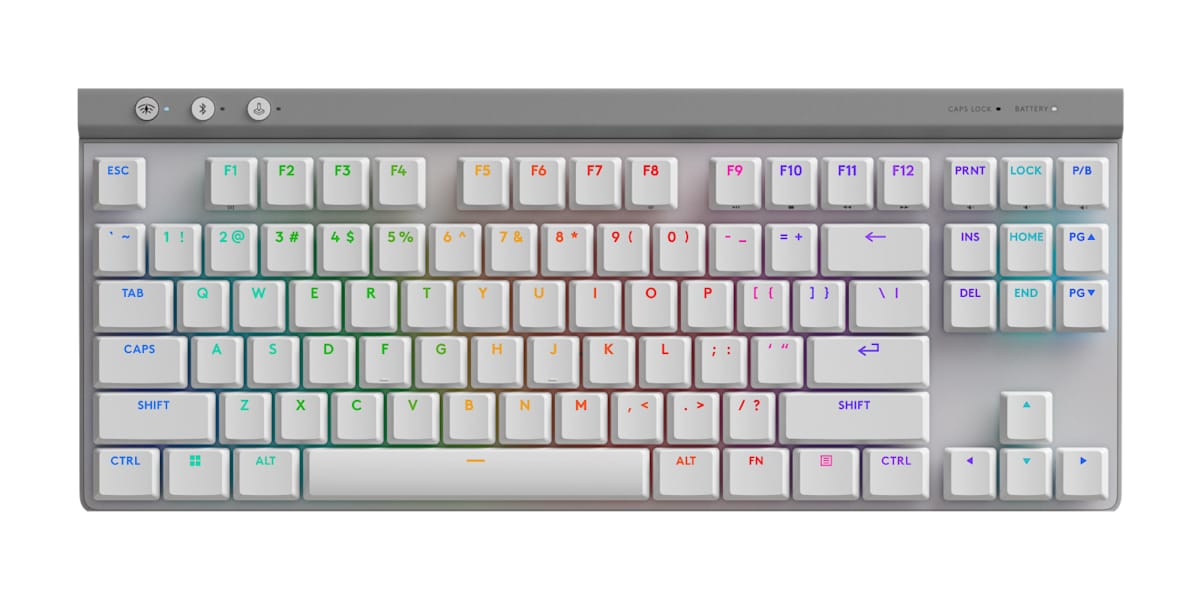
Buy the G515 if you want one thin wireless keyboard for both work and games: its low-profile switches feel smooth and quiet for typing and quick in play, and the Lightspeed link felt as responsive as a cable in testing. A full tenkeyless layout and deep remapping in G HUB make it easy to live with. Battery life is the trade-off, rated at up to 36 hours with the lighting at full brightness, so a brightly lit board needs regular charging. Shooter players who want rapid trigger are better served elsewhere.
Pros
- Smooth, quiet low-profile switches (tactile or linear)
- Lightspeed wireless felt as responsive as wired in testing
- Full tenkeyless layout in a 22 mm thin body
- Deep remapping with KEYCONTROL and a customizable Game Mode
- Double-shot PBT keycaps; cross-style stems fit most low-profile keycaps
Cons
- Battery rated at up to 36 hours with lighting at full brightness
- No dedicated media keys or volume roller
- Switches aren't hot-swappable
- No rapid trigger or adjustable polling rate
As an Amazon Associate I earn from qualifying purchases. Disclosure
Overview
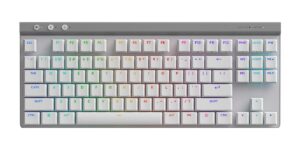
The Logitech G515 Lightspeed TKL pairs a full tenkeyless layout with Logitech’s Lightspeed wireless, a less common mix than it sounds: as Stuff points out, most low-profile rivals are 65% boards or smaller. What it skips are the rapid trigger and adjustable polling rates some similarly priced gaming boards offer. It has full-size keys, low-profile GL mechanical switches in tactile or linear form, and three ways to connect (Lightspeed 2.4 GHz wireless, Bluetooth and a USB-C cable), in a body 22 mm tall.
It is the more basic sibling of Logitech’s G915 TKL in the same low-profile family, and in a few ways an improvement on it. The switches now use cross-style stems, so most third-party low-profile keycaps fit, the keycaps are double-shot PBT rather than the G915’s ABS, and charging has moved to USB-C. Logitech saved money on the frame instead: it is all plastic, and the G915’s media keys and volume roller are gone.
Key Specifications
| Price (USD) | $109.99 |
| Layout | Tenkeyless (TKL), full-size keys |
| Switches | Low-profile GL mechanical, tactile or linear, factory-lubed; not hot-swappable |
| Actuation point / total travel | 1.3 mm / 3.2 mm |
| Actuation force | 43 g (linear), 45 g (tactile) |
| Keycaps | Low-profile double-shot PBT |
| Connectivity | Lightspeed 2.4 GHz wireless (2:1 receiver), Bluetooth, wired USB-C |
| Rated battery life | Up to 36 hours with lighting at full brightness; up to 600 hours with lighting off |
| Dimensions | 368 x 150 x 22 mm (14.49 x 5.91 x 0.87 in) |
| Weight | 880 g (31.04 oz) |
| Software | Logitech G HUB (KEYCONTROL: up to 15 functions per key) |
| Works with | Windows 10 or later, macOS 12 or later; Bluetooth also Chrome OS, Android, iOS |
| Warranty | 2 years |
Logitech G515 Lightspeed TKL Typing and Gaming Feel
The switches are what most buyers are paying for, and they are the part testers liked most. Both versions register a press at 1.3 mm and bottom out at 3.2 mm, with 43 g of force for the linear switch and 45 g for the tactile one. Tom’s Hardware lists the G915’s older GL switches at 50 g, 1.5 mm and 2.7 mm, so these are lighter, quicker to trigger and a little deeper. The keys feel smooth and controlled for long typing sessions, and the tactile version in particular won over testers who normally avoid low-profile boards. Tom’s Hardware typed at about 125 to 130 words per minute straight away, though its accuracy slipped from 98% to around 95% on the flat keycaps.
In games the picture depends on what you play. Tom’s Hardware found the flat, slightly slippery keys held it back somewhat in shooters and esports titles where speed and accuracy both peak, while calling it a great companion everywhere else. Tom’s Guide found the tactile bump awkward for tap-strafing in Valorant, which is a reason to pick the linear switches if you play that way. It also notes two features some similarly priced gaming boards add and the G515 doesn’t: rapid trigger and adjustable polling rates. The switches aren’t hot-swappable either, so choose tactile or linear with care; the cross-style stems at least leave the keycaps open to upgrades.
It is a quiet keyboard. Logitech pre-lubes the switches and adds sound-dampening layers inside the case, and the result is a lot quieter than a regular mechanical keyboard. Tom’s Hardware still heard a slightly plasticky thunk when keys bottom out, and some rattle, and Stuff reckons only a boutique keyboard brand would give you a more satisfying sound.
Lightspeed Wireless and Battery Life
Logitech’s 2.4 GHz link is the G515’s strongest gaming feature. Over the included receiver it runs at a 1,000 Hz polling rate, and in testing it felt no slower than a cable, with no dropouts. Stuff kept a perfect connection even after moving its laptop into the next room. The receiver is a 2:1 model, so a compatible Logitech mouse can share it and free a USB port. Bluetooth is there for laptops, tablets and handhelds, but Tom’s Hardware notes it pairs with only one device at a time and carries the usual Bluetooth lag, so games belong on the receiver.
Battery life is where opinions split. Logitech rates the G515 at up to 36 hours with the lighting at full brightness and up to 600 hours with it off. Tom’s Hardware calls that fantastic for a board this slim, and Stuff calls it respectable for a low-profile keyboard, good for four or five days of working hours. PCMag found it surprisingly low, with G HUB estimating 44 hours on its review unit. For context, NuPhy rates its Air75 V3 at 60 to 100 hours with all lights on. With the RGB off, the G515’s rating beats the ASUS and Corsair figures in the table below; with the RGB on, plan on plugging in the USB-C cable regularly.
Build, Size and Missing Extras
At 368 by 150 mm it takes the same desk space as the G915 TKL, and the all-plastic chassis feels sturdy. Tom’s Hardware puts it at 880 g against the G915 TKL’s 810 g, so it is a little heavier than the older board. Stuff found it stayed rooted in place on the desk, though Tom’s Guide still calls it light for a mid-sized gaming keyboard. Underneath there are two sets of flip-out feet (4 and 8 degrees), rubber grips and a slot that stores the wireless receiver. In the box you get the receiver, a 1.8 m USB-C to USB-A cable and a USB extender.
The cuts are easy to spot. There are no dedicated media keys and no volume roller: playback and volume live on Fn shortcuts printed along the keycaps, and Digital Citizen found the volume shortcuts hit-and-miss in the middle of a game. There is no wrist rest and no carrying case. Some testers count the missing wrist rest as a real drawback, while two who normally use one didn’t miss it, because the board sits so close to the desk.
G HUB, KEYCONTROL and Game Mode
The software is where the G515 makes up for its missing keys. With KEYCONTROL in G HUB (Windows and macOS), one key can hold up to 15 functions: each of the three layers (base, Fn and G-Shift) takes its own action, and that action can change with Alt, Ctrl or Shift held, or between a tap, a hold and a release. Few people will use all of that, but a handful of layered shortcuts can stand in for the number pad and macro keys. Testers mostly found G HUB easy to get around, though PCMag calls it dense, and the layered remapping takes time to learn. The same app sets the per-key RGB lighting, profiles can switch automatically when a game launches, and onboard memory keeps a profile on the keyboard for other computers; Digital Citizen notes there is one onboard slot.
Tom’s Guide found Game Mode more useful than most: rather than only locking the Windows key, it lets you choose which keys switch off while you play.
How Does It Stack Up Against the Competition?
The G515’s closest rivals are other wireless gaming boards a buyer weighs at this level: two low-profile alternatives and a 75% board with deeper key travel.
| Feature | Logitech G515 Lightspeed TKL | NuPhy Air75 V3 | ASUS ROG Falchion RX Low Profile | Corsair K65 Plus Wireless |
|---|---|---|---|---|
| Price (USD) | $109.99 | $139.95 | $160.50 | $129.99 |
| Layout | Tenkeyless (TKL) | 75% (84 keys) | 65% | 75% |
| Switches | Low-profile GL mechanical, tactile or linear; not hot-swappable | Low-profile mechanical; hot-swappable | ROG RX low-profile optical | Corsair MLX Red mechanical; hot-swappable |
| Connections | 2.4 GHz, Bluetooth, wired | 2.4 GHz, Bluetooth, wired | 2.4 GHz, Bluetooth, wired | 2.4 GHz, Bluetooth, wired |
| Media control | Fn shortcuts only | Knob | Touch panel and multi-function button | Multi-function dial |
| Rated battery life (maker figures) | Up to 36 hours (full lighting); up to 600 hours (lighting off) | 60 to 100 hours (lights on); up to 1,200 hours (lights off) | 430+ hours (RGB off, 2.4 GHz) | Up to 266 hours (LEDs off) |
| TTP Review | This review ↑ | Read our review → | — | Read our review → |
| Amazon | View on Amazon | View on Amazon | View on Amazon | View on Amazon |
Prices change frequently — always verify current pricing before purchasing.
Logitech G515 Lightspeed TKL: Worth It for One Board That Games and Types
The G515 makes the most sense on a desk that does double duty. If you write, code or answer email all day and play in the evening, it gives you a full tenkeyless layout, switches that suit both jobs and a wireless link you don’t have to think about, in a frame thin enough that some testers didn’t miss a wrist rest. It is an especially easy fit if you already use a Lightspeed mouse, since both can run from one receiver, and the tactile version is the safer pick if typing comes first.
Look elsewhere if your priorities are narrower. Competitive shooter players who want rapid trigger will be better served by a board that has it, such as the SteelSeries Apex Pro Mini that Tom’s Guide suggests. If you want a lit keyboard that goes longer between charges, a knob and hot-swappable switches in a smaller low-profile frame, the NuPhy Air75 V3 is the one to look at. The Corsair K65 Plus Wireless suits buyers who want deeper key travel (4.0 mm against the G515’s 3.2 mm) and a volume dial, and the ASUS ROG Falchion RX Low Profile fits a smaller desk with its 65% layout and touch panel, and it pairs with up to three Bluetooth devices.

Sources
- Logitech — G515 LIGHTSPEED TKL Wireless Gaming Keyboard (official product page and specifications)
- Logitech G515 Lightspeed TKL — Amazon Product Listing
- Tom’s Hardware — Logitech G515 Lightspeed TKL Review: Low profile, affordable price
- Tom’s Guide — Logitech G515 Lightspeed TKL review
- PCMag — Logitech G515 Lightspeed TKL Review
- Stuff — Logitech G515 Lightspeed TKL review: low-profile goes more mainstream
- Digital Citizen — Logitech G515 LIGHTSPEED TKL review
- GGRecon — Logitech G515 review: Smaller number, better package
- NuPhy — NuPhy Air75 V3 (official specifications)
- ASUS — ROG Falchion RX Low Profile Gaming Keyboard (official product page)
- ASUS — ROG Falchion RX Low Profile Tech Specs
- Corsair — K65 PLUS WIRELESS 75% RGB Mechanical Gaming Keyboard (official specifications)
Reader Poll
Which G515 switch would you choose?
Help Our Editors Know What Matters to You
Explore on Amazon →