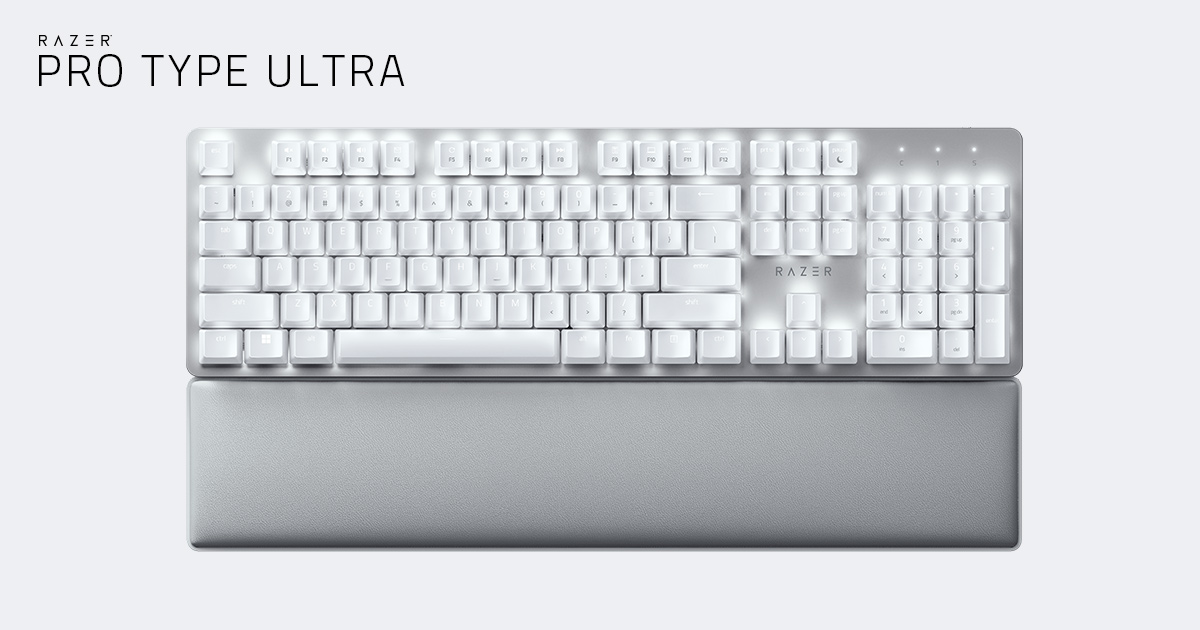
The Pro Type Ultra is a strong buy for fast typists in Canadian offices who work on Windows: its light, shallow linear switches feel quick and comfortable, and a cushioned wrist rest comes in the box. Four-device pairing over Bluetooth and a 2.4 GHz dongle makes it easy to share between a work laptop and a home PC. It is quieter than most mechanical boards but not silent, with a spacebar stabilizer and plate pings that some testers heard clearly; Mac users are better served by the Logitech MX Mechanical.
Pros
- Light, fast linear switches
- Cushioned wrist rest included
- Pairs up to four devices
- Up to ~214 hours with the backlight off (Razer)
- Simple, optional Synapse software
- Bright white backlight
Cons
- Spacebar stabilizer and plate pings work against the silent pitch
- Synapse is Windows only; no macOS optimisations
- Coated ABS keycaps can feel damp and shine with use
- About 13 hours at full backlight brightness (Razer)
As an Amazon Associate I earn from qualifying purchases. Disclosure
Overview
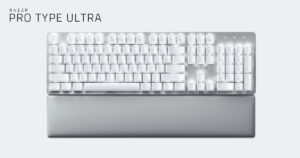
Razer made its name with flashy, rainbow-lit gaming keyboards, and the Pro Type Ultra is its attempt at the opposite: a white, full-size wireless mechanical keyboard with plain white backlighting, linear switches Razer sells as silent, and a padded leatherette wrist rest in the box. It connects by USB-C cable, Bluetooth or Razer’s 2.4 GHz HyperSpeed dongle, and it is aimed at people who type all day and want a mechanical feel without a gamer look.
It first went on sale in November 2021 and is still Razer’s current productivity keyboard, sold alongside the Pro Type Ergo. As of October 2026, Amazon.ca lists it without new stock, so the price in this review is Razer Canada’s own $229.99 CAD; Razer’s Canadian store had it in stock and ships free on orders over $129 CAD. PCMag’s 2026 roundup of wireless keyboards still names it the best for most users, but not every tester agrees, mainly over the coated keycaps and the price.
Key Specifications
| Price (CAD) | $240.72 |
| Layout | Full size (104 keys) |
| Switches | Razer Yellow mechanical, linear and silent; rated for 80 million keystrokes |
| Keycaps | ABS plastic with soft-touch coating |
| Backlight | White LED |
| Connectivity | Wired USB-C, Bluetooth, Razer HyperSpeed 2.4 GHz |
| Devices | Up to 4 |
| Battery life (Razer) | Up to ~214 hours on Bluetooth and ~207 hours on 2.4 GHz with backlighting off; up to ~13 hours at full brightness |
| Wrist rest | Yes, leatherette, separate piece |
| USB passthrough | None |
| Software | Razer Synapse 3 (optional) |
| Size | 439 × 131 × 40 mm (17.3 × 5.2 × 1.6 in) |
| Weight | 1,038 g (2.29 lb), including cable |
Razer Pro Type Ultra Typing Feel
Typing is where this keyboard earns its price. The Razer Yellow switches are linear, so there is no bump or click on the way down, and they are shallow for a full mechanical switch: 3.5 mm of total travel, registering at 1.2 mm, with a moderate 45 g of force. The result is a quick, light action that rewards fast touch typists. PCMag called it “a supremely responsive, comfortable, and customizable PC control center” and gave it an Editors’ Choice award.
Tom’s Guide put a number on that feel: its reviewer typed 91 words per minute on the Pro Type Ultra, above her 86.89 average across all the keyboards she has tested, at 90.2% accuracy, a little under her 91.12% average. Hinged feet give three typing angles: flat, six and nine degrees. TechRadar found the tall keys and steeper angles could tire some typists over time, which is where the wrist rest comes in.
Noise in a Shared Office
Razer’s pitch is silent switches plus sound-dampening foam, and most testers found it quieter than a typical mechanical keyboard, describing a muted clatter rather than a clack. CGMagazine’s reviewer could type gently during meetings without the people on the video call hearing it.
Tom’s Hardware’s complaint was the spacebar stabilizers, which clacked and rattled; Tom’s Guide found the board still loud for an office keyboard overall and heard metallic pings from the aluminum plate on some keys. The switches can’t be swapped out either, since the board isn’t hot-swappable.
Wireless, Battery and Multi-Device Use
Connection options are a strength. A switch on the back picks Bluetooth or the 2.4 GHz dongle, which stores in a small compartment under the keyboard, and the cable works too. You can pair one device over the dongle and three over Bluetooth, swapping between them with Fn plus 1, 2 or 3. Razer’s Productivity Dongle can also run the Razer Pro Click Mini mouse, leaving one USB port for both. TechRadar found Bluetooth wasn’t always easy for other computers to discover, though the 2.4 GHz dongle worked well.
Battery life depends almost entirely on the backlight. With it off, Razer rates the keyboard at about 214 hours on Bluetooth and 207 on the dongle; at full brightness that falls to about 13 hours, which is less than two eight-hour workdays. You can keep typing while it charges over USB-C, and PCMag found a full charge takes about two hours.
Keycaps, Wrist Rest and Build
The wrist rest is the most praised accessory here. Tom’s Guide said it “might be the most comfortable one I’ve used so far.” It is a separate piece, though, with no magnets or clips, so it can shift out of place when you move. CGMagazine also found the light grey wrist rest marked easily and needed regular cleaning.
The keycaps divide opinion. They are ABS plastic with a soft-touch coating; Expert Reviews and TechRadar felt the coating improved the typing feel, while Tom’s Hardware and Tom’s Guide found it left their fingers feeling damp and picked up fingerprints. ABS also tends to develop a shine with heavy use, which the PBT keycaps on many rivals resist better. The build itself is solid, with a metal top plate over a white base, and the white backlight gets very bright at its top setting. There is no USB passthrough port.
Software and Mac Support
The keyboard works without software, but Razer Synapse 3 adds key remapping, macro recording, backlight brightness and a static or breathing effect. It is simple to use, and Tom’s Guide noted it also adds Snap Tap, a gaming setting that decides which key wins when two are pressed at once. PCMag’s one gripe was that Synapse asks you to sign up for a Razer account and carries links to Razer’s store and loyalty programs.
This is a Windows keyboard first. Synapse runs on Windows only, and PCMag’s review lists the keyboard as Windows only, although Tom’s Guide’s spec table lists macOS too. Expert Reviews found no macOS optimisations. TechRadar did get it working with an iMac over the cable and the 2.4 GHz dongle, but couldn’t connect it over Bluetooth. Mac owners are better served by Logitech’s MX boards below, which Logitech supports on macOS.
How Does It Stack Up Against the Competition?
Here is how the Pro Type Ultra compares with Logitech’s two MX office keyboards and the full-size Keychron that RTINGS now picks ahead of it, on the makers’ own specs.
| Feature | Razer Pro Type Ultra | Logitech MX Mechanical | Logitech MX Keys S | Keychron Q6 Ultra 8K |
|---|---|---|---|---|
| Price (CAD) | $240.72 | $222.98 | $169.99 | $339.99 |
| Key type | Mechanical, linear (Razer Yellow) | Low-profile mechanical (Tactile Quiet, Clicky or Linear) | Low-profile, non-mechanical | Mechanical, hot-swappable (Keychron Silk POM) |
| Keycaps | ABS, soft-touch coating | Low-profile, matte | Spherically dished | Double-shot PBT (KSA profile) |
| Wireless | Bluetooth + 2.4 GHz dongle | Bluetooth + Logi Bolt receiver | Bluetooth + Logi Bolt receiver | Bluetooth 5.3 + 2.4 GHz |
| Devices | Up to 4 | Up to 3 | Up to 3 | Not in Keychron’s spec table |
| Battery, backlight off (maker’s own units) | Up to ~214 hours (Bluetooth) | Up to 10 months | Up to 5 months | Up to 660 hours |
| Battery, backlight on (maker’s own units) | ~13 hours (full brightness) | Up to 15 days | Up to 10 days | Up to 200 hours (lowest brightness) |
| Systems (maker) | Not listed by Razer; Synapse is Windows only | Windows, macOS, ChromeOS, Linux, iPadOS | Windows, macOS, ChromeOS, Linux, iPadOS | macOS, Windows, Linux |
| Weight | 1,038 g (with cable) | 828 g | 810 g | 2,238 g |
| TTP Review | This review ↑ | Read our review → | Read our review → | — |
| Amazon | View on Amazon | View on Amazon | View on Amazon | View on Amazon |
Prices change frequently — always verify current pricing before purchasing.
Razer Pro Type Ultra: Worth It for Comfortable All-Day Typing
Buy it if you type fast for hours on a Windows PC and want a mechanical keyboard that looks at home in an office. The light, shallow switches and the cushioned wrist rest are what testers liked most, and the four-device pairing suits a desk shared between a work laptop, a home PC and a tablet. In Canada the price needs weighing: Razer Canada’s $229.99 CAD sits above the MX Mechanical’s $215.98 CAD and the MX Keys S’s $159.99 CAD on Amazon.ca (October 2026), so the case for it rests on the typing feel and the wrist rest in the box. Buying from Razer’s Canadian store does come with what that store lists as up to two years of warranty, and 14 days of risk-free returns on orders placed there. Reviews split widely on it: Tom’s Guide came away unconvinced, mostly over the keycaps, the plate noise and the price, yet it too praised the switches and the wrist rest, which carry most of our score.
Look elsewhere if you use a Mac: the Logitech MX Mechanical gives a lower-profile mechanical feel with official macOS support and up to 15 days of battery with its backlight on, though RTINGS found some of its buttons don’t work as intended on macOS. The MX Keys S skips mechanical switches altogether. If you want PBT keycaps and switches you can change, RTINGS now prefers the Keychron Q6 Ultra 8K, a heavy aluminum board with far longer battery life. Tom’s Hardware found its tall keycaps and heavy switches less pleasant for typing, though, and as of October 2026 it costs considerably more.
Sources
- Razer — Pro Type Ultra Tech Specs
- Razer — Pro Type Ultra Product Page
- Razer Pro Type Ultra — Amazon.ca Product Listing
- PCMag — Razer Pro Type Ultra Review
- PCMag — The Best Wireless Keyboards We’ve Tested for 2026
- Tom’s Hardware — Razer Pro Type Ultra Review: Too Loud for the Office
- Tom’s Guide — Razer Pro Type Ultra review
- TechRadar — Razer Pro Type Ultra review
- Expert Reviews — Razer Pro Type Ultra review
- CGMagazine — Razer Pro Type Ultra Keyboard Review
- XDA — Razer introduces new Pro mouse and keyboard for productivity
- RTINGS — The Best Wireless Keyboards
- Logitech — MX Mechanical Specs
- Logitech — MX Keys S Specs
- Keychron — Q6 Ultra 8K Product Page
- Tom’s Hardware — Keychron Q6 Ultra 8K Review
- Razer Canada — Pro Type Ultra Store Page
- Razer Canada — Pro Type Ultra Product Page
Reader Poll
What would you change first on the Razer Pro Type Ultra?
Help Our Editors Know What Matters to You
Explore on Amazon →