Buy the ASUS ROG Strix Scope II 96 Wireless if you want one wireless keyboard for both gaming and long typing days, with a number pad that still leaves room for your mouse. Its pre-lubed linear switches and dampening foam make it smooth and quieter than most gaming boards, and the battery is rated for up to 1,500 hours over 2.4GHz with the lighting off. The trade-off is ASUS's Armoury Crate app, which you need for firmware updates and which testers found cluttered and slow. If you want adjustable actuation for competitive play, a magnetic-switch board fits better.
Pros
- Smooth, pre-lubed NX Snow linear switches
- Quiet, well-dampened typing sound
- Number pad in a frame close to tenkeyless width
- Hot-swappable switch sockets
- Up to 1,500 hours rated battery over 2.4GHz, lighting off
- Magnetic wrist rest included
Cons
- Armoury Crate app is cluttered and slow
- Only one programmable key layer
- Backlight dimmer than many gaming boards
- 96% layout takes a few days to learn
As an Amazon Associate I earn from qualifying purchases. Disclosure
Overview
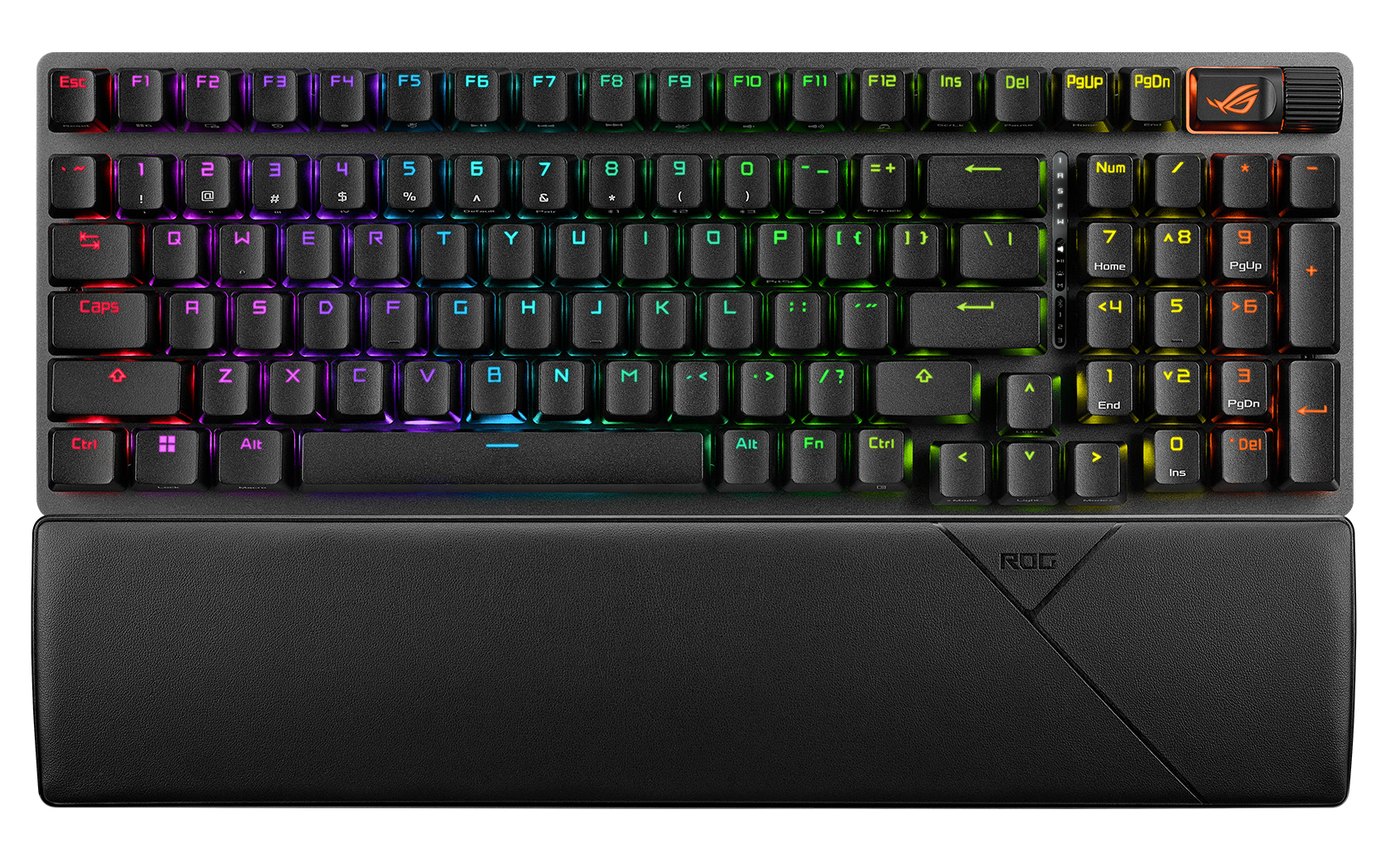
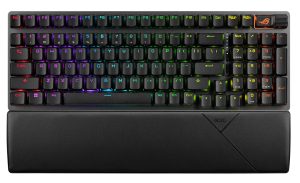
Most gaming keyboards make you choose between a number pad and room for your mouse. The ASUS ROG Strix Scope II 96 Wireless keeps the number pad, arrow keys and function row, then squeezes them into a frame ASUS says is only 1 cm wider than a standard 80% (tenkeyless) board. It connects over a 2.4GHz receiver, Bluetooth or a USB-C cable, and the version we link on Amazon comes with pre-lubed ROG NX Snow linear switches in hot-swappable sockets.
ASUS first showed it at Computex 2023, and it still sits at or near the top of the big test sites’ lists. PCMag calls it its current favorite gaming keyboard for most people. Tom’s Hardware ranks it first on its list of the best gaming keyboards. PC Gamer names it the best mechanical gaming keyboard. What earns that standing is the typing feel: it brings the lubed switches and dampening foam of enthusiast boards to a mainstream wireless gaming keyboard.
Key Specifications
| Price (USD) | $129.99 |
| Layout | 96% (number pad, arrow keys and function row) |
| Switches | ROG NX Snow linear, pre-lubed, hot-swappable (NX Storm also sold) |
| Actuation (NX Snow) | 1.8 mm, 45 g |
| Keycaps | PBT on the listing we link (ASUS says keycap material may vary by region) |
| Connectivity | 2.4GHz receiver, Bluetooth 5.1 (up to three devices), wired USB |
| Rated battery life | Up to 1,500 hours over 2.4GHz with lighting off |
| Polling rate | 1,000 Hz |
| Dimensions | 377 x 131 x 40 mm (14.84 x 5.16 x 1.57 in) |
| Weight | 1,012 g (2.23 lb) without cable |
| Software | Armoury Crate (Windows 11) |
| In the box | Wrist rest, keycap and switch puller, wireless receiver, USB extender, ROG spacebar keycap, 2 m braided USB-C to USB-A cable |
ASUS ROG Strix Scope II 96 Wireless Typing and Switch Feel
The switches are the reason to buy it. The NX Snow is a light linear switch: 45 g of actuation force and a 1.8 mm actuation point. ASUS lubes the switches and the stabilizers on the big keys at the factory, and lines the case with foam plus pads under each switch. The result is smooth, stable and quieter than a typical gaming board, with no scratchiness or pinging from the case, though Digital Citizen found the spacebar wobbled a bit. PC Gamer used it alongside Corsair’s K70 Max and found the Scope II 96 noticeably quieter. Trusted Reviews adds that the NX Snow travels 3.6 mm in total, shorter than ASUS’s older NX Red, which helps it feel snappy in games.
The switches sit in hot-swappable sockets, and the included puller removes both keycaps and switches. The sockets take standard MX-style switches with three or five pins, so you can change the feel later without soldering. ASUS also sells the board with NX Storm switches, which it describes as clicky. The PBT keycaps have a mid-height profile and a shorter stem to cut wobble. The spare ROG-themed spacebar is the odd one out: two testers found it taller than the standard spacebar.
What it doesn’t have is adjustable actuation. Many newer gaming boards use magnetic switches that let you set how far each key travels before it registers. The Scope II 96’s fixed 1.8 mm point felt responsive in testers’ games, but if per-key actuation is on your list, this isn’t that kind of keyboard.
Layout and Build
The 96% layout keeps nearly every key of a full-size board. Keys such as Print Screen, Scroll Lock and Pause move onto other keys, and the number pad and arrows sit right up against the main keys. Expect a short adjustment: two testers needed a few days before the squeezed-in number pad and keys stopped tripping them up, and Digital Citizen found most keys cramped. Tom’s Guide went further, finding the desk space saved too small to be worth relearning, though it called that a personal preference. If you already like a full-size board, plan on a few days of muscle-memory work.
Media control lives in the top-right corner: press the ROG-logo button to cycle the clickable roller through volume, media, lighting and one custom mode, and a small strip of icons shows which is active. The board itself feels solid. Trusted Reviews found no flex in the deck, which pairs an aluminum top plate with a plastic case, and at 1,012 g, with rubber grips underneath, the keyboard doesn’t wander across the desk. The magnetic leatherette wrist rest split opinion: PCMag found it stiff, while Tom’s Guide’s reviewer found it very comfortable through eight straight hours of work.
Wireless and Battery Life
ASUS rates the battery at up to 1,500 hours over the 2.4GHz receiver with the lighting off, and about 90 hours with it on at the default 50% brightness. Tom’s Hardware ran it at full brightness with sleep turned off and still had 56% left after about 50 hours, so it called ASUS’s rating relatively accurate, even a little conservative. For a reference point, Corsair rates its K65 Plus Wireless at up to 266 hours with lighting off. Logitech rates its G515 Lightspeed TKL at up to 36 hours but doesn’t say at what lighting setting, so that figure can’t be lined up against either ASUS number.
Over 2.4GHz, testers noticed no lag in games or typing. The receiver is an ROG Omni Receiver, so one dongle can also run a compatible ASUS mouse. A switch on the back moves between the receiver and Bluetooth, which pairs with up to three devices. PC Gamer used that to move between two PCs without unplugging anything. Polling tops out at 1,000 Hz; the wired Razer BlackWidow V4 75% goes up to 8,000 Hz, for players who chase every millisecond.
Software and Lighting
ASUS’s Armoury Crate app is the weak spot: it is cluttered with sign-up prompts and extras such as a virtual pet, it is slow to load and update, and at times it failed to detect the keyboard. You can’t avoid it entirely, because it is how you update the keyboard’s firmware and pair the receiver with a second device. Day to day, the built-in Fn shortcuts handle lighting changes and macro recording, and Windows 11’s Dynamic Lighting can run the RGB. ASUS lists Windows 11 as the supported system; on a Mac the lighting shortcuts still work but full customization doesn’t.
Two more limits matter to power users. Only one layer of keys can be reprogrammed, where the Razer BlackWidow V4 75% adds a second layer through HyperShift and the Logitech G515 builds layers with its Key Control feature. And the per-key RGB is on the soft side: three of the reviews we read found it dimmer than other gaming boards, with Digital Citizen struggling to read the keys in a bright room, while Trusted Reviews called the same lighting vibrant.
How Does It Stack Up Against the Competition?
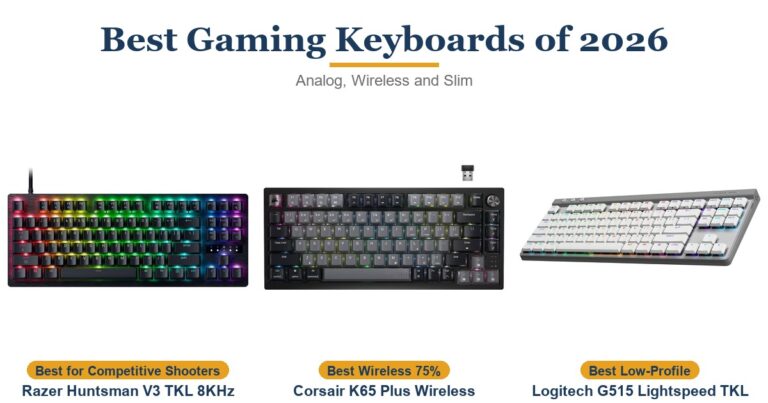
These are the boards test sites weigh it against at this price: two compact wireless rivals and the wired Razer that PCMag’s review named its favorite in this price range. Only the ASUS keeps a number pad.
| Feature | ASUS ROG Strix Scope II 96 Wireless | Corsair K65 Plus Wireless | Logitech G515 Lightspeed TKL | Razer BlackWidow V4 75% |
|---|---|---|---|---|
| Price (USD) | $129.99 | $159.00 | $149.00 | $121.28 |
| Layout | 96% with number pad | 75% | Tenkeyless (no number pad) | 75% |
| Connection | 2.4GHz, Bluetooth, wired | 2.4GHz, Bluetooth, wired | 2.4GHz, Bluetooth, wired | Wired only |
| Stock switches | ROG NX Snow linear, pre-lubed | Corsair MLX Red linear, pre-lubed | Low-profile GL linear | Razer Orange tactile |
| Hot-swappable switches | Yes | Yes | No | Yes |
| Maker’s battery rating | Up to 1,500 hours (2.4GHz, lighting off) | Up to 266 hours (2.4GHz, lighting off) | Up to 36 hours (lighting not stated) | No battery (wired) |
| TTP Review | This review ↑ | Read our review → | Read our review → | — |
| Amazon | View on Amazon | View on Amazon | View on Amazon | View on Amazon |
Prices change frequently — always verify current pricing before purchasing.
ASUS ROG Strix Scope II 96 Wireless: Worth It for Gamers Who Type All Day
Buy it if one keyboard has to handle evening games and a full day of typing, and you want the number pad without a full-size footprint. Its switches and dampening are what put it at the top of test sites’ lists, and with the lighting on, ASUS’s 90-hour rating is about two working weeks per charge by Trusted Reviews’ reckoning. As of November 2026, Amazon sells it for less than the K65 Plus Wireless and a little more than the G515 and BlackWidow V4 75%, and it is the only one of the four with a number pad. PCMag scored it 4 out of 5, calling its complaints minor but its price steep when it reviewed it. That price has come down on Amazon since, which is why our value score, and our overall rating, sit higher.
Look elsewhere in a few cases. Competitive players who want adjustable actuation should look at a magnetic-switch board. If you never use a number pad and want a slimmer, lighter wireless board, the low-profile Logitech G515 Lightspeed TKL takes less room. If you want hot-swap sockets and wireless in a smaller frame, the 75% Corsair K65 Plus Wireless drops the number pad for a shorter board. And if you play wired anyway, the Razer BlackWidow V4 75% adds 8,000 Hz polling, at the cost of the number pad and wireless.
Sources
- ASUS ROG — ROG Strix Scope II 96 Wireless Tech Specs
- ASUS ROG — ROG Strix Scope II 96 Wireless Product Page
- ASUS ROG Strix Scope II 96 Wireless — Amazon Product Listing
- PCMag — Asus ROG Strix Scope II 96 Wireless Review
- PCMag — The Best Gaming Keyboards We’ve Tested for 2026
- Tom’s Hardware — Asus ROG Strix Scope II 96 Wireless Review
- Tom’s Hardware — Best Gaming Keyboards 2026
- PC Gamer — Asus ROG Strix Scope II 96 Wireless gaming keyboard review
- PC Gamer — Best gaming keyboards in 2026
- Tom’s Guide — Asus ROG Strix Scope II 96 Wireless review
- Trusted Reviews — Asus ROG Strix Scope II 96 Wireless Review
- Digital Citizen — ASUS ROG Strix Scope II 96 Wireless review
- Corsair — K65 Plus Wireless 75% RGB Mechanical Gaming Keyboard
- Logitech G — G515 Lightspeed TKL Wireless Gaming Keyboard
- PCMag — Logitech G515 Lightspeed TKL Review
- Logitech Support — Specification G515 LIGHTSPEED TKL
- Razer — Razer BlackWidow V4 75%
- Tom’s Hardware — Razer BlackWidow V4 75% Review
Reader Poll
Which trade-off would bother you most on the Scope II 96?
Help Our Editors Know What Matters to You
Explore on Amazon →